

Document AI is software that uses AI to read, classify, extract from, generate, or answer questions about documents. For 2026 planning, a search for "document ai" can mean extraction platforms, document generators, PDF chat tools, or source-grounded review workspaces, so the useful comparison starts by naming the document job and the proof each tool must show.

Review documents with cited answers in Atlas
Review uploaded documents with cited answers you can inspect before synthesis.
Document AI meaning
Document AI is broader than OCR. OCR makes scanned text readable, while Document AI can classify files, pull fields from invoices or contracts, create formatted documents, summarize PDFs, answer questions, or preserve source links depending on the product.
The right choice starts with the document job. If the output is a structured field in a business system, look at extraction platforms. If the output is a formatted report, look at document generators.
If the output is a claim for a memo, paper, or decision, keep the source passage close enough to inspect.
Quick verdict
Use Google Document AI or SAP Document AI when the job is repeated document processing. These platforms classify files, extract fields, route reviews, and connect the output to enterprise systems.
Use AI Doc Maker when the job is creating a formatted document from a prompt or template.
Use Atlas, NotebookLM, or ChatPDF when a person needs to read, ask, and check source material.
In Atlas, the cited review flow starts with uploaded sources. The reader asks a grounded question, opens citation badges, and checks the source before saving a synthesis.
The four Document AI jobs
Before comparing vendors, classify the document job you need to finish.
- Extract fields. The system reads invoices, IDs, forms, contracts, or other repeatable files and sends fields into a workflow.
- Create formatted files. The tool creates a proposal, report, PDF, spreadsheet, or other deliverable from a prompt or template.
- Chat with one or more files. The reader asks about a file and gets an answer in chat.
- Review source material with citations. The reader needs an answer that can be checked against exact passages, compared across sources, and reused in analysis.
That distinction matters because "accuracy" means different things in each lane. Field work needs review for wrong values and edge cases. A file generator needs layout control. A cited review tool needs source links and passage checks.
Best Document AI tools by workflow
Atlas
Atlas fits when the reader already has files, papers, reports, websites, or notes and needs to ask grounded questions. Atlas can return citation badges that link back to source passages.
It can also compare evidence across several sources.
Related workflows:
Use Atlas for questions like:
- What evidence does this report give for its main recommendation?
- Compare the limits in these 2 papers.
- Which source supports the claim I want to use in my memo?
- Where do these documents disagree?
Atlas is not a high-volume extraction platform. It is better suited to review work where a person needs to inspect the source trail before turning an answer into a finding.
Google Document AI
Google Document AI is the best fit when file processing belongs in Google Cloud. It can parse files, split them, classify them, and pull out fields for cloud systems. For a broader view, see Document AI tools.
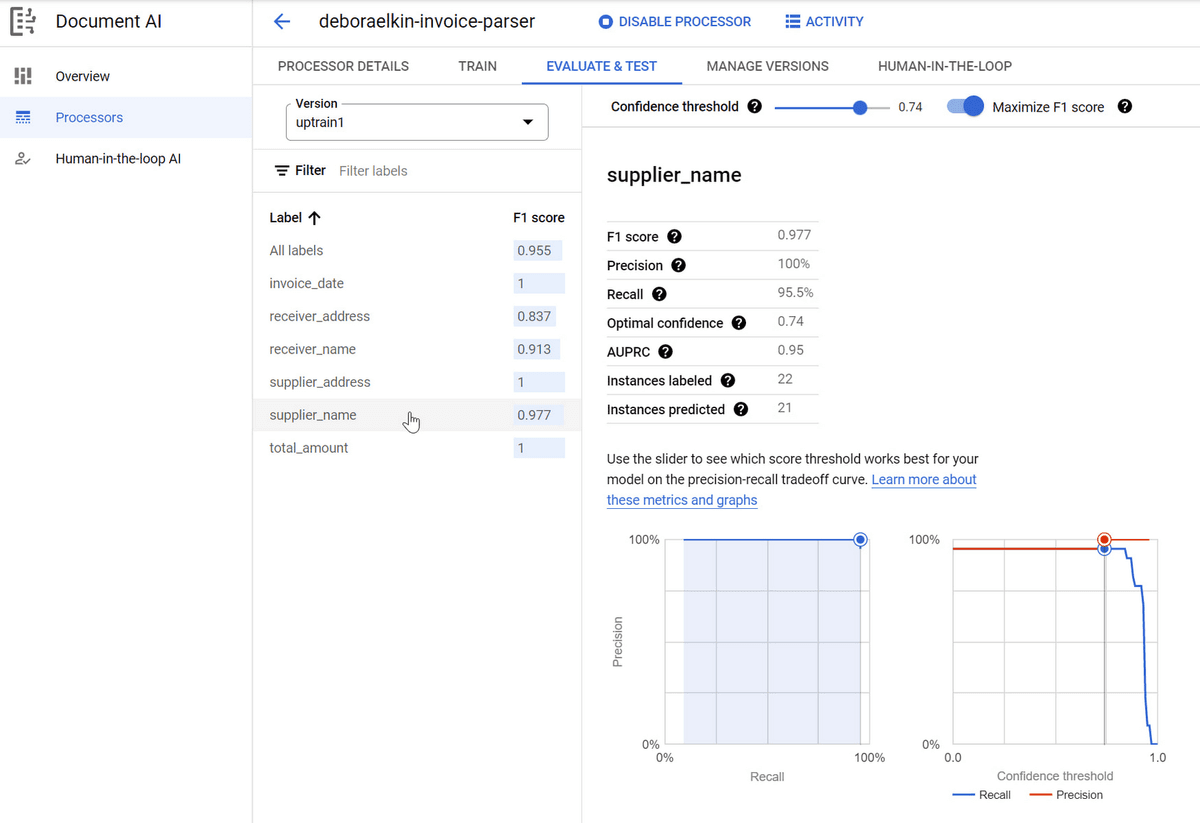
This Google Document AI Workbench screen shows why extraction tools need field-level evaluation rather than a single sample answer.
The visible supplier-name field has F1, precision, recall, optimal confidence, AUPRC, instances labeled, and instances predicted values, plus a confidence-threshold slider and precision-recall chart. Buyers should inspect those metrics field by field before trusting extracted values in a workflow.
Pick it for invoices, contracts, forms, receipts, identity documents, and other repeatable inputs where the team wants structured data. A reader may need to discuss a PDF and turn the answer into a note. For that job, use a cited review tool instead.
SAP Document AI
SAP Document AI fits enterprise teams that already run file-heavy work through SAP systems. Its value is strongest when field review and routing need to connect to business data and approvals.
SAP Document AI is an operations lane. Ask which file types SAP supports. Check how people review fields, where data is stored, and how exceptions move through approvals.
AI Doc Maker
AI Doc Maker-style products fit prompt-to-file creation. Use them when the goal is a report, letter, spreadsheet, proposal, or PDF that starts from a prompt.
The proof to demand here is not a citation trail. Ask whether the export has the right shape, file type, and edit path. If the file contains factual claims, check those claims in the source.
NotebookLM
NotebookLM is useful when the job is building a source notebook around selected materials. It is often a good fit for learning, briefing, study guides, and exploratory analysis over a bounded source set. Students and researchers comparing this lane can also read NotebookLM for students.
Ask whether the reader wants notebook-style outputs or a source-grounded workspace. If the review will become notes and cited findings, test whether the tool keeps sources separate. Also check whether the reader can inspect claims.
ChatPDF
ChatPDF fits fast PDF question answering. It is useful when the reader wants to upload one file and ask a few direct questions.
Its limit is also its appeal. The PDF chat session stays lightweight. If the review grows into many sources, reusable notes, and source checks, the team may need a workspace that keeps the trail.
LlamaIndex
LlamaIndex fits technical teams building their own document AI or retrieval workflows. It gives engineers building blocks for parsing, indexing, RAG, agents, and custom file pipelines. For build-versus-buy context, start with best AI research assistants.
Choose this lane when the team has engineers, custom needs, and a reason to own the system. An existing workspace is usually faster for a team that mainly needs cited answers over files.
Document AI decision table
| Tool | Best workflow | What to verify before trusting it |
|---|---|---|
| Atlas | Cited review over uploaded sources | Citation badges, passage support, source separation, synthesis quality |
| Google Document AI | Cloud document extraction and processing | Processor fit, field accuracy, exception review, integration path |
| SAP Document AI | SAP-centered enterprise document automation | Supported document types, validation workflow, SAP data handoff |
| AI Doc Maker | Prompt-to-document generation | Export quality, formatting control, source accuracy if claims are included |
| NotebookLM | Source notebook study and briefing | Source coverage, output usefulness, citation behavior, export needs |
| ChatPDF | Quick PDF question answering | Whether answers point to the right passage and handle document limits |
| LlamaIndex | Custom document AI applications | Engineering effort, retrieval quality, monitoring, privacy, maintenance |
Table 1: The table starts with the job. A buyer comparing Google Document AI with Atlas is usually comparing two needs. One is field extraction at scale. The other is cited human review.
A better shortlist may include one tool from each lane if the team needs both automation and analysis. For a longer benchmark, read best Document AI tools.
Where Atlas fits
Atlas helps after the source set exists. Import the files that matter. Ask a specific grounded question. Inspect the citation badges on important claims.
If the answer compares sources, ask Atlas to separate the evidence. That makes the synthesis easier to check.
Related lanes:
A practical flow looks like this:
- Add the PDF, paper, report, webpage, or note set to the project.
- Ask a narrow question, such as "Compare the limits these sources mention for retrieval-based AI."
- Open citation badges for the claims you plan to reuse.
- Read the cited passage and surrounding context.
- Save the verified finding as a note or use it to guide the next question.
This is slower than accepting a raw chatbot answer, but it catches expensive mistakes. A citation check can show when a claim is related but not supported. It can also reveal missing caveats or summaries that blend sources together.
How to choose a Document AI tool
Start with the output.
If the output is fields in a workflow, choose an extraction platform and test it on real files. If the output is a formatted file, choose a generation tool and inspect exports.
If the output is an answer from source material, choose a tool that lets the reader check passages.
The last mile is often the hard part for research, analysis, and knowledge work. A tool can summarize a file quickly and still leave the reader unsure whether a claim is supported. When the answer will affect a decision, open the source and check the passage. Save the verified finding where the team can reuse it.
Final recommendation
Do not buy "Document AI" as a category. Buy the lane that matches the document job.
Choose Google Document AI, SAP Document AI, or similar systems for repeatable field work. Choose a file generator when the output is a formatted file.
Choose Atlas or another source-grounded workspace when the reader needs cited answers. It also fits source comparison and synthesis over files the reader can inspect.
If the main job is PDF Q&A, compare the dedicated PDF chat AI tools lane before choosing.
Review documents with cited answers in Atlas
Review uploaded documents with cited answers you can inspect before synthesis.