

A contract summarizer turns a long contract into a short list of key terms, dates, duties, and risks. Some tools give a quick summary of one file. Some are part of a system that stores and tracks many contracts. Others link each claim to the source text so you can check it.
This guide groups tools by those three jobs. Product claims come from each vendor's product and help pages.
Use every summary as a first read. Read the contract yourself and ask a lawyer about terms that create real risk.

Turn contracts into cited answers
Ask a focused contract question, then inspect the cited passage before saving.
Quick verdict
Pick the type that matches your work:
- Quick upload tools give a fast view of one contract. ContractCrab, LegalZoom Doc Assist, and Xodo Sign AI Summarizer fit this need.
- Contract systems store many contracts and track dates, duties, and search data. Contractzy CORA AI, CobbleStone Contract Insight, CLM 365, and Summize fit here.
- Cited reading tools link key claims to the source passage so you can check them. Atlas fits this need.
AI can miss a limit, special term, due date, change, or clash between clauses. Read the text around each key finding.
None of the tools compared here, including Atlas, give legal advice, review a contract for risk, or replace a lawyer when the decision matters.
What to look for
Use the same 6 checks for each tool.
Source traceability
Can you open the exact sentence behind a claim? A source link lets you check the answer before you use it. The same rule applies to any AI tool that cites sources.
Citation or source inspection
A source link shows where the answer came from. It does not prove the answer is right. Read the full clause and nearby terms or limits.
Contract detail coverage
Summize and CobbleStone list fields such as deal terms, renewal dates, duties, risk caps, party names, and payment dates. Check whether the tool finds the fields you need and links them to the clause.
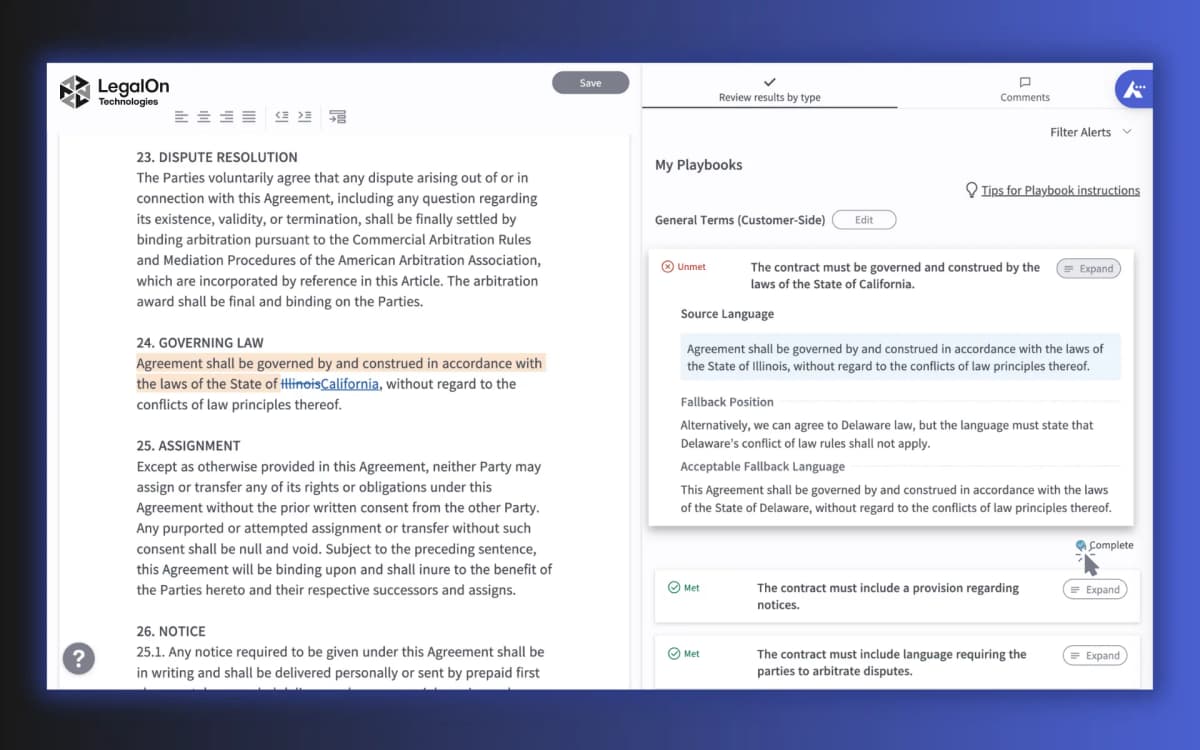
The LegalOn screen shows a useful source check. The contract text sits beside each alert and review note. Look for the same link between a summary and its source.
Workflow fit
A quick upload tool reads one file. A contract system stores many files and tracks key dates and duties. Choose the job you need.
Sensitive document handling
Contracts may hold private terms, prices, and personal data. Read the vendor's file storage and deletion rules before you upload them.
Counsel boundary
LegalZoom's Doc Assist says its results may be incomplete or wrong and do not give legal advice. Xodo Sign says users must check details in the full file. Apply those limits to every tool in this guide, including Atlas.
Contract summarizer comparison table
This table matches each tool to its main job and limit. It does not rank legal accuracy or file safety.
Refresh pricing, plan limits, and format support from each vendor's current page before you commit a workflow to one.
| Tool | Best fit | Source traceability | Workflow lane | Caution |
|---|---|---|---|---|
| Atlas | Turning uploaded contract sources into cited answers you can check against the original passage | Citation badges open the exact passage in the PDF viewer for inspection | Source-grounded cited-summary workspace | Skip it for contract review, drafting, redlining, or legal advice |
| Contractzy CORA AI | CLM users who want clause, obligation, deadline, and financial-term extraction in one summary | Structured summary output, with no public citation-inspection surface described | CLM / legal-ops | Refresh speed or accuracy claims before repeating them |
| ContractCrab | Quick pay-per-document or subscription review across common formats | Upload, review, and summarize flow, so check current export options | Quick upload | Formats and pricing tiers can change, so verify before upload |
| LegalZoom Doc Assist | A free first read of a contract with clause highlights and document Q&A | LegalZoom states results may be incomplete or inaccurate | Quick upload | Explicitly informational rather than legal advice |
| Xodo Sign AI Summarizer | Teams that want a summary near editing, redaction, and e-signature | Vendor tells users to verify details in the full document | Quick upload, signature-adjacent | Its own FAQ says it does not provide legal interpretation |
| CobbleStone Contract Insight | Enterprise teams that need contract intelligence across a searchable repository | Enterprise workflow surfaces span intake through compliance, so verify the deployed setup | CLM / legal-ops, enterprise | Heavier than a single contract needs for a quick summary |
| CLM 365 | SharePoint and Microsoft 365 teams standardizing contract lifecycle work | Lifecycle stages carry the record, so confirm current AI summary detail on the page | CLM / legal-ops, Microsoft-centric | Best when contracts already live in SharePoint |
| Langbase Contract Summarizer | Builders prototyping an extraction pipeline for legal contracts | Public pipe or template, with no visible production privacy or citation guarantee | Builder template | Test it before trusting it with a real contract |
| Summize | Legal teams who want summaries embedded in a broader contract-data workflow | Summize keeps the summary attached to the source contract with searchable structured data | CLM / legal-ops, contract data | A vendor guide rather than proof of comparative superiority |
Table 1: Use the table to make a short list. Then test the closest tools on the same contract.
Best contract summarizer tools
Best for cited answers: Atlas
Choose Atlas when the useful output is not merely a shorter contract, but a set of claims you can trace back to the file. After the PDF is ready, ask about one topic—renewal terms or ending rights, for example—and open the source link beside each answer. This workflow supports reading and verification; legal-risk review, drafting, redlining, and advice still belong elsewhere.
Best for CLM extraction: Contractzy CORA AI
Contractzy positions CORA AI as one part of a larger contract system, with clauses, duties, due dates, and money terms placed into structured fields. The product page lists Word files, PDFs, and scans. That makes it relevant to legal teams whose summary must feed later contract operations, although current speed and accuracy claims still need verification.
Best for quick pay-per-document review: ContractCrab
ContractCrab takes the opposite approach: upload one file and receive a quick first read without adopting a full contract system. Its site lists PDFs, Word files, text files, and images. Before making it a repeat workflow, confirm the current file support and pricing rather than relying on an older review.
Best for free reads: LegalZoom Doc Assist
LegalZoom's Doc Assist is designed for an initial overview, with short clause notes and questions about one contract. LegalZoom also states the important boundary plainly: results may be incomplete or wrong, and they are not legal advice. Treat its output as a reading guide, not a conclusion about the agreement.
Best near e-signature: Xodo Sign AI Summarizer
Xodo Sign's AI Summarizer keeps summarization close to editing and e-signature. It surfaces key terms, risks, due dates, duties, and payment details, while its FAQ directs users back to the full file for verification. The integration matters most to teams already completing the rest of the contract workflow in Xodo Sign.
Best for enterprise CLM: CobbleStone Contract Insight
CobbleStone Contract Insight covers the broader lifecycle: intake, fact finding, review, record storage, rule checks, and search. Those capabilities make sense when a large team manages a contract portfolio. They are more infrastructure than a person needs for a quick summary of one file.
Best for SharePoint-centered teams: CLM 365
CLM 365 is the natural candidate when contracts already live in SharePoint or Microsoft 365. Its site spans drafting, approvals, signing, renewal, negotiation, review, file history, and AI assistance. Because that scope is broad, confirm the current product page's exact summary behavior before treating it as equivalent to a dedicated summarizer.
Best for builders: Langbase Contract Summarizer
Langbase provides a public contract-summarizer template rather than a finished legal workflow. Builders can use it as a prototype for extracting key points, but the public page does not establish production file safety, pricing, or a citation guarantee. A known sample contract is the right test material before any real file enters the pipeline.
Best for contract-data workflows: Summize
Summize turns deal terms, renewal dates, duties, and risk caps into searchable fields while keeping the summary attached to its contract. That structure serves legal, sales, procurement, and finance teams that need to retrieve the same facts across a portfolio, not just shorten one agreement.
Create a cited contract summary in Atlas
Atlas keeps each key claim linked to the source contract so you can check it.
- Add the contract as a source. A PDF with text you can select works best.
- Wait until the file is ready. Check its title, page count, and text.
- Ask about one topic, such as renewal or ending rights.
- Open the source link on each claim that matters.
- Read the full clause and nearby terms or limits.
- Save only the findings you checked. Note which sources you opened.
This check shows where Atlas found the text. It does not tell you whether a clause is valid, fair, or safe to sign.
Ask a lawyer to review any term that creates legal or money risk.
When to choose each contract summarizer lane
Choose based on the work and the harm a wrong summary could cause.
- A quick first read: Use ContractCrab, LegalZoom Doc Assist, or Xodo Sign AI Summarizer to skim one contract. Read the full file before you act.
- A large set of contracts: Use Contractzy CORA AI, CobbleStone, CLM 365, or Summize to store files and track key facts.
- Claims you need to check: Use Atlas to open the source passage behind an answer.
- Legal or money risk: Read the contract and ask a lawyer. No tool in this guide gives legal advice.
People in r/GeneralContractor describe AI as a first filter while they still read the contract. Use the same habit here.
The same source check applies to PDF chat AI tools, legal document AI, and a PDF summarizer.
Turn contracts into cited answers
Ask a focused contract question, then inspect the cited passage before saving.