

Legal documents AI covers several jobs. One tool drafts forms. Another helps lawyers write. Others review files, offer general chat, or answer questions with source links.
The difference matters because legal files affect rights, duties, dates, money, and private facts.
AI can draft, sum up, compare, or find text. It does not replace legal advice or counsel.

Ask cited questions across legal documents
Add legal documents, ask a focused question, and inspect each cited passage.
Quick answer
Match the tool to the job. Use a generator for a template-based draft. Use a writing tool when a lawyer will guide the draft. Use a firm assistant when your team already works in that system. Use a cited workspace to check existing files.
For source-based reading, choose a tool that links each answer to a passage. Read the nearby text and judge whether it supports the claim.
Atlas fits that cited reading job. Add the files, ask a narrow question, and open the cited text before you use the answer. Atlas is not a law firm, contract reviewer, drafting tool, or source of legal advice.
If you only need a general category map before narrowing the legal use case, compare this article with best document AI tools, legal document AI, and AI that cites sources.
The legal document AI jobs
Name the job before you compare tools. Drafting, review, and cited reading produce different results and need different checks.
- Draft a file: Use a legal generator, then have a qualified person check the facts, law, key terms, and effect.
- Revise legal prose: Use a writing tool for tone, shape, summaries, or first edits. A lawyer still owns the final text.
- Create forms: Use a tool made for intake questions and repeatable templates.
- Summarize one file: Use a reader for a first pass, then check clauses, dates, parties, and exceptions in the source.
- Review a file set: Use legal review or eDiscovery tools for large batches, privilege, or discovery.
- Ask a cited question: Use a workspace that links each answer to an uploaded file.
- Prepare for counsel: Use AI to sort what you found. Let a qualified person give the legal answer.
For contract-specific reading, the narrower guide is legal document AI. For broader source checking, use AI that cites sources.
What to look for
Source traceability
Legal document AI output should show where the answer came from. A summary or draft can help you move faster.
Claims tied to a legal source need passage-level checks, especially when the answer mentions obligations, exceptions, deadlines, parties, or defined terms.
Legal workflow fit
Do not compare every tool on the same axis. DocDraft and Law ChatGPT position around legal document generation.
Harvey and MyCase IQ sit closer to professional legal workflows. Atlas fits after documents exist and the job is cited reading.
Confidentiality and approval path
Legal files may hold private, personal, or regulated data.
Before you upload a file, check that the tool is approved for it. Decide whether a lawyer, your team, or a source check must review the output.
Legal documents AI decision table
This comparison separates source quality, legal-document job, output type, and the main guardrail. Treat it as a routing aid for tool selection. It is not legal advice or a universal ranking.
| Tool | Best fit | Source basis used here | Legal-document job | Guardrail |
|---|---|---|---|---|
| Atlas | Cited questions over documents you already have | Atlas public docs for PDF import, PDF viewer, citations, and synthesis | Source-grounded reading with cited answers | Inspect passages before use. Do not treat output as legal advice or drafting. |
| DocDraft | Guided legal document drafting | Official product page | Drafting, analysis, revision, and legal questions | Verify attorney-review and scope claims before relying. |
| MyCase IQ | Law firms already using MyCase | MyCase legal AI guide | Drafting, summarizing, and editing in a firm workflow | Keep firm policies and lawyer supervision in the loop. |
| Law ChatGPT | Fast legal document and letter generation | Official product page | Documents, agreements, letters, and research prompts | Check accuracy, jurisdiction, and confidentiality before use. |
| Harvey | Legal and professional-services teams | Official Harvey pages and drafting guide | Drafting, analysis, legal research, and bulk document work | Lawyer review and ownership remain central. |
| AI Lawyer | Consumer, student, solo, or firm legal-assistant use cases | Official product page | Templates, document handling, summaries, and research | Do not treat outputs as verified legal conclusions. |
| ChatGPT or LegalGPT | Low-risk brainstorming and supervised drafting experiments | GPT listing and legal-tech guidance | Prompts, summaries, and first drafts | Verify sources, privacy, and legal boundaries yourself. |
| Clearbrief | Source-linked legal writing checks | Official product page and legal writing guides | Brief and claim support workflows | Use it when legal writing needs source support. |
| Gavel | Logic-based legal document automation | Official product page and legal writing guides | Questionnaire-led document generation | Use it when the intake and template logic have been designed and reviewed. |
Table 1: The table uses an official or strong source for each claim. It leaves out prices, savings, security, models, and legal outcomes because those claims can change.
Where Atlas fits in legal documents
Use this Atlas workflow after a legal file becomes source material:
- Add a lease, contract, policy, or court file that you may process.
- Ask a focused question, such as, "Which sections mention termination notice, and what conditions apply?"
- Open each citation and read the marked text plus the nearby paragraph. Check the title, key terms, exceptions, and linked clauses.
- If an answer blends files, ask Atlas to split the sources into a table.
Best legal documents AI tools
Atlas
Atlas fits when the file exists and you must keep a source trail. It answers questions over added files and links back to passages you can inspect.
Ask, "Which files mention renewal notice?" or "How do these two policies define private data?" Do not use Atlas to draft, approve, redline, or decide legal action.
DocDraft
DocDraft offers legal drafts, file review, revisions, legal questions, and access to lawyer help.
Choose it when the job starts with a new draft or revision. Choose Atlas when the job starts with source files.
The image below shows DocDraft's public choices for drafting, review, revision, and legal questions. Check its current page before you buy.
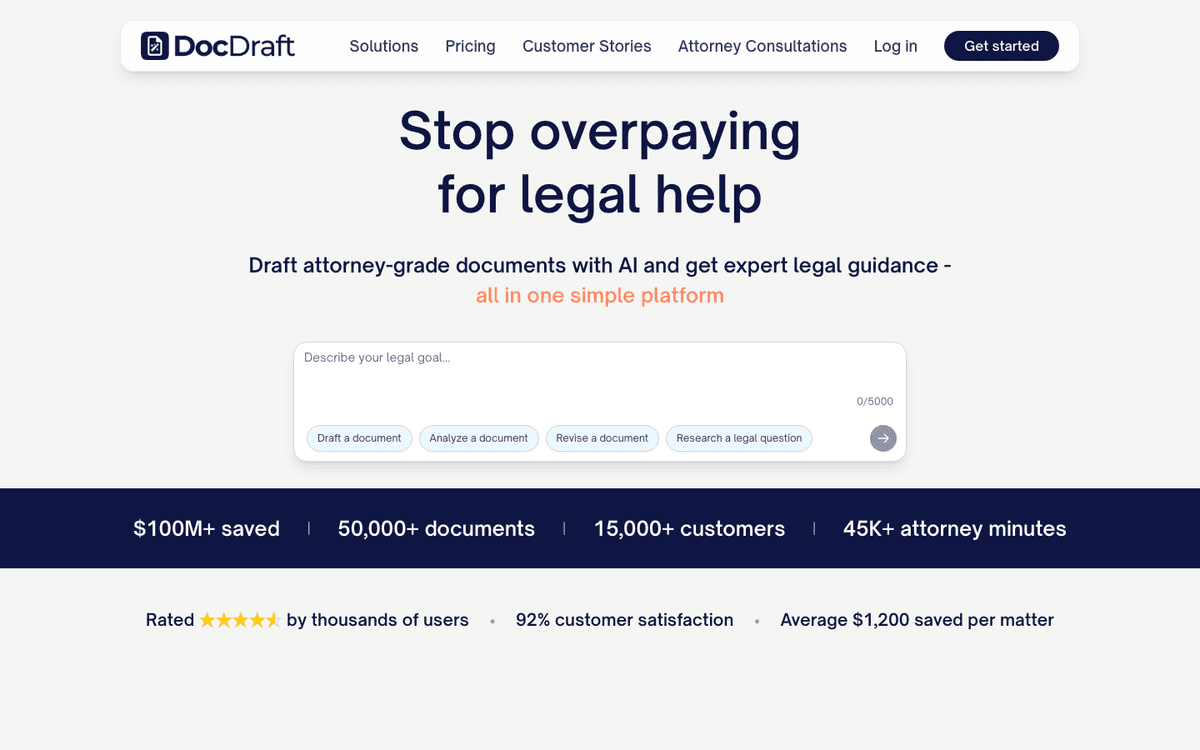
The image proves how DocDraft presents the product. You still need to check quality, lawyer review, legal coverage, data terms, and how it handles facts that do not fit the draft.
MyCase IQ
MyCase IQ fits law firms that already use MyCase. Its guide covers drafting, summaries, edits, translation, privacy, citations, and lawyer review. Judge it inside the full MyCase workflow. For cited Q&A over a small file set, compare narrower source tools.
Law ChatGPT
Law ChatGPT generates agreements, letters, emails, and legal research drafts. Use it when you need a fast first version. Check the source law, facts, data terms, and lawyer review path before you use the output.
Harvey
Harvey serves legal and professional teams. Its tools cover questions, file review, drafts, large batches, research, and agents. Its drafting guide keeps a lawyer in charge. Choose it for a large legal team's workflow, not for simple chat over a small file set.
AI Lawyer
AI Lawyer serves consumers, lawyers, firms, and students. It lists file help, research, templates, summaries, and chat. Define the exact job first. Then check its legal coverage, data terms, and review path. A broad product claim does not prove a legal answer is right.
ChatGPT and LegalGPT
General chat tools can help with low-risk ideas, plain rewrites, lists, and guided first drafts. ABA and MyCase guides show prompts for contract review, summaries, drafts, and research. If an answer has no source you can open, treat it as unchecked. Spellbook also stresses lawyer review and private data. Add a private file only through an approved path.
Clearbrief
Clearbrief links claims in legal prose to source files. Choose it when a legal draft needs fact support. Choose Atlas when you first need to read and check the source set.
Gavel
Gavel makes legal files from a rule-based form. Use it when intake answers can fill a reviewed template. Use a cited reading tool when you need to know what existing files say.
Legal guardrails before you use AI output
Legal AI output needs a verification path. Before a summary, draft, or cited answer moves into a decision, run these checks:
- Confirm the document is approved for the tool you are using.
- Identify the exact source passage behind the claim.
- Read the surrounding paragraph and any cross-reference.
- Check jurisdiction, date, parties, defined terms, and document context.
- Verify whether citations support the answer or only relate to it.
- Preserve the passage, citation, prompt, and answer in an audit trail.
- Route legal conclusions, advice, risk calls, and filing decisions to qualified counsel.
This is also the line between a useful assistant and an unsafe shortcut. AI can help you find, summarize, and organize text. It should not make the legal judgment for you.
Which legal documents AI tool fits?
Choose a legal document generator when you need a template-led draft and have a review path. Choose a practice-management assistant when the firm already works inside that product. Choose a legal-specific drafting platform when lawyers will supervise drafts, revisions, and analysis.
Choose ChatGPT-style tools only for low-risk brainstorming or supervised drafting where source verification, confidentiality, and review are handled elsewhere. Choose a source-grounded workspace when the key question is what a set of documents says and whether the answer can be checked.
Choose Atlas when you need a cited answer trail over legal documents you are allowed to upload. Inspect the citations before the finding becomes a note, memo, or question for a lawyer.
For adjacent decisions, use legal document AI when the job is legal document analysis. Use AI that cites sources for source-checking standards, and use PDF chat AI tools when the file format is the main constraint.
Ask cited questions across legal documents
Add legal documents, ask a focused question, and inspect each cited passage.