

A contract analyzer reads a contract and points out key terms. It may find names, dates, duties, limits, renewal terms, and unusual clauses. Some tools review one file at a time. Others help legal teams search and review a large set of contracts.
Atlas is useful when you want to ask questions about contracts you already have. Each answer can link back to the source text, so you can read the clause before you use the finding.

Analyze contract evidence with cited answers
Ask about clauses, obligations, or conflicts, then inspect each cited passage.
Quick verdict
Choose a tool for the work you need to do. A tool for a quick first review is not the same as a system for a large legal team. A drafting tool also serves a different need from a tool that compares a set of signed contracts.
- Use Atlas to ask cited questions across contracts you provide.
- Use CompareX for a quick, self-serve review of one business contract.
- Use Legly to flag missing terms and risks during a first review.
- Use eBrevia Contract Analyzer to pull the same fields from many contracts.
- Use Thomson Reuters HighQ Contract Analysis if your legal team already works in HighQ.
- Use Bloomberg Law Draft Analyzer to compare draft wording with language from past deals.
- Use the open-source GitHub contract-analyzer to study or test how this type of software works.
No contract analyzer can replace legal advice. A lawyer should make the final call when a contract creates legal or business risk.
What matters in a contract analyzer
- Links to the source: Can you open the exact passage behind each answer or risk flag?
- Terms it can find: Can it find names, dates, duties, renewal terms, limits, and exceptions?
- Number of files: Is it made for one contract, a folder, or a large company archive?
- Side-by-side checks: Can it show where two contracts use different terms?
- File support: Can it read your PDFs, scans, Word files, exhibits, and tables?
- Ways to share the work: Can you send the results to a memo, sheet, contract system, or note?
- File safety: Does the vendor clearly state how it stores, deletes, and uses your files?
- Human review: Does the tool show when a lawyer must review the result?
Contract analyzer examples
The table below matches each tool to its main job. Check the vendor's current price, file rules, and safety terms before you upload a contract.
Use it to make a short list, then test the closest matches on the same files.
| Tool | Best fit | What it does | Main limit |
|---|---|---|---|
| Atlas | People who need cited answers from their own contracts | Answers questions, compares terms, and links findings to source passages | Does not give legal advice, draft redlines, or manage approvals |
| Legly | A first review for a business or law firm | Flags risks and missing clauses, finds contract details, and supports search | A risk report does not prove that a contract is safe to sign |
| eBrevia Contract Analyzer | Legal teams that review many contracts | Pulls key fields and clauses from a large set of files | Built more for legal teams than a one-time upload |
| CompareX Contract Analyser | A quick review of one business agreement | Reads PDF or Word files, explains clauses, flags gaps, and answers questions | Check upload limits and file safety terms first |
| HighQ Contract Analysis | Legal teams that already use HighQ | Adds review tasks, team work, charts, and reports to HighQ | Not a simple upload tool for a casual user |
| Bloomberg Law Draft Analyzer | Lawyers who want to compare draft terms | Checks draft wording against public deal documents and market language | Focuses on drafting, not full contract review |
| Sirion AI Contract Analysis | Teams that manage contracts from signing through renewal | Makes contract data searchable and tracks duties and alerts | Confirm each feature on a current product page |
| GitHub contract-analyzer | Developers who want a sample project | Shows how to read PDFs, search text, and produce answers | Sample code is not a safe system for legal work |
Table 1: Choose a contract analyzer by review depth, workflow fit, and whether findings link to source clauses.
Best contract analyzer tools
1. Atlas
Atlas works best when you need to check the source behind an answer. Add one contract or a set of related contracts. Ask a clear question, open the cited passage, and read the terms around it.
This flow helps when you need to compare clauses across several files. You can also save a note with the source attached. That makes the finding easier for a lawyer or contract owner to check.
Atlas does not give legal advice or approve a deal. It also does not replace a contract system, a redlining tool, or a law firm. Use it to read and compare source text before a person makes the decision.
2. Legly
Legly offers online AI contract review for businesses, law firms, and large teams. Its product page lists risk reports, missing-clause checks, contract details, search, a dashboard, and an API.
Choose Legly when you want a first pass that flags terms for review. Treat the report as a list of issues to check, not as proof that the contract is safe to sign.
3. eBrevia Contract Analyzer
eBrevia is made for teams that need to pull the same facts from many contracts. It can find key clauses and fields, show the source beside the result, and support review of a large file set.
Choose it when a legal team needs a repeatable process for a high number of contracts. Check its current links to other tools, file safety terms, setup, and scope before buying.
4. CompareX Contract Analyser
CompareX offers a quick first pass on a business agreement. Its free tool accepts PDF and Word files. The product page says it can explain clauses, flag gaps and risks, and answer questions about the contract.
It is a good fit when you want to check one agreement without a large rollout. Read the upload limits and file safety terms first. A quick result may not be enough for a high-risk deal.
5. Thomson Reuters HighQ Contract Analysis
HighQ Contract Analysis fits legal teams that already work in HighQ. Thomson Reuters says it adds guided review tasks, team work, charts, field capture, notes, and reports.
Choose it when contract review is one step in a wider HighQ process. It is less suited to a person who only wants to upload one contract and ask a few questions.
6. Bloomberg Law Draft Analyzer
Bloomberg Law Draft Analyzer helps lawyers check draft wording. Its product page covers public deal files, market language, clause ratings, deal terms, and clause outlines.
Use it to compare a draft with wording from past deals. If you need a summary or a list of fields from a signed contract, choose a review or data tool instead. A lawyer still owns each drafting choice.
7. Sirion AI Contract Analysis
Sirion describes contract analysis as part of contract management. Its guide covers text recognition for scans, search, alerts, duties, and dashboards.
This approach fits teams that want to track contracts after they are signed. Check Sirion's current product pages before you rely on a feature named in its guide.
8. GitHub contract-analyzer
The public GitHub project shows developers one way to build a contract question tool. It reads PDFs, searches the text, and creates an answer from the parts it finds.
Use the code to learn or make a test. Do not treat a demo project as secure legal software or proof that its answers are reliable.
Contract analysis workflow in Atlas
Use Atlas when you have the contracts and need to check their text.
- Add the contract PDF and make sure its text can be searched.
- Ask one clear question, such as "Which clause controls renewal after the first term?"
- Open the source link beside the answer.
- Read the full clause and nearby terms, limits, and changes.
- Check related contracts or later changes that may affect the answer.
- Save only findings that the source supports. Send legal calls to a lawyer.
The image below shows a contract review screen. The contract appears on the left and the finding appears on the right. The marked source text lets a person check the finding against the clause.
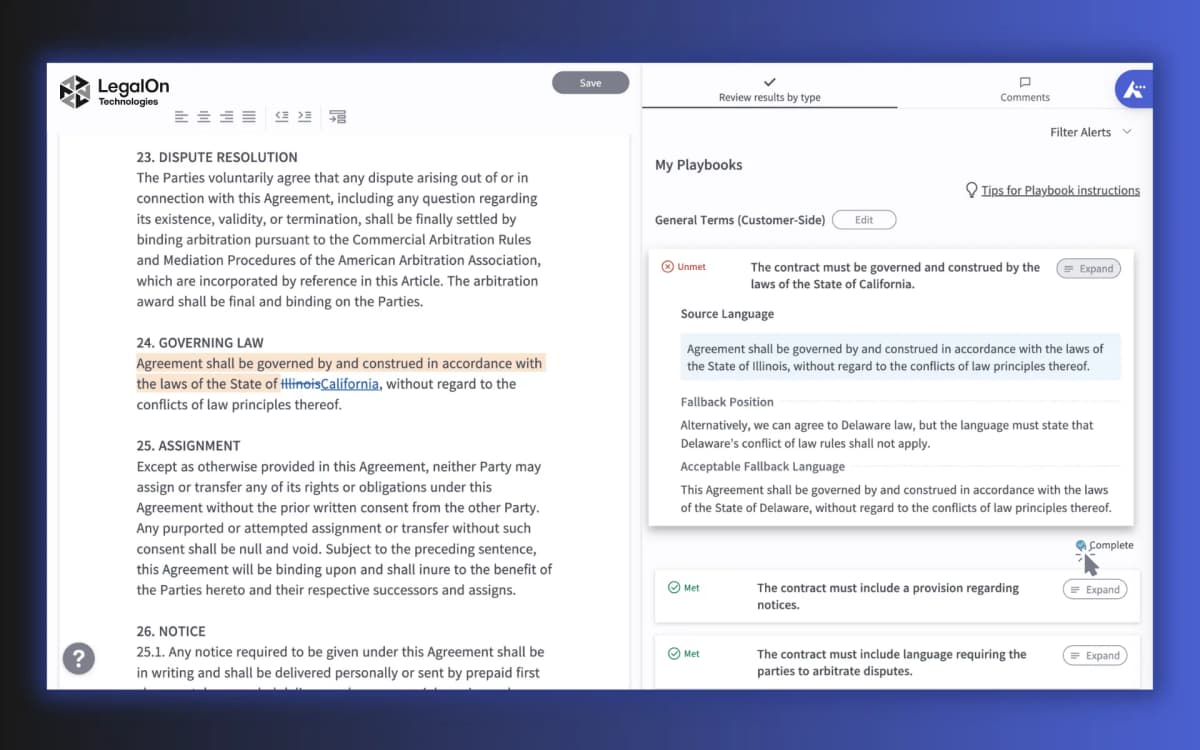
LegalOn places the contract beside playbook results, so a reviewer can compare flagged language with the rule that triggered it. Use this layout as a buying check: a useful analyzer should keep the clause and the finding visible together instead of returning an isolated risk label.
Atlas uses the same core check in a different layout. Keep the contract open, ask a clear question, and follow the source link. Read the cited passage and the text around it before you save the finding.
Legal and evidence-safety guardrails
A contract analyzer can miss text that changes the meaning of a clause. A term may have a special meaning elsewhere in the file. A later change may replace it. Local law may also affect the result.
Before you rely on an answer:
- note the exact file, version, page, and clause
- open the source instead of trusting the summary alone
- read nearby terms, limits, schedules, and changes
- check whether a newer file changes the term
- keep facts from the contract separate from legal advice
- ask a lawyer to review legal risk, deal choices, approvals, and signatures
Which contract analyzer should you choose?
Use a self-serve tool such as CompareX for a quick first pass on one contract. Choose eBrevia when a legal team must pull the same fields from many files. Choose HighQ Contract Analysis when the work must stay in an existing HighQ process. Use Bloomberg Law Draft Analyzer when a lawyer needs to compare draft wording.
Choose Atlas when your contracts are the source set and you need cited answers across them. It is a good fit for questions, clause checks, and notes that keep a link to the source.
For related tasks, see AI legal document analyzers, AI contract readers, PDF analyzers, and AI document comparison. The legal document organizer guide explains how to sort the files before review.
Analyze contract evidence with cited answers
Ask about clauses, obligations, or conflicts, then inspect each cited passage.