

AtlasCompare contracts with cited evidence
Add contracts, compare clauses, and inspect the cited passage for each finding.

Quick verdict
AI contract tools do different jobs. They can pull out terms, check a contract against team rules, compare clauses, track terms across many files, suggest edits, or link findings to source text.
The right pick depends on which job your team needs first. No single ranking fits every buyer. For document AI that spans contracts and other file types, see legal document AI tools.
- Use Atlas to compare issues across a set of contracts and open the passage behind each finding.
- Use Legly to organize contracts, pull out key fields, and flag problems across the set.
- Use LegalOn when a legal team wants attorney-built playbooks and standardized contract review.
- Use Sirion when you need to manage contracts and track terms across the whole set.
- Use Lexis+ Agreement Analysis when a lawyer needs to compare negotiated clauses against alternate clause language.
- Use goHeather for self-serve review, issue spotting, and suggested edits on a PDF or Word contract.
- Use ContractSafe to store and organize contracts while AI helps with the first review.
None of these tools give legal advice. AI contract analysis can extract, summarize, compare, and flag issues in a contract.
The legal conclusion (whether a clause is enforceable, favorable, or safe to sign) still belongs to a qualified lawyer who reviews the source language.
Match the tool to the analysis job
Search results place several contract tasks under one name. Define your task before you compare tools.
- Pull out terms: collect parties, dates, renewal terms, governing law, and duties from one contract or many.
- Check team rules: compare the contract with a legal team's preferred terms, backup wording, and risk limits.
- Compare clauses: match a clause with other wording, past deals, or common drafts.
- Track many contracts: find duties, renewal dates, and risks across a contract system.
- Suggest edits: draft changes or comments for a lawyer to accept or reject.
- Build a cited table: compare issues across contracts and keep each finding linked to the exact source passage.
What to look for
Not every contract tool covers every task. If your files include more than contracts, see the AI document summarizer and document comparison tool guides.
- Files. Most tools accept PDFs and Word files. Some also accept web pages or connect to contract stores.
- Result. You may need flags beside the clause, a report based on team rules, a table of terms, or findings across many files.
- Source links. Each finding should lead back to the exact passage. This lowers the risk of acting on a made-up or misread clause.
- Existing tools. Some products work inside Word or Docusign. Others run on their own or connect through an API.
- Review team. A legal team may want checks based on its own rules. A small team may prefer plain-language flags and draft edits.
AI contract analysis tools compared
The table groups tools by their main job. A system for a large legal team serves a different buyer from a quick upload tool.
| Tool | Best fit | Analysis output | Source/evidence posture | Legal workflow fit | Caveat |
|---|---|---|---|---|---|
| Atlas | Cited synthesis across uploaded contract sets | Themes, gaps, and issues in a table with one cited finding per row | Every row links back to the source passage in the PDF or source viewer | Evidence preparation that a lawyer reviews before acting | Verify each citation before acting. Findings support counsel review rather than replace it. |
| Legly | Contract organization and red-flag reporting | Highlighted deal-breakers, missing clauses, and metadata pulled into a dashboard | Findings surface inside Legly's organization and reporting layer | Portfolio triage, task assignment, and API access for legal-adjacent teams | Confirm current pricing, security, and jurisdiction coverage on the official page |
| LegalOn | Attorney-built playbook review | Risk flags, non-standard language callouts, and suggested changes against a playbook | Review runs inside Word/Docusign workflows the legal team already uses | Standardized in-house review for teams with an existing playbook | Speed, benchmark, and playbook-count claims need current verification |
| Sirion | Contract lifecycle and portfolio analytics | Extracted data, lifecycle insights, and analytics across a contract repository | Analysis output sits inside a full CLM platform rather than a lightweight upload flow | Best evaluated as part of a broader CLM buying decision | Better suited to a CLM evaluation than a quick upload tool. Confirm implementation and integration scope directly. |
| Lexis+ Agreement Analysis | Negotiated clause comparison for lawyers | Matches a clause against alternate clause language in the Lexis+ research environment | Comparison output is anchored to the legal-research product family rather than a general upload tool | Fits lawyers already working inside Lexis+ for clause precedent | Built for lawyers already using Lexis+ rather than a general contract upload tool for non-lawyers |
| goHeather | Self-serve review and suggested edits | Issue spotting against playbooks and common-law standards, plain-language risk notes, suggested edits | Findings are tied to the uploaded PDF or Word file during review | Fast first-pass review for lawyers, founders, or small teams | Vendor-authored comparisons should not stand in for a demo on your own contracts |
| ContractSafe | Contract management with AI-assisted review | Data extraction, organization, and workflow support alongside AI review | Review sits inside a contract management and commenting workflow | Teams that want management, extraction, and review in one system | Guide itself stresses pairing AI output with human oversight |
Table 1: Use the table to shortlist 2 or 3 tools, then test each on the same contract set before deciding.
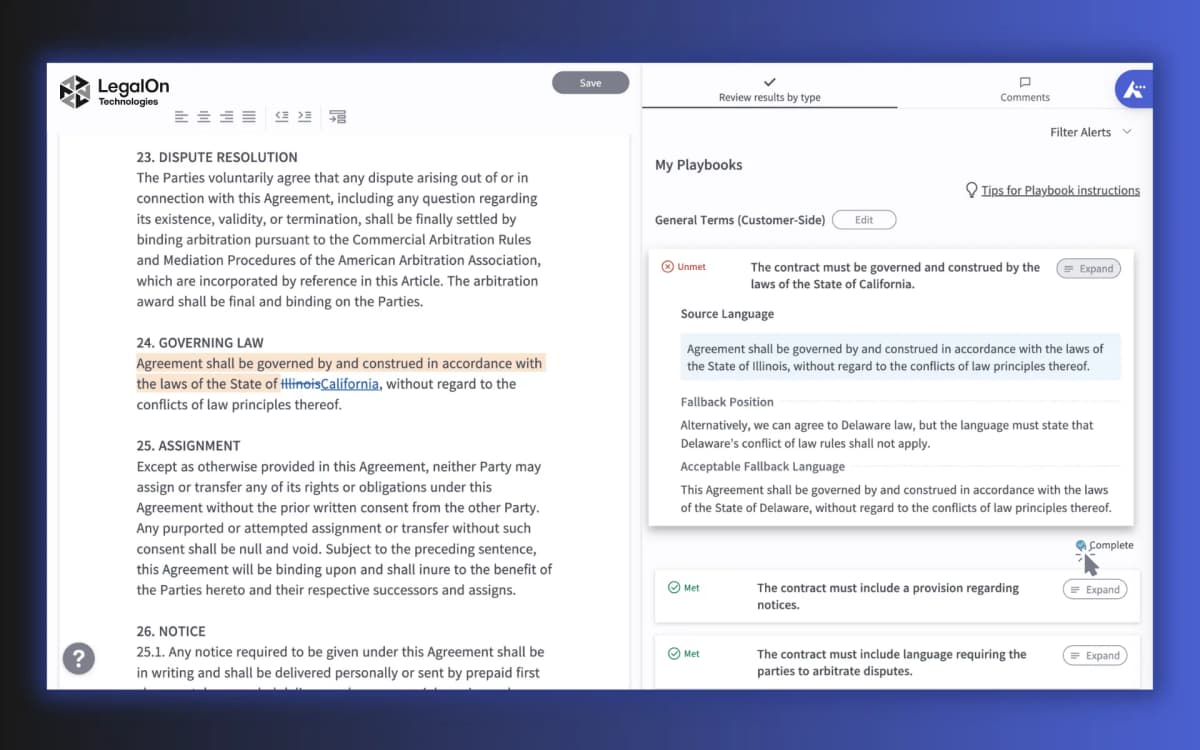
A contract review interface should keep analysis output beside the source text.
The screenshot shows the contract beside the team's review rules. Each flag can be traced back to the clause that caused it.
Build a cited evidence table
A cited table makes contract findings easier to check. Each row should name the contract, issue, source passage, and a citation you can open.
This format works across tools. Keep a source link on each row so a reviewer can check the passage before acting.
The workflow
Building a cited evidence table follows the same 4 steps regardless of the tool:
- Add each contract as a distinct source. Keep agreements separate so findings trace back to the right contract. Blended summaries lose that connection.
- Ask for themes, gaps, and issues in a table. A narrow prompt produces a more checkable table than a broad "summarize these contracts" request. For example: "Compare these contracts for termination rights, auto-renewal terms, liability caps, and indemnity obligations. Return a table with contract name, issue, supporting passage, and citation."
- Require one cited finding per row. A row that blends two contracts or drops the citation is not reviewable. Ask the tool to split or re-cite it before the row becomes a review task.
- Open every citation that matters. Jump to the cited passage, then read the surrounding definitions, exceptions, and cross-references before treating the row as settled.
| Step | What the reviewer should see | Why it matters |
|---|---|---|
| Add each contract | Each agreement appears as its own processed source | Findings stay tied to the right contract instead of blending into a generic summary |
| Ask for a cited table | Rows name the contract, the issue, the supporting passage, and a citation | The output is reviewable rather than a detached synthesis |
| Open the citation | The viewer jumps to the exact passage behind the row | The reviewer confirms the passage supports the finding |
| Check nearby text | Definitions, exceptions, and cross-references sit next to the cited clause | A clause can read differently once its exceptions and defined terms are visible |
Table 2: Each step keeps the finding tied to the exact source passage, so a reviewer can verify the claim before it becomes a legal decision.
Example output format
A well-structured contract analysis table should look like this when returned by any AI contract analysis tool. Each row links a finding to the specific passage that supports it:
| Contract | Issue | Supporting passage | Citation | Check status |
|---|---|---|---|---|
| Vendor A MSA | Auto-renewal: 90-day notice required to cancel | "This Agreement will renew automatically for successive one-year terms unless either party provides ninety (90) days written notice..." | Atlas cites §8.2 with a link to the source passage | Open §8.2 to confirm notice period and defined "written notice" |
| Vendor B SLA | Liability cap: 3x total fees paid in prior 12 months | "Liability of either party shall not exceed three times the fees paid in the twelve months preceding the claim." | Atlas cites §11.3 with a link to the source passage | Check if "fees paid" is defined. Confirm whether the cap covers indemnity claims. |
| Vendor C NDA | Termination: either party may terminate on 30 days' notice | "Either party may terminate this Agreement upon thirty (30) days' written notice without cause." | Atlas cites §6.1 with a link to the source passage | Verify whether a cure period applies. Check if notice must follow a specific delivery method. |
Table 3: This format applies to any tool that returns cited contract analysis output. Each row is verifiable: open the citation, read the source passage, then decide whether the finding holds before moving it into a review decision.
Verify before acting on the output
AI contract analysis output is a starting point for evidence review. It is not a legal conclusion. A lawyer still owns the interpretation, negotiation, and compliance calls.
Atlas can import contract PDFs, compare issues across the set, and cite the passage behind each finding.
Best AI contract analysis tools
1. Atlas
Atlas fits when you need to compare more than one contract without losing the source text. Add the contracts, changes, or vendor terms as separate sources. Then ask for a table of issues, gaps, and themes with one citation per row.
Each citation opens the passage behind the finding. Use Atlas to build the table, then ask a lawyer to decide what the terms mean and what to change. Atlas is not a redline tool, contract management system, or lawyer.
For related document reading workflows outside contracts, see AI document reader and PDF AI assistant. If your job is closer to reading and asking questions about a single contract rather than cross-document synthesis, the contract AI guide covers that narrower workflow.
2. Legly
Legly combines contract storage with flags. Its page lists missing-clause and deal-breaker checks, key-field extraction, reports, task assignment, a dashboard, and API access.
It fits a team that needs to keep many contracts organized and mark work for follow-up. Check the current price, security terms, and country coverage before you buy.
3. LegalOn
LegalOn is built for legal teams that want AI review to follow rules written by lawyers. Its buyer's guide describes risk flags, clause highlights, and draft changes inside Word and Docusign.
That playbook structure suits teams where the same contract types move through review every week and consistency matters more than open-ended exploration.
Treat any specific speed, benchmark, or playbook-count claim as something to verify on the current page rather than take at face value.
4. Sirion
Sirion places AI analysis inside a full contract management system. Its guide describes reading scanned text, pulling out fields, searching clauses, and tracking terms across the contract set.
Consider Sirion when you need a full system, not a quick upload tool. Ask what setup and links to other business tools the rollout requires.
5. Lexis+ Agreement Analysis
Lexis+ Agreement Analysis is for lawyers who need to compare a negotiated clause with other wording. Its page says it finds heavily changed clauses and shows other clause language inside Lexis+.
That is a different job than general contract upload analysis. The buyer already has a research-backed comparison need rather than a request to summarize or extract from an arbitrary contract set.
If clause precedent and legal research context matter more than portfolio-wide synthesis, it belongs on the shortlist.
6. goHeather
goHeather fits buyers who want fast, self-serve contract review.
Its product page describes Word or PDF uploads, issue spotting against playbooks and common-law standards, plain-language risk explanations, suggested edits, and redlines.
The appeal is speed and accessibility for lawyers, founders, and small teams without an enterprise rollout.
Confirm which countries the tool covers and test its claims for yourself. A lawyer must approve any suggested edit before anyone signs the contract.
7. ContractSafe
ContractSafe combines contract management with AI-assisted review.
Its review software guide covers pulling out data, storing files, comments, work steps, and redlines. It also says people should check AI output.
That combination makes ContractSafe worth evaluating for teams that want extraction and organization in one place. For teams that need to read and Q&A contracts without a full management layer, see PDF AI assistant and chat PDF workflows.
How to verify AI contract analysis output
Any AI contract finding, including one from Atlas, is a starting point. It is not legal advice. Use these checks before you act. The guide to AI that cites sources explains how to check source links in more depth.
- Open the cited passage. Do not accept a summary claim without seeing the source text behind it.
- Read the nearby text. Definitions, exceptions, and links to other clauses can change the meaning.
- Check related files. An amendment or side letter may replace the clause you found.
- Flag legal claims. A tool can point to useful text. It cannot decide whether that text is valid, fair, or safe in your country.
- Ask a lawyer. A lawyer should review high-stakes terms about payment, damages, legal duties, ownership, or ending the deal.
If the review set mixes contracts with other legal filings, see the guide to legal document analysis AI for that broader document set. Use an AI citation checker to confirm that citations are accurate before relying on any AI contract analysis output.
Which AI contract analysis tool fits?
Match the tool to the task:
- To compare a set of contracts and open the source behind each finding, use Atlas.
- To store contracts, pull out key fields, and flag problems, use Legly.
- For attorney-built playbook review, use LegalOn.
- To manage and track a large contract set, use Sirion.
- To compare a changed clause with other wording, use Lexis+ Agreement Analysis.
- For fast self-serve review and suggested edits, use goHeather.
- To store contracts and add AI review, use ContractSafe.
To read and ask questions about one contract, see the contract AI guide. Legal teams comparing larger systems should see contract AI software. For other legal files, see legal document AI. To find changes between two versions, see AI document comparison.
Whichever tool you pick, keep the source passage attached to every finding, and route the legal call to a qualified lawyer.
Compare contracts with cited evidence
Add contracts, compare clauses, and inspect the cited passage for each finding.