

"Contracts AI" can refer to several tools. Contracts.ai helps teams search signed contracts. ContractAI is an App Orchid product for review and contract data. Salesforce Contracts AI works inside Salesforce. Other tools draft, review, or store contracts.
Atlas fits when you have the contracts and need cited answers. Add the PDFs, ask a clear question, and open the source behind each answer. Read the full clause before you rely on it. Atlas does not give legal advice, draft terms, make redlines, track approvals, or score legal risk.
Use contract software for drafting, redlines, approvals, signatures, file storage, and task tracking. Ask a lawyer to make legal calls. Use Atlas when a narrow answer must stay linked to its source.

Ask contract questions with citations in Atlas
Add your contracts, ask a focused question, and verify every cited passage.
What to look for
Start by choosing the job:
-
Search signed contracts: Contracts.ai pulls fields from signed files and lets teams search across them.
-
Review and manage contracts: App Orchid says ContractAI finds data and supports review work. Juro covers web-based drafting, review rules, file storage, and contract tasks.
-
Work inside Salesforce: Salesforce Contracts AI drafts clauses, pulls data from old contracts, and searches a clause library.
-
Review one upload: Lighter apps find clauses and flag possible risks. A lawyer must check any risk label.
-
Create a new contract: Lumin AgreementGen creates and edits agreement text.
-
Check the source behind an answer: Atlas lets you ask about contract copies and open the cited text.
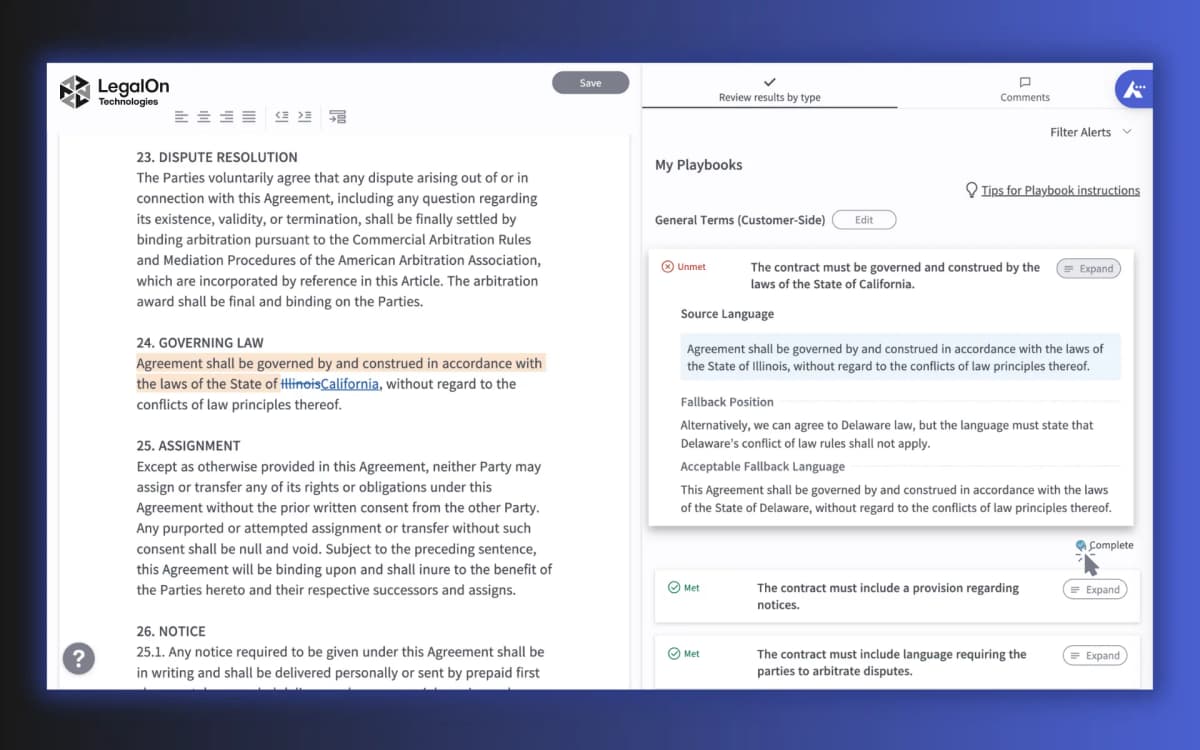
The screen above guides a review with clauses and set rules. Atlas serves a later reading step: checking the source behind an answer.
Contracts AI decision table
| Option | Best fit | Lifecycle stage | Source trail | Boundary |
|---|---|---|---|---|
| Atlas | Cited questions over contract sources | Reading and evidence checking | Citation links back to source passages | Not legal advice, drafting, review, redlines, CLM, or risk scoring |
| Contracts.ai | Post-signature contract intelligence | Executed agreement portfolio | Emphasizes source-language validation | Refresh enterprise, security, and implementation claims before buying |
| ContractAI | Analytics, extraction, review, and negotiation evaluation | Review through management | Product-specific evidence depends on App Orchid materials | Do not merge it with Contracts.ai |
| Salesforce Contracts AI | Salesforce-native contract workflows | Salesforce contract operations | Salesforce documentation is the primary source | Not a standalone generic contract AI product |
| Juro | Contract lifecycle education and CLM evaluation | Drafting through management | Vendor explainer for category framing | Treat comparative claims as vendor positioning |
| Icertis | Enterprise contract AI concepts | Drafting through post-signature management | Strong category explainer | Vendor benefits still need buyer validation |
| Contracts AI App | Lightweight upload-based analysis | Review and triage | Advertises clause locations and document analysis | Do not treat risk output as legal advice |
| Lumin AgreementGen | Agreement generation and editing | Drafting | Generator workflow for creating agreement text | Use another process for legal verification |
Table 1: Use the table to match the tool to drafting, review, storage, search, or cited reading.
Where Atlas fits for contracts
Atlas is strongest when an answer must stay linked to the contract text. You can add a vendor contract, later change, policy, and note. Then ask, "Which source states the renewal notice period?"
Use this workflow:
- Add the contracts and related files to Atlas.
- Wait until each source is ready.
- Ask one clear question about the text.
- Open each source link behind the answer.
- Read the full clause and the text around it.
- Check special terms, limits, dates, and links to other clauses.
- Send legal and deal choices to a lawyer.
Atlas can read PDFs and other source types. It can compare ready files and open cited passages in its PDF view. You still need to read the source.
Use Atlas after the contract exists and you need a source trail. Use other tools for drafts, redlines, approvals, legal advice, and contract records.
Best Contracts AI tools and pages
Atlas
Atlas is the best fit here for cited questions across contracts you add. Ask one clear question, open the source link, and read the full clause before you share the answer. Use it to compare facts across files and keep a source trail. It does not review legal risk, draft terms, make redlines, or store the signed record.
Contracts.ai
Contracts.ai focuses on signed contracts. Its page says teams can pull key fields, ask questions across many files, and keep the source text. It fits legal, finance, and buying teams that need a broad view of signed contracts. Check file safety, setup, and links to other tools with the vendor.
ContractAI
ContractAI is an App Orchid product. It is separate from Contracts.ai. App Orchid says it finds contract data and supports review and deal work. Consider it when you need a managed process rather than a quick reading tool.
Salesforce Contracts AI
Salesforce Contracts AI works inside Salesforce. Salesforce lists clause drafting, data from old contracts, and clause search. Choose it when your contract work already lives in Salesforce.
Juro
Juro's contract AI guide explains how AI can help draft, store, and track contracts. It also covers legal limits and file safety. Use it to shape buying questions, then test product claims on your own work.
Icertis
Icertis covers contract work from drafting and review through signing and later tracking. It is aimed at large teams. Its vendor claims do not prove that AI can replace legal review.
UConn Contracts AI
The UConn Contracts AI page gives more context on Salesforce Contracts AI. It is a help page, not a separate vendor choice. Use current Salesforce pages for product claims.
Contracts AI App
Contracts AI App lets users upload a PDF or text file. Its site says it finds clauses, shows their place in the file, flags risk, and lists public prices. Check its file safety terms and risk claims before you upload a private contract.
Lumin AgreementGen
Lumin AgreementGen creates and edits agreement text from prompts and templates. Users can then download, edit, send, or sign it. Ask a lawyer to check the draft before you use it.
For broader review-tool options, compare these with the dedicated AI contract reader guide, PDF chat tools, and document AI tools. If the core need is answer traceability, start with AI that cites sources.
Legal boundaries for contract AI
Contracts can create legal and money risk. AI can help read, search, draft, or sort them. A lawyer should review high-value, unusual, or regulated deals.
Bloomberg Law says AI can support contract drafting, but lawyers still need to make the legal calls. AI can miss a special term, limit, schedule, linked file, or fact about the deal.
Before using any contract AI output, check:
- What job the tool does: draft, review, search, create, or find source text.
- Whether its file and data rules fit your contract.
- Whether each answer links to the exact source text.
- Whether an exhibit, later change, or linked file is missing.
- Whether a lawyer must review the result before anyone acts.
Atlas keeps a source trail. You still have to read the cited text and send legal calls to counsel.
Which Contracts AI option fits?
Start with the job. Use a reading tool for cited answers. Use a contract system when you need drafts, set review rules, approvals, and signed file storage. Send any result about rights, duties, money, risk, or deal plans to counsel.
-
Choose Contracts.ai to search and track facts across signed contracts.
-
Choose ContractAI for App Orchid review and contract data work.
-
Choose Salesforce Contracts AI when the work already lives in Salesforce.
-
Choose a contract system for drafts, redlines, approvals, set review rules, file storage, and task tracking.
-
Choose Atlas to ask a clear question across contract copies and open the source behind the answer.
-
Choose Lumin AgreementGen to create a draft from prompts and templates. Test the closest fit on your own contracts. Check its source links, file rules, exports, and handoff to a lawyer or contract owner.
Ask contract questions with citations in Atlas
Add your contracts, ask a focused question, and verify every cited passage.