

The best concept map generator depends on what the map has to prove. Use Atlas when the map should come from papers, reports, chapters, or other sources. It fits when you need source evidence behind key nodes.
Use Canva or FigJam when the job is a polished classroom or presentation visual. Use Lucidspark or Miro when a team needs a shared whiteboard.
Use MindMap AI or Algor Education for a fast AI study map from notes, files, or media. Use Mapify for a PDF, webpage, YouTube video, recording, or long text that needs a visual summary. Use ConceptMap.ai when reading material needs to become a map for teaching or annotation.
A concept map generator should do more than arrange attractive branches around a topic. For a real concept map, the hard part is the relationship between ideas. The tool should show what connects two ideas. It should keep labels, cross-links, and verification intact when the map comes from evidence-heavy work.

Generate a Knowledge Map from your sources
Map papers or reports, then verify key relationships against the source text.
What makes a concept map generator useful?
Concept maps are more than topic clusters. The IHMC concept-mapping theory guide defines the basic unit as two ideas joined by words that explain the link.
A map that says photosynthesis -> chlorophyll -> light may help memory. A map that says chlorophyll absorbs light energy for photosynthesis gives the reader a claim they can understand and test.
Use this rubric before comparing tools:
Relationship quality
- Relationship labels: Can the tool label edges, or does it only create unlabeled branches?
- Cross-links: Can one concept connect to several other concepts, or is everything forced into a tree?
- Input type: Does it start from a blank canvas, a prompt, pasted text, a PDF, a video, or a processed source?
Fit to the task
- Source trail: Can you inspect where a map node came from?
- Edit control: Can you rename nodes, change relationships, remove noise, and preserve caveats?
- Collaboration: Can multiple people comment, vote, present, or work on the map together?
Output checks
- Export: Can the map leave the tool as an image, PDF, SVG, Markdown, CSV, or shareable page?
- Fit: Is the output a concept map, a mind-map recap, or a whiteboard sketch?
For school, teaching, and workshops, the map needs to be easy to read and share. For research, strategy, policy, or dense work, source checks matter more. A map node can look plausible even when it misreads the document.
Concept map generators compared
This comparison table leaves out pricing. Free limits, AI credits, and plan names change often, so check each vendor page before you buy or set a team standard.
| Tool | Best use case | Inputs | Relationship support | Collaboration | Exports | Verification fit |
|---|---|---|---|---|---|---|
| Atlas | Knowledge Maps from papers, reports, chapters, and dense documents | Processed source text in an Atlas project | Shows claims, ideas, methods, proof, structure, nodes, and links from the source | Built for research and project work | Export after labels and links are readable | Strong when key nodes must be checked against the source text |
| Canva | Polished concept maps for classes, business topics, slides, and quick graphics | Templates, design parts, manual editing, whiteboard work | Good for designed maps when the author controls labels and layout | Sharing, whiteboard, and slide-focused team work | Visual and embeddable output | Weak for source checks unless the author adds citations outside the map |
| ConceptMap.ai | Turning reading material into a map for teaching, presenting, and annotating | Reading material and map generation | Built around concept-map presentation and annotation | Public sharing and presentation | Shareable maps and presentation output | Useful for reading tasks. Check current source-link behavior before using it for research proof |
| Lucidspark | Team maps, workshops, imports, sticky notes, and AI idea starts | Templates, imports, sticky notes, brainstorm inputs | Flexible diagrams and labeled links on a large canvas | Comments, voting, and shared work | Diagram and slide-style output | Better for team alignment than source checks |
| MindMap AI | Fast AI concept maps from prompts, notes, PDFs, Markdown, CSV, and other structured inputs | Topic prompts, text, notes, PDFs, Markdown, CSV, and related files | Supports custom links and editing after generation | Sharing | PNG, PDF, SVG, Markdown, CSV, and related exports listed by the product | Good for quick drafts. Check map links before using them as evidence |
| FigJam | Light team maps inside a familiar design whiteboard | Blank canvas, templates, FigJam objects, team input | Good manual link control when the team creates the structure | Strong for teams already using Figma or FigJam | FigJam and visual sharing/export workflows | Weak for file checks unless paired with source notes |
| Mapify | Turning PDFs, webpages, YouTube videos, recordings, audio, images, and long text into map summaries | PDFs, docs, URLs, YouTube, podcasts, meeting recordings, long text, audio, and images | More mind-map summary than formal concept-map method | Editing, sharing, and presentation | Export and presentation-oriented mind map outputs | Useful for content-to-map triage. Treat the output as a summary to inspect |
| Algor Education | Student-oriented AI concept maps from text, files, photos, audio, or video | Text, photos, files, audio, and video | Concept-map generation with customization and enrichment | Sharing and student workflow support | Export, print, and share workflows | Good for study maps. Check key claims against the class material or source file |
Table 1: Miro belongs in the same decision set as Lucidspark for team mapping. Choose it when your team already works in Miro and needs a workshop, planning session, or shared board.
Choose a document-to-map tool when the map needs to come from sources instead of a live group session.
Verify a Knowledge Map in Atlas
Atlas is the best fit in this list when the concept map has to explain a source. If the map helps you read a paper, report, chapter, transcript, or technical document, keep verification close to the text.
The Atlas workflow is:
- Add or open a processed source.
- Generate a Knowledge Map for that source.
- Read the top-level nodes first so you understand the source's structure before diving into details.
- Look for claims, methods, proof, caveats, and links between ideas.
- Open nested nodes when a concept needs more detail.
- Select nodes and edges to inspect why ideas are connected.
- Check key nodes against the source text before saving, citing, exporting, or showing the map.
That source check keeps the map tied to the text.
Atlas Knowledge Maps come from source material, so they can show how a source is structured. They are still an interpretation layer. If the source extracted poorly, inspect the passage. Do the same when the paper is unclear or a claim will appear in a final report.
The visual source check is crawlable in text: start from the source, inspect the map structure, and return to cited source evidence before saving a claim.
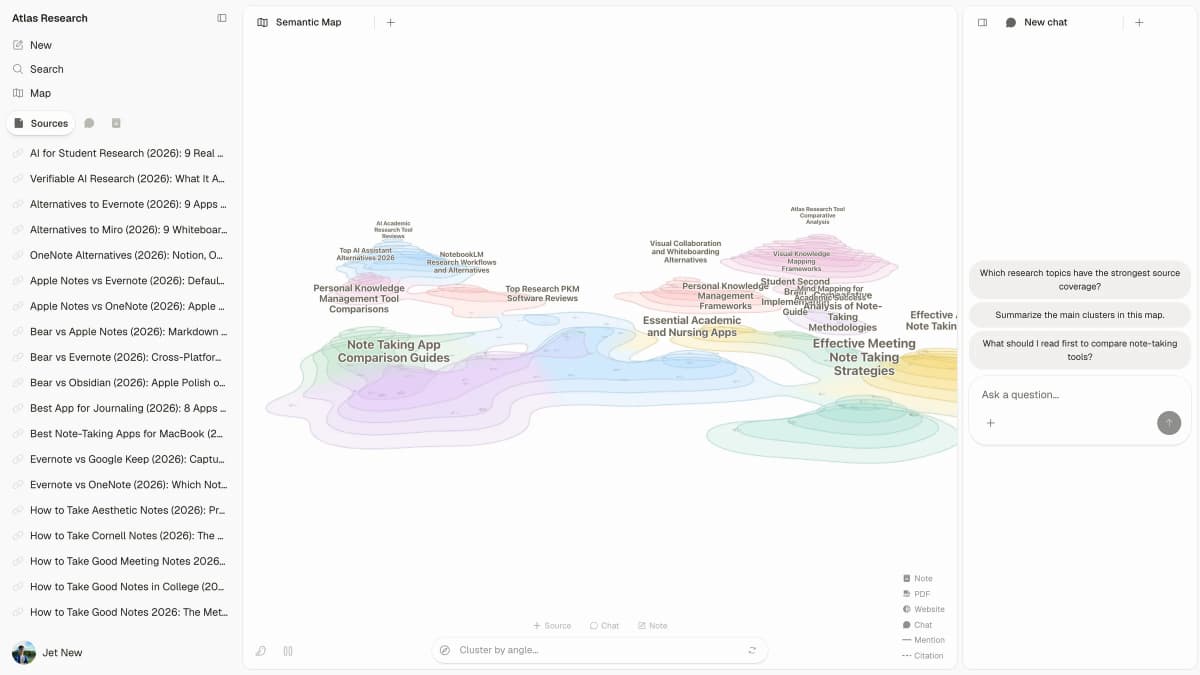
The Atlas workspace keeps source lists, map structure, and research questions visible in one review surface. Read that layout as a source review path. Start with the source, inspect the map, and return to source evidence before a map node becomes a note, citation, or decision.
Use Atlas for source-grounded concept maps when you need to answer questions such as:
- Which claims does this paper make, and what evidence supports them?
- Which method connects to which finding?
- Where do limitations weaken the conclusion?
- Which concepts need nested detail rather than one crowded top-level map?
- What should I inspect before turning a map node into a citation, note, or decision?
For source sets that need prose synthesis before a map, compare the AI research assistant tool workflow.
Best concept map generators
1. Atlas
Atlas is the best concept map generator for source-grounded Knowledge Maps because it fits readers who want a map from real evidence instead of recall.
The strongest use case is a dense source: a paper, report, book chapter, technical document, or interview transcript. Atlas can create a Knowledge Map after the source is processed.
Top-level nodes orient you, nested nodes preserve detail, and edges show relationships that a linear summary can hide.
Choose Atlas when source checks are part of the job. For a live workshop, classroom template library, or open whiteboard, Canva, FigJam, Miro, or Lucidspark will usually fit the collaboration pattern better. For the broader tool-selection page across template makers, whiteboards, simple editors, and source-grounded maps, compare the concept map maker guide.
2. Canva
Canva is the easiest pick when the map needs polish fast. Its maker has templates, design parts, online board work, sharing, and visual output for lessons, business topics, research visuals, and slides.
Choose Canva for classroom handouts, slide graphics, marketing explainers, and simple concept maps where a human writes the relationship labels. Do not choose it because you expect automatic source verification. If the map summarizes a reading, keep source notes or citations outside the Canva graphic.
3. ConceptMap.ai
ConceptMap.ai is a strong fit when reading text needs to become a concept map for teaching, sharing, or notes. It is closer to reading-to-map work than blank-canvas drawing.
Choose ConceptMap.ai when the output needs to support teaching or slides. Before using it for research claims, check how the current product handles source links, privacy, and claim trails.
4. Lucidspark
Lucidspark fits team concept mapping on a large canvas. It works well for workshops, sticky notes, votes, imports, slides, and AI idea starts.
Choose Lucidspark when the map is a team thinking aid. It can support concept-map structure, but its main advantage is shared visual work. If the job is to turn a paper or report into a source map, use a source-based workflow instead.
5. MindMap AI
MindMap AI is useful when you want a fast AI map from a topic, text, notes, PDF, Markdown, CSV, or another input. It includes edits, custom links, sharing, and exports such as PNG, PDF, SVG, Markdown, and CSV.
Choose MindMap AI for first drafts, study maps, and quick structure from supplied text. Check the links before relying on the output. A generated link may help you see a pattern, but it should not become the proof for that pattern.
6. FigJam
FigJam works well for teams already inside Figma. It is a light map maker for group sketching, dense notes, and shared boards.
Choose FigJam when the team needs to build the map during a meeting or design session. For PDF maps or source checks, use a document-to-map or research map workflow.
7. Mapify
Mapify turns content into visual recaps from PDFs, docs, URLs, YouTube videos, podcasts, meeting recordings, long text, audio, and images. It also supports editing, sharing, export, and presentation workflows.
Choose Mapify when the input is content and the desired output is a fast visual summary. Many Mapify outputs are closer to mind maps than formal concept maps with labeled claims and cross-links. That can still be useful. Match the output to the job.
8. Algor Education
Algor Education is built for student workflows. It can generate concept maps from text, photos, files, audio, or video. It also supports edits, export, print, and sharing.
Choose Algor when a student needs to turn class text into a study map. For research or grading, check key nodes against the source file or lesson text before trusting the map.
Concept map vs mind map
A mind map usually starts with one central topic and branches outward. Use it for brainstorming, memory work, outlines, and fast grouping.
A concept map focuses on relationships between ideas. It may have a central concept, but it also uses linking phrases, cross-links, and many connected concepts.
A useful map shows how the cause produces the effect. It also shows what proof supports the claim and which caveat changes the reading. Faculty Focus makes a similar teaching point. Concept maps help students explain how ideas relate and connect those ideas to what they remember.
Choose a mind map when you need speed, recall, or a clean hierarchy. Choose a concept map when relationships matter more than the list of ideas. Choose a source-grounded Knowledge Map when document relationships need verification against the original material.
For adjacent workflows, compare document comparison tools, AI document summarizers, and market research AI tools.
Decision guide
Choose by the source of the map first, then judge the quality and presentation format of the output.
If the map is a visual deliverable
If you need a classroom or presentation visual, start with Canva. If you need a collaborative workshop map, use Lucidspark, Miro, or FigJam.
If you need a fast AI study map, shortlist MindMap AI and Algor Education. If you need a visual summary from PDFs, webpages, videos, or recordings, test Mapify. If you need a reading-to-presentation concept map, test ConceptMap.ai.
When the map supports a claim
If the map will support research, analysis, or a decision, use a stricter test. Can you check the key nodes and links against the source?
Atlas is strongest when that answer needs to be yes. Generate the Knowledge Map, inspect the top-level structure, expand the parts that carry the argument, and verify the nodes that will become notes, citations, claims, or decisions.
The final filter
The best concept map generator is not always the most visual one. Match the tool to the map's job: a polished graphic, a team canvas, a study aid, a content summary, or a source-based structure you can verify.
Generate a Knowledge Map from your sources
Map papers or reports, then verify key relationships against the source text.