
Atlas vs Copilot Mode (2026): AI Browser Comparison
Compare Atlas, Microsoft Edge Copilot Mode, and Dia for AI browsing, AI assistants, tab context, source checks, privacy, browser actions, and research handoff.
- Byline

Summary
Use Atlas for ChatGPT-led browsing. Use Microsoft Edge Copilot Mode when Edge is already your daily browser.
Evidence: the main tradeoff is setup and review cost. Atlas adds a new browser. Copilot Mode keeps profiles, passwords, tabs, and policy in Edge.
Evidence: Dia, Comet, and Perplexity widen the category. They are reference points for autonomy, UX, and answer-first research.
Name boundary: Atlas Workspace has Knowledge Maps, citation-grounded answers, and a compounding graph. The browser choice is OpenAI Atlas versus Edge Copilot Mode.
Note: Here, "Atlas" means the AI browser from OpenAI. Atlas Workspace is a separate research product.
By Jet New.
Choose Atlas if you want ChatGPT to lead the browser. Choose Microsoft Edge Copilot Mode for AI help inside Edge.
Compare both browsers on the time they save after source checking, not on the speed of the first answer. A fast answer loses its advantage when correcting unsupported claims takes longer than reading the pages yourself.
Track setup, answer, source-check, and correction time across five repeated tasks. This separates the one-time cost of changing browsers from the review work each answer creates.
Atlas and Microsoft Edge Copilot Mode both move the AI assistant from a separate chat tab into the browser itself. Atlas makes ChatGPT the main layer for search, reading, page work, and browser actions. Copilot Mode keeps that layer inside Edge, where it can work with tabs, page context, account state, and the habits Edge users already have.
Dia belongs in the same search set because people often compare the wider AI browser market. The main choice is still Atlas versus Microsoft Copilot.
Atlas Workspace is the visual research workspace with Knowledge Maps, citations that open supporting source passages, and tools for synthesizing multiple sources. Those are separate research features, so the comparison below treats Atlas as the AI browser from OpenAI.
Use Atlas if you want a ChatGPT-first browser and you are willing to adopt a new browsing surface. Use Microsoft Copilot if you already work in Edge. It gives AI help without moving bookmarks, profiles, passwords, or work flows. Use Dia or Perplexity Comet as reference points when you are testing the wider AI-browser category.
Both products put an AI assistant in a browser, while Atlas Workspace organizes a selected research collection. The shared name does not make the products interchangeable.

Atlas

Keep the sources your AI browser found
Compare saved pages and inspect citations after browsing with either AI browser.
Verdict or decision summary
Atlas is the cleaner fit when the browser assistant itself is the product you want to judge. It is strongest for people who already use ChatGPT as their main work surface. Microsoft Copilot Mode is the better fit when Edge is already your work browser. The assistant can sit inside the existing browser, tab, and Microsoft account context.
| Atlas | Microsoft Copilot |
|---|---|
| Better when you want a ChatGPT-first browser experience. | Better when you already use Microsoft Edge every day. |
| Cleaner for open-ended page analysis and prompt iteration. | Cleaner for tab-aware help inside the browser you already manage. |
| Higher switching cost if your browser life is already in Edge. | Lower switching cost for Microsoft users, but less attractive outside Edge. |
| Strong name-collision risk because "Atlas" can also mean Atlas Workspace. | Clearer brand intent because Copilot Mode is tied to Microsoft Edge. |
| Adequate for a quick page summary; verify important claims in the page. | Adequate for summaries across Edge tabs; verify important claims in their pages. |
| Does not preserve an existing Edge setup. | Better when you need to preserve Edge profiles, passwords, and managed settings. |
Table 1: Atlas and Copilot browser decision summary.
The practical decision is not "which model is smarter?" It is "where should the assistant live?" If the assistant should be ChatGPT and the browser should adapt around it, Atlas has the stronger fit. If the browser should remain Edge and the assistant should adapt around it, Microsoft Copilot has the stronger fit.
Both can help with web research. Neither should be treated as a full citation audit system for high-stakes work.
How is Atlas different?
1. ChatGPT-Atlas browser
OpenAI's Atlas browser differs from Microsoft Copilot Mode in the center of gravity. OpenAI's browser starts from ChatGPT and extends into browsing. Copilot Mode starts from Edge and adds AI into an existing browser. That sounds like a small product-design distinction, but it changes the user's daily loop.
In Atlas, the assistant is the primary surface. You ask a question, inspect a page, and refine the answer. The thread stays close to the page. That helps when the task is open-ended. You can compare pages, pull out the gap between two claims, or draft a response. You can also keep a research thread alive while moving through search results.
2. Copilot Mode and Browser Switching Cost
In Microsoft Copilot Mode, the browser is still the primary surface. That helps when the browser is already settled. Edge users may have work profiles, managed settings, saved passwords, favorites, work rules, and sign-in controls. Copilot's job is to add AI help without forcing a browser move.
| Atlas | Microsoft Copilot |
|---|---|
| Assistant-first: ChatGPT is the main reasoning layer. | Browser-first: Edge remains the main work surface. |
| Best for people willing to change browser habits around AI. | Best for people who want AI inside existing Edge habits. |
| Stronger fit for prompt-led reading and synthesis. | Stronger fit for tab-aware browser help and Microsoft context. |
| More likely to feel like a new product category. | More likely to feel like an upgrade to an existing browser. |
| Atlas fits when the assistant should lead. | Copilot fits when the existing browser should lead. |
| Requires moving established browser habits. | Better fit when existing Edge habits and account context must stay intact. |
Table 2: Atlas and Copilot browser switching costs.
3. Market, Pricing, and Test Context
Dia and Perplexity Comet help explain the market because both treat the browser as an AI surface. Dia is a broader browser test. Comet pushes harder on agentic browsing. Atlas has the ChatGPT habit advantage. Copilot has the Edge install advantage. For most searchers, Dia and Comet are reference points rather than the main decision.
Pricing Models and Ecosystem Integrations
Pricing is not just the plan price. For each pilot, record four access states: free access, paid access, work access, and admin approval. Then record the setup work.
For Atlas, check ChatGPT login, bookmarks, passwords, extensions, and the default-browser change. For Copilot Mode, check Edge profiles, favorites, saved passwords, rules, account state, and sync. Atlas carries the cost of changing browsers. Copilot benefits from being part of Edge.
Testing Methodology and Open Questions
Use the same prompt, pages, account risk, and source-check rule for both browsers. Test one public page, one video transcript, one dummy inbox, and one repeat research task.
Ask the assistant to list the claims a page proves and provide the source sentence behind each price claim. Ask it to draft a reply without sending it and name the step that needs human approval.
Record answer time, source visibility, wrong claims, setup friction, and review time for each run. The useful result is the total time needed to reach a checked answer.
Other AI Browser Context
Dia shows AI browser UX. Comet shows high-autonomy browser action. Perplexity shows answer-first research and content workflows. Google's Chrome AI work and Claude show how assistants can move closer to everyday browsing and professional work. Apple matters because Safari and iOS defaults can slow any browser switch.
Trust, Team Design, and Memory Architecture
Trust in Big Tech matters because browser AI sits near private pages, accounts, and work data. Team design matters when a company needs rules, logs, and support. Treat memory, chat intake, MCP, wiki tools, and open-source claims as roadmap signs until they show up in the browser workflow.
Comparison criteria
I used six criteria for this comparison: browser control, page context, tab context, source checking, privacy posture, and switching cost. Those points matter more than a plain feature list. AI browsers are not just chat products. They sit close to browsing history, active pages, forms, downloads, identity state, and sometimes work data.
The comparison uses first-party product and policy pages for capabilities and boundaries, plus independent reporting for the browser-market context:
- OpenAI's Atlas browser introduction for the company's documented product framing.
- Microsoft's Copilot Mode announcement for Microsoft's documented Edge workflow.
- Dia and Perplexity Comet for their current first-party browser positioning.
- The Verge's AI-browser coverage for independent category context and the screenshot below.
- The OpenAI privacy policy and Microsoft privacy statement for current general privacy terms.
- Apple Safari for the incumbent-browser context behind switching costs on Apple devices.
Sort browser tasks by the harm a mistake could cause. Reading a public page is low risk. Comparing tabs, summarizing an account page, or drafting text into a form carries more risk.
High-risk browser AI clicks, buys, sends, downloads, or changes settings. The higher the assistant climbs that ladder, the more the product needs clear permission, review, and source checks.
That ladder is the most useful way to compare Atlas and Microsoft Copilot. Atlas may feel more fluid when you want the assistant to reason with the page. Copilot may feel safer in managed Edge setups. The browser, profile, and admin model are already familiar. The best choice depends on which layer you trust more: the assistant as the center, or the existing browser as the center.
Comparing Atlas and Microsoft Copilot
The core comparison is not a simple winner-take-all table. Atlas and Microsoft Copilot solve different versions of the same browser-AI job. Atlas is best understood as ChatGPT becoming a browser. Microsoft Copilot Mode is best understood as Edge gaining a more active assistant.
| Atlas | Microsoft Copilot |
|---|---|
| Makes sense when you want AI to drive the browser session. | Makes sense when you want AI to support an Edge session. |
| Strong for asking layered questions about a page. | Strong for asking about pages inside a familiar browser shell. |
| Strong for people who already trust ChatGPT's answer style. | Strong for people who already trust Microsoft Edge and Copilot. |
| Weaker if you do not want another browser in your workflow. | Weaker if you do not use Edge or Microsoft services. |
| Atlas fits prompt-led exploration. | Copilot fits Edge-native continuity. |
| Does not inherit an organization's Edge controls. | Better for Microsoft-managed teams that already administer Edge. |
Table 3: Atlas and Copilot workflow context differences.
The first visible difference is workflow ownership. Atlas asks the user to adopt a new browser surface. That can be worth it if the user wants ChatGPT close to every page. Microsoft Copilot asks the user to keep Edge and turn on a mode. That can be worth it if the user values continuity more than a new AI-native interface.
The second difference is context scope. Atlas is compelling when the task can be expressed as a conversation with the current page and the surrounding search journey. Microsoft Copilot is compelling when the task is anchored in Edge tabs, Microsoft identity, and everyday browsing.
Both patterns can summarize and draft. The question is which context is more natural for the task.
The third difference is risk. Browser assistants can make mistakes in places where ordinary chatbots cannot: forms, accounts, shopping carts, private pages, and internal tools.
For low-risk reading, both products can be useful. For high-risk actions, the safer product is the one whose permission model, confirmation steps, and data boundary you understand.
Browser Control and Task Automation
Browser control is the headline feature in this category. Users do not only want a page summary. They want the assistant to find, compare, fill, sort, and sometimes act. Atlas, Microsoft Copilot, Dia, and Perplexity Comet all address parts of that workflow.
| Atlas | Microsoft Copilot |
|---|---|
| Better for ChatGPT-led task planning inside the browser. | Better for Edge-led task help across familiar pages and tabs. |
| Strong when the user starts with a prompt and then browses. | Strong when the user starts with tabs and asks Copilot to help. |
| Should be watched carefully on actions that change account state. | Should be watched carefully on actions that cross work and personal tabs. |
| Competes with Dia and Comet on the AI-native browser idea. | Competes with Chrome Gemini and other incumbent-browser AI modes. |
| Atlas fits when task planning starts in chat. | Copilot fits when task planning starts from open Edge tabs. |
| Does not begin from an existing Edge tab group. | Better when the task starts from Edge tabs that are already open. |
Table 4: Atlas and Copilot browser control risks.
Start with read-only help, such as summarizing or comparing the current page. Treat drafting as a higher-risk step because the text can later be pasted or sent.
Assisted action is higher risk when the browser moves through pages, clicks, gathers, or prepares a purchase. High-stakes action should always require clear user review before submit, buy, send, or delete.
The two products should be judged harshly at the top of that ladder. A browser AI that sums up a page incorrectly wastes time. A browser AI that acts incorrectly can create cost, data exposure, or legal risk. That is why the best browser AI workflow keeps the assistant visible, easy to stop, and permissioned.
Source Checking in AI Browsers
Source checking is where many AI browser comparisons become too sunny. A browser assistant can cite or sum up the current page. That does not prove the claim is backed by the cited passage. It only proves that the assistant had access to a page or tab.
| Atlas | Microsoft Copilot |
|---|---|
| Good fit for quick explanation of the page in front of you. | Good fit for quick explanation of a page or tab group in Edge. |
| Needs manual review when a page summary becomes a decision. | Needs manual review when a Copilot answer becomes a decision. |
| Not the same as a dedicated citation review workflow. | Not the same as a dedicated citation review workflow. |
| Should expose enough page context for the user to verify. | Should expose enough source context for the user to verify. |
| Tied: neither browser should replace manual source review. | Tied: neither browser should replace manual source review. |
| Does not inherit the page set open in Edge. | Better when the sources are already open across Edge tabs. |
Table 5: Atlas and Copilot source checking limits.
For the separate research method behind passage checks, the guide to AI tools that cite sources explains why a citation is not enough unless the cited passage supports the claim.
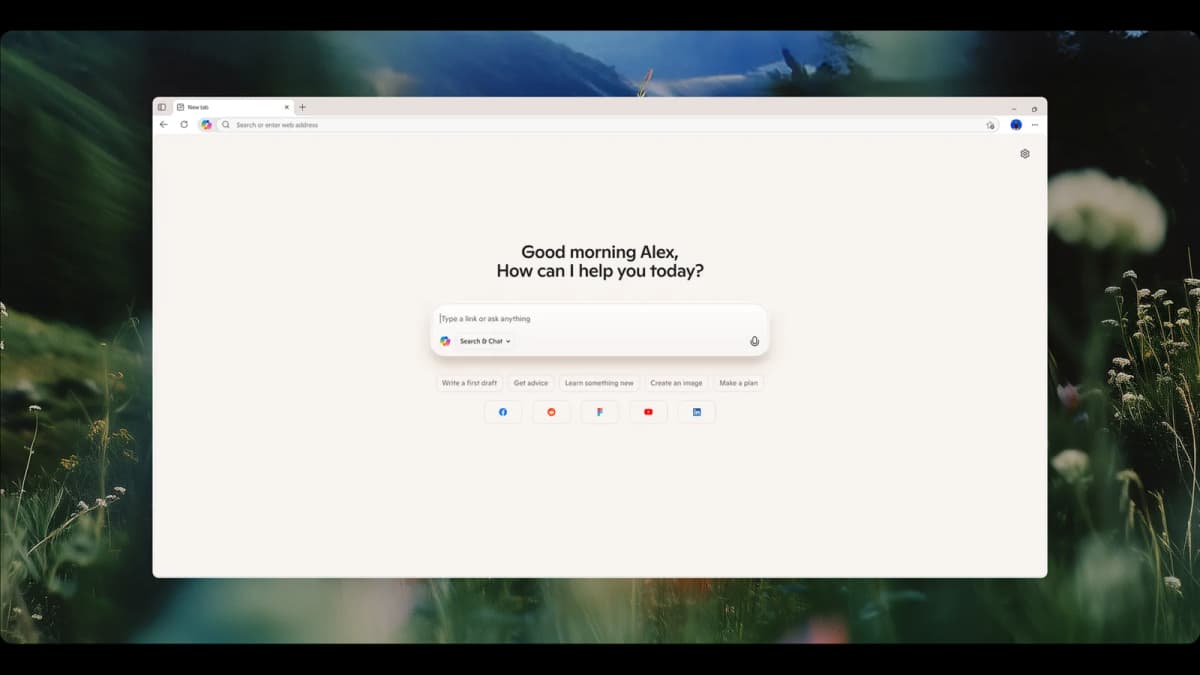
Microsoft's launch image shows Copilot Mode replacing the ordinary Edge new-tab page with one field for links, search, and chat. It demonstrates Copilot's browser-level entry point; it does not show how the browser cites a source or acts across open tabs.
The image above is a real source-backed AI-browser screenshot from The Verge's AI browser coverage. It shows the pattern this comparison is about: a normal web page on one side and an AI answer panel on the other.
That split is useful, but it also shows the review problem. The answer panel helps only if the user can still inspect the page, transcript, source, or tab behind the answer.
Privacy, Memory, and Admin Control
Privacy is not a side issue for AI browsers. It is the product surface. The assistant may see pages, tabs, prompts, browsing state, files, screenshots, or form context. More context can make answers better. It also raises the cost of a bad permission choice.
For individual users, the best practice is simple: keep browser AI away from accounts where a wrong action would hurt. Use it first on public pages, shopping research, travel research, docs, articles, and low-risk comparisons. Move slowly before any assistant touches money, health, legal, HR, customer, or admin pages.
For organizations, the question is less about novelty and more about control. Edge has an advantage when IT already manages Edge. Atlas has an advantage when a group wants a browser built around one assistant. Neither edge removes the need for policy. The policy should say what browser AI can read, what it can store, and what actions need human approval.
Price comparison
Pricing changes, access changes, and preview programs change. The durable pricing question is not only "what does the plan cost?" It is "what switching cost does the browser create?"
| Atlas | Microsoft Copilot |
|---|---|
| Direct cost depends on OpenAI's browser and account packaging. | Direct cost depends on Microsoft Copilot and Edge availability. |
| Switching cost includes adopting a new browser surface. | Switching cost is lower for existing Edge users. |
| Training cost is lower for users who already prompt in ChatGPT. | Training cost is lower for users who already use Copilot. |
| Procurement cost may be higher if the organization has not approved OpenAI browser use. | Procurement cost may be lower if Microsoft and Edge are already approved. |
| Atlas fits when ChatGPT fluency offsets browser switching cost. | Copilot fits when Microsoft approval and Edge rollout already exist. |
| Requires approval as a separate browser. | Better value when Edge procurement and support are already in place. |
Table 6: Atlas and Copilot price setup costs.
For personal use, the better value is the browser you will use every day. If Atlas gives you better answers but you keep returning to Edge, the value decays. If Microsoft Copilot is available but you do not like Edge, the value also decays.
For work use, ask a stricter question. Which product can be approved, taught, watched, and supported? Copilot is easier to buy in Microsoft-heavy companies. Atlas has a work-flow edge for people who want ChatGPT to be the browser's main interface.
When to choose Atlas vs Microsoft Copilot
Different users should choose differently. A student doing public web research is not like an IT admin setting browser policy. A consultant comparing vendor pages is not like a developer reading docs. Each case has a different risk level.
| Atlas | Microsoft Copilot |
|---|---|
| Best for ChatGPT-native users who want the assistant to lead browsing. | Best for Edge-native users who want AI without changing browsers. |
| Best for open-ended web research where prompt iteration is the work. | Best for tab-heavy work inside an existing Microsoft browser setup. |
| Best for users willing to learn a new browser to get a tighter AI loop. | Best for users who value continuity, policy, and profile stability. |
| Tied for casual page summaries: both work fine if you verify important claims. | Tied for casual page summaries: both work fine if you verify important claims. |
| Edge-managed default: no. | Edge-managed default: yes, supported. |
Table 7: Atlas and Copilot user fit scenarios.
- Want a ChatGPT-centered browser? Go with Atlas.
- Want AI help inside Edge? Go with Microsoft Copilot.
- Want to test the browser-native category beyond the two main options? Try Dia as a reference point.
- Want a low-risk first test? Use either product on public pages before private accounts.
- Want source certainty? Treat both browser answers as drafts until you check the source.
- Tied: both work fine for quick page summaries, travel research, and lightweight shopping comparisons.
- Want the least browser switching at a Microsoft-heavy company? Go with Microsoft Copilot.
- Want Edge as your default browser? Go with copilot.
If your organization already manages Edge, Microsoft Copilot is usually easier to approve and support. Atlas remains a reasonable pilot for people who want ChatGPT to be the starting point, but browser migration is a real cost.
Decision framework and flowchart
Use this flow before you run a pilot:
- If the user must stay in Edge, choose Microsoft Copilot.
- If the work starts as ChatGPT prompts, test Atlas first.
- If the task touches private accounts, keep both tools in read-only mode.
- If the task needs source quotes, score the answer only after checking the cited passage.
- If the task asks the browser to click, buy, send, or change settings, require a human stop point.
- If Dia or Comet is in the test set, score autonomy and review burden as separate items.
These checks keep capability and safety separate: the browser that can do more is not automatically the safer browser for the task.
Recommendations by user type
Individual ChatGPT power users: choose Atlas first. Your advantage is habit. You already know how to prompt, challenge, and refine ChatGPT answers. Moving that loop into the browser can remove copy-paste work and keep page context close to the thread.
Edge users in Microsoft-heavy workplaces: choose Microsoft Copilot first. Copilot is the stronger fit when Edge is already managed. It also fits when profiles are already in Edge and policy has approved Microsoft AI. The assistant may feel less new than a separate browser, but rollout friction matters.
Students and casual researchers: both work fine for low-risk page summaries. Use Atlas if your questions begin as prompts. Use Microsoft Copilot if your questions begin from a set of open Edge tabs. In both cases, check the source before citing a claim. If the decision is primarily about the assistants rather than the browsers, use the separate Copilot vs ChatGPT comparison.
Consultants, analysts, and marketers: test both on the same task. Ask each browser to compare three vendor pages, extract price claims, and sum up the tradeoffs. The better choice is the one that saves review time without hiding the source trail. For marketing work, ask whether AI assistants can safely read drafts, data pages, or customer data. Do that before using them on live accounts.
IT and security groups: start with Microsoft Copilot unless there is a strong reason to approve a new browser. Edge policy, identity controls, and existing buying paths reduce rollout risk. Atlas may still deserve a pilot for small groups that need a ChatGPT-first browsing experience. A pilot should define data rules, action limits, storage rules, and review paths.
Publisher and content groups: treat all agentic browsers as both workflow software and a traffic risk. If assistants answer directly from pages, fewer users may click through, read ads, or see subscription prompts. That affects the whole market, including Atlas and Microsoft Copilot.
Groups comparing against Comet: keep Comet in the test set when autonomy is the main question. A high-autonomy browser can feel more powerful than either Atlas or Microsoft Copilot, but it also raises the review burden.
The more a browser can act, the more your test should cover permissions, confirmations, source visibility, and rollback.
Pilot Tests, Examples, and Edge Cases
Use the following tests to compare time saved, source visibility, and failure risk on repeat work. They turn a broad product preference into results that an individual, team, or publisher can inspect.
Measure review time over five runs
Marketing groups should test browser AI with a time log. Run the same task in Atlas and Microsoft Copilot five times: compare three vendor pages, extract price claims, and draft a short brief. Record four numbers for each run:
- setup minutes
- answer minutes
- source-check minutes
- rework minutes
Use this simple ROI proxy:
saved minutes = old workflow minutes - (answer minutes + source-check minutes + rework minutes + setup minutes / 5)
The setup cost is divided by five because repeated work gives a fairer measure than the first run. Atlas passes the pilot only if the ChatGPT-led flow saves review time after source checks. Microsoft Copilot passes only if staying in Edge lowers setup and rework without hiding the source trail.
Check whether the answer credits its sources
AI browsers change more than personal speed. They can answer from a page before the reader clicks deeper into the site. The Verge AI-browser screenshot shows the split-screen pattern: a normal page beside an answer panel.
That pattern is useful for readers, but it can weaken the click path for publishers.
"use a computer as well as a human." Satya Nadella, Microsoft CEO, quoted in The Verge
Check two things:
- Does the answer name the page or publisher before giving the answer?
- Does the answer give a reason to open the source, such as a quote, chart, pricing detail, or method note?
If the answer gives a full response with no source cue, the browser may reduce visits even when it uses the page. If it names the source and leaves a clear reason to click, the browser is more likely to help discovery. This matters for Atlas, Microsoft Copilot, Dia, and Comet because all four can move value from the page into the answer panel.
Practical Examples
Here are simple tests that make the difference easier to feel.
Start with a public product page. Ask Atlas to explain what the page sells, list the price claims, and name anything the page does not prove. Then ask Microsoft Copilot the same thing in Edge.
Atlas should feel better if you want to keep asking follow-up questions in a ChatGPT style. Microsoft Copilot should feel better if you want to stay in Edge and compare the page with other open tabs.
Next, open three vendor pages. Ask each browser assistant to compare plans, limits, and support terms. Do not ask for a winner yet. First ask for the source sentence behind each claim. This test shows whether the assistant keeps the page trail visible. It also shows where the answer becomes too confident. A good browser answer says when the page does not give enough proof.
For a research task, use a public report and a news article about the same topic. Ask for points of agreement and points of conflict. Atlas may be easier if your next move is another prompt. Microsoft Copilot may be easier if your next move is another Edge tab. In both cases, keep the source open. Do not cite a claim until you have checked the passage.
For a work task, use a low-risk internal page first. Do not begin with payroll, customer records, legal material, or admin pages. Ask the assistant to summarize the page and draft questions for a meeting. This keeps the browser in read-and-draft mode. It avoids the risky step where an assistant takes action inside an account.
For a publisher task, ask each browser to summarize one of your own articles. Look at what the assistant extracts. If it answers the user's question without showing enough reason to click, that is a business issue.
Atlas, Microsoft Copilot, Dia, and Comet all point toward a web where assistants may stand between readers and publishers. That does not make the tools bad. It means content groups need to measure how AI browsers affect visits, signups, and paid conversions.
These tests are intentionally plain. They do not require a lab setup. They reveal the real tradeoff. Atlas is better when the ChatGPT-style thread is the work. Microsoft Copilot is better when Edge context and rollout cost matter more.
Common Objections and Edge Cases
"Is Atlas Workspace part of this comparison?" No. Atlas Workspace is a separate research product. Here, Atlas means the AI browser from OpenAI.
"Does Microsoft Copilot win because Edge is already installed?" Not always. Edge distribution lowers switching cost, but it does not automatically make Copilot the better assistant for every user. If the user thinks in ChatGPT prompts and wants that assistant close to browsing, Atlas can still be the better workflow.
"Does Atlas win because ChatGPT is familiar?" Not always. ChatGPT familiarity helps, but browser trust is different from chatbot trust. A browser assistant may see pages, tabs, account context, or form state. Users should judge both the browser product and the assistant behind it.
"Where does Dia fit?" Dia is useful as a reference. It shows the same move toward AI inside the browser. Most "atlas vs copilot" searchers are still choosing between OpenAI's browser path and Microsoft's Edge path.
"Can either product replace source review?" No. They can speed up reading, summarizing, comparing, and drafting. For high-stakes claims, the user still needs to inspect the source passage, especially when a summary becomes a decision.
"What about Perplexity Comet?" Comet is another agentic browser reference point. It matters because the market is moving from answer engines toward task-capable browsers. But adding Comet does not change the Atlas versus Microsoft Copilot choice. It is still assistant-first browser versus Edge-based AI mode.
Atlas
Keep the sources your AI browser found
Compare saved pages and inspect citations after browsing with either AI browser.
Frequently Asked Questions
This comparison covers Atlas, the AI browser from OpenAI, and Microsoft Edge Copilot Mode. Atlas Workspace is a separate research product. OpenAI puts ChatGPT at the center of the browser, while Microsoft adds Copilot to Edge. That difference changes switching cost, privacy review, and how much existing browser context the assistant can use.