


Copilot and ChatGPT solve different jobs. The better choice depends on where the task starts. It also depends on which data boundary matters and whether the final answer needs source checks.
If the job lives in Microsoft 365, choose Copilot first. If the job is writing, coding, file analysis, planning, or exploration outside Microsoft, choose ChatGPT first.
If either assistant gives you a claim you must defend, move the source files into Atlas. Then check the answer against cited passages.
How this comparison was checked
This guide uses current Microsoft and OpenAI pages for product claims. Those pages cover Copilot, Copilot Chat, data rules, ChatGPT Projects, file uploads, work plans, and apps. Outside reviews show common buyer questions. Official pages set the facts on price, security, and limits.

Compare sources from either assistant in Atlas
Add key files from either workflow, then compare claims against cited passages.
Quick verdict
Use Copilot when the task needs work-app context. That includes Teams meetings, Outlook threads, Word drafts, Excel files, slides, shared files, labels, file rules, and admin controls.
Use ChatGPT when the task needs broader making or review. It fits drafts, code, data work, file uploads, Projects, custom tools, web research, image work, voice, and tasks outside Microsoft 365.
Use both when the job has stages. A team might use Copilot for a Teams recap and Word follow-up. It might use ChatGPT for a brief or code prototype. It can then use Atlas to compare the source docs before client work goes out.
Core decision criteria
The core difference is where each tool works. Copilot is built to sit inside the Microsoft work stack. That helps when the prompt depends on files, meetings, email, access rules, and admin control. Microsoft centers Copilot on apps, Teams, SharePoint, org context, labels, and enterprise admin needs in its own comparison page.
Product design
ChatGPT is built as a broader tool. It can help with writing, code, file review, Projects, custom GPTs, web search, apps, and repeat context. The ChatGPT capabilities overview is the best current source for the broad tool list.
That range matters when the job starts outside Microsoft apps. It also helps when a user wants to explore ideas before a draft enters company files.
Data boundary
Risk also changes with the tool choice. Microsoft 365 admins often like Copilot because it can use the organization's access rules.
That does not mean every Copilot surface works the same way. Consumer Copilot, Copilot Chat, and paid work plans are packaged in different ways. Check security claims against the exact license and setup.
ChatGPT has work controls too. The current OpenAI pricing page lists workspace admin, SSO, MFA, apps, and higher-tier data settings. OpenAI also lists no training on work data by default.
The boundary is different. ChatGPT does not become your Microsoft 365 access layer on its own. It needs the right apps, workspace settings, and team approval.
Copilot vs ChatGPT workflow matrix
This is the practical check most buyers need. The strongest tool changes as the job moves from Microsoft apps to general AI tasks. It changes again when the output needs source checks.
| Workflow job | Better first stop | Why it fits | What to verify |
|---|---|---|---|
| Teams, Outlook, Word, Excel, PowerPoint, and SharePoint work | Copilot | It is built around app context, tenant data, and work access. | Check which Copilot surface is in the license and whether the needed app link is available. |
| Enterprise governance | Copilot | Microsoft documents enterprise data protection for Copilot prompts and responses, plus permission inheritance. | Confirm account type, policy, labels, retention, and admin settings. |
| Flexible writing and planning outside Microsoft | ChatGPT | Projects, instructions, files, and broad tools make it easier to iterate outside one app. | Keep source links apart from generated prose until claims are checked. |
| Coding and technical exploration | ChatGPT | ChatGPT is usually stronger for code, debugging, and analysis than Microsoft 365 Copilot. | Microsoft 365 Copilot and GitHub Copilot are separate products. Treat coding as a different decision. |
| File uploads and document analysis | Depends on the file location | Use Copilot when files live in Microsoft 365. Use ChatGPT for a separate workspace with uploaded files, sheets, PDFs, and transforms. | Refresh current file limits and formats before heavy use. |
| Current web research and broad discovery | ChatGPT or Copilot Chat | Both can support web-grounded chat, but behavior depends on plan, settings, and account context. | Treat web citations as leads. Open the sources before relying on them. |
| Source verification before a deliverable | Verification layer | Use a project source workspace for grounded questions, synthesis, and citation checks. | Open citation badges and inspect the exact passage before reusing a claim. |
| Personal creative work | ChatGPT | It offers broader creative tools and less dependence on a work tenant. | Review privacy settings before uploading governed material. |
| Microsoft-centered team rollout | Copilot | Admins can evaluate it inside the licensing, security, and compliance stack they already manage. | Pricing, license eligibility, and agent costs change, so use current pages. |
Table 1: The table maps where each tool fits. A Microsoft-heavy company can still prefer ChatGPT for some writing and analysis. A ChatGPT-heavy user can still use Copilot when an answer depends on Teams, Outlook, Excel, or SharePoint.
Use both with source checks
Choose the combined path when the answer starts in Copilot or ChatGPT but must end with source-backed claims you can inspect. Source verification is not a replacement for either assistant.
Source-check boundary
Use a cited workspace when the Copilot or ChatGPT output depends on source material that must survive review. Start Microsoft 365 app work in Copilot. Start general drafting in ChatGPT. Move cited source comparisons into Atlas only after that assistant work creates claims worth checking.
The common failure mode is a source handoff. Copilot might summarize a meeting and point to a SharePoint doc. ChatGPT might draft an answer from uploaded PDFs or web pages.
That answer may look right. Still, each important claim needs a source passage. The passage should say what the answer says.
Atlas can handle that follow-up job with source files, grounded questions, source comparison, and citation checks. Add the relevant PDFs, reports, pages, or notes to an Atlas project.
Ask a focused comparison question. Then open the citation badges. Read the supporting passage before the claim moves into client work, a memo, a paper, or a deck.
Use-both path
- Use Copilot for work-app context, such as a Teams recap or Word follow-up from a shared file.
- Use ChatGPT for flexible shaping, such as turning rough notes into a memo, code outline, research plan, or new frame.
- Add the important source documents, pages, PDFs, or reports to Atlas.
- Ask Atlas a grounded question, such as "Compare these sources on the implementation risk and cite each claim."
- Open the citations behind the claims that matter before reusing them.
That changes the choice from "Which chatbot do I like?" to "Which claims need source checks?" For source-based claims, review often matters more than the first draft.
Microsoft 365 work and governance
Copilot's strongest case is Teams, Outlook, Word, Excel, and SharePoint work. A user might ask, "What did we decide in the Teams meeting?" Then they might ask for a follow-up email. That answer may need the meeting, calendar, email thread, file, org access, and target app.
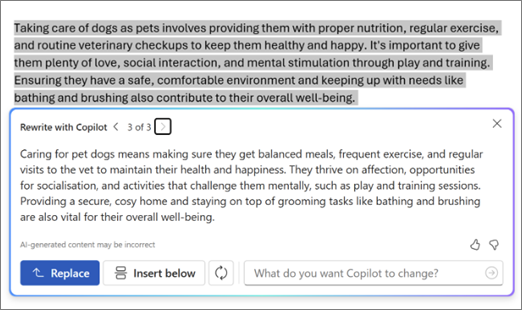
Microsoft's Word example shows Copilot rewriting selected text inside the document. It supports the Microsoft-app workflow described here; it does not demonstrate a web-research or citation-verification result.
Current Copilot pages say it can inherit access rules, labels, and file rules. Microsoft also says prompts and answers in Copilot are covered by its data protection docs.
That is why Copilot often wins for teams that already run on Microsoft 365. It can fit company access rules and keep work data in the same stack. The team does not need a new place to copy files and prompts.
The same benefit creates an admin check. Copilot can only use the data and access rules available to it. If SharePoint is over-shared or stale, Copilot can surface weak context. If files are locked down or outside the tenant, Copilot may not have the source material the user expects.
Ask the sharper admin question. Which data can this user access? Is that access right for the task?
Copilot Chat also makes casual checks harder. Microsoft currently lists Copilot Chat as included for some Entra users with some Microsoft 365 plans. Paid Copilot adds more work context and app links. Teams should split included chat, paid seats, agents, and app rollout.
Best-fit tasks
Choose Copilot first when the prompt needs:
- a Teams meeting, transcript, chat, or calendar thread
- an Outlook email chain or follow-up
- a Word, Excel, or PowerPoint file that should stay in Microsoft 365
- SharePoint or OneDrive context with Microsoft permissions
- policy, labels, audit, file rules, or admin review
Do not choose Copilot only because the word "Microsoft" appears in a request. For a blank-page memo, code review, data task, or source check outside Microsoft 365, ChatGPT may be the better start.
Flexible writing, coding, files, and research
ChatGPT's edge is range. It is easy to use ChatGPT for drafts, plans, code, file review, structured output, and research.
Projects can group chats, files, instructions, and context around a recurring goal. File uploads can help with summaries, pulled fields, sheets, and document checks. Current plan limits still apply.
That range matters when the task does not begin in a Microsoft app. A student checking sources may not need Microsoft 365 context. A founder drafting copy, an analyst reading CSVs, or an engineer fixing broken code may need the same thing: a tool built for the task itself.
For code-heavy tasks covered here, ChatGPT is usually the better start because Microsoft 365 Copilot is not GitHub Copilot. If the real need is code help, compare ChatGPT with GitHub Copilot instead of treating Microsoft 365 Copilot as the coding option.
The tradeoff is the data boundary. ChatGPT Business and Enterprise have work controls. Current OpenAI pages list no training on work data by default. They also list workspace admin, SSO/MFA, and apps.
Those controls are different from tenant access. If the answer needs protected work files, Teams context, or SharePoint access, check 2 things. Does ChatGPT have the right app access? Does the team's policy allow that use?
Best-fit tasks
Choose ChatGPT first when the prompt needs:
- open drafting across formats
- coding, data analysis, or spreadsheet work
- uploaded files outside the Microsoft 365 tenant
- a Project with files, instructions, and saved context
- creative work, custom GPTs, image generation, voice, or app-based tasks
- a workspace outside the final Microsoft file
Which should you choose?
Choose Copilot if your work lives inside Microsoft 365 and the assistant needs to respect tenant context. That includes meeting recaps, email follow-ups, internal drafts, Word or Excel work, SharePoint answers, and admin review.
Choose ChatGPT if your work needs an open AI tool. That includes drafts, code, data work, research plans, file uploads outside Microsoft 365, Projects, custom workflows, and creative work.
Choose both if your organization has mixed work. Use Copilot for Microsoft work. Use ChatGPT for open-ended writing and analysis. Add Atlas when sources need a final check before the answer goes to a client, class, or team. That avoids forcing one tool to own the whole workflow.
Choose neither as the final authority when the stakes depend on sources. A polished answer still needs inspection. For important research, strategy, legal, health, finance, school, or client claims, open the original source. Check the exact passage before you use the claim.
Pricing and plan volatility
Pricing needs its own caveat because both Microsoft and OpenAI change plans. Microsoft now splits included Copilot Chat from paid Copilot plans, agent use, and extra add-ons.
OpenAI also splits ChatGPT Business and Enterprise. Business has list pricing. Enterprise uses custom pricing. Details can change by market, term, license, rollout, and setup.
For a buyer, monthly price is only 1 part of the choice. Ask 4 questions:
- What work data does the assistant need to access?
- Which admin, privacy, and file rules does the team need?
- Which users need help inside apps instead of a separate AI workspace?
- Which outputs need source review before they become final?
If the first 2 questions point to Microsoft 365, give Copilot priority. If the third question points to flexible work and analysis, give ChatGPT priority. If the fourth question matters, add Atlas or another source-checking step before you rely on generated prose.
Pick by workflow boundary
Copilot is the better default for Microsoft 365 work. ChatGPT is the better default for broad assistant work. Add Atlas after either one when the answer depends on sources that need to be checked.
The cleanest choice is a task boundary. Keep Teams, Outlook, Word, Excel, and SharePoint tasks in Copilot. Use ChatGPT for open work and analysis. Check important claims in Atlas before they become final.
For more comparison paths, read Atlas vs ChatGPT, Atlas vs Copilot, ChatGPT alternatives, or Copilot alternatives. If source-led web research is the open question, compare Copilot vs Perplexity. You can also compare ChatGPT vs Gemini, Perplexity vs ChatGPT, Claude vs ChatGPT, Copilot vs Claude, and Gemini alternatives.
Compare sources from either assistant in Atlas
Add key files from either workflow, then compare claims against cited passages.