


Choose Copilot when the task already lives in Microsoft 365, GitHub, or VS Code. Choose Claude when the job needs careful writing, a coding agent, or search outside Microsoft tools.
"Copilot" can mean more than one product. Microsoft 365 Copilot helps with work apps. GitHub Copilot helps with code. A team may use either one beside Claude.
Judge the assistant by context access, action surface, and whether the answer leaves evidence you can inspect before using it.
Copilot and Claude can gather, draft, search, or code. When a final claim needs cited support, add the key files, pages, papers, or notes to Atlas and check the sources there.

Compare sources from either assistant in Atlas
Add research files from either workflow, then compare evidence with citations.
Comparison criteria: which Copilot are you comparing?
Copilot is a brand family with several product paths. A Microsoft 365 team usually means Copilot in Teams, Outlook, Excel, PowerPoint, Word, SharePoint, and admin controls.
A developer often means GitHub Copilot in an editor, pull request, repo, or cloud agent workflow. A buyer comparing "Copilot vs Claude" may be mixing both.
Use this routing rule before reading any feature list:
- If the task starts in Microsoft 365 apps, compare Microsoft 365 Copilot with Claude's workplace and enterprise-search features.
- If the task starts in a repository, compare GitHub Copilot with Claude Code and Claude's VS Code agent path.
- If the task starts with reports, research papers, web pages, or notes, compare both assistants as intake and drafting tools. Then verify selected sources in a cited workspace.
Microsoft's own Copilot comparison centers on Microsoft 365 apps, Work IQ, Teams, Outlook, Excel, PowerPoint, SharePoint, Purview, and enterprise controls. Treat that page as evidence for Microsoft's product position.
It is vendor material. Use separate Anthropic and workplace-search sources when evaluating Claude outside Microsoft's tested frame.
Copilot vs Claude workflow matrix
This table separates jobs that the SERP often collapses into one winner. Product packaging, model access, credits, connectors, and previews change often. Check official Microsoft, GitHub, Anthropic, and VS Code pages before a purchase or rollout.
| Workflow | Better default | Why it usually wins | What to verify before choosing |
|---|---|---|---|
| Microsoft 365 work in Teams, Outlook, Excel, PowerPoint, Word, or SharePoint | Copilot | Microsoft 365 Copilot is closest to the permissions, documents, meetings, mail, and admin surfaces that already govern tenant collaboration. | Confirm which apps, licenses, security controls, and tenant data are enabled for your team. |
| GitHub and VS Code coding assistance | GitHub Copilot | GitHub Copilot is built into GitHub and common editor flows, with inline suggestions, chat, pull request context, and repository-aware workflows. | Confirm model availability, plan policy, AI credits, and whether the task needs inline help or a more autonomous agent session. |
| Agent-first code changes across a codebase | Claude Code | Anthropic positions Claude Code around reading a codebase, editing files, running commands, and delivering committed changes. | Test it on a contained repository task and review every diff, command, and test result before merging. |
| Cloud or branch-based implementation work | GitHub Copilot | GitHub documents Copilot cloud agent as a paid-plan feature that can research a repository, plan work, change a branch, run in a GitHub Actions-powered environment, and open pull requests. | Check paid-plan access, repository permissions, action limits, and the review process for generated branches. |
| Enterprise or organization search | Depends on system of record | Copilot has the advantage when Microsoft 365 is the source of truth. Claude Team and Enterprise can search connected organizational sources when enterprise search connectors, authentication, and permissions are configured. | Verify connector coverage, permission behavior, retention policy, and whether the answer cites or points back to the source material you need. |
| Source verification for papers, reports, pages, and notes | Atlas after either assistant | Copilot or Claude can help gather, summarize, or draft. Atlas is the better continuation when imported sources need cited comparison and passage-level inspection. | Add the selected sources, ask a grounded comparison question, and inspect citations before using the claim. |
| Pricing, model, and quota stability | No universal winner | GitHub Copilot credits, supported models, Claude plan access, Microsoft 365 packaging, and connector availability can change by plan and date. | Avoid choosing from a stale pricing table. Re-check the official plan page and admin settings during evaluation. |
Table 1: The table hinges on the surface where work happens. Microsoft tenant tasks favor Copilot. Agent-first coding can favor Claude Code. High-risk source claims should move into a cited check.
Microsoft 365 work and enterprise governance
When Copilot wins in Microsoft 365
Microsoft 365 Copilot is the stronger default when the assistant needs to operate inside the Microsoft tenant. It sits close to the calendars, chats, files, slides, spreadsheets, meetings, and controls that define tenant collaboration.
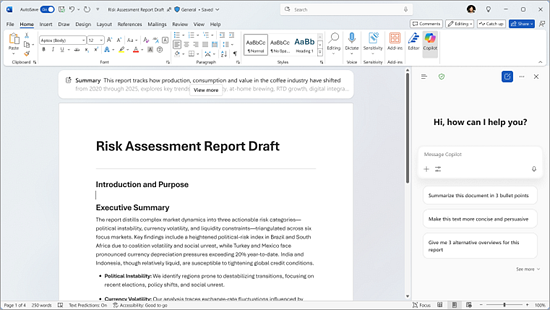
Copilot in Word works alongside the document being reviewed.
That matters for an operator asking for meeting follow-ups in Teams. It matters for a manager turning notes into a PowerPoint. It also matters for an analyst using an Excel workbook that cannot leave a governed tenant.
In those cases, Copilot starts closer to the permissions and team surface. Claude may still produce a better explanation or draft in a separate chat. It may lack the same native view of Microsoft 365 unless the team has set up the right Claude connectors and permissions.
When Claude still belongs
Claude is more attractive when the Microsoft app is not the main constraint. It fits long documents, policy rewrites, pasted excerpts, or analysis outside a tenant-bound flow.
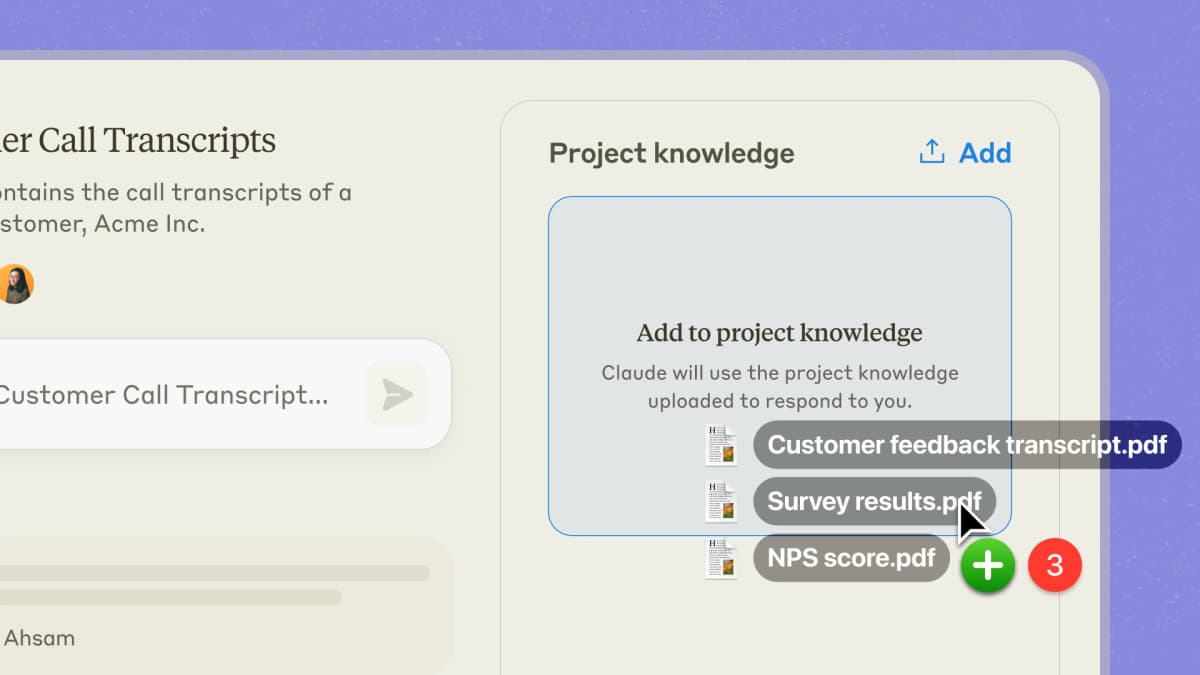
Claude Projects can keep project files available as context for a conversation.
For enterprise search, Claude's Ask Your Org path can search connected sources such as Slack, Microsoft 365, Gmail, Google Drive, and SharePoint. The Team or Enterprise setup has to support the connector. Claude does not see every company source just because the company uses Claude.
So the Microsoft 365 decision is less about brand loyalty than context control. Choose Copilot when the assistant should act inside the governed tenant.
Choose Claude when the main bottleneck is reasoning quality, writing depth, or flexible analysis. The required sources also need to be available to Claude in a permitted way.
What to check before rollout
Before a Microsoft 365 rollout, verify the tenant, app, and admin details rather than buying from the comparison page alone. Check app coverage, identity rules, data retention, and SharePoint or OneDrive access. Also check whether users can trace important answers back to a document, meeting, or message.
GitHub Copilot vs Claude Code
For developers, the Copilot comparison usually means GitHub Copilot versus Claude Code. Put Microsoft 365 Copilot in a separate workplace tool review.
Where GitHub Copilot fits
GitHub Copilot is strongest when coding help should stay close to GitHub, VS Code, pull requests, and team repo workflows.
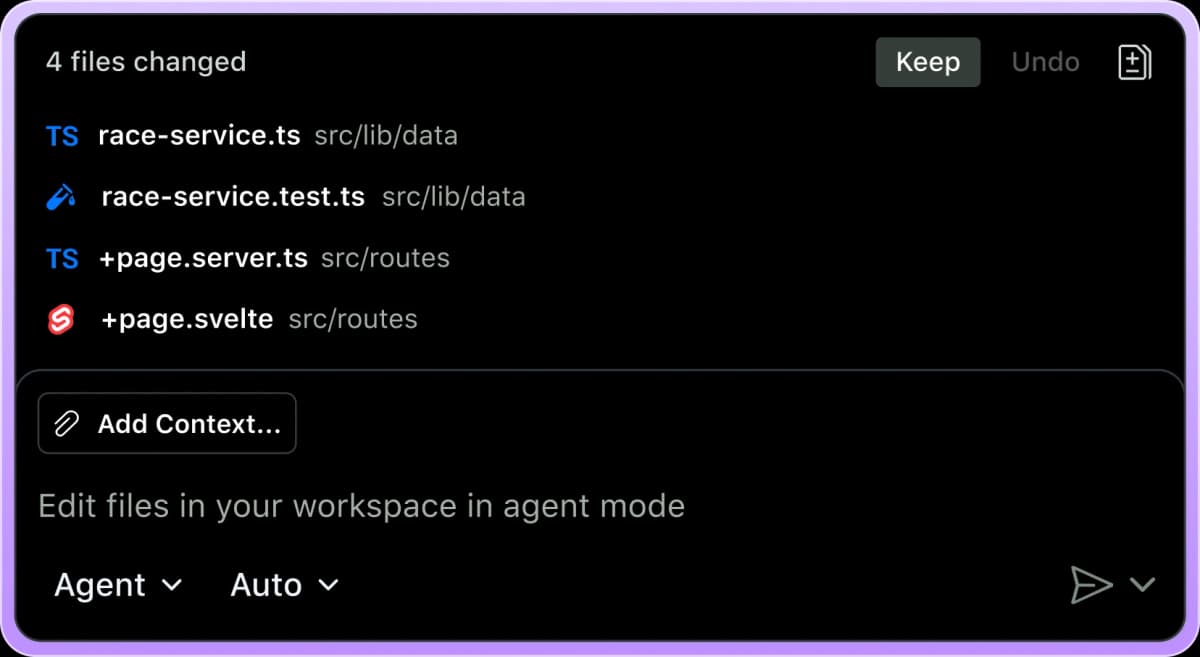
GitHub Copilot’s agent interface keeps proposed file changes available for review.
GitHub's supported models and models and pricing pages show why plan and model access need a fresh check.
Copilot can support inline help, chat, agent mode, pull request work, model choices, and cloud-agent workflows depending on plan and policy. That makes it a strong default for teams that already review, test, and merge inside GitHub.
Where Claude Code fits
Claude Code is stronger when the session is agent-first. Anthropic describes Claude Code as a coding system that can read a codebase, change files, run tests, and deliver committed code.
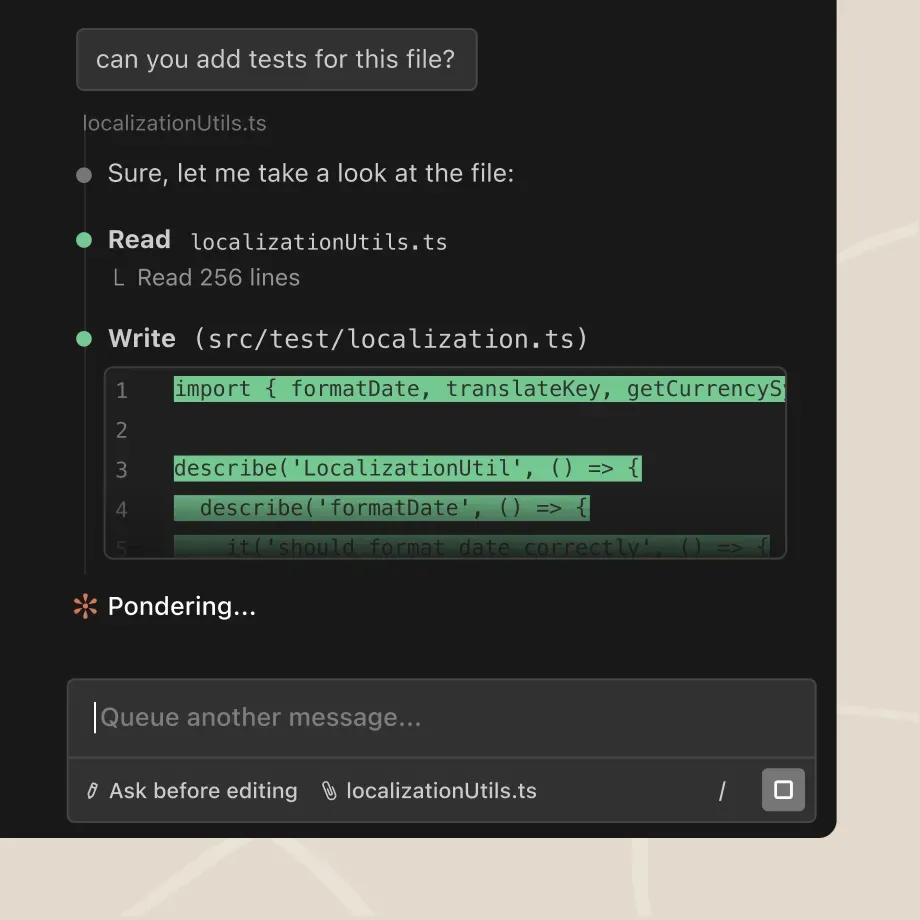
Anthropic's product-page demo shows Claude Code reading a project file and creating a test file.
The VS Code third-party agents page also shows how Claude Agent can appear inside some editor workflows.
That framing matters. A developer is not only asking for the next line. They are asking whether the assistant can plan a multi-file change, inspect the codebase, run commands, recover from errors, and explain what changed.
The practical split is:
- Use GitHub Copilot when you want editor-native help, repository context, pull request flow, or branch-based work that fits GitHub review.
- Test Claude Code when you want a more autonomous coding session. Be ready to inspect the agent's plan, commands, diffs, and tests.
- Use both when your team wants Copilot's platform fit and Claude's agent style for harder implementation sessions.
VS Code also complicates the old tool boundary because it documents third-party agents, including Claude Agent paths. That means the comparison is not always "Copilot in VS Code or Claude somewhere else."
In some setups, ask which agent belongs in the editor for the task. Then decide which changes should go back through GitHub review.
What to check before merging
Before adopting either coding agent for serious work, run the same repo task through the candidate tools. Inspect the review burden.
Check whether the agent explains its plan, keeps changes scoped, and runs the right tests. It should mark uncertainty and produce a diff another developer can review without reconstructing the session.
Do not decide from a model leaderboard alone. For code, the review burden is part of the product. A tool that produces larger changes may save time only if the plan is legible. The diffs must be reviewable, the tests meaningful, and the team able to reject the change without losing the thread.
Source work, enterprise search, and verification
Access is not verification
Copilot and Claude can both help with source work, but they solve different source-access problems.
Copilot is compelling when the source material is already inside Microsoft 365 or GitHub. A team may want answers grounded in tenant documents, meeting context, email, issues, pull requests, or repository files. In that case, the assistant's access path is part of the reason to use it.
Claude is compelling when the user needs broader reading and reasoning across connected workplace sources or uploaded context. Claude Team and Enterprise search can help when connectors and permissions are configured.
Anthropic also positions Claude Cowork as a work agent for finished deliverables. Claude Code can inspect repo files during an agentic coding task. For knowledge work outside Microsoft 365, Claude often feels less tied to one app family.
Connected search is not the same as verified evidence. An answer can be helpful and still need inspection before it supports a decision, memo, literature review, or customer-facing claim.
The source-access question asks, "Can the assistant find or use the relevant material?" The verification question asks, "Can I see the exact source passage, compare it with other sources, and decide whether the claim is supported?"
Many Copilot-versus-Claude comparisons skip this split. A smart answer in the right app may still be too thin for final source checks. The reader may need to inspect the passage, see source disagreement, or save the finding with a traceable citation.
When to continue in Atlas
After either assistant has helped gather, draft, search, or reason through material, continue in Atlas when evidence must support the final answer. Import the sources that matter. Ask a grounded comparison question. Inspect the cited passages before reusing the claim.
The matrix above separates Microsoft 365 tasks, GitHub coding tasks, Claude agent sessions, and cited source checks. Atlas belongs in that last step.
Where Atlas fits after Copilot or Claude
Choose Atlas when a draft, summary, or source list from Copilot or Claude needs cited support. Atlas serves this check after those tools.
Check a draft in Atlas
Use this process when the sources behind the draft matter:
- Import the materials that need to support the final answer. Use PDFs, public web pages, paper search results, Markdown notes, text notes, or relevant attachments.
- Ask a focused grounded question. For example: "Compare the migration risks these three vendor reports mention" or "Which source supports this security claim?"
- Ask for source separation when the answer compares several documents. A table with claim, evidence, limit, and citation often works well.
- Open the citation badges behind important claims and read the surrounding passage before reusing the answer.
Inspect the source before reuse
This source check works after Copilot drafts a memo, GitHub Copilot opens a branch with notes, or Claude sums up a set of files.
The assistant can speed up the first pass. Atlas helps when the final version needs source-by-source support that a reviewer can inspect.
Which should you choose?
Choose Copilot for work that must stay in Microsoft 365 or GitHub. Examples include Teams recaps, Outlook follow-ups, Excel work, slide drafts, pull requests, and coding help.
Choose Claude for careful writing, deep thought, or hands-on code work outside Microsoft tools. Test it on long reports, hard drafts, company search, and code tasks that need a plan.
Choose both when the team has two different systems of record. A common stack is Copilot for Microsoft and GitHub tasks. Claude handles deeper reasoning or hands-on coding sessions. Atlas handles the cited source check after either assistant produces material worth checking.
The cutoff I would use is source risk. If the output is a convenience draft, use the assistant that lives closest to the app or repo.
If the output will support a decision, review, customer claim, policy, or implementation plan, move the source material into a cited workspace. Inspect the citations and disagreements before the answer leaves your desk.
Final evaluation checklist
Before you pick a default, check the parts that tend to change or create review work:
-
Does the Microsoft 365 path match your Copilot plan and app access?
-
Does the tenant require Microsoft Purview controls for this work?
-
Does GitHub Copilot have the right billing and credit model for the team?
-
Are the needed GitHub Copilot models enabled by plan and policy?
-
Does the coding task need Copilot cloud agent, inline help, or both?
-
Does Claude Code have the codebase access needed for the trial task?
-
Does the team want Claude inside VS Code through third-party agents?
-
Does Claude enterprise search cover the required connected sources?
-
Can the user inspect the source behind a workplace answer?
-
Can a developer review the full diff before merge?
-
Can the team reject an agent change without losing context?
-
Will the final answer need cited source comparison?
-
Which claims must be checked before the answer becomes a deliverable?
Related comparisons
These guides compare related choices:
- Atlas vs Copilot
- Atlas vs Claude
- Copilot vs ChatGPT
- Claude vs ChatGPT
- ChatGPT alternatives
- GitHub Copilot alternatives
Copilot for context, Claude for depth
Copilot is the safer default when Microsoft 365, GitHub, VS Code, identity, permissions, and review workflows define the job. Claude is the better default when the task needs a flexible reasoning assistant. It also fits coding-agent work that needs more autonomy across a codebase.
For source-heavy decisions, the best answer is often a sequence rather than a winner. Use Copilot or Claude where each has the right context.
Then use Atlas for the step many comparisons rush. Import the sources that matter. Ask a grounded comparison question. Check the passages behind the claims before the answer becomes a deliverable.
Compare sources from either assistant in Atlas
Add research files from either workflow, then compare evidence with citations.