


Use Claude first for careful writing, code review, long reading, or tone edits. Use ChatGPT first when you need search, files, images, or data work. It is also the better first pick for Projects, custom GPTs, tasks, and broad tools.
Treat that as a task verdict. Anthropic and OpenAI change model names, limits, context windows, files, search, connectors, and agents often. Ask: "Which tool gets this job to a checkable output with fewer fragile steps?"
For many source-heavy tasks, the answer is to use both. Use Claude or ChatGPT for drafting, coding, exploring, summarizing, or searching. Then move key sources into Atlas when the final claim needs citations and passage checks.

Check assistant claims in Atlas
Compare selected sources and inspect the cited passages behind your final claim.
Compare by task fit
Before choosing between Claude and ChatGPT, split the task into stages. A tool can be excellent for a draft and still weak as the final proof system. A tool can be useful for web search and still require you to inspect the sources it found.
Use these criteria:
- Writing and tone
- Code help
- File uploads
- Current search
- Images and mixed media
- Projects, memory, custom tools, connectors, and agents
- Source checks
- Plan limits, settings, and team permissions
Anthropic's Claude getting-started page says Claude handles questions and multi-step tasks. Its examples include reading, writing, coding, and technical work.
Anthropic help pages also cover file uploads, Artifacts, web search, and connectors.
OpenAI's ChatGPT capabilities page says ChatGPT can answer questions, draft, summarize, reason, translate, and help with creative work.
It also lists search, deep research, images, files, data work, voice, canvas, memory, Projects, tasks, custom GPTs, and the GPT Store. OpenAI's Projects docs describe Projects as spaces for chats, files, instructions, app links, and shared context.
That breadth is ChatGPT's main edge. Claude's edge is narrower. Writers, developers, and analysts often prefer it for careful prose, code review, and focused thinking.
Neither assistant turns a source-linked answer into final proof by itself. If the answer will support a review, memo, grant, policy note, or public claim, inspect the source passage before you reuse it.
Claude vs ChatGPT compared
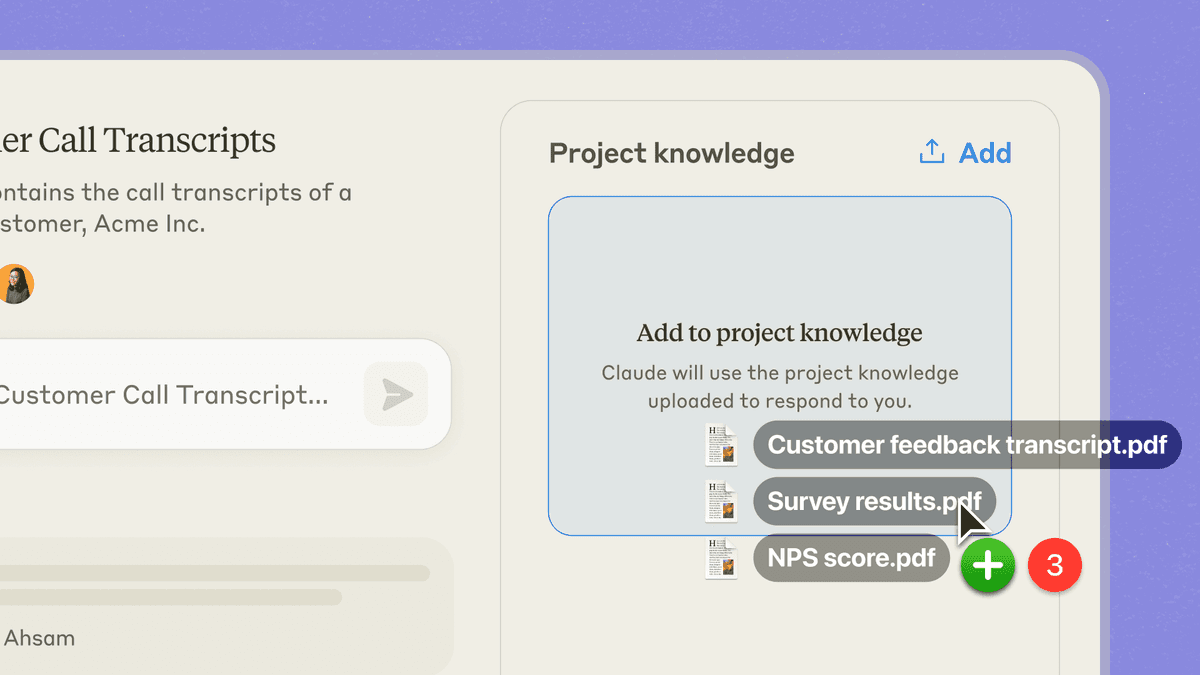
Source-backed Claude UI image copied into this slug from the approved Atlas vs Claude asset set. It shows why Claude can be a strong start for document-aware assistant tasks. The final source check still needs passage inspection.
Use this matrix as a first-pass chooser. It splits drafting, code, files, search, tools, and source checks.
| Workflow job | Claude fit | ChatGPT fit | What to verify |
|---|---|---|---|
| Writing and editing | Strong for long-form prose, tone, argument repair, careful rewrites, and feedback that preserves nuance. | Strong for outlines, variants, quick rewrites, and writing workflows that also need images, files, projects, or custom assistants. | Check factual claims, examples, and citations. Better prose can still carry weak evidence. |
| Coding and architecture | Often strong for code reasoning, refactoring plans, bug analysis, and architectural tradeoffs. | Strong for broad coding help, data analysis, debugging, code explanation, and tool-supported iteration. | Run tests locally and check current library docs before trusting generated code. |
| File and document analysis | Claude supports common document and image uploads, project files, and analysis over attached material within documented limits. | ChatGPT supports document synthesis, extraction, transformation, spreadsheets, and comparison within documented limits. | Test with the real file type. PDFs, images, spreadsheets, and long documents can behave differently. |
| Current web search | Claude web search can retrieve current information, cite sources, fetch direct links, and show image results when available. | ChatGPT search and deep research cover timely web work, cited research outputs, and multi-source online synthesis when available. | Open the cited sources. Check whether the answer uses each source accurately. |
| Images and multimodal work | Claude can work with image uploads and may show image search results, but it is not the better default for image generation. | ChatGPT is usually the better default when image generation or editing matters. | Confirm feature access for your plan and check whether generated visuals are licensed and accurate enough for use. |
| Projects, connectors, and agents | Claude has projects, Artifacts, connectors, and MCP-based extension paths. | ChatGPT has Projects, custom GPTs, GPT Store, app links, scheduled tasks, agent mode or deep research for eligible users, and a broad tool surface. | Review permissions carefully. Connected apps can expose or change data based on account access. |
| Everyday assistant breadth | Strong when the task benefits from focused reasoning, writing quality, and sustained context. | Stronger all-in-one choice for most mixed daily workflows: drafting, search, files, images, voice, data, projects, and custom assistants. | Decide whether you need one broad assistant or a smaller set of best-fit tools. |
| Source verification | Useful for reading, comparing, and drafting around sources, but important claims still need source inspection. | Useful for research, file analysis, and search, but file or web citations still need passage checks. | Move selected sources into Atlas when the output must be traced to exact supporting passages. |
Table 1: The matrix is deliberately conservative. Zapier, Morph, Tom's Guide, and Stackademic are useful for language and practical objections.
Official docs should carry capability claims. Hands-on tests can flip when the model, prompt, account, file type, or product setting changes.
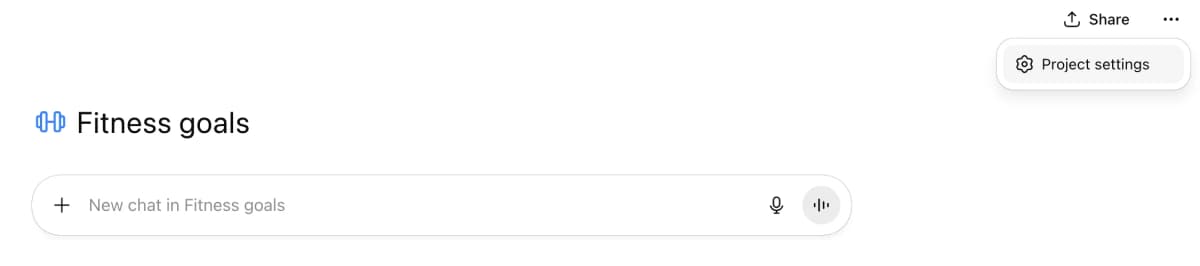
OpenAI’s example shows the Fitness goals Project home, a new-chat entry point, and a Project settings control. It illustrates the chat surface inside a named Project; it does not show the project’s source list or private data.
Writing, coding, files, and research
Writing and coding
For writing, Claude is often the stronger first draft partner when the task needs judgment rather than volume.
It fits essays, long memos, careful rewrites, code review notes, and analysis where structure matters as much as the answer.
ChatGPT is often stronger when the writing task is part of a larger tool chain. It helps when the same session needs a chart, image idea, spreadsheet pass, custom tool, memory, or web search. That reduces switching cost.
For coding, the split is similar. Claude is a strong fit for reading a code path, explaining architectural tradeoffs, and suggesting careful changes.
ChatGPT is a strong fit for broad code help, data work, debugging, examples, and tasks that mix code with files or docs. Generated code still needs the normal review loop. Inspect the diff, run tests, check current docs, and keep secrets out of the prompt.
Files and research
For files, both tools can help. Anthropic says Claude can work with common files, images, chat uploads, project files, and PDFs.
OpenAI says ChatGPT can combine, compare, pull facts from, reshape, and read files. Those features help with first-pass triage. They do not replace checking the exact sentence, table, passage, or note behind a final claim.
For research, ChatGPT has the broader product surface. Search, deep research, files, Projects, and custom GPTs can live in one assistant. Claude can be a better reading partner when you already know the docs and want careful synthesis.
Both can produce a confident answer before the evidence is ready. That is the dangerous part.
Testing your own workflow
How to read hands-on Claude vs ChatGPT tests
Use hands-on comparison posts for criteria, task ideas, and searcher language. Do not turn them into permanent claims that one assistant is always better.
A coding test can change when the model, prompt, file, plan, or tool setting changes. The same is true for writing and research tests.
The practical pattern is to test each assistant on your own work. Give both tools the same messy brief, source packet, code path, or document set.
Judge the output by what remains useful after source checks, tests, or edits. Reddit threads about Claude vs ChatGPT, late-May 2026 tool choice, and 2026 assistant preferences show why this matters. Users often choose by friction, limits, quality, and ecosystem fit rather than one abstract benchmark.
How to use both with source checks
The safest Claude-plus-ChatGPT setup keeps drafting separate from proof.
- Use Claude or ChatGPT for the first assistant task. That might be an outline, code review, exploratory search, file summary, argument map, or draft.
- Save the source material that matters. This might be PDFs, web pages, notes, papers, reports, transcripts, exported tables, or copied passages.
- Keep a short claim log. For each key claim, record where it came from. Note whether the assistant gave a source link, file reference, or direct passage.
- Remove claims that have no source, no inspectable passage, or only a vague reference.
- Move the remaining sources into a workspace where you can compare them. Inspect citations before the claim becomes a deliverable.
That workflow is slower than pasting an answer into a draft. It is faster than repairing a polished memo after a citation fails.
For low-stakes work, you may not need the full handoff. A brainstorming session, internal draft, study prompt, or code sketch can stay in Claude or ChatGPT.
The handoff matters when the final output depends on sources. Use it for research summaries, policy claims, market work, reviews, technical advice, or investor memos. It also helps with any claim a reader may challenge.
Verify sources after Claude or ChatGPT
Source verification is not a replacement for Claude or ChatGPT. Use Atlas after either assistant when the job shifts from creating an answer to checking the sources behind it.
Source-check handoff steps
A practical Atlas follow-up looks like this:
- Add the selected docs, papers, pages, notes, or transcripts to an Atlas project. Use a temporary chat attachment only when the material does not need to become project evidence.
- Ask a grounded question. Try: "Which source supports this claim?" Or: "Where do these sources disagree about the method?"
- Ask for source separation when the answer blends proof together. A table with columns for claim, source, limit, and citation is easier to inspect.
- Open the citation badges behind the answer.
- Read the cited passage and surrounding context before saving or reusing the finding.
This is the information-gain step most Claude vs ChatGPT comparisons skip. The real decision is not only which assistant writes better. It is whether the final claim can survive a source check.
First-party Atlas screenshot copied into this slug from an existing cited workflow asset. It shows the passage-checking surface used after Claude or ChatGPT helps with a draft, search pass, or file triage.
Verification boundary
Atlas can compare project sources and return grounded answers with citation badges. It works best when the question names the source, claim, method, or comparison.
It also has a clear boundary. Grounding can fail when sources are missing or still processing. It can also fail when retrieval finds the wrong passage or the source text is unclear. For important research, the citation starts the check. The reader still has to inspect the passage.
The dedicated Atlas vs Claude and Atlas vs ChatGPT comparisons cover those product boundaries directly. Here, Atlas appears only after the draft or search task, when selected sources need cited synthesis and passage checks.
If your shortlist also includes Gemini, the ChatGPT vs Gemini comparison covers search, files, Workspace fit, and Atlas follow-up in the same format. If the Google choice is against Anthropic instead, read Claude vs Gemini for the writing, coding, files, Deep Research, and source-checking split.
Which should you choose?
Choose Claude if your main bottleneck is depth. Use it for careful writing, tone edits, code review, architecture questions, long docs, or a focused tool.
Choose ChatGPT if your main bottleneck is breadth. Use it for images, visual edits, search, deep research, files, and data work. It also fits Projects, custom GPTs, tasks, app links, voice, and many daily jobs.
Use both if your tasks cross those boundaries. A common pattern is Claude for the careful draft or code review. Use ChatGPT for search, tools, images, and project tasks. Add Atlas for source checks before the output becomes a final claim.
If you only want one paid assistant, choose the tool that matches your most frequent tasks. If most of those tasks are prose, reasoning, and code review, start with Claude. If most of those tasks mix creation, search, files, data, images, and automation, start with ChatGPT.
For source-backed work the final choice is separate. Use Claude or ChatGPT to get moving. Bring the sources into Atlas when you need to show exactly which passage supports a sentence.
Check assistant claims in Atlas
Compare selected sources and inspect the cited passages behind your final claim.