


Claude vs Gemini is a workflow choice. Start with the step you need help with. You may need to draft, code, read files, or search the web. You may also need Google context or a source check.
For a quick route, use Claude for careful writing, code review, project context, and long-form work over supplied files. Use Gemini for Google Search, Workspace context, images, video, uploaded files, and Deep Research reports. Add a source check after either one when the answer needs to become a note, report, or decision.
Product details change often because model names, plan access, file limits, app links, and research tools can shift. Treat benchmark claims and plan limits as snapshots. Then test the task you plan to run every week.

Compare saved sources in Atlas
Ask across documents, links, notes, or papers and inspect every cited passage.
Quick verdict
Choose Claude if your main work is writing, coding, or reasoning through files you provide. It also fits project work where the same knowledge should carry across chats. Anthropic's Claude model guide frames model choice around capability, speed, and cost. Claude Projects can also use uploaded project knowledge across chats.
Choose Gemini if your main work starts in Google. It is also a strong fit for files, images, video, Drive context, and fast web research. Google says Gemini Apps can upload and analyze files. That includes docs, sheets, NotebookLM notebooks, photos, videos, code folders, GitHub repos, and Drive files. Access still depends on the account, admin settings, plan, and activity settings. Gemini Deep Research also uses Search and selected sources when the plan and account support them.
Use both when research and drafting are separate stages. Gemini can help find and gather Google material. Claude can help reason, write, and review hard passages. A cited workspace such as Atlas can collect the sources that matter and help you check claims before you save or reuse the answer.
Compare by workflow fit
A raw smartness ranking hides the real choice. A writing and coding assistant, a web research assistant, and a Drive or video assistant create different transfer costs. Use these criteria before reading any benchmark table:
- Source control: Are you giving the assistant a stable set of sources, or asking it to find new material?
- Ecosystem fit: Does your work already live in Drive, Gmail, Docs, Sheets, GitHub, local files, or a research app?
- Inputs: Do you need text, screenshots, sheets, audio, video, images, code folders, or repos?
- Memory and project context: Do you need reusable project knowledge, or one-off answers from files and connected apps?
- Verification: Can the final claim stay a draft? Or does a reader need to inspect the source passage?
- Privacy boundary: Are you willing to connect the relevant account, file, or app? Have you checked the current data policy for that surface?
That rubric matters because the best assistant is usually the one with the least transfer work.
If your sources are already in Drive and the task needs Search, Gemini may remove steps. If your sources are PDFs, notes, or code snippets, Claude may be easier to keep on task. If the final output must be defensible, neither assistant should be the last stop.
Claude vs Gemini compared
This table uses official product docs for stable feature claims. It keeps model, quota, and pricing details out of the verdict because those details change often.
Recheck current Claude plan, Claude file upload, Gemini file upload, and Gemini privacy pages before you buy. Do the same before you make one tool the team default.
For source checks, start with the primary product pages:
- Anthropic's models overview, model-choice guide, Claude Projects guide, and Projects RAG guide.
- Google's Deep Research guide, file upload guide, and Gemini Apps Privacy Hub.
| Decision point | Claude fit | Gemini fit | What to verify before relying on it |
|---|---|---|---|
| Best default use | Careful writing, coding, reasoning, project knowledge, and work over supplied context. | Google-native research, Search-connected exploration, multimodal prompts, and files already in the Google ecosystem. | Run one real task from your own work instead of trusting a generic benchmark. |
| Model and plan choice | Anthropic's docs route model choice by capability, speed, cost, and effort settings. | Google routes many features through Gemini Apps, Google AI plans, Workspace settings, and account eligibility. | Current model names, plan access, quotas, and admin settings. |
| Files and documents | Claude supports common document and image uploads, and Projects can use uploaded content as project knowledge. | Gemini can upload documents, spreadsheets, NotebookLM notebooks, photos, videos, code folders, GitHub repositories, and Drive files when requirements are met. | File type, file count, size, context-window behavior, and whether the file remains available in later chats. |
| Research and web | Claude can analyze supplied sources and project knowledge. Web or connector behavior depends on the current surface and plan. | Gemini Deep Research is built for Search-led reports and can use selected files, Drive, Gmail, images, or NotebookLM sources where available. | Whether the report cites enough sources, whether sources are current, and whether the assistant missed conflicting evidence. |
| Google ecosystem | Useful if you copy or upload the relevant material, with extra transfer work for Drive/Gmail-first jobs. | Stronger fit when the work depends on Google Workspace, Drive, Gmail, Search, NotebookLM, or Android-connected context. | Workspace administrator settings, Keep Activity, connected apps, and data-sharing boundaries. |
| Coding | Strong candidate for code review, refactoring, architecture discussion, and project-style reasoning. | Useful for code folders, GitHub repository import, explanation, and multimodal debugging when supported. | Test on your own repo with the same privacy and context limits you will use daily. |
| Writing and editing | Often the better first stop for careful prose, long-form restructuring, and tone-sensitive editing. | Strong when writing depends on live research, Google files, or multimodal context. | Whether the draft preserves facts from the source material and avoids unsupported certainty. |
| Source verification handoff | Treat outputs as drafts or leads unless every important claim can be traced to the supplied source. | Treat Deep Research reports and file answers as research starts that still need source checks. | Move important sources into a verification workflow before using claims in deliverables. |
Table 1: The table starts with the reader job, then maps each tool to that job. Claude may lead one reasoning task while Gemini leads another research task.
The screenshot below shows the Claude side of that split: source files are added to project knowledge so later chats can reuse the same context. This supports the article's workflow split: Claude is stronger when repeated chats need stable project context, while Gemini's Deep Research path is stronger when the assistant gathers Search-led material for a report.
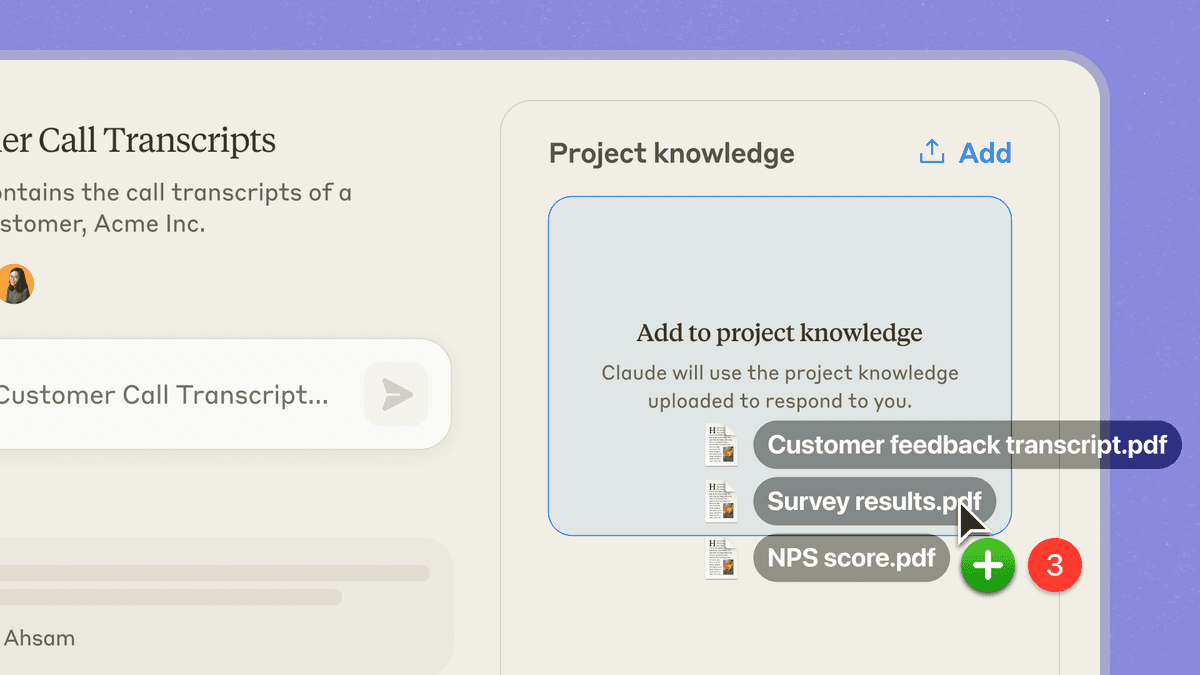
Anthropic's official Projects screenshot shows files being added to project knowledge. That matters because this article is not comparing only chat output. Claude Projects is a recurring-context workflow, while Gemini Deep Research is a Search-led discovery workflow. That difference is why the table separates discovery, project knowledge, and source verification instead of naming one universal winner.
A model comparison can flip with a new release, a plan change, or a prompt style. Ask where the sources live. Ask what the assistant can access. Ask how you will check the answer.
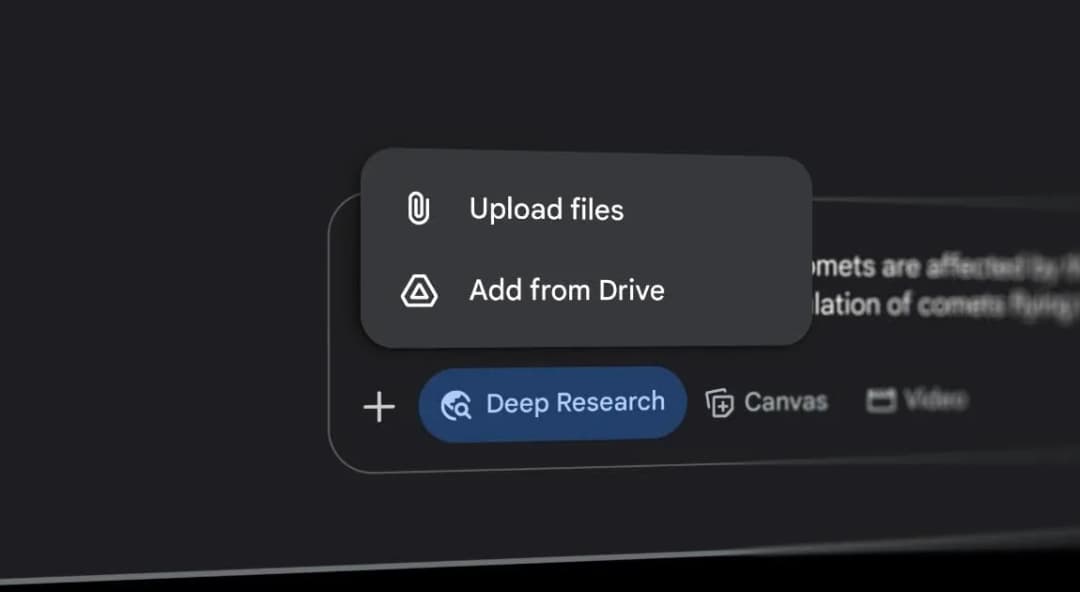
Google's 2025 I/O screenshot shows local-file and Drive source options beside Gemini Deep Research. Access depends on current account, plan, activity, and Workspace settings. Google Help.
When source verification matters
Claude and Gemini can both draft, outline, explain, and find research leads. The risk starts when a generated answer becomes the source of record. A paragraph about a paper, interview, clause, or technical choice is still a draft until someone checks the source.
Use this checklist when the output will shape a note, report, client work, academic claim, or team call:
- Save the key sources: Keep the paper, page, file, transcript, or note that the answer depends on.
- Separate the sources: Require the assistant to name which source supports which claim, especially when sources disagree.
- Open the passage: Check whether the cited passage supports the sentence.
- Look for missing caveats: Read nearby text for exclusions, time ranges, sample limits, or contrary findings.
- Tighten weak claims: Rewrite claims that the source only partly supports.
At this point, the tool choice becomes a workflow choice. Claude Projects can help when you want recurring context inside Claude. Gemini Deep Research can help when you need Search-led discovery or Google sources.
Atlas can help when checked sources should live in a workspace instead of a short-lived chat thread.
Verify sources after Claude or Gemini
Source verification is a narrower job than Claude or Gemini. Use Atlas after either one when the key task is to compare sources you own or select.
A practical handoff looks like this:
- Use Claude or Gemini to explore the question, draft a first answer, or identify the sources worth keeping.
- Add the key PDFs, web pages, notes, or files to an Atlas project when you need them again.
- Ask a focused question. For example: "Where do these sources disagree about adoption risk?" or "Which source gives the strongest support for this claim?"
- Inspect the citation badges for the claims that matter.
- Save only the finding that survives the citation check. Include the question, the claim, and which citations you opened.
Atlas can compare several project sources in one cited answer. Its citations help you check the answer.
A citation means Atlas found related support. Important work still needs a passage check. That is why cited verification belongs after Claude or Gemini.
Which should you choose?
Choose Claude when the task stays inside a defined context and needs careful prose or reasoning. Use it to edit a memo, review code, read a PDF, keep project instructions, or turn notes into a draft.
Choose Gemini when the task benefits from Google's ecosystem or mixed inputs. Use it for Search research, Drive files, sheets, videos, and code folders. It also fits GitHub repo import or Deep Research as a report starting point.
Use both when discovery and drafting are separate jobs. Gemini can be the first pass for Search and Google context. Claude can be the second pass for restructuring, critique, or code reasoning. The handoff is worth it when the output justifies one extra step.
Use Atlas when the question changes from "What can the assistant generate?" to "Which source supports this claim?" That usually happens after the first answer, when you are deciding what to save, cite, share, or act on.
The best Claude vs Gemini choice is a workflow boundary. Pick the assistant that reduces friction at the current step. Then move important claims into a source-grounded check before they become part of your work.
Related comparisons
Use these next if your choice is part of a larger tool stack:
- Read Atlas vs Claude if you are choosing between a general assistant and a source-grounded research workspace.
- Read Atlas vs Gemini if your main question is Google context versus cited work over your own sources.
- Read this citation workflow for assistant answers if you are comparing outputs by whether their source trail can be checked.
- Compare ChatGPT options, including ChatGPT Deep Research vs Gemini Deep Research, if research reports are the job.
- See AI tools for academic research for a broader research stack.
Compare saved sources in Atlas
Ask across documents, links, notes, or papers and inspect every cited passage.