
Atlas vs Gemini for Research (2026): Workspace Comparison
Atlas is a visual research workspace. Gemini is Google's Workspace AI assistant. Compare paper maps, Drive fit, and citation grounding for research teams.
- Byline

Summary
Atlas ties answers to source passages. Use Gemini for quick help inside Google Workspace.
Atlas adds visual maps through Knowledge Maps and Semantic Maps. Gemini stays closer to Docs, Sheets, Drive, and broad prompts.
Atlas keeps sources, notes, maps, and chats inside one project-scoped evidence base.
Use Gemini for Workspace tasks. Use Atlas for research corpora that need evidence trails.
Note: We make Atlas. This comparison comes from the team that built it, so read it knowing that. Where Gemini has the better answer for a given research job, the article says so plainly. See the table rows where Gemini wins and the "When to choose Gemini" section below. The goal is to give you the data you need to choose the right tool for the kind of work in front of you. Atlas is not the answer to every research job.
Atlas is a visual research workspace for people who need to understand a body of papers. That may be a thesis, treatment decision, major-purchase teardown, or literature review.
Gemini is Google's general-purpose AI assistant. Google documents its native use in Docs, Sheets, Slides, Vids, and Forms. Both tools can help a researcher, but the split appears after the first answer.
Atlas turns each paper into a Knowledge Map and the whole corpus into a Semantic Map. These visual maps extend the navigation method in the second-brain apps guide.
Every claim traces to a source, and Atlas explains why the source supports it. Sources, notes, maps, and chats remain scoped to the Atlas project where they were created.
Gemini's Workspace surface is better when your work already lives in Docs, Sheets, Drive, or Gmail. Google also supports natural-language file retrieval in Drive. Atlas earns the comparison when you need to trust the answer enough to defend it.
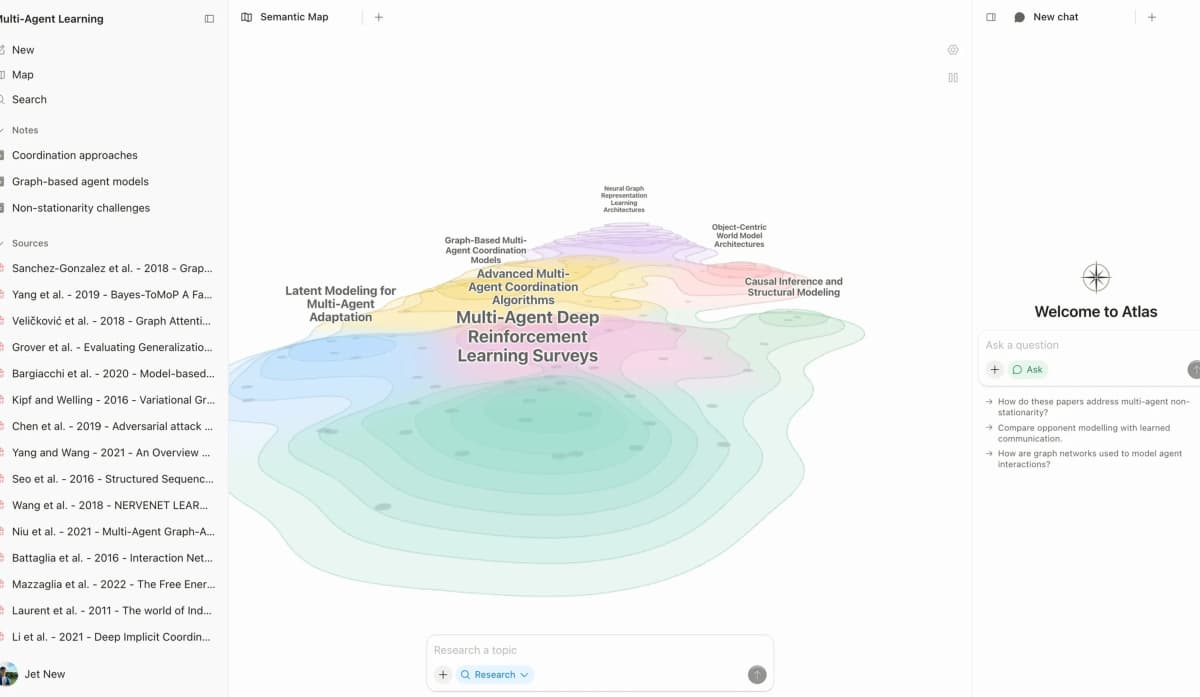
The screenshot above is Atlas's first-party research workspace: the map, source list, and chat panel live together so a user can move from a visual claim structure to the source text behind an answer.

Atlas

Build a cited corpus from Google Drive
Upload Drive papers, map claims, and inspect cited answers inside one project.
Quick verdict: Atlas Workspace vs Gemini
Choose Gemini when the task lives inside Google Docs, Sheets, Gmail, or Drive, or when broad web and multimodal help matter most. Choose Atlas when a bounded paper corpus needs maps, passage-level citations, and one project-scoped research context.
Many researchers can use both. Gemini handles the live Workspace task, while Atlas maps and verifies the papers behind the document.
How we compared Atlas and Gemini
The comparison uses 5 criteria. Can you trace the answer to a source with the passage check in the AI citation checker guide? Can you see the source set? Does the tool fit Google Drive?
The last 2 checks cover moving Gemini work into a research space and reusing it later. Both tools can write a readable draft. The harder question is whether the draft holds up when someone asks where a claim came from.
Use this quick frame:
- Choose Atlas when the project depends on a lasting source set. It is better for cited literature reviews, thesis work, briefs, and treatment syntheses.
- Choose Gemini when the task already lives in Google Workspace. It is better for Docs, Sheets, Gmail, multimodal prompts, and broad web tasks.
- Treat the Drive handoff as manual. Export PDFs or Docs from Google Drive, then upload them to Atlas when the source set needs to become a durable research corpus.
| Atlas | Gemini |
|---|---|
| Best for a lasting research corpus with papers, notes, maps, and cited answers. | Best for daily help inside Docs, Sheets, Gmail, and Drive. |
| Claim-source-justification ties each answer to a passage and support note. | Links or citations may appear when grounding is available, but the support trail is thinner. |
| Knowledge Maps and Semantic Maps make papers and projects easier to scan. | ✗ No equivalent project map for a research corpus. |
| ✗ No native Docs or Gmail sidebar. Sources move in through export and upload. | ✓ Native Workspace surface across Docs, Sheets, Gmail, and Drive. |
| Sources, maps, notes, and chats share one project-scoped evidence base. | Best for the current chat, document, or Workspace task. |
Table 1: Atlas vs Gemini quick comparison across research corpus, citation grounding, visual maps, Workspace integration, and project context.
How is Atlas different?
Gemini and Atlas overlap at the surface. Both help with reading and reasoning over sources. They diverge on three capabilities that decide whether the output is shareable, defensible work. This section walks through the three differences, in order.
Maps for papers and projects
Atlas builds two maps as you read. A Knowledge Map breaks each paper into claims, evidence, definitions, and links between ideas. You see the paper's spine first, then click into the source passages.
A Semantic Map puts the whole project on a spatial canvas. Related sources, notes, chats, and citations cluster by topic. That is how 200 papers stop being a folder and start being a corpus.
"It's like an ultimate GPT. I can finally see what I've read." Kyle Lao, CEO & Co-founder of MenSC Labs
Gemini does not have a per-paper claim-evidence map or a project map you can reframe by topic. If you have spent an afternoon trying to recover a paper you read three weeks ago, the Knowledge Map is the surface that pays for itself first. Visual maps make a body of papers legible at a glance.
Atlas explains every cited claim
The hallucination problem in AI research tools is often not "the model made something up." It is "the model put a citation next to a claim that the cited passage does not justify." Atlas renders each answer as a claim, source, and justification. You see the claim, the passage, and a short note on why the passage supports it. You can click into the source and read the highlighted lines in context.
Atlas tracks this with the H/V ratio, which measures unsupported cited sentences divided by supported cited sentences on a source-level re-check. Atlas targets H/V < 0.1 on the grounding benchmark. We publish the method in Verifiable AI Research (2026): What It Actually Means.
The cited-chat guide explains why a source link and a supported claim are different checks. Gemini's answers may include citations or links, but they do not show the same claim-level support trail. A casual answer may only need a link. A thesis sentence, legal brief, or treatment summary benefits from the added passage trace.
Project-scoped research context
Atlas keeps sources, notes, chats, Knowledge Maps, and the Semantic Map inside the project where they were created. Those surfaces share one evidence base.
A separate Atlas project has separate sources and context. That isolation prevents unrelated evidence from entering a cited answer. Gemini takes a different approach through chats, Gems, and Workspace files.
Choose Atlas when maps, notes, and cited chat should share one bounded source set. Choose Gemini when research assistance should remain embedded in Docs, Drive, and other Workspace surfaces.
Comparing Atlas and Gemini
Atlas and Gemini live in different categories. Atlas maps papers and traces claims to sources inside one project. Gemini provides Workspace chat and broad web help.
The sections below compare paper maps, project maps, cited answers, source notes, and reuse. Each table includes at least one row where Gemini wins or ties.
This comparison is about Atlas Workspace
Some search results for "atlas vs gemini" compare OpenAI's Atlas-named browser, Perplexity Comet, Gemini Advanced, Chrome, and Gemini. Those are browser or general-assistant comparisons.
The ChatGPT alternatives guide and Copilot alternatives guide cover those choices.
This article compares Atlas, the research workspace, with Google Gemini for source-backed research. If your question is about AI browsers or general agents, evaluate browser memory use, tabs, sidebar answers, agent control, privacy, and extension support.
Paper deconstruction with Knowledge Map
The Knowledge Map is Atlas's per-paper surface. It breaks a single paper into claims, evidence, source-faithful nodes, and links between ideas. The node text is drawn directly from the paper's source passages. Breadcrumbs let you move from the paper's main thesis down to a specific passage.
| Atlas | Gemini |
|---|---|
| Multi-level argument structure ✓ | ✗ |
| Labeled relations (motivates, causes, enables) ✓ | ✗ |
| Faithful-to-source node text ✓ | Generated text summaries |
| Hierarchical breadcrumbs ✓ | ✗ |
| ✗ | Native Google Docs / Sheets / Gmail integration ✓. Strong Workspace presence for document-native tasks. Per-paper research structure is a different surface. |
Table 2: Atlas vs Gemini on paper deconstruction and Knowledge Map capabilities.
Good to know: The bottom row belongs to Gemini. Atlas does not ship that surface. The Knowledge Map's payoff is recovering a paper's argument three weeks after you first read it, when topic chips alone are no longer enough.
Project and corpus view with Semantic Map
The Semantic Map is Atlas's per-project surface. It puts sources, notes, chats, and citations on a spatial canvas. Related items cluster by topic. You can view the same canvas from a new topic angle without uploading the files again, following the reusable-source approach in the research-notes guide.
| Atlas | Gemini |
|---|---|
| Spatial embedding of sources + notes + chats ✓ | ✗ |
| Auto-labeled topic clusters ✓ | ✗ |
| Topic-angle re-projection ✓ | ✗ |
| One project-scoped evidence view ✓ | ✗ |
| ✗ | Multimodal (image, video, audio) input ✓. no per-claim citation |
Table 3: Atlas vs Gemini on project corpus view and Semantic Map capabilities.
Good to know: Gemini's multimodal input is the better surface when research depends on image, video, or audio analysis. The Semantic Map helps when 200 papers must be inspected from different topic angles without re-reading.
Citation-grounded answers
Atlas produces claim, source, and justification triples. You get the claim, the passage, and a short note on why the passage supports the claim. You can jump to the source paragraph and follow the citation-checking workflow.
| Atlas | Gemini |
|---|---|
| Claim-source-justification triples ✓ | Source links on web-grounded answers (no per-claim reasoning) |
| Reasoning traces (why this passage supports this claim) ✓ | ✗ |
| Jump-to-source with passage highlight ✓ | Jump to web sources ✓ |
| H/V ratio < 0.1 benchmark published ✓ | Per-session synthesis |
| ✗ | Wider web index for grounding ✓. Broad web grounding for current information. An annotated, persistent corpus is a different surface. |
Table 4: Atlas vs Gemini on citation-grounded answers and source evidence trails.
Good to know: Both tools have a citation surface. A source link can serve everyday Q&A. Atlas adds the passage-level explanation needed to defend a thesis sentence or brief paragraph.
Literature-grounded annotations
Atlas annotates each paper on ingest. Citations inside the paper become first-class objects. When a cited source is open access, Atlas pulls in the relevant passage. The research citation-tool guide separates this source check from reference storage.
| Atlas | Gemini |
|---|---|
| Auto-annotate on ingest ✓ | ✗ |
| Multi-citation synthesis (how citations build the argument) ✓ | ✗ |
| Resolve cited sources (open-access) ✓ | ✗ |
| Exact passage / page / paragraph anchors ✓ | ✗ |
| ✗ | Deep Workspace search across your Drive ✓. Effective for finding files and drafts in Drive. Per-paper deconstruction is a different surface. |
Table 5: Atlas vs Gemini on literature-grounded annotations and ingest-time citation resolution.
Good to know: These annotations resolve citations inside the paper you're reading. When a paper cites an open-access source, Atlas pulls in the cited passage. This is not web search. It is a way to see how a paper builds its case.
Project-scoped context
Atlas keeps citations, notes, maps, and chats inside one project. A separate project has a separate evidence base.
| Atlas | Gemini |
|---|---|
| Project-scoped research context ✓ | Per-chat or Workspace-file context ✓ |
| Sources, notes, maps, and chats share one evidence base ✓ | Gems can package instructions and files ✓ |
| Separate projects isolate unrelated context ✓ | Separate chats isolate conversations ✓ |
| Sources must be added to each relevant Atlas project | Drive search can retrieve Workspace files ✓ |
| ✗ | Free with Google account, integrated everywhere ✓. no project or corpus features |
Table 6: Atlas vs Gemini on project-scoped context and Workspace organization.
Good to know: Atlas's project boundary is deliberate. Put sources that answer the same question together, and start a separate project when the evidence should remain isolated.
Price comparison
Atlas is a paid product with no perpetual no-cost plan. You get a short evaluation sample of 10 sources and 5 lifetime AI chats. After that, Atlas Pro costs $20/mo or $204/yr and includes unlimited sources, unlimited AI chats, Knowledge Maps, Semantic Maps, and cited answers.
Google lists current consumer plans on its official Google One pricing page. Google AI Pro costs $19.99 per month and includes higher Gemini limits, the Pro model, Deep Research, and Gemini in Gmail, Docs, and more.
| Atlas | Gemini |
|---|---|
| Free: ✗ (evaluation sample only: 10 sources · 5 lifetime AI chats) | Free: Free with Google account, basic Gemini access in Workspace ✓ |
| Pro: $20/mo or $204/yr (unlimited sources · unlimited AI chats · all features) | Paid: Google AI Pro $19.99/mo with higher Gemini limits and Workspace features |
| Pro unlocks Knowledge Map, Semantic Map, and claim-source-justification ✓ | ✗ |
Table 7: Atlas vs Gemini pricing comparison across free and paid tiers.
When to choose Atlas vs Gemini
Choose Gemini when the deliverable is a Google Doc, Sheet, email, current-web answer, or multimodal analysis. Its native Workspace surface removes handoffs for those tasks.
Choose Atlas when the deliverable depends on a reusable paper library and a reviewer must inspect the evidence behind each claim. Atlas trades broad app reach for deeper source maps and passage checks.
- Want paper structure deconstructed multi-level? Go with Atlas. (Knowledge Map)
- Want answers that explain how each citation justifies the claim? Go with Atlas. (claim-source-justification)
- Want one project-scoped evidence base for maps, notes, and cited chat? Go with Atlas.
- Want Google Workspace integration with answers surfaced inside Docs, Sheets, and Gmail? Go with Gemini.
- Tied: quick Q&A over a Google Doc you already have open. Both work fine. The wedge only opens up once you're building a corpus you'll return to.
Recommendations by user type
- PhD researchers: Atlas. Early literature review work benefits most from the Knowledge Map. Later thesis work benefits from claim-source-justification, because each thesis sentence can point back to a passage. Keep the sources for a thesis question inside one Atlas project.
- Students doing literature reviews and thesis research: Atlas. The Knowledge Map saves time in the reading phase, while one project keeps the relevant source set and cited conversations together. The AI tools for students guide places that source work in the wider study stack.
- Knowledge workers (consultants, analysts, PMs, journalists): Atlas when the answer needs to be cited and defensible, and Gemini when daily tasks happen inside Workspace and provenance is less load-bearing.
- Personal researchers with stakes: Atlas. Medical, legal, major-purchase, and deep learning projects need cited reasoning. Gemini is a fine starting tool. Atlas is the tool you move to once you need to defend the answer.
Gemini has the advantage for Google Workspace tasks and long-context, single-shot analysis. Atlas has the advantage when the same papers and citations need to persist as a research object. The literature-review guide shows why that source continuity matters across drafting stages.
Migration and worked example
Bringing a Gemini workflow into Atlas
If you have been running research through Gemini, the move into Atlas is less of a migration and more of a re-housing. Gemini does not keep a project workspace the way Atlas does. Your sources live in Drive, while Gemini can connect to Gmail, Docs, Drive, Calendar, Tasks, and Keep.
Gather the sources you used with Gemini and upload them into an Atlas project. PDFs go in as PDFs. Google Docs export cleanly. Chat history can be pulled from your Google account's Activity controls and pasted in as a source.
Those sources land on the Semantic Map as nodes you can rearrange. Related papers cluster together instead of remaining a folder of file names.
Atlas also builds a Knowledge Map for each paper. The map shows the paper's structure before you ask a question. Open it, find the claim you care about, click into the source, then ask the chat.
The third change is claim-source-justification. Each answer shows the claim, its passage, and a short support note. The AI citation analysis rubric gives a repeatable way to inspect that evidence.
Keep sources that answer the same question in one Atlas project. Its notes, maps, and chats use that shared evidence base. Upload a source again when it must support a separate project.
Worked example with 8 papers
Imagine writing a literature-review section for a thesis chapter from 8 papers. In Gemini, the natural workflow is to drop the PDFs into a chat or Gem.
The chat-with-PDF guide covers the strengths and limits of that pattern. Gemini's long context can produce a fluent first draft across all 8 papers.
In Atlas, you upload the 8 papers into a project. Atlas builds a Knowledge Map for each one, so you can scan the structures side by side. Shared claims, conflicts, and build-up between papers become visible.
The Semantic Map clusters the papers by topic. Data limits, method assumptions, and prior negative results appear as clusters. Then you ask Atlas to synthesize the papers' unresolved question. The answer pairs claims with source passages and short support notes. When you draft, you write against the claim layer and cite against the passage layer.
Gemini is faster on the first draft and often more fluent. Atlas takes longer on the first read because it attaches passages to claims. That evidence trail matters when the section must survive an advisor or reviewer.
Gemini also wins when the source material is multimodal, such as a lecture, slide deck, or video. Its image, video, and audio skills are ahead of Atlas's text-first surface. If the papers live as Google Docs your committee edits in real time, Gemini is better for that drafting layer. Atlas is the better fit when an anchored draft matters more than immediate fluency.
This worked example is the proof surface for the comparison. Test one paper from a current Gemini task, inspect the cited passage in Atlas, and decide whether the added evidence trail earns a place in your workflow.
When Gemini is the right call
Gemini is the better fit for Google Workspace drafting. If the draft lives inside Docs, Sheets, or Gmail, Gemini can rewrite a paragraph, summarize a thread, or fill a table in place.
Gemini also fits long-context one-shot analysis. It can produce one fluent answer across a 300-page transcript, giant codebase, or long email thread. Google's Gemini plan page documents access to Pro models and Deep Research.
The third is video and audio input. Gemini can read a lecture, podcast, or chart-heavy deck. It reasons over audio, pixels, and transcripts. Atlas is text-first and treats PDFs as its native surface. If your sources are mostly video or audio, start with Gemini.
The fourth is broad web research. If the answer needs current events, market data, or breaking research, Gemini's Deep Research mode is built for that job. Atlas stays close to your uploaded library plus cited-source resolution. That boundary gives you source specificity. Workspace tasks, long one-shot analysis, video and audio input, and broad web research favor Gemini. A bounded source set with passage-level checks favors Atlas.
Gemini's integration with Docs, Sheets, and Gmail is stronger than Atlas's. Gemini's search is broader when the job starts on the live web. Gemini's ecosystem is also stronger for teams that already run their work in Google Workspace.
Common objections and edge cases
"My institution already pays for Google AI Pro. Why add another tool?" If Gemini meets the needs of light-touch research, keep using it. Atlas becomes useful when a thesis, brief, or treatment decision needs defensible passage-level support.
Atlas also earns a role when one corpus supports a sustained research question. Its claim-source-justification surface keeps each answer tied to the sources inside that project.
"Doesn't Gemini's large context window make per-paper Knowledge Maps redundant?" They solve different problems. Long context lets Gemini answer questions across many papers in one shot. A Knowledge Map helps you recover a paper's argument weeks later without rereading or prompting again. The Atlas vs Notion comparison covers the same distinction between a lasting research surface and a general workspace.
"What if my sources are mostly in Google Docs?" Atlas does not have native Docs sync. Export Docs to PDF or paste the body text in as a source.
This handoff creates friction for documents that change often. It works cleanly for final reference material. If live Workspace sync is essential, Gemini should handle that layer while Atlas holds the parallel research corpus.
If Gemini helped you draft around a source set that you now need to defend, move one source into Atlas. Run a Knowledge Map and compare its cited answer trail against the Gemini draft.
Atlas
Build a cited corpus from Google Drive
Upload Drive papers, map claims, and inspect cited answers inside one project.
Frequently Asked Questions
Atlas makes that explanation the core of its citation surface. Every answer is rendered as a claim-source-justification triple: the claim, the passage it draws from, and a one-sentence explanation of why the passage supports the claim. You can click into the source paragraph and read the highlighted sentences in context. Gemini may cite at the sentence level or link to sources, but it does not render the reasoning trace that connects the claim to the passage. That trace helps when you need to defend a thesis sentence, a brief paragraph, or a treatment-plan summary. Read more about how Atlas grounds claims in Verifiable AI Research (2026): What It Actually Means.