

Name what you want to compare before you choose a tool. Traffic, search rank, page speed, changed text, and page claims are different types of data.
Use a traffic or SEO tool to compare reach and search results. Use a speed tool to test load time. Use Atlas to compare what public pages say and link each finding to its source.

Compare websites with citations in Atlas
Compare public page claims and inspect citations before saving differences.
Quick verdict
Use Similarweb for traffic and audience size. Use Semrush or Ahrefs for search rankings and links. Test page speed with PageSpeed Insights. Track page changes with Visualping.
Use Atlas to compare page claims, terms, and product wording. Add the exact public URLs and ask for a table. Open each citation and keep only findings that the page text supports.
One score cannot cover all of these jobs. A site may get more traffic, load more slowly, have more links, and make weaker claims than a smaller rival.
For rival sites, state the measure. Compare market reach with traffic data, speed with the same test settings, and page claims with the source text open.
The website comparison jobs
Website comparison usually means one of five jobs:
- Traffic and market: Check visits, audience, traffic sources, countries, market rank, and overlap with rivals.
- Search results: Check keywords, links from other sites, top pages, content gaps, and search rank.
- Page speed: Test load times, scripts, Core Web Vitals, and what loads in each step.
- Page changes: Track changes to prices, product copy, screenshots, or page sections.
- Page claims: Compare what pages claim, define, promise, or cite. Check each finding against the text.
Pick the job first, then choose a tool that measures it.
What to look for when comparing websites
Check what each number describes. An estimate for a whole site cannot answer the same question as a speed test for one page or a citation for one claim.
Check where the data came from. It may be an estimate, a web crawl, a lab test, or text taken from a page you added.
Match the result to the person using it. A marketer may need clues about market share. An SEO may need crawl and link data. A researcher may need a cited table of page claims.
Website comparison tools compared
| Tool | Best comparison job | Evidence type | Check before relying | Atlas fit |
|---|---|---|---|---|
| Atlas | Cited website-content comparison | Imported public pages and citation passages | Capture quality and whether citations support each row | Native fit for source-backed content matrices |
| Similarweb | Traffic and market comparison | Modeled audience and traffic estimates | Estimate definitions, plan limits, and segment coverage | Use Atlas after choosing pages to compare claims |
| Semrush | SEO and domain visibility | Keyword, backlink, and competitive SEO data | Metric definitions, database scope, and export needs | Use Atlas for page-claim review after SEO research |
| Ahrefs | Backlink and organic search research | Link, keyword, and competitor SEO data | Index coverage, keyword data, and crawl limits | Use Atlas to verify page messaging or evidence |
| PageSpeed Insights | URL performance diagnostics | Lab and field performance signals | Field-data availability and URL-specific context | Use Atlas when speed findings need page-content evidence |
| WebPageTest | Deeper page-load diagnostics | Waterfalls, filmstrips, and lab traces | Test location, device, connection, and repeatability | Use Atlas after speed issues become source notes |
| Visualping | Page-change monitoring | Visual and text change alerts | Monitoring frequency, alert rules, and page access | Use Atlas to compare captured page claims |
| Seobility | Lightweight website-vs-website SEO comparison | Browser-based SEO comparison output | Crawl scope, checked URLs, and metric definitions | Use Atlas when the SEO finding needs page-source support |
Table 1: The table keeps unlike data apart. A traffic estimate does not prove what a page says.
If you will quote the result, keep a link to the source. Atlas can attach the right page passage to each row in a comparison table.
Compare website content with citations in Atlas
Use Atlas when public pages are your sources. You can compare product pages, policy pages, rival sites, help pages, or public reports in seven steps:
- Add the exact public page URLs as website sources.
- Check that Atlas saved the title, main text, and key headings.
- Ask one clear question, such as "How do these three pages define export rights?"
- Request a table with columns for the page, claim, quoted text, citation, and any limit.
- Open each citation badge.
- Read the cited passage and the text around it.
- Save a row only when the page supports it.
See AI website reader to ask questions about one page. See organize website to collect pages and web page analyzer to review one public page. The website AI guide covers site builders instead.
Best for each website comparison workflow
Atlas
Choose Atlas when you need to cite what websites say. It can show which page makes each claim, where terms differ, and which passage supports each row in a table. Atlas does not measure traffic, crawl a whole site for SEO, test speed, or watch pages for changes. It compares pages you add and links answers to them.
Similarweb
Choose Similarweb to compare traffic, audiences, market rank, and where visits come from. It can show which rival seems larger and which channels may bring people to the site. Its traffic data is an estimate. Use it to guide market research, but do not cite it as proof of what a rival's page says. Add the page itself to Atlas for that job.
Semrush
Choose Semrush to compare search rank, paid search clues, keywords, and rival domains. Its Domain Overview shows how sites compete in search. Use Semrush to find the sites and pages worth reading. Then use Atlas if your final answer depends on the words on those pages.
Ahrefs
Choose Ahrefs to compare links, search rivals, missing keywords, and the rank of each page. It fits work focused on links and search results. A high search rank does not make a page's claim true. Open and compare the page text when the claim itself matters.
PageSpeed Insights
Choose PageSpeed Insights to test how fast one page loads. It reports Core Web Vitals and points to code that may slow the page down. It does not compare sales copy or page claims. Add Atlas only if your report must place speed results next to cited notes about the page text.
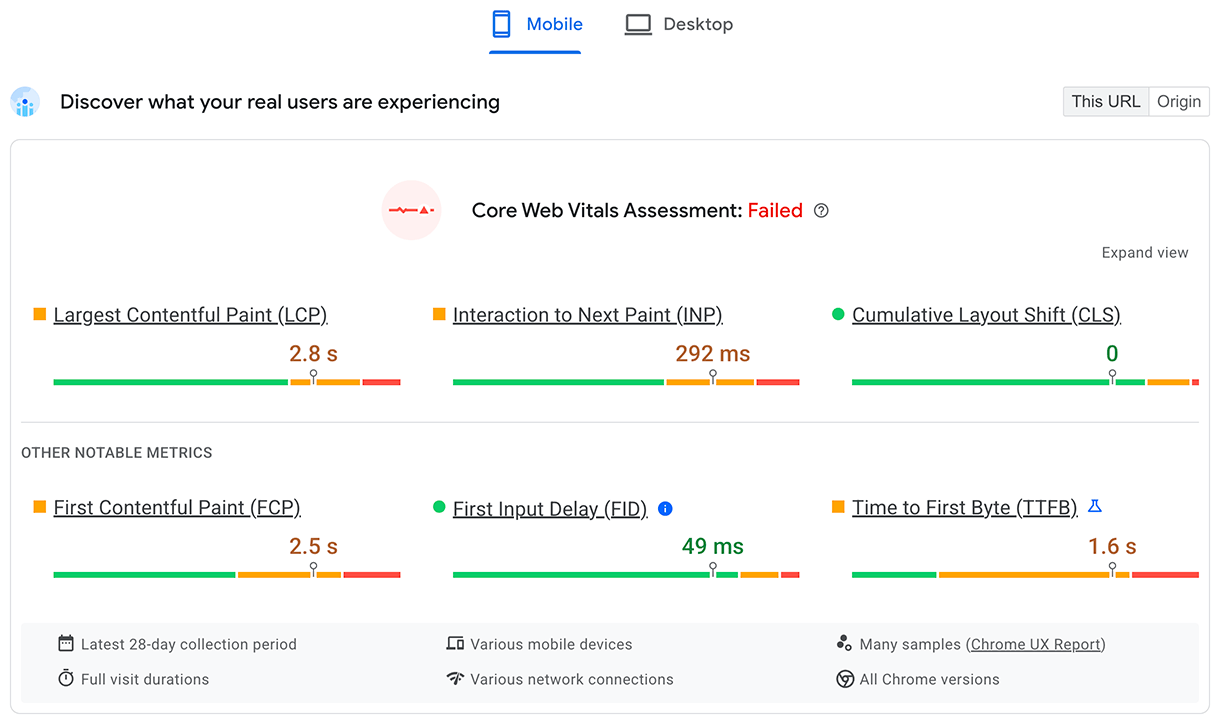
Google's example separates measurements for one URL from origin-wide data and shows the device setting. Record both before comparing two sites so the results describe the same scope.
WebPageTest
Choose WebPageTest for a deeper speed test. It shows when each file loads, records page frames, repeats tests, and lets you control the test setup. Use it when PageSpeed Insights lacks enough detail. Record the location, network, device, and number of runs because each can change the result.
Visualping
Choose Visualping to watch selected pages for text or visual changes. It can track prices, product copy, terms, and a rival's sales message. An alert shows what moved. Read the page to decide why it matters. If you use the change in a report, add the page to Atlas and cite the passage.
Seobility
Choose Seobility for a quick SEO check between two pages or sites. It is a lighter first step than a full SEO suite. Use its score to find what needs a closer look. If your answer depends on a page claim, read and cite that page.
What website comparison tools can miss
Each type of tool can fail in a different way:
- Traffic estimates can show a trend, but they are not the site's own data.
- SEO scores depend on which pages the provider has found and how it defines each measure.
- Speed tests change with location, device, network, cache, and the data available for that page.
- Site crawlers such as Screaming Frog SEO Spider find technical faults but do not explain page claims.
- Tools such as Website Grader score a page but do not replace a check of its text.
- Change alerts can miss hidden text, content loaded by scripts, or pages behind a login.
- AI summaries can drop limits or mix claims from different pages.
- A website import may fail on a login, paywall, consent screen, complex script, or page that keeps loading as you scroll.
- A citation may link to weak support. Open the passage and check the claim.
Use one tool for each job. If your final claim depends on page text, read and cite that text.
Choose the right website comparison workflow
Choose Similarweb for market size, traffic sources, audiences, and market rank. Choose Semrush or Ahrefs for keywords, links, search rank, and rival sites.
Choose PageSpeed Insights or WebPageTest for page speed. Choose Visualping to learn when a selected page changes.
Choose Atlas to compare what public pages say. Add the pages and ask for a cited table. Open each citation and keep only the findings that the page supports.
Compare websites with citations in Atlas
Compare public page claims and inspect citations before saving differences.