

Website AI usually means a tool that turns a prompt into a website draft. The prompt may describe a business, a design, or a web app. Some people use the same term for AI that reads existing web pages, sums them up, compares them, or answers with source links.
Those jobs need different tools. A builder creates and publishes a site. A source tool checks what an existing page says.

Ask cited questions over websites in Atlas
Add public website pages, compare cited answers, and inspect each passage.
Quick answer
Start with the result you need. Use Figma for a visual site concept. Use Replit or Base44 when the site needs user accounts, stored data, or visible code. Use Wix for a hosted business site with editing tools. Use Durable or QuillBot for a quick first draft. Use WeWeb for a web app made without code.
Use Atlas after a website becomes a research source. Add the direct public URL and check that Atlas saved the main text. Ask a question, open each citation, and read the passage before you save the answer.
If your question is "can AI build this website?", pick a builder. If your question is "what does this website say, and can I cite the answer?", use a source-grounded workflow.
For related jobs, see AI website readers for chatting with a page. Compare website covers traffic, search rank, speed, and page content. AI document reader fits web sources saved as files. AI that cites sources explains how to judge citations.
What does website AI mean?
Website AI can mean 4 jobs:
- Create a simple site: turn a short business or project brief into pages, text, and a first layout.
- Build a web app: create a dashboard, form, portal, or site with user accounts from prompts.
- Edit a hosted business site: use AI to plan, write, and change a site inside an online builder.
- Study existing pages: add public pages as sources, ask questions, compare claims, and check citations.
Atlas fits the last job. It does not create, host, redesign, publish, or monitor a site. Use it when a public page is evidence that you need to question and check.
Builder pages often group design, hosting, writing, code, business tools, and traffic reports into one promise. Decide which part matters most before you choose.
What to look for in website AI
Answer 2 questions before you compare brands.
Builder fit
First, check what the tool makes. It may create a hosted business site, code, a test design, a web app, a wireframe, or a page draft that still needs your edits.
Second, check what happens next. A founder may need the code and control over the launch. A local business may need a domain and forms. A designer may need layouts that work on every screen and files for a developer. A researcher may only need to check claims on a page.
Write that risk down first.
Source-checking fit
When existing pages are your sources, judge the citations instead of the site builder. The tool should save the page, answer a narrow question, and open the text behind the answer.
Atlas fits after you add a public page as a source and need to check an answer against its text.
Do not mix those jobs.
Website AI tools compared
| Tool | Best fit | Creates | Control model | Check before relying |
|---|---|---|---|---|
| Atlas | Cited questions over existing public pages | Answers, summaries, comparisons, and notes | Source workflow after pages are added | Captured text quality and cited passage support |
| Figma | Design-first site concepts | Responsive interactive concepts | Design-and-build workflow | Publishing path and handoff limits |
| Replit | Functional websites and app-like projects | Web projects with code and backend elements | Developer workspace with deployment options | Runtime, usage, backend behavior, and code ownership |
| Wix | Hosted small-business websites | Site drafts and editable pages | Hosted website builder | Current plans, domains, commerce, and AI features |
| Base44 | Prompt-built websites with app logic | Site structure, backend, auth, data, and workflows | AI app-builder workflow | Credits, integrations, deployment, and security claims |
| Durable | Fast small-business website starts | Hosted website drafts from prompts | Quick hosted generation | Publishing terms, editing depth, domains, and export |
| QuillBot | Lightweight prompt-to-website creation | Responsive site draft with generated content | No-code prompt workflow | Hosting, ownership, plan limits, and refinement controls |
| WeWeb | Data-connected no-code web apps | Visual app front ends connected to data | Visual development platform | Data sources, export terms, auth, roles, and deployment |
Table 1: Choose by the result you need. A local business page, a test version of a software product, a student site, and a client portal need different tools.
Compare what the tool makes, how you edit it, whether you get the code, where the site runs, and which business tools it includes. Also check its citations if it reads sources. Guides from Jotform and Repaint use similar tests for setup speed, design, editing, and business fit. Framer's AI page shows how one tool can span both design and publishing.
Other search results cover more types. Lovable and Base44 focus on web apps. Hocoos and Durable focus on small business sites. Relume helps plan the page list, wireframes, and design. Check each product's current features, price, hosting, and export rules before you rely on them.
Figma represents the design-first type. Its site says Figma Make can turn plain-language prompts into site concepts that respond to screen size and user actions.
Ask cited questions about websites in Atlas
Atlas fits when you need to understand an existing page instead of creating one.
A website-source check in Atlas looks like this:
- Add the direct public URL for an article, report, help page, or other page with clear main text.
- Avoid search pages, feeds, pages behind a login, and pages whose main text loads only after scripts run.
- Check that the saved title, body, and key headings match the live page.
- Ask a narrow grounded question, such as "What evidence does this page give for its pricing claim?" or "Which features are described as available today?"
- Open the citation badge on the answer.
- Read the cited passage and nearby text before you use the answer.
- Save the takeaway only if the page text supports it.
Each answer stays linked to text you can inspect.
Use AI that cites sources when citation behavior is the main evaluation criterion. Use AI document summarizer when website evidence has been saved into files and the first job is triage. This page compares website AI builder categories, then shows where cited website analysis fits.
Choose by website job
Choose Figma when the hard part is turning an idea into a visual, responsive website concept. Choose Replit when you want a generated website that can become a functional code project. Choose Base44 when the site needs app-like workflows, auth, data, or backend behavior from prompts.
Choose Wix when you need a hosted business website path with editing, domain, and growth workflows in the same ecosystem. Choose Durable or QuillBot when speed and a simple website draft matter more than deep app logic. Choose WeWeb when the project is a no-code web app with data connections rather than a simple marketing site.
Choose Atlas when the website already exists and your risk is source accuracy. That is the moment to add the page as a source, ask a cited question, and inspect the passage before relying on the answer.
Best website AI tools
1. Atlas
Atlas is best for asking cited questions about public web pages. Use it to compare claims, sum up source text, and keep each answer linked to its passage.
Atlas does not build, publish, host, redesign, or monitor websites. It helps you study a page after Atlas has saved its text.
Ask questions such as "Which page supports this claim?" or "Do these 3 pages describe the same limit?" Open each citation and read the nearby text.
2. Figma
Figma's AI website generator is best for teams that want to explore a site design before they build it. Prompts create visual concepts inside Figma's design tools.
Check whether the result uses your design system, puts content in a clear order, works on each screen size, and gives developers what they need.
3. Replit
Replit's AI website builder fits a site or web app whose code and server logic matter. It is a coding workspace with AI help, rather than a simple page template. TechRadar's review describes the same mix.
Use Replit when the site needs custom logic, files, routes, other apps, or debugging. Check current launch and usage rules before you choose it for a live product.
4. Wix
Wix's AI website builder is best for a small business that wants AI inside a hosted site builder. It combines page setup, editing, domains, business tools, and marketing.
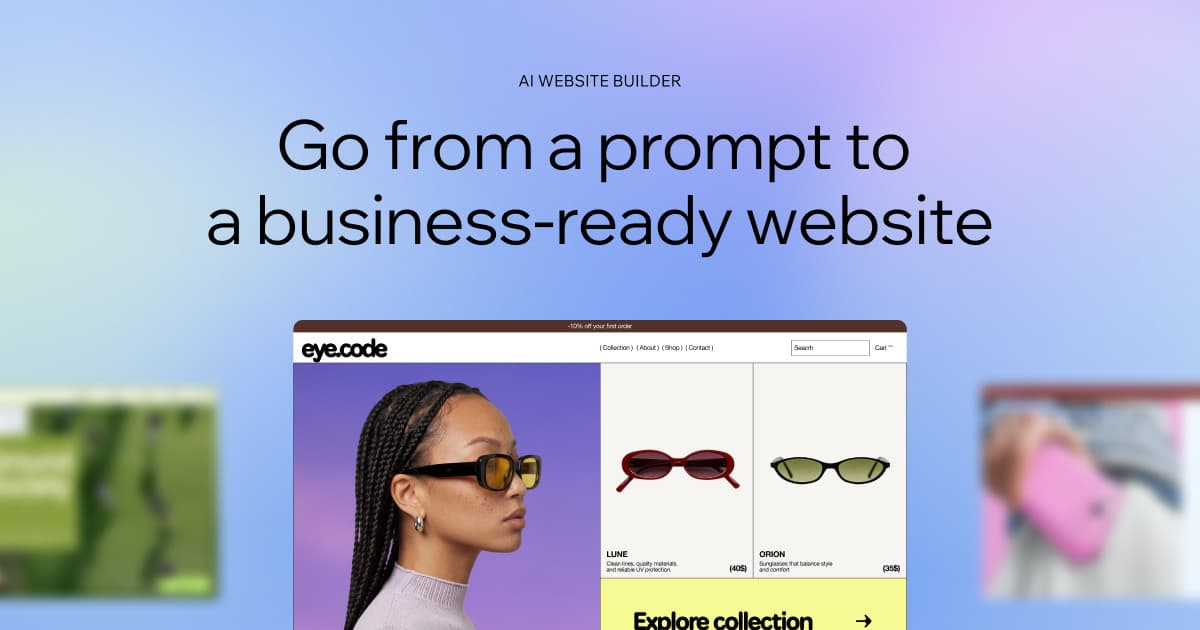
Wix's product image shows the output category: a business website draft generated inside a hosted builder. It does not show code ownership, export, or the quality of later edits, so test those separately.
Use Wix when you need to launch a business site quickly and keep editing it. Check current plans, domains, store tools, and marketing features first.
5. Base44
Base44's AI website builder is best when the site acts like an app. Its page covers prompts that build the layout, server logic, user accounts, saved data, and later edits. TechRadar's review gives another view of this tradeoff.
Use Base44 when you need set steps, user accounts, saved data, or links to other apps. Check current credits, launch options, connected apps, and security claims first.
6. Durable
Durable's AI website builder is best for a fast small-business website draft from prompt-based inputs. It fits the "give me a starting point now" branch of website AI.
Use it when speed and a usable first layout matter more than custom app behavior. Check editing depth, publishing terms, domain options, and export expectations before treating the output as final.
7. QuillBot
QuillBot's AI website builder is best for a lightweight prompt-to-site workflow where the user wants generated content and a no-code path. It fits quick starts and simple page creation.
Use it when the first decision is whether a prompt can produce a usable page draft. Refresh hosting, ownership, export, and plan details before using it for a business-critical site.
8. WeWeb
WeWeb is best for no-code web apps with data connections and production-oriented workflows. It is not the easiest fit for someone who only wants a one-page brochure site.
Use WeWeb when the project needs a visual app builder, structured data, internal tools, portals, dashboards, or a front end that connects to external systems. Refresh ownership, export, hosting, and integration details before deciding.
Website AI limits to check
Website AI tools can make a site feel finished before the important checks are done. Before publishing or relying on output, check:
- Plan and credit limits: current free tiers, AI credits, branded domains, and usage caps change often.
- Publishing path: confirm hosting, custom domains, SSL, redirects, staging, and rollback needs.
- Code and export rights: decide whether you need source code, design files, data ownership, or infrastructure control.
- Business features: refresh commerce, forms, bookings, memberships, analytics, email, and marketing-tool availability.
- Backend behavior: test auth, databases, workflows, integrations, and permissions instead of trusting a demo.
- Content quality: check generic copy, duplicated section patterns, unsupported claims, and pages that sound plausible but thin.
- Design quality: inspect responsiveness, accessibility, navigation, contrast, forms, and real content states.
- SEO controls: verify titles, descriptions, indexing controls, structured data, canonical URLs, image alt text, and redirects.
- Security and compliance: confirm claims directly from current product documentation and your own requirements.
- Website-source capture: for cited analysis, confirm the public page content was captured before asking AI to rely on it.
The fastest tool is not always the safest one. Use a builder when the bottleneck is creating a website. Use a source-grounded workflow when the bottleneck is trusting what existing pages say.
For a practical split, builders create or modify a web presence. Atlas helps you question web pages as evidence. If the job is asking questions about an existing page or site, compare the adjacent chat with website AI workflow. If that evidence later turns into a broader research workflow, AI research assistant tool covers the research-assistant branch more directly. Keep those jobs separate and the tool choice becomes much easier.
Ask cited questions over websites in Atlas
Add public website pages, compare cited answers, and inspect each passage.