


Choose Notion when the team needs one place for notes, tasks, tables, and project records. Choose ChatGPT for open-ended questions, drafts, code, web research, and work with files.
Many teams use both. Notion keeps the project in order. ChatGPT helps explore a topic, make a plan, and draft text.
Use Atlas before a claim enters a report or literature review. It lets you open the source passage behind each answer point.

Verify your sources in Atlas
Add selected sources, check a claim, and inspect the cited passages.
Compare by workflow job
Use these job questions to decide:
- If the team needs a shared place for notes and tasks, start with Notion.
- If you need help with a draft, plan, file, or open question, start with ChatGPT.
- If a claim must be proven, open the source and read the passage behind it.
- If several people share the work, decide where the final record will live.
The tools overlap. Notion has AI writing and workspace search. ChatGPT can keep project files and instructions. Still, they start in different places: Notion starts with a workspace, while ChatGPT starts with a conversation.
Use Notion AI when the project already lives in Notion. Check current product pages before you choose a plan or link other apps. Notion explains its AI FAQ, AI connectors, Enterprise Search, and other AI tools. OpenAI explains ChatGPT features, Deep Research, file uploads, and Projects.
Notion vs ChatGPT compared
This three-tool matrix shows where each part of the work belongs. Check current plan access before you rely on a feature.
| Workflow job | Atlas fit | Notion fit | ChatGPT fit |
|---|---|---|---|
| Search team knowledge | Searches the project sources you choose. | Searches Notion pages and linked apps. | Searches chats and files in a Project. |
| Write with project context | Writes answers and notes from project sources. | Writes inside pages and can help with database work. | Drafts, rewrites, and explains in chat or Canvas. |
| Web or deep research | Checks claims against a fixed source set rather than the open web. | Research Mode can use workspace, linked-app, and web context. | Deep Research can use the web, files, and linked apps. |
| Work with files | Compares findings across added source files. | Uses files and content stored or linked in the workspace. | Compares, extracts, and rewrites uploaded files. |
| Analyze data | Finds and compares claims or values in source material. | Works with database fields, formulas, and workspace records. | Runs data analysis on tables and spreadsheets. |
| Use images or voice | Keeps the focus on text and evidence in project sources. | Focuses on content inside the Notion workspace. | Can work with images and voice, depending on the plan. |
| Share team work | Keeps cited answers with the source collection. | Keeps pages, tasks, comments, and records together. | Shares chats and Project context. |
| Check a citation | Opens the exact source passage behind an answer point. | Shows source links in supported search and research results. | Deep Research reports include source links. |
Table 1: The key choice is where the team will store its work and how it will check important claims.
Workspace context and everyday productivity
Notion for durable structure
Notion is better when the team needs to keep its work in one place. A workspace can hold notes, tables, project views, owners, tasks, and key choices. This suits long projects, classes, product work, and team records.
Enterprise Search can look across Notion pages and supported linked apps, then show source links with the answer. Research Mode can gather material from the workspace, linked apps, and the web. Notion Agent works inside the workspace, while inline AI can help write pages and fill database fields. Access depends on the plan and setup, so check Notion's current help pages before you build around these tools.
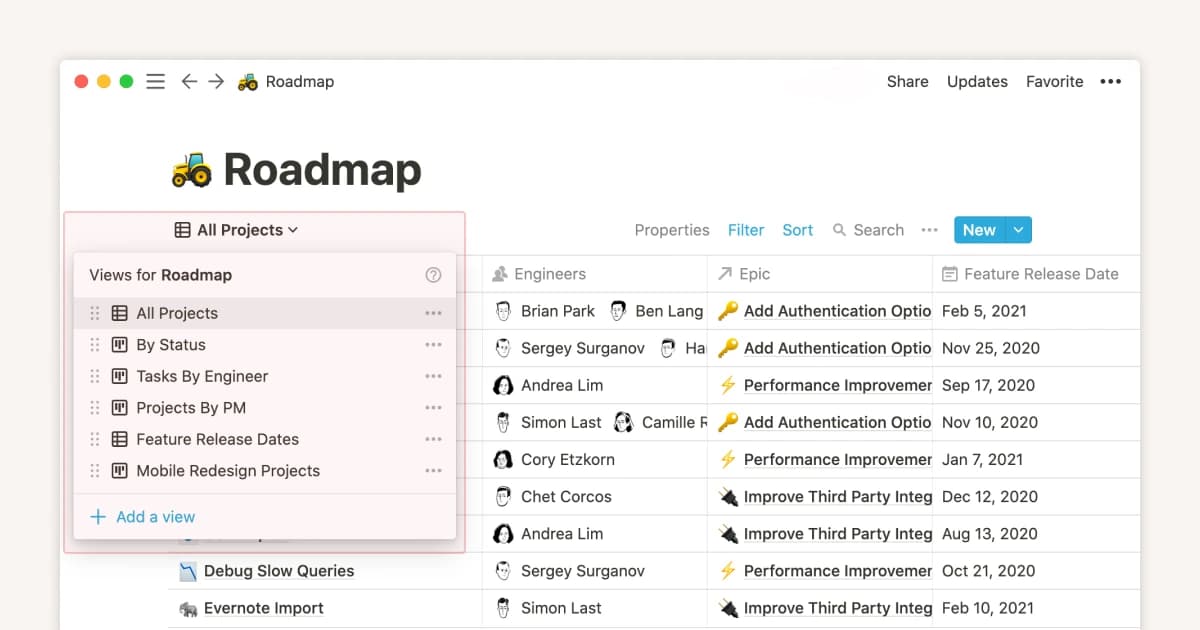
Notion’s sample database shows a table-based workspace with multiple views. Source: Notion Help.
ChatGPT for drafting around work
ChatGPT can write a meeting recap, revise a research note, or explain a rough plan. The team still needs to choose where those results will live.
Where the record should live
Use Notion when a team must find and edit the result later. Use ChatGPT when you need help thinking through a problem or changing a draft.
If your main problem is note structure, first learn how to organize research notes. ChatGPT may help with the text, but it does not decide where the notes belong.
Broad research, files, and analysis
ChatGPT for open-ended analysis
ChatGPT is stronger when the task is open-ended. It can turn rough notes into a plan, explain a method, compare options, draft text, or read files. This helps early in a project, before the team knows what it needs to store.
Projects keep related chats, files, and instructions together. Deep Research can search the web, files, and linked apps, then return a report with source links. ChatGPT can also analyze a spreadsheet, write code, and work with images or voice when the plan supports those tools. These jobs reach beyond a Notion page, but important claims still need a source check.
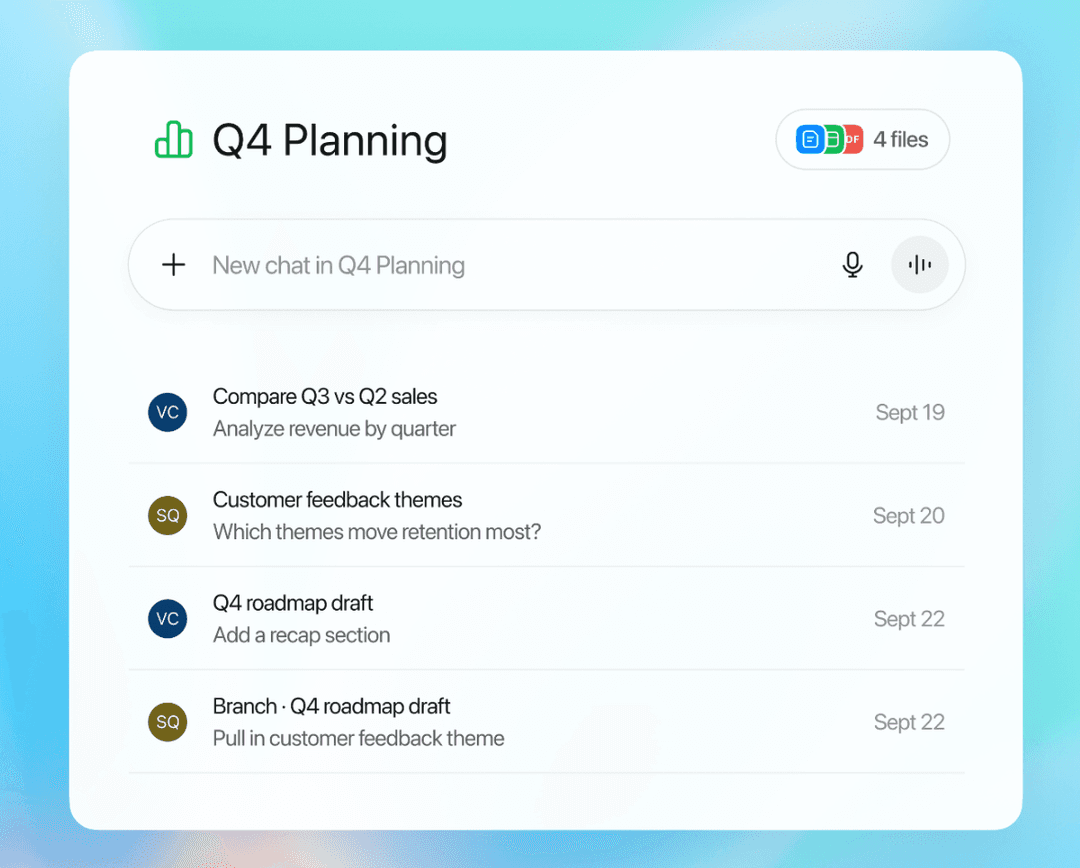
The ChatGPT Projects view groups related chats and files. The sample project content is illustrative. Source: OpenAI Help Center.
See ChatGPT for research for ways to search, work with files, and check sources.
Notion for organized outcomes
Notion is stronger after the team has notes and choices to store. A page, table, or template can keep the result. But a neat page does not prove that a claim is true.
Verification before storage
ChatGPT can make a useful first pass. Before you save the answer in Notion, check its quotes, study details, source links, and limits.
For PDFs and saved web pages, use the same process as chatting with documents. Ask the question, open the source, and read the passage behind the claim.
Where Atlas fits after the comparison
Atlas fits when readers need to see the source behind an answer. Keep the project in Notion, use ChatGPT to explore or draft, and use Atlas to check the final claim.
Move the work through the three tools in 5 steps:
- Use ChatGPT to draft or explore the question.
- Store the project plan and durable notes in Notion.
- Add the key PDFs, web pages, papers, or notes to Atlas.
- Ask a clear question about the claim.
- Open each citation badge and read the passage before you save the answer.
Atlas keeps the source open beside the answer. Click each citation marker and read the linked passage. Only then should the claim move back into Notion. This gives each tool a clear job: Notion stores the work, ChatGPT helps create it, and Atlas checks it against the sources.
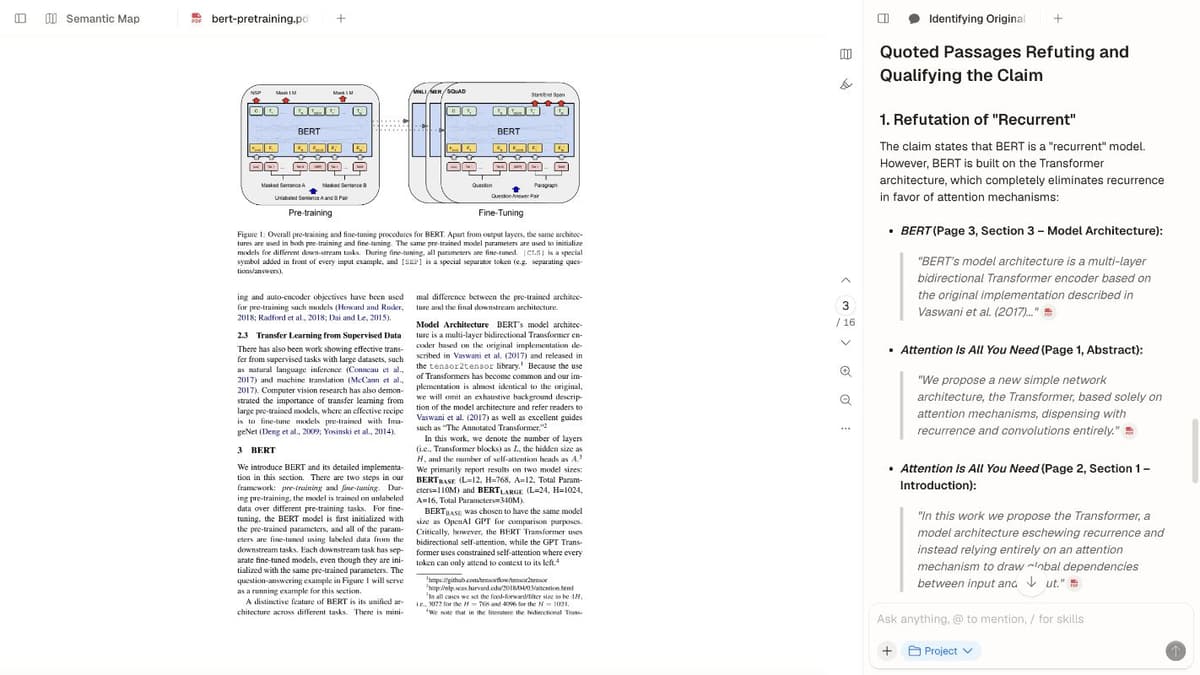
Atlas shows an answer alongside passages that readers can inspect. Screenshot: Atlas.
Which should you choose?
Choose Notion if the team needs shared notes, tables, templates, and a lasting project record. Choose ChatGPT if you need help with questions, drafts, files, or code.
Use both when ChatGPT helps make the answer and Notion stores the project. Add Atlas when readers must be able to open the source behind a claim.
Verify your sources in Atlas
Add selected sources, check a claim, and inspect the cited passages.