


ChatGPT is useful for research, but it is not one tool doing one job. Ordinary chat is good for planning, question refinement, and turning a rough topic into a search plan.
ChatGPT Deep Research is closer to a web research agent. It can gather sources, work through a task in stages, and return a cited report. Research GPTs and specialist tools add another layer for scholarly search, paper reading, finance memos, and academic writing.
The risk is treating all of those jobs as the same problem. A report with source links is not the same as a verified literature review. A citation next to a sentence is not proof that the passage supports the claim.
For serious research, ask 3 questions. Who controls the source set? Where can you inspect the evidence? What happens to the verified finding after the first answer?

Compare sources in Atlas
Compare papers, reports, websites, and notes with citations you can inspect.
Quick verdict
Choose ChatGPT when you need a broad first pass. It can help with search terms, outlines, summaries, interview questions, and Deep Research reports.
Choose a specialist tool when the task depends on papers. Use one when you need paper search, PDF reading, extraction tables, or source checks.
Use this routing rule:
- Choose ChatGPT or Deep Research to map the topic and find source leads.
- Choose Elicit, Consensus, SciSpace, ScholarAI, or another paper tool when the task depends on papers or a field-specific corpus.
- Choose Atlas when the source set is ready. Use it for source checks, cited comparison, synthesis, and a map for follow-up reading.
That division matters because research quality depends on the trail behind the answer. You need to recover the paper, page, passage, caveat, and source disagreement.
What researchers need from ChatGPT
Before ranking tools, separate the research job into stages. ChatGPT can help in several of them, but the verification burden changes at each stage.
| Research job | What you need to control | What to verify before relying on it |
|---|---|---|
| Broad web research | Topic scope, source types, recency, excluded sources | Whether the cited pages are authoritative and current |
| Scholarly discovery | Database or corpus coverage, search terms, inclusion criteria | Whether important papers were missed |
| Paper comprehension | The exact PDF, section, table, figure, or equation | Whether the answer matches the passage |
| Citation checking | Claim, source, passage, and surrounding caveat | Whether the cited passage supports the claim |
| Domain-specific memos | Source class, such as filings, transcripts, news, or disclosures | Whether the memo separates source facts from interpretation |
| Academic writing support | Institutional policy, author responsibility, and citation rules | Whether every claim has inspected evidence |
| Source-grounded synthesis | Selected sources, comparison question, and saved findings | Whether each source is separated and cited in context |
Table 1: The rubric has 4 stages: find sources, select sources, ask grounded questions, and inspect the proof trail. If a tool only helps with stage 1, it can still earn a place in the stack. Do not treat it as the final research record.
ChatGPT research decision table
The table below compares the tools by research fit. A single "best" score would hide the real tradeoff.
Check pricing, plan limits, model names, and access on official pages before you buy.
| Tool | Best use | Source control | Citation inspectability | Upload or corpus support | Main verification risk |
|---|---|---|---|---|---|
| Atlas | Synthesis after source selection | User-chosen project sources | Citation badges open passages | Papers, PDFs, websites, notes, maps | Skipping passage review |
| ChatGPT Deep Research | Broad web reports | User-guided task, files, and connected sources | Source links need review | Web, files, connected apps | Treating the report as finished proof |
| Research GPTs | ChatGPT-style research flows | Varies by GPT | Check whether links reach passages | GPT links and tools | Trusting a polished chat flow |
| Elicit | Paper search and extraction | Stronger for paper workflows | Sentence-level citation support | Papers, reports, tables | Assuming extraction is complete |
| Consensus | Focused science questions | Scholarly corpus | Citations back to papers | Scientific literature | Assuming one synthesis covers the field |
| SciSpace | Reading individual papers | Strong with a chosen PDF | Paper-specific Q&A | PDFs and paper surfaces | Mistaking comprehension for discovery |
| ScholarAI | Paper search near ChatGPT | Peer-reviewed paper workflows | Citation-oriented chat | Papers, PDFs, library sync | Assuming the exact GPT path is stable |
| ResearchGPT | Finance research memos | Filings, transcripts, news | Source spans for memo review | Finance sources | Using it for academic literature work |
Table 2: Use this table to choose the next research step by source control, citation checks, and review risk.
Best ChatGPT and AI tools for research
ChatGPT Deep Research
ChatGPT Deep Research is the best fit when you need a broad, multi-step report over web material. OpenAI's launch post frames it as agentic web research. It can use selected sources and return a report with citations or source links.
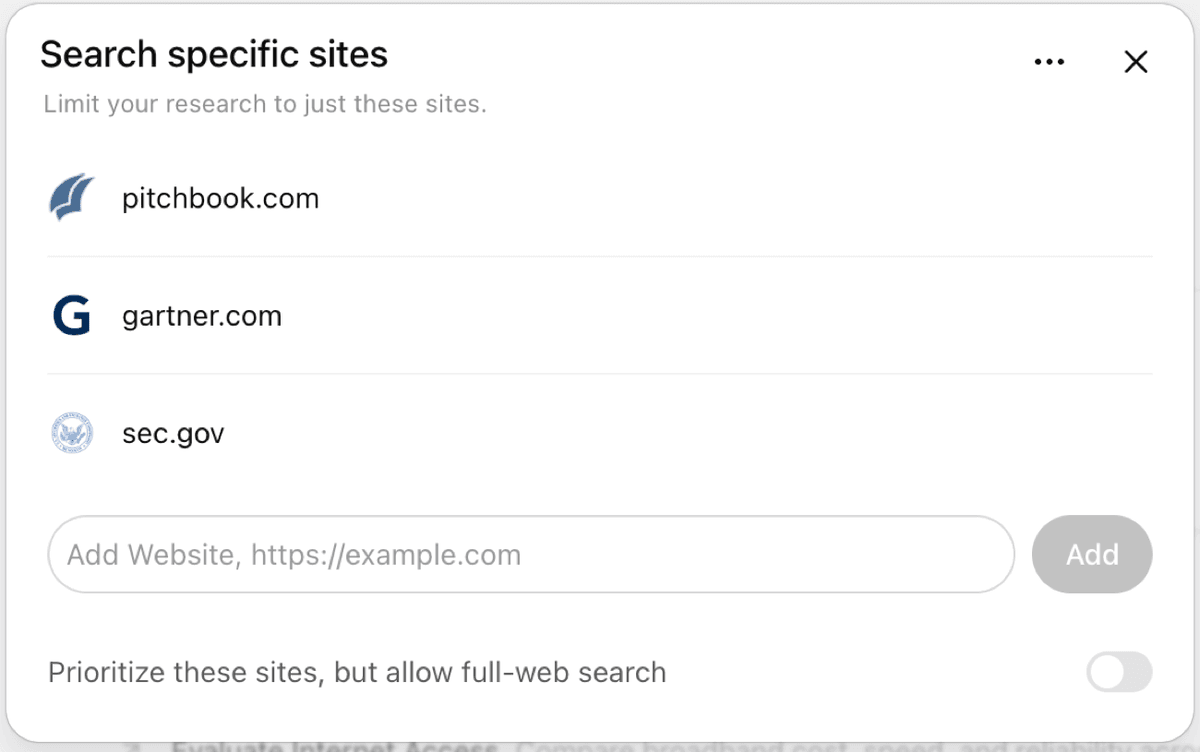
Use it for market scans, policy background, product research, technical topics, and new subjects. Start by building a source map.
Do not stop at the report for high-stakes work. Open the key sources. Check dates. Read the passage behind each claim you plan to reuse.
Research GPTs
Research GPTs can help when a custom chat wraps search, paper lookup, summaries, or citation formatting. Treat them as workflow shortcuts. They do not create a separate standard of proof.
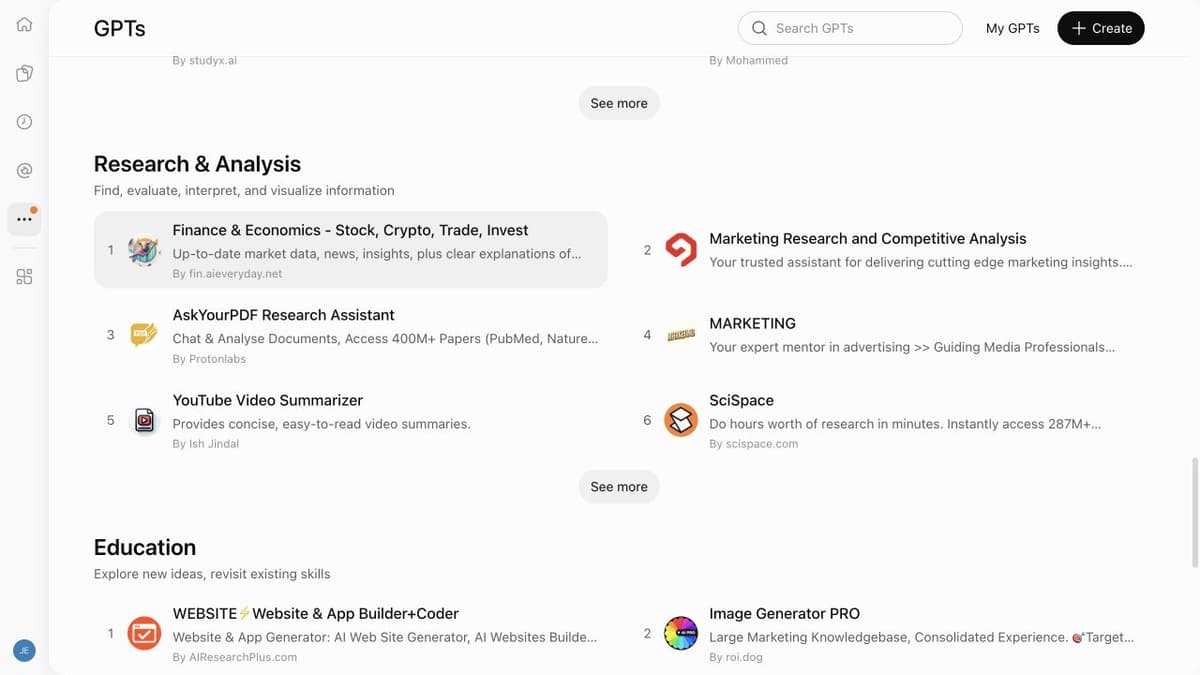
DeSci's research GPT roundup shows common checks: sources, links, paper notes, and study comparison. Verify each GPT's current source path before using it for a claim.
Before relying on 1 research GPT, check the sources it can reach. Then check whether it cites pages or passages. Check whether it can use PDFs. Check whether the output can leave the chat. The name of a GPT matters less than the source trail it leaves behind.
Atlas
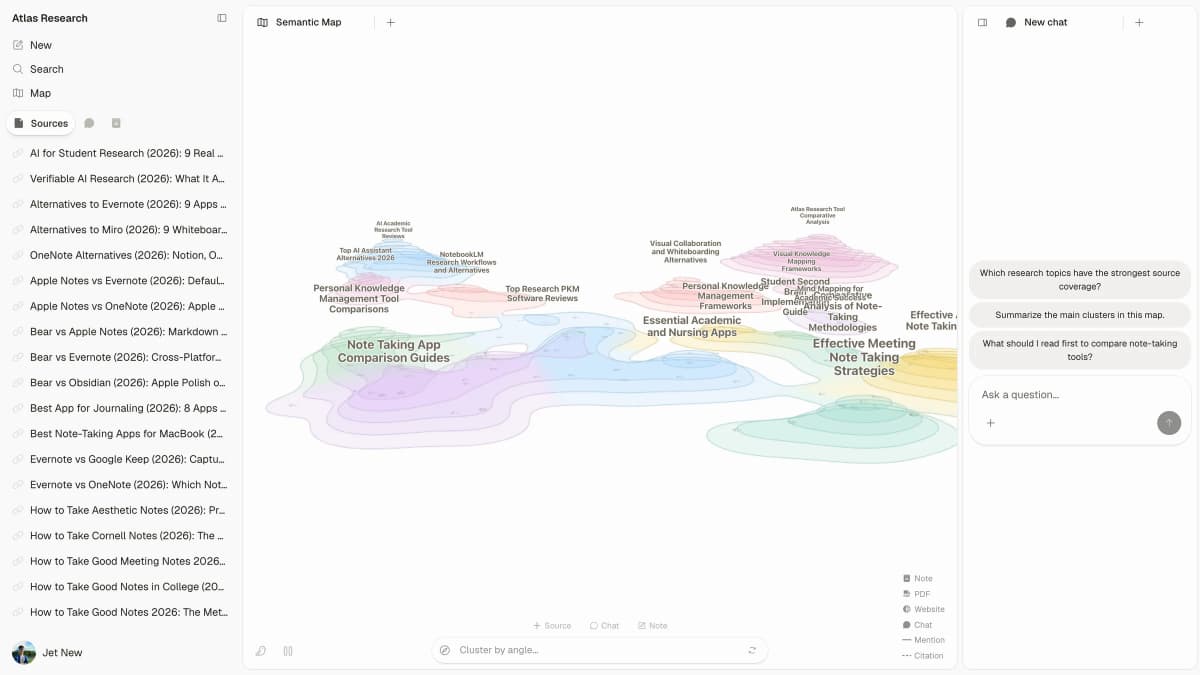
First-party Atlas product screenshot showing the handoff after ChatGPT research: selected sources stay visible beside the knowledge map and cited-answer surface.
Atlas fits after search, when you already have papers, PDFs, websites, reports, or notes. Use it to turn those sources into checked evidence.
In Atlas, a project-scoped question can return citation badges that open the source passage. A synthesis question can compare processed sources and split evidence by source. Knowledge maps help you review a source's claims, methods, limits, and structure before deciding what to read next.
That makes Atlas a continuation of the ChatGPT research workflow. Use ChatGPT for broad exploration. Use scholarly tools for discovery and paper search.
Use Atlas when the source set is ready and the next actions are concrete. Compare these sources, inspect these citations, save the checked finding, and keep a map of the material. For the source-checking side of that workflow, see AI citation tools for research.
Elicit
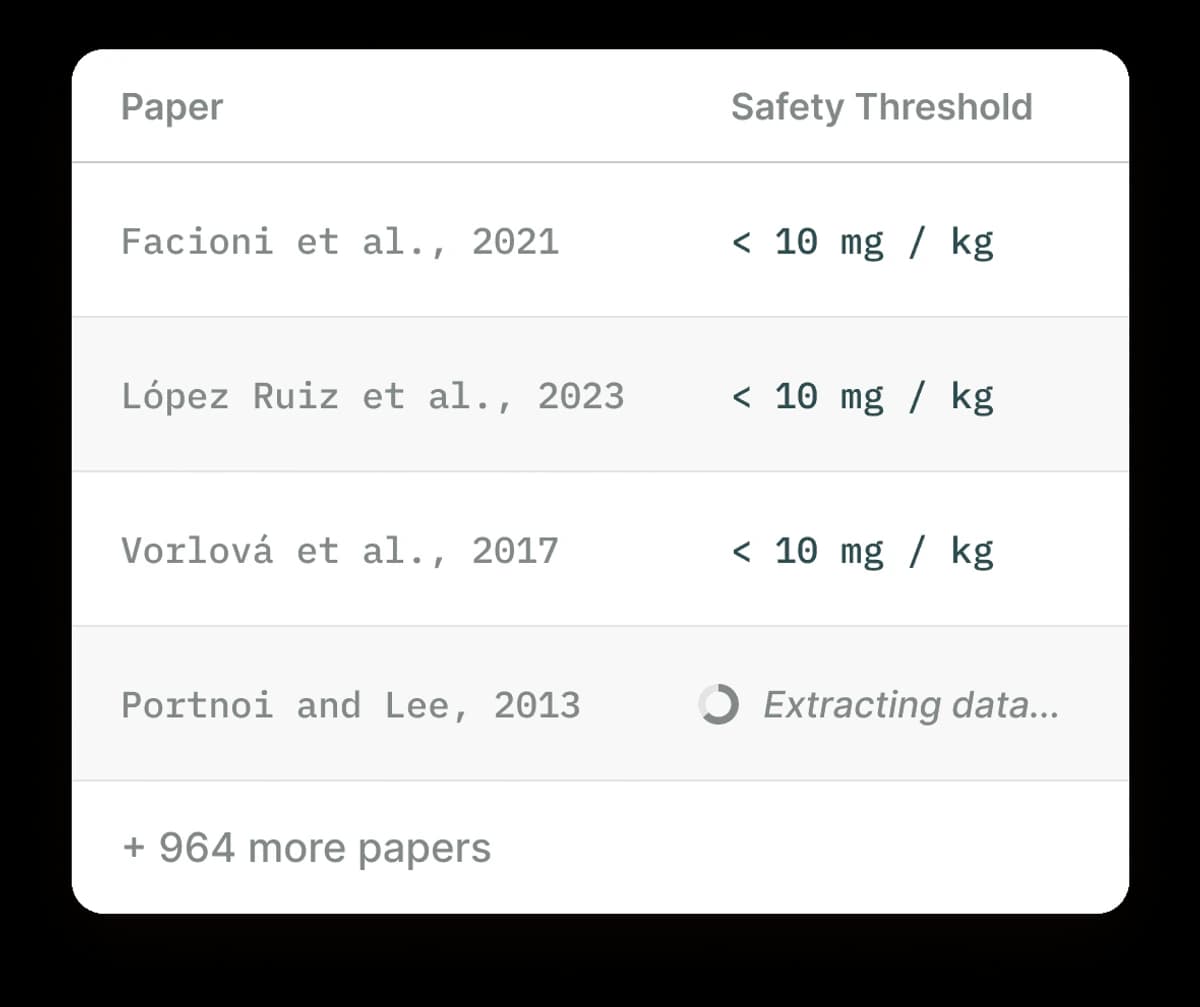
Elicit is useful when the research job is structured paper extraction.
Elicit is strongest when the research job starts with papers rather than the open web. Its product page centers on paper search, reports, review flows, data tables, and source-linked claims.
Use Elicit when you need to search papers, compare study details, or build a table of findings. Still screen the paper set yourself. An extraction table can miss studies when the search query, rules, or corpus are too narrow.
Consensus
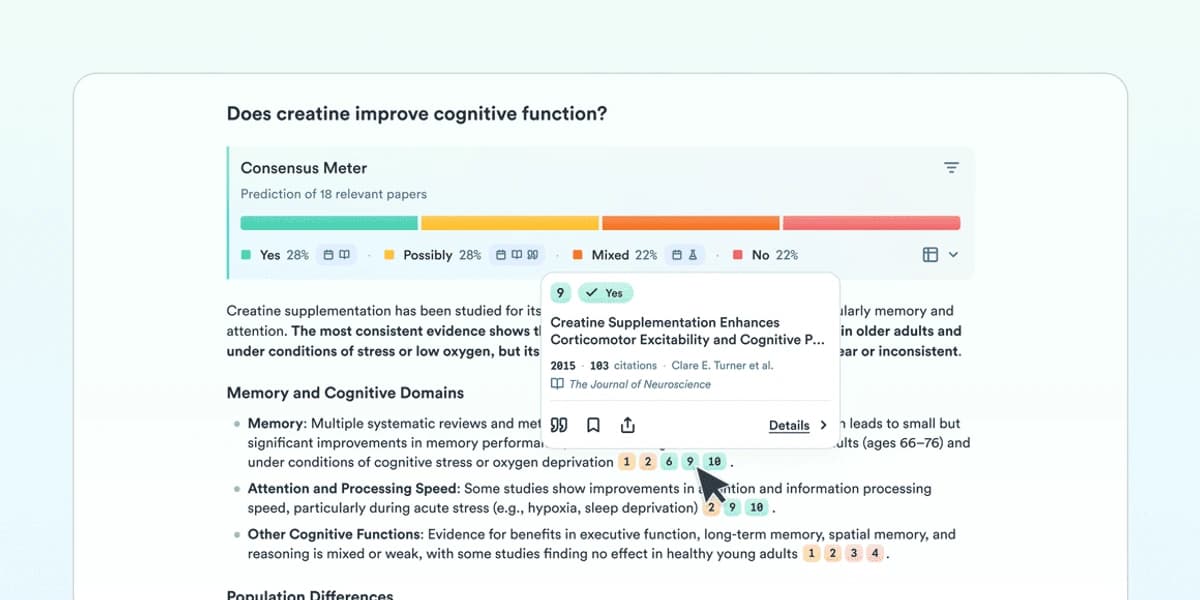
Consensus helps when the question can be answered from published studies.
Consensus fits focused science questions where the answer should come from papers. Its product material covers search across a large research corpus, paper retrieval, AI synthesis, and links back to original sources.
Use it when your question can be answered by papers and you want a fast read on what they say. For broad or policy-heavy questions, check other sources too. The best source may be a report, dataset, legal text, or expert review outside the indexed papers.
SciSpace
SciSpace is strongest for reading papers after you know which paper matters. Its paper assistant can explain a paper, answer PDF questions, summarize selected text, and help with equations or tables.
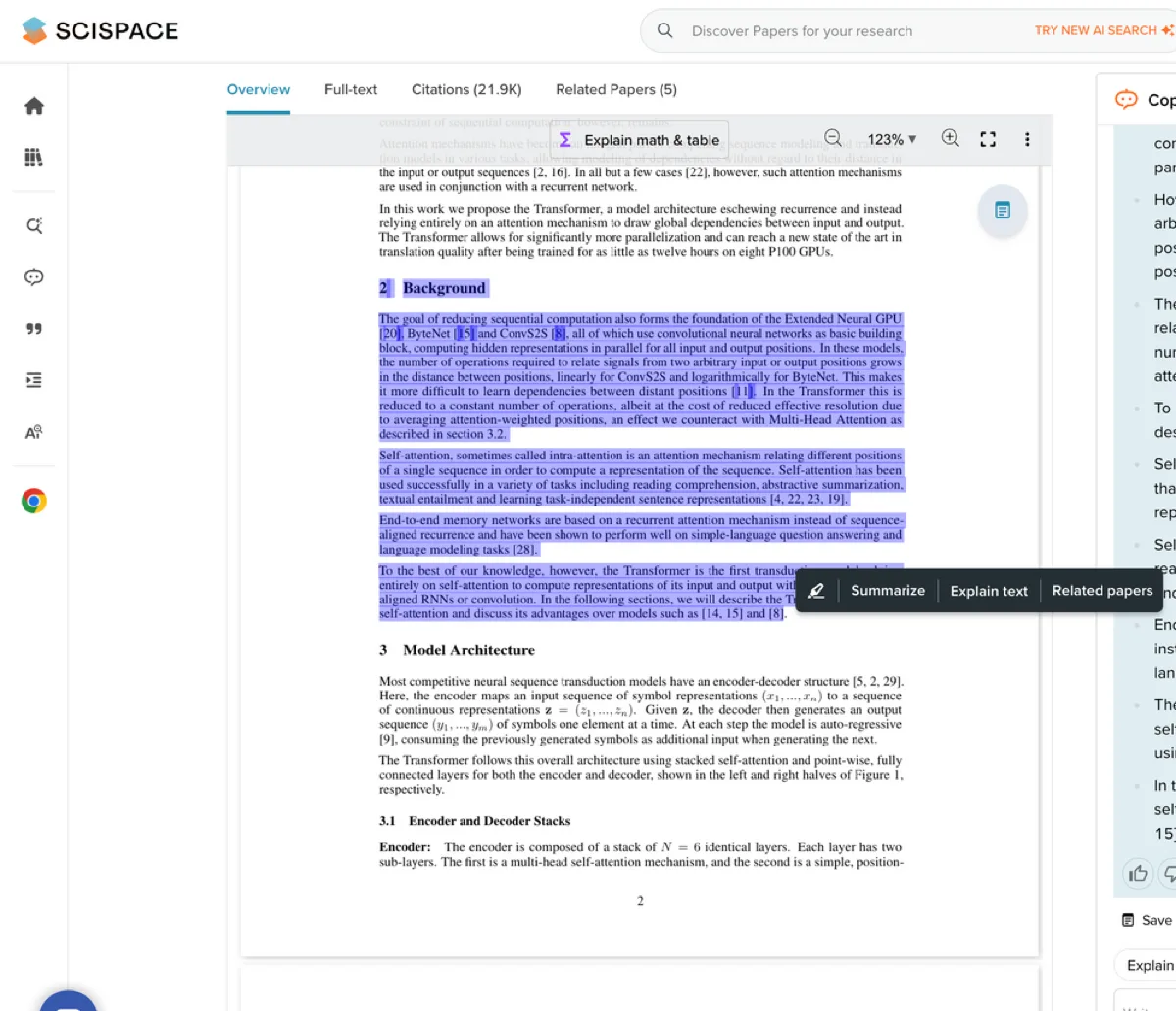
Use it when a single paper is dense and you need help with the method, result, limit, or terms. Do not use paper reading as a substitute for search.
If a missing paper would change your conclusion, cross-check the source set. Use citation trails, Google Scholar, library search, or another paper search tool. For the adjacent discovery workflow, see AI tools for literature review.
ScholarAI
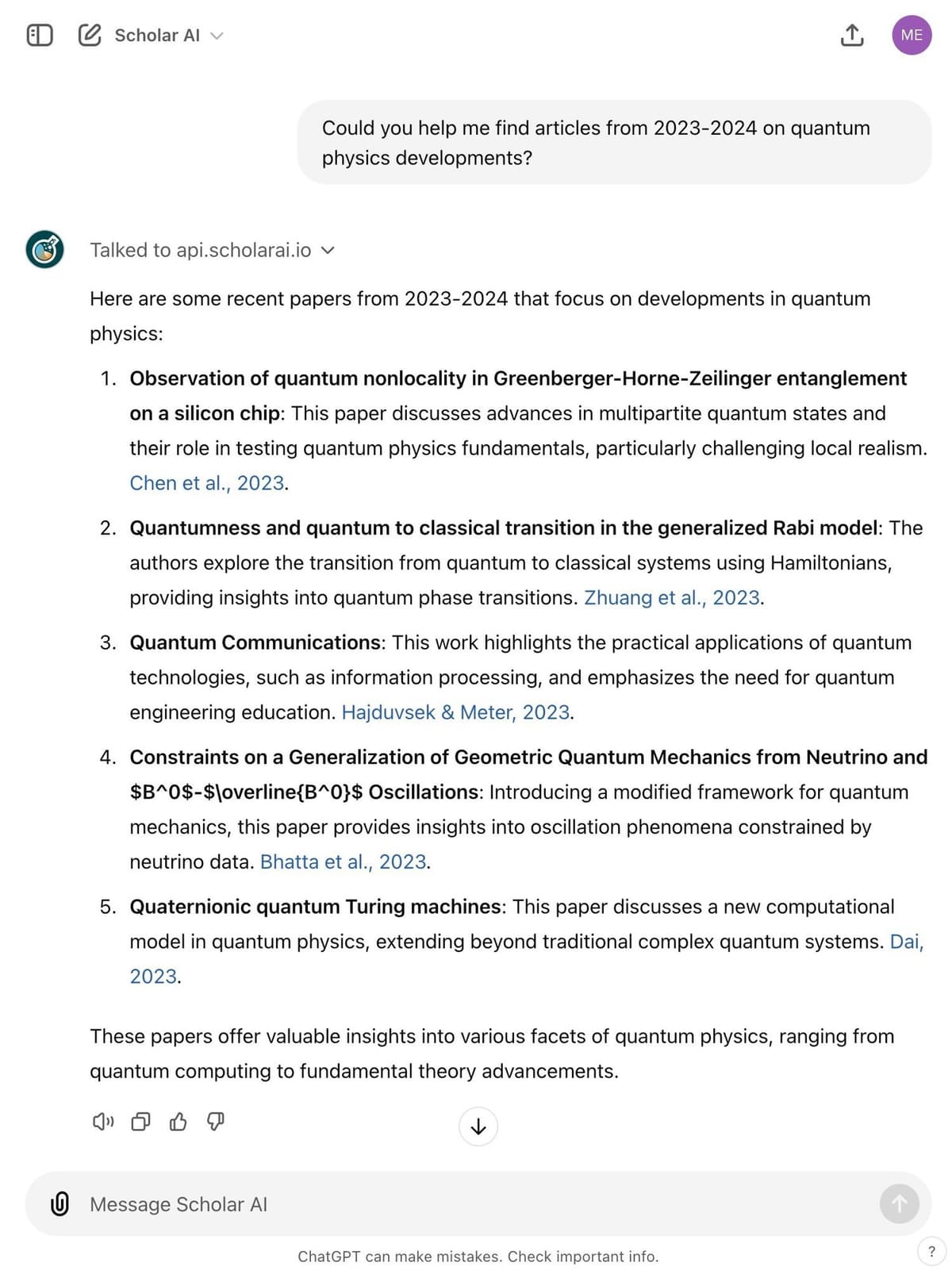
ScholarAI sits close to the ChatGPT research workflow. It positions itself around peer-reviewed paper search, citations, research chat, PDF drafts from sources, library sync, and citation styles.
Use it when you want a ChatGPT-adjacent way to find and work with papers. Verify the exact product or GPT path before you depend on a feature. Names, links, and access can change quickly in this category.
ResearchGPT
ResearchGPT is a finance-specific research product. It builds cited investment memos from filings, earnings transcripts, news, peer disclosures, and source spans.
Use it when the research question is about companies, markets, or investment diligence and the source base matches that job. The useful test is whether the memo links back to the filing, transcript, or disclosure behind each key point.
Do not use it as a literature-review tool for academic papers unless the product has added and documented that workflow.
Paperpal
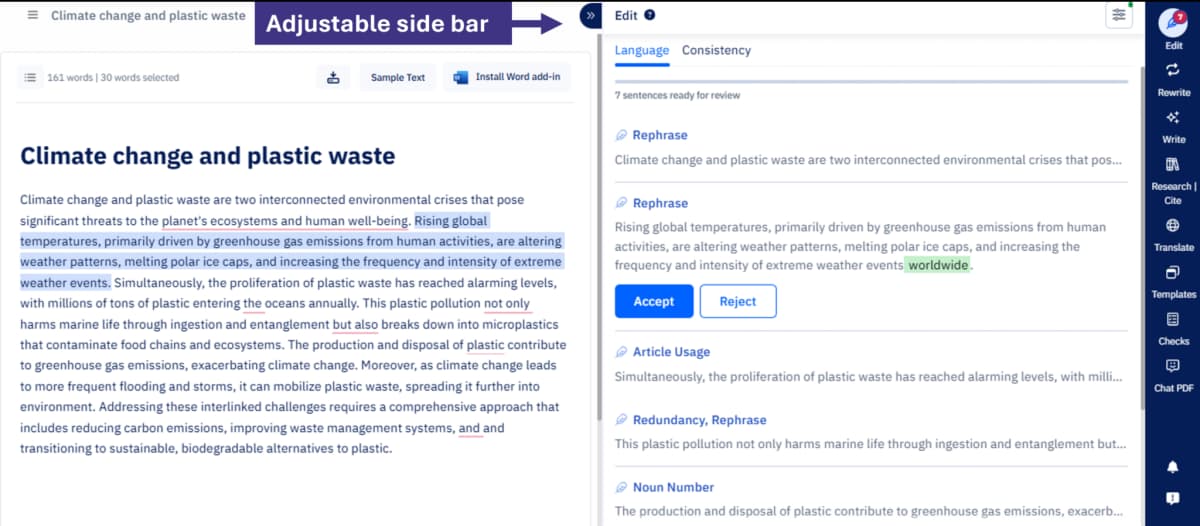
Paperpal’s April 2025 product update shows a split writing view with editing suggestions beside the draft; the current interface may differ.
Paperpal is best treated as a writing and manuscript tool. Keep source discovery and source checks separate. Paperpal's own roundup frames the category by search, citation checks, writing support, and workflow fit.
Use it when you need writing help around an academic manuscript, then keep the source audit separate. A writing assistant can improve clarity, but it cannot make an unsupported claim usable. For a broader writing-tool split, see AI tools for academic writing, and for the direct academic-writing choice, compare Jenni AI vs ChatGPT. The writer still needs checked sources, policy approval, and clean citation practice.
A safer research workflow
Start with the research job before choosing the tool.
Build the source set before the answer
- Define the research question and exclusion rules. Write down what would count as a useful source and what source types are out of scope.
- Use ChatGPT or Deep Research for broad exploration. Ask for search terms, source types, rival definitions, and likely caveats.
- Build the source set outside the answer. Open the cited pages, search paper databases, follow citation trails, and check whether key papers or primary sources are missing.
Verify claims before saving them
- Move from search to grounded questions. Ask about a specific source, claim, method, result, limit, or comparison.
- Inspect citations before saving findings. Open the cited source, read the highlighted passage, and check the surrounding paragraph for caveats.
- Compare sources explicitly. Ask where sources agree, where they disagree, which source uses which method, and what limitation recurs.
- Save only verified findings. Keep the source name, passage, question, and caveat with the note so the claim can be checked later.
This workflow sounds slower than asking 1 model for the answer. It is faster than finding a source gap during draft review. It also catches citations that do not support the sentence they were attached to.
Where Atlas fits after ChatGPT
Here is the handoff I would use for a source-dependent project.
First, ask ChatGPT Deep Research for a broad report on the topic and source leads. For a narrower Deep Research comparison, see Perplexity vs ChatGPT Deep Research. Then choose the sources that are worth inspecting: papers, PDFs, websites, reports, or notes. Add those materials to an Atlas project.
If the next source is an academic paper, add it with the most precise handle you have: a DOI, arXiv ID, exact title, or author-plus-topic query. That cuts down the chance of pulling in the wrong paper. After the sources finish processing, ask a grounded comparison question such as "Compare the methods used in these 3 papers," "Which source gives the strongest evidence for this claim?" or "Where do these reports disagree?"
Atlas can answer from the project sources and attach citation badges to the claims it uses. Open the important badges, read the passage, and check whether the answer overstates the source.
If the project has several dense sources, generate a knowledge map for the most important paper or report. Use the map as a reading guide for the central claim, method nodes, evidence nodes, limits, and relationships. For high-stakes work, use the map to find the text to inspect next.
The useful boundary is this. Atlas is strongest after source intake. It is not a live web research agent, a universal paper database, or a guarantee that a cited answer is correct. It is the workspace for selected sources that need source checks, comparison, and reuse.
How to choose the right research tool
-
Choose Atlas when the source set has been selected. Use it to ask grounded questions, inspect citations, compare sources, synthesize findings, and keep a knowledge map of the material.
-
Choose ChatGPT Deep Research when the task is broad, current, web-heavy, and exploratory. It helps map the territory before you decide which sources deserve closer reading.
-
Choose Elicit or Consensus when the question belongs in the research literature. Use them for paper search, study comparison, or a quick read on findings.
-
Choose SciSpace or ScholarAI when the hard part is reading, explaining, and working with papers you already have or can identify.
-
Choose ResearchGPT when the source base is finance-specific and the deliverable is a cited investment memo.
-
Choose Paperpal when the job is academic writing support around a manuscript. Keep source discovery in a separate tool. For a broader tool shortlist, see best AI research assistants, AI tools for academic research, and research assistant AI.
If you are deciding between Atlas and ChatGPT specifically, read Atlas vs ChatGPT. If your next step is writing a literature review, start with how to synthesize research papers or ChatGPT with citations.
If the choice is about document-heavy source work, the same evidence rules apply when you chat with PDFs or other uploaded research files.
Conclusion
ChatGPT can be a strong research assistant when the task is exploratory and the reader keeps control of the proof. Risk rises when a fluent answer replaces source choice, citation checks, or review by someone who knows the field.
The best research stack separates the stages. Use ChatGPT to explore. Use specialist tools to find and understand papers. Use Atlas when selected sources need to become cited, comparable, and reusable findings.
The goal is responsible AI use in research. Keep the evidence trail strong enough that the final claim can survive being checked.
Compare sources in Atlas
Compare papers, reports, websites, and notes with citations you can inspect.