


Jenni AI is the better fit for drafting a paper or essay. It helps with outlines, paragraphs, and citations inside one writing space. ChatGPT fits a wider range of work. It can brainstorm, explain ideas, work with files, write code, analyze data, and search the web.
Choose based on the part that slows you down. Start with Jenni AI when you have a draft and need help with academic prose or citations. Start with ChatGPT when you need to explore an idea, make a plan, or review files. Check key claims against their sources before you submit the work.

Compare your sources in Atlas
Add your sources, compare their evidence, and inspect the cited passages.
Compare the actual writing job
Jenni AI and ChatGPT overlap because both can help with writing. They differ in default workflow. Jenni AI is closer to an academic editor. ChatGPT is closer to a general assistant.
A smooth sentence can still lack support. Ask which tool helps with your current step and how you will check the source afterward.
Use Jenni AI when the paper and its citations are the main job. Use ChatGPT when the task is still open or mixes several kinds of work. Check the source before you reuse a claim, quote, number, or reference.
Use this source-check ladder for any AI output:
- No source: the claim has nothing to check.
- Suggested citation: the tool names a possible source, but you still need to find and read it.
- Generated citation: the tool creates a reference that may be wrong or made up.
- Cited report: the answer links to a source, but the link alone does not show that the claim is supported.
- Inspectable source passage: you can open the exact text behind the claim and judge its support.
If you are still evaluating Jenni as a research workspace rather than a direct head-to-head comparison, use the focused guide to Jenni AI for research before choosing a writing stack.
Writing flow and academic drafting
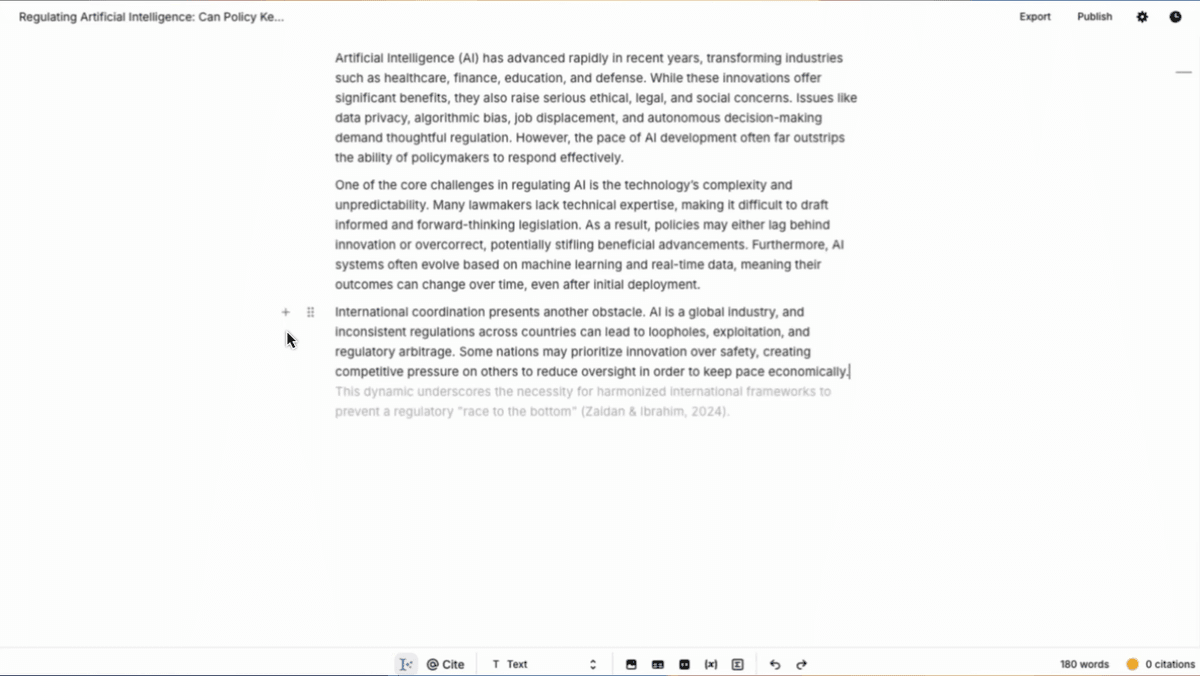
Jenni AI in the editor
Jenni AI is designed around academic writing. Its official product pages position it as a workspace to read, write, and cite with academic writing assistance.
The autocomplete page frames the product around real-time writing suggestions. That makes it useful when a student or researcher wants help with structure, flow, wording, and citation-adjacent drafting without leaving the writing task.
ChatGPT before the draft settles
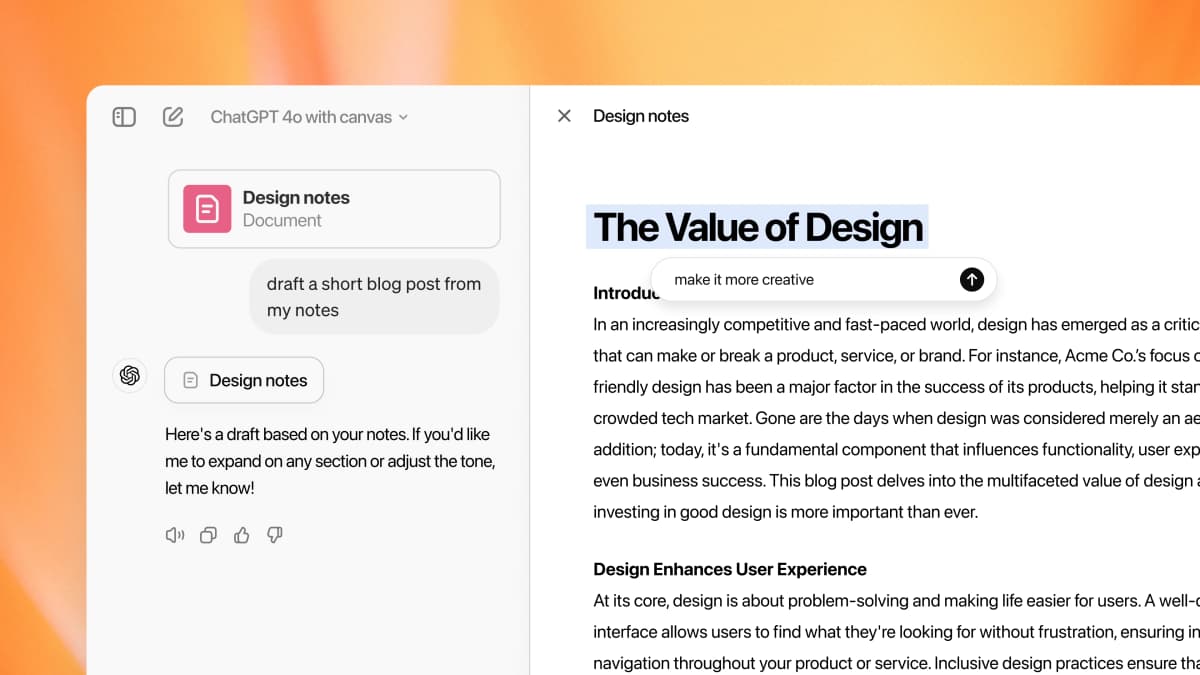
ChatGPT is more flexible. It can propose thesis options, explain a concept in several ways, rewrite an argument, or turn rough notes into a draft. Depending on plan and mode, ChatGPT also supports broader assistant work listed on the ChatGPT pricing page, including uploads, projects, custom workflows, and research features.
For a broader breakdown of where ChatGPT fits in research workflows, see ChatGPT for research.
The drafting boundary
That flexibility creates responsibility. ChatGPT may sound confident even when a reference, quote, or claim needs checking. Use it for drafts and explanations, but do not treat fluency as evidence.
Citations, sources, and verification
Citation help is not proof
A citation only helps when its passage supports the sentence. A tool can suggest or format it. The writer must still open the source and check the claim.
Source checks after AI writing
Jenni AI is more directly shaped around citation-focused writing, and its pricing page is the place to refresh current citation, upload, and export limits before relying on exact plan details.
ChatGPT can also work with sources, files, search, and Deep Research-style outputs depending on product mode and settings. OpenAI's file-upload FAQ describes tasks such as searching documents, extracting quotes, and checking files. But the final standard is the same: open the source, read the relevant passage, and check whether the claim is too broad.
Keep verification separate
For a review, essay, grant, or memo, write first and check sources second. Draft with Jenni AI or ChatGPT. Then open the source passages before you keep each key sentence.
Retrieval-augmented generation, or RAG, gives an AI source passages to use in its answer. It does not prove the answer is true. The original RAG paper on arXiv explains the method. The writer still has to check that each passage supports the claim.
If your next step is evaluating citation support rather than drafting prose, compare the dedicated AI citation checker guide before deciding where verification belongs.
Where Atlas fits next
Atlas fits after the writing or exploration step when selected sources need cited comparison and passage inspection. It does not replace Jenni AI's writing workflow or ChatGPT's broad assistant tools.
Use Atlas when the next task is to compare claims across a defined source set and open the passages behind the answer.
- Add the papers, PDFs, pages, or notes that support the draft's key claims.
- Ask one comparison question that names the evidence or caveat you need.
- Open each citation badge and read the supporting passage before keeping the claim.
Files, research, and broader assistant work
ChatGPT for broad tasks
ChatGPT has the advantage when the task reaches beyond academic prose. It can help check uploaded files, explain methods, write code, create outlines, reason through feedback, and generate alternate structures.
OpenAI's Deep Research documentation describes a mode that can research and synthesize documented reports from web sources, uploaded files, specific sites, and connected apps. That makes ChatGPT a stronger first stop for messy early-stage work.
If the decision is mainly about asking questions across uploaded files, the broader document chat tools guide covers source inspection and multi-document Q&A.
Jenni AI for academic focus
Jenni AI has the advantage when the task is already inside an academic writing lane. If the writer needs fewer broad assistant features and more help with the paper itself, Jenni AI can be the better fit.
Using both tools
The tools can also work together. ChatGPT can help explore the idea and create a rough structure. Jenni AI can help tighten the academic draft. A final source check can confirm that the claims still match the evidence.
Jenni AI vs ChatGPT compared
Read this table as a workflow map. The strongest choice depends on whether the reader is drafting prose, checking citations, analyzing files, or trying to verify source support before a claim goes into a paper.
| Decision point | Atlas fit | Jenni AI fit | ChatGPT fit | What to verify |
|---|---|---|---|---|
| Academic drafting | Not a drafting editor | Paper and essay writing | Rough drafts and new structures | Claims still match sources |
| Citation workflow | Cited answers over selected sources | Citation help inside the draft | Depends more on prompts and source setup | Every reference is real and relevant |
| File analysis | Questions across a chosen source set | Uploaded sources near the writing flow | Broad file review and transformation | File limits and supported formats |
| Broad assistant work | Narrow source review and comparison | Narrower writing focus | Files, code, data, search, and planning | Current features in official docs |
| Verification | Citation badges open source passages | Writer opens each cited source | User checks each report or link | Passage supports the exact claim |
Table 1: This matrix routes Jenni AI toward editor-first academic drafting, ChatGPT toward broader assistant work, and both tools toward a separate source-checking pass before academic claims are reused.
Worked source-check example
A practical handoff starts with a graduate student who has a draft paragraph comparing retrieval-augmented generation with ordinary chatbot answers. They have three materials: a course PDF on hallucination, a journal article on retrieval, and their own interview notes.
Jenni AI helps tighten the paragraph. ChatGPT helps propose a clearer structure. The verification step belongs in Atlas, where the remaining claims can be checked against the selected sources.
In Atlas, the student adds the PDF, article, and notes to one project, waits for processing to finish, and asks a grounded comparison question:
Which uploaded source best supports the claim that retrieval reduces unsupported answers, and what caveat should I mention?
Verify the cited answer
A useful Atlas answer should name the strongest source, summarize the relevant caveat, and attach citation badges to the claims that depend on the uploaded material.
Before reusing the sentence, the student should open each citation badge, read the passage Atlas used, and work through 5 checks:
- Confirm that the cited source is the one the sentence is actually describing.
- Check that the passage really supports the claim being made.
- Judge whether the claim is too strong for the evidence in that passage.
- Read the nearby context so the quotation is not pulled out of its original meaning.
- Look for another uploaded source that weakens or contradicts the claim.
For this comparison, the important point is the separation between drafting tools and the later verification surface where selected materials can be questioned together.
Image source is a first-party Atlas Workspace product UI asset. It shows the source library, map, and question panel used for the verification step after drafting in Jenni AI or ChatGPT.
That example keeps the roles separate:
- Use Jenni AI for academic drafting or ChatGPT for broader thinking and file work.
- Save the papers, PDFs, pages, or notes that support the key claims.
- Add those materials to Atlas as project sources.
- Ask a grounded comparison question tied to those sources.
- Open the citation badges and inspect the supporting passages before using the answer.
Which should you choose?
Choose Jenni AI to draft and improve an academic paper with citation help. Choose ChatGPT for a less defined task or one that also needs files, code, data, search, or broad reasoning.
You can also use both. ChatGPT can explore the idea and shape the outline. Jenni AI can help with the academic draft. Then check the sources behind key claims.
Use Atlas when you need to trace an answer back to the source. Open each citation and read its passage before you use the claim in academic work.
Compare your sources in Atlas
Add your sources, compare their evidence, and inspect the cited passages.