


Jenni AI is still the right fit if your main job is drafting school or research prose close to the page. The better replacement depends on the job you need to fix:
-
Use Atlas when you have PDFs, notes, transcripts, or source docs and need cited answers you can inspect.
-
Choose Paperpal when you need cleaner research prose and paper polish.
-
Choose scite when you need to see how later papers treat a source.
-
Choose Anara when you want a research library plus writing support from your own documents.
-
Choose Mapify when you need visual study maps more than a writing editor. The practical answer is that many researchers use more than one tool. A drafting assistant helps you produce text. A source-grounded workspace helps you decide whether the text is backed by proof.

Compare your own sources in Atlas
Add your sources, compare their claims, and inspect the cited passages.
Quick verdict
If you are replacing Jenni AI, first name the step that keeps breaking. Draft help is useful when the blank page is the problem. It may still leave source checks unresolved.
Jenni is a writing-first research workspace. Its product pages point to draft help, in-doc writing, source links, paper search, PDF and library chat, and review tools. That is useful when you need words on the page.
But a replacement for Jenni may need to solve a different problem:
- Drafting: you need help turning an outline into prose.
- Polish: you need tighter language, grammar, and paper checks.
- Source context: you need to understand how other papers cite a source.
- Source-grounded Q&A: you need answers tied back to your uploaded documents.
- Compare and synthesize: you need to compare sources before you write.
- Visual study: you need a map, summary, or study plan.
Atlas belongs in the source-grounded bucket. It is not a drop-in swap for Jenni's writing editor. Use it when you want to upload your own sources, ask a focused question, and inspect the passages behind the answer. For the broader category, compare the best AI research assistants.
Evaluation criteria for a Jenni AI alternative
The key split is source traceability. Many tools show source links, but those links do not all mean the same thing.
Source-traceability rubric
Use this rubric before comparing features:
- Formatted references help you style refs. They do not prove the source supports the sentence.
- Suggested sources point you toward possible proof. You still need to read them.
- Source context shows how other papers discuss a source.
- Source-backed answers connect AI responses to source text. You still need to check the source.
- Inspectable passages let you open the source text and decide whether the answer is usable.
For school and research work, that last step matters.
A fluent paragraph with a source link can still be wrong, weak, or tied to the wrong passage. That is why the best drafting tool may not be the best AI tool that cites sources or checks source support.
Workflow checklist
Before choosing, write down the job you need the product to do:
- Do you need sentence-level drafting help inside a document?
- Do you need grammar, tone, and writing polish?
- Do you need source formatting or source discovery?
- Do you need to compare papers, PDFs, notes, or transcripts you already have?
- Do you need to inspect exact proof before turning an answer into prose?
- Do you need app sync, exports, or paper checks?
- Do you need a free plan for light use, or a paid workspace for sustained research?
Pricing, plan limits, upload limits, source styles, and app sync change often. Refresh those details on official product pages before buying. Start with Jenni pricing, Anara, scite, and the official product page for any writing tool you shortlist.
Jenni AI alternatives compared
| Workflow question | Atlas | Jenni AI | Paperpal | scite | Anara | Mapify |
|---|---|---|---|---|---|---|
| Best-fit job | Source-grounded Q&A, comparison, and synthesis from your materials | Academic co-writing, autocomplete, citations, and writing support | Academic editing, manuscript polish, and submission-oriented writing help | Citation context and research discovery | Library-based research writing and Q&A | Visual study maps, summaries, and learning workflows |
| Source traceability | Citation badges can be inspected against source passages in your Atlas project | Useful for writing with citations, but source checking still needs review | Useful for editing and academic-writing workflows, with claims to verify from official pages | Stronger fit for seeing how papers cite each other | Stronger fit when writing from a personal research library | Better for visual organization than citation inspection |
| Writing support | Not a sentence-by-sentence writing editor | Core reason to use it | Strong fit for editing and polish | Not the main job | Supports writing from a library | Not the main job |
| Citation verification | Good fit for checking whether uploaded sources support an answer | Helpful starting point that still needs review | Check official scope before relying on it for verification | Core use case is citation context | Useful when citations are tied to your library | Limited fit for citation forensics |
| Works from your sources | Designed around project sources and grounded answers | Supports PDF and library workflows | Check current official upload and document features | Mostly paper and citation-network oriented | Built around a research library | Often used for imported materials and visual summaries |
| Best user | Researcher who needs to compare and verify evidence before writing | Writer who wants help drafting academic prose | Researcher polishing academic writing | Researcher checking citation context | Researcher building a source library | Student who wants visual structure |
| Pair it with | A writing or reference tool when checked findings need manuscript formatting | A source-checking tool when cited claims need passage review | A research tool when the argument still needs evidence | A writing tool when the source check is finished | An editor when the library-backed draft needs final polish | The original sources when a visual summary needs verification |
| Buying caveat | Confirm it matches source-grounded research rather than manuscript editing | Refresh autocomplete, chat, upload, and export limits | Refresh plan limits and any plagiarism or AI-detection claims | Refresh access, database, and plan details | Refresh library, model, and export details | Refresh import, export, and source limits |
Table 1: This table starts with the job. If your problem is "I need a better paragraph," choose a writing tool. If your problem is "Do these sources support this claim?", choose a source-checking tool.
Best Jenni AI alternatives by workflow
Atlas for source-grounded comparison and synthesis
Atlas is the better fit when your Jenni replacement search is about proof. If you already have sources and need to compare or check them, a writing-first tool is too shallow for the job.
In Atlas, the source-check workflow is:
- Add your PDFs, notes, transcripts, or other source materials to a project.
- Ask a focused question, such as "Which sources support this claim, and where do they disagree?"
- Read the answer with source badges attached to source text.
- Open the badges and inspect the exact passages before using the answer.
- Turn the checked answer into your draft, outline, memo, or review section.
That process is slower than draft help, but it answers a different question. It helps you decide what the source set can support.
Paperpal for research paper polish
Paperpal is the clearest Jenni AI alternative when you already have ideas and need cleaner prose. Its product pages focus on research writing, edits, source help, PDF chat, plagiarism checks, and submission support.
That makes Paperpal a better fit than Atlas when you need help with language or paper prep. It is also closer to Jenni for writers who want a writing assistant.
Use Paperpal when:
- You already know what you want to say.
- You need language suggestions and edit support.
- You care about manuscript-readiness features.
- You want a writing surface closer to the final document.
Do not use competitor pages as proof of Paperpal pricing, upload limits, plagiarism coverage, AI detection, or journal fit. Check the official product and pricing pages first. Paperpal's own Jenni AI review and alternatives page is useful for SERP shape, but it is still a vendor page.
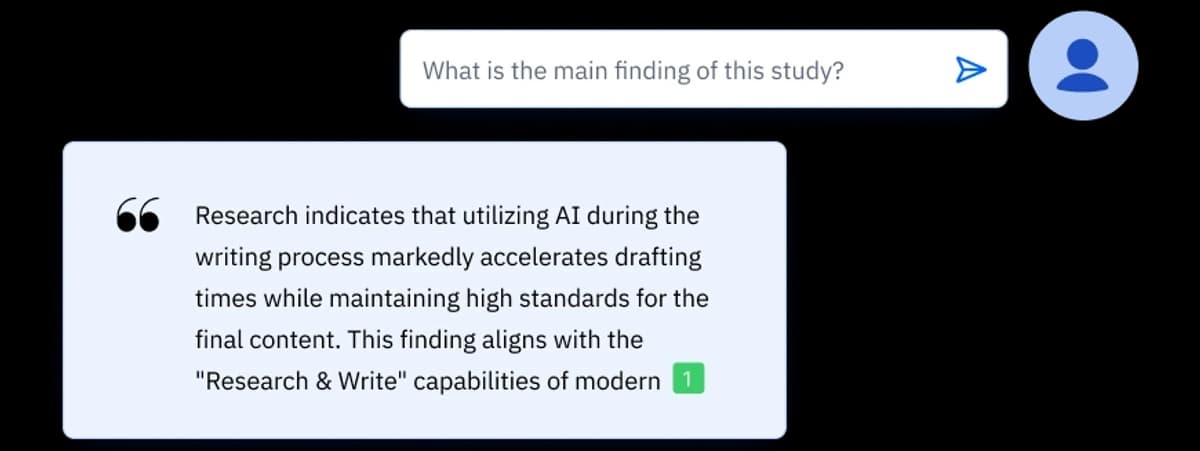
Paperpal's official product image shows its research-and-writing surface returning an answer excerpt with a citation marker. The image supports the product's source-help positioning; it does not establish answer accuracy, plan limits, or manuscript quality.
Jenni for co-writing
Sometimes the best Jenni AI alternative is no alternative. If your main work is drafting, extending notes, and adding sources while you write, Jenni may still fit.
The reason to compare alternatives is not that Jenni is bad. Your project may have moved from drafting into proof work. A literature review, thesis chapter, or research memo often starts as writing and turns into source checking. If you are still deciding where Jenni fits, use this guide to Jenni AI for research before switching tools. At that point, draft help matters less than knowing which source supports which claim.
Stay with Jenni when:
- The blank page is the main friction.
- You want draft help near your text.
- You need a writing-first workspace with source support.
- You are comfortable checking source support outside the drafting flow.
Move beyond a writing-first tool when you need to compare multiple PDFs, notes, and source documents before deciding what the draft should say.
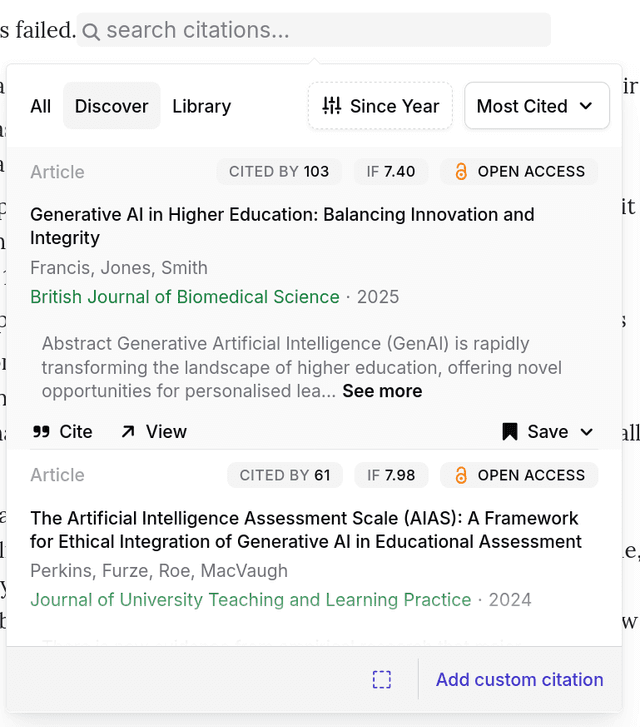
Jenni’s official citation-management guide shows search results and cite controls beside the writing workflow. The displayed sample records and metrics are illustrative.
scite for source context
scite is a better fit when the job is source context. Its Smart Citations feature helps show how later papers cite a work. That can include support, contrast, or discussion.
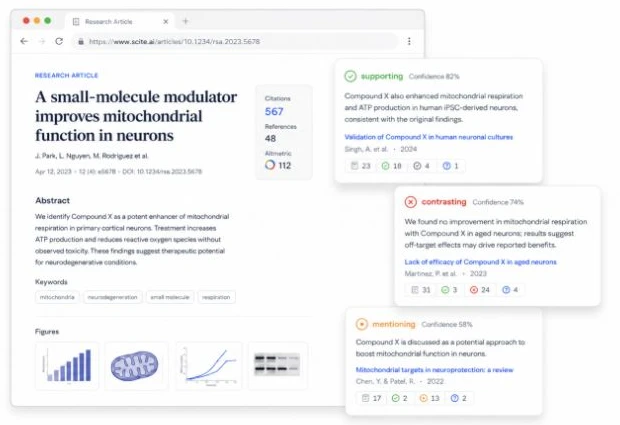
Scite’s official feature page publishes this interface illustration. Its examples show the product layout and labels, not independently verified citation evidence.
That is a different job from Jenni's writing space. Use scite before drafting a literature review, while checking sources, or when deciding whether a source is central or disputed.
Use scite when:
- You need to understand how a source is treated by later research.
- You are checking whether a paper is supported or contested.
- You want a source-network view before choosing sources.
- You are doing literature discovery rather than paragraph drafting.
Do not treat any citation label as automatic truth. Source context gives you a lead for human review. You still need to read the source and the citing papers. If source handling is the main job, compare dedicated citation tools for research before choosing a writing assistant.
Anara for library-based writing
Anara is relevant when you want a research library, document Q&A, and writing support around the sources you collect. That makes it a strong fit for readers who are moving from generic AI writing into source-based work.
Compared with Jenni, the decision comes down to where the session begins. If you start in a draft, Jenni may feel more direct. If you start with a library of papers and notes, Anara may fit better.
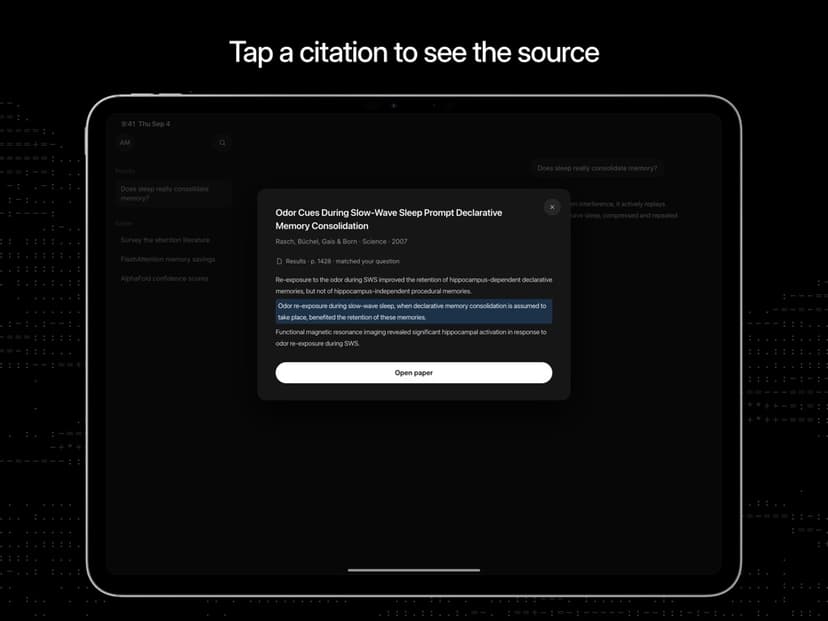
Anara’s official App Store listing shows a citation opening a highlighted source passage on iPad. The sample citation is not independently verified evidence.
Use Anara when:
- You want to build a research library.
- You want to ask questions across saved documents.
- You need writing assistance that references your library.
- You want a workspace that connects reading and writing.
Refresh limits and export details from Anara's official pages before you commit. This matters if your project depends on a large library, set source formats, or team work.
Mapify for visual study and summary workflows
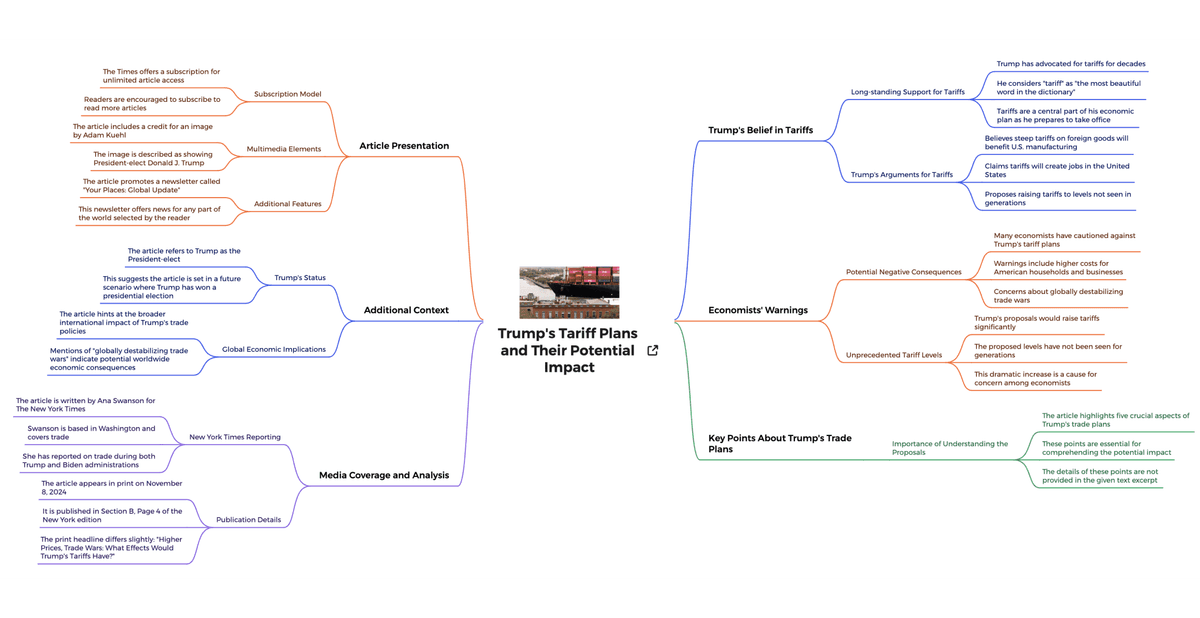
This official Mapify asset shows its webpage-summary workflow; it illustrates visual study and summarization, not source-grounded academic writing. View the Mapify website summary feature.
Mapify appears in the Jenni AI alternatives SERP because some searchers do not need a better writing editor. They need a different representation of the material.
Visual maps and summaries can help when you are trying to understand a topic. They can also help you plan a talk or turn scattered sources into a study path. That is useful for students and researchers, but it is not the same as writing polish or source checks.
Use Mapify when:
- You want a visual map of ideas.
- You are studying or explaining a topic.
- You need summaries and order before writing.
- You care more about comprehension than manuscript drafting.
Do not choose a visual tool as your only writing tool if your final paper depends on precise source handling, source checks, and prose review.
Logically and other workflow comparisons
Logically appears in competitor comparison pages for research writing, so it belongs in the research set for anyone comparing Jenni alternatives. Those pages are useful SERP proof. They show that searchers care about writing, source use, source support, and fit.
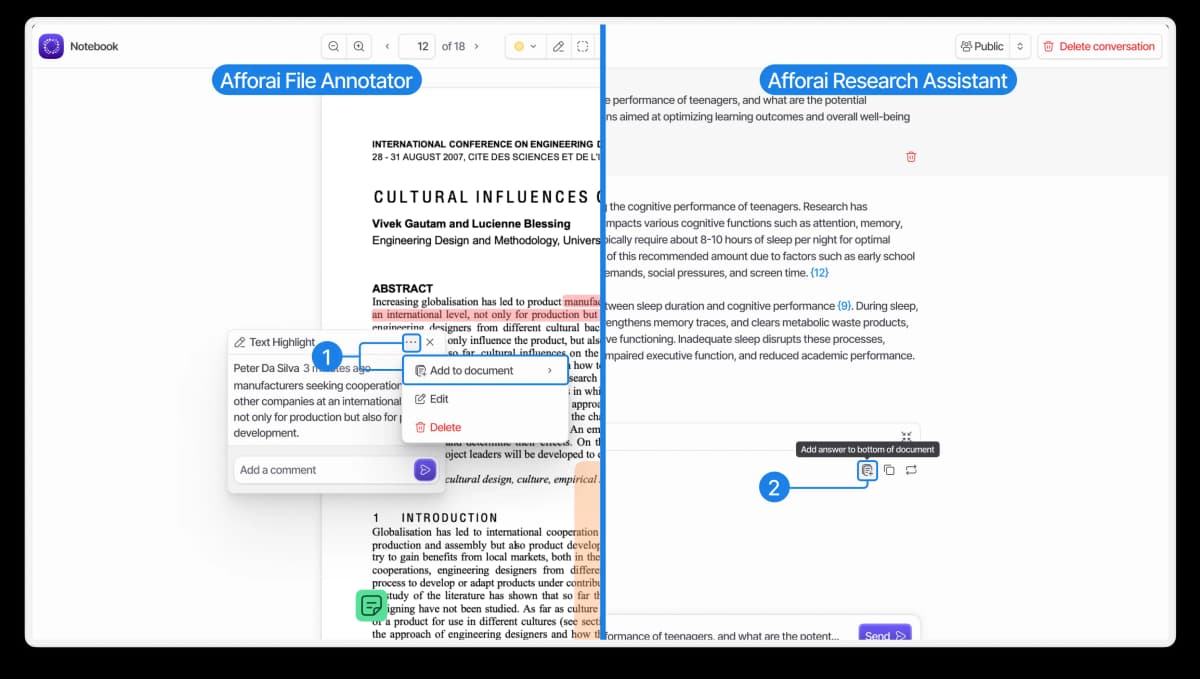
Logically’s official getting-started guide publishes this workflow image. The displayed paper and assistant answer are demo content.
For product decisions, verify feature claims from official product pages. Competitor pages can help you find criteria. They should not be the final source for claims about which tool is better. I used pages such as PaperGuide's Jenni vs Paperpal comparison, Mapify's Jenni alternatives list, and Effortless Academic's Jenni AI review for searcher criteria, then bounded product claims to official sources.
Use comparison pages to build your shortlist, then check:
- Does the tool support the writing surface you need?
- Can it work with your sources?
- Can you inspect evidence?
- Can you export in the format your institution or workflow requires?
- Are pricing, limits, and model claims current?
When Atlas fits better
Use Atlas after the draft idea becomes a source question. The moment often sounds like one of these:
- "Which of these papers supports this claim?"
- "Where do these sources disagree?"
- "What does this PDF say about my research question?"
- "Can I compare these notes before I write the section?"
- "Which passages should I inspect before citing this?"
Atlas supports grounded questions, source badges, and source grounding as part of the product experience. That is the important difference from a writing assistant. The output is not just polished text. It is a cited answer connected to the sources in your project. If most of your sources are PDFs, the same source-checking pattern applies to chat with PDF workflows.
For a Jenni AI alternative searcher, that means Atlas is strongest when:
- You are past brainstorming and need evidence.
- You have source documents you trust enough to upload.
- You want to compare several materials in one workspace.
- You need source links you can open and inspect.
- You want to reduce the risk that a fluent answer hides weak proof.
Atlas is a poor fit when the immediate job is one of these writing tasks:
- Grammar correction.
- Autocomplete.
- Plagiarism or AI-detection reports.
- Citation-style export.
- Journal submission polish.
Pair it with a writing or editing tool when those jobs matter.
Which Jenni AI alternative should you choose?
Choose the alternative by the failure point in your current work:
- If you are stuck drafting research prose, stay with Jenni or compare writing-first tools.
- If the prose is written but rough, compare Paperpal and other academic editing products.
- If your problem is whether a source is supported or disputed in the field, use scite.
- If your work starts from a research library, compare Anara and library-based assistants.
- If you need a visual study structure, consider Mapify.
- If your next step is to compare your own sources and inspect the evidence behind an answer, use Atlas.
The strongest research stack often uses more than one tool. Use a source-grounded workspace to decide what the proof supports. Then use a writing or editing tool to shape the prose. That split keeps draft help from replacing source judgment.
Compare your own sources in Atlas
Add your sources, compare their claims, and inspect the cited passages.