


Jenni AI can help with research, but it helps most with one job. It turns source material into a working draft. Its own researcher page positions the product around academic writing flow, with research support attached to the manuscript workspace. That matters because a review or thesis chapter needs both writing flow and source checks.
Use Jenni when you want writing help, AI chat, source search, PDF-aware drafting, or review notes inside a draft. Use a separate check when a generated sentence or source will appear in submitted work.
The practical test is not "Can Jenni write research text?" It can help with that. The better question is whether each claim in the draft still points to a source you can inspect.

Verify research claims in Atlas
Check draft claims against your sources and inspect the cited passages.
Quick answer
Jenni AI is useful when the task is writing a research draft. It can help you revise text, find sources, manage a paper list, and work with saved papers. The product includes an editor, writing help, AI Chat, source tools, open access paper search, and review tools. If you are still choosing the wider category, start with a broader AI research assistants comparison before judging Jenni alone.
That does not mean every Jenni-assisted citation is ready to trust. Jenni can find and format sources. Its chat can cite sources it uses. The researcher still has to check whether the cited paper supports the sentence in the draft.
I would use Jenni for writing and source discovery. Then I would check important claims against the source before they leave the draft. Atlas appears later for that check. It is not a replacement for Jenni's editor.
Split the research workflow into three jobs
Most bad evaluations of AI research tools collapse three different jobs into one score. For Jenni, keep them separate.
- Find and organize sources. This includes source search, saved papers, PDFs near the draft, and a usable paper list.
- Draft with citation support. This includes writing help, AI Chat, section prompts, transitions, review prose, and formatted citations.
- Verify claim support. This means opening the source, reading the relevant passage, checking nearby caveats, and deciding whether the claim is too strong.
Jenni is strongest in the first two jobs. It can help you stay inside the draft while finding sources and writing around them. The third job still needs human judgment. A citation can be real and well formatted, yet still fail to support the sentence it sits beside.
This three-job model also prevents the article from becoming a feature checklist. A feature matters only if it helps one of those jobs without hiding the risk in another.
Where Jenni AI helps researchers
Jenni's core advantage is that it puts writing, source lookup, and citation formatting in the same workspace. That helps when the draft is already underway. You know the section you need to write. You need better wording, a candidate source, or a cleaner source path.
The AI Autocomplete tool reads nearby text, headings, prompts, and cited material before it suggests more text. It can also suggest in-text citations from uploaded sources or outside sources when that setting is on. That can help you move from notes into prose. The wording still needs source review before it becomes proof.
AI Chat is useful for focused research work. It can answer questions about the draft. It can use selected text, draw from saved sources, and include inline citations when it uses a source. That helps when you want to ask which claims in an intro need support or which papers discuss a method.
Jenni's citation tools deserve close review. They support source search, DOI and PMID lookup, URL import, BibTeX and RIS files, PDF upload, source imports, citation styles, and a reference list. Jenni resolves paper records through OpenAlex. Uploaded PDF text can support writing help, chat analysis, and source suggestions. For a citation-first stack decision, compare dedicated citation tools for research separately from writing assistants.
The Library turns those source workflows into a reusable paper list. You can import from Zotero or Mendeley. You can upload PDFs, sort sources into groups, search records and PDF text, and export references. A source without an attached PDF may still be citable as a record. It is not the same as full-text context for chat or writing help.
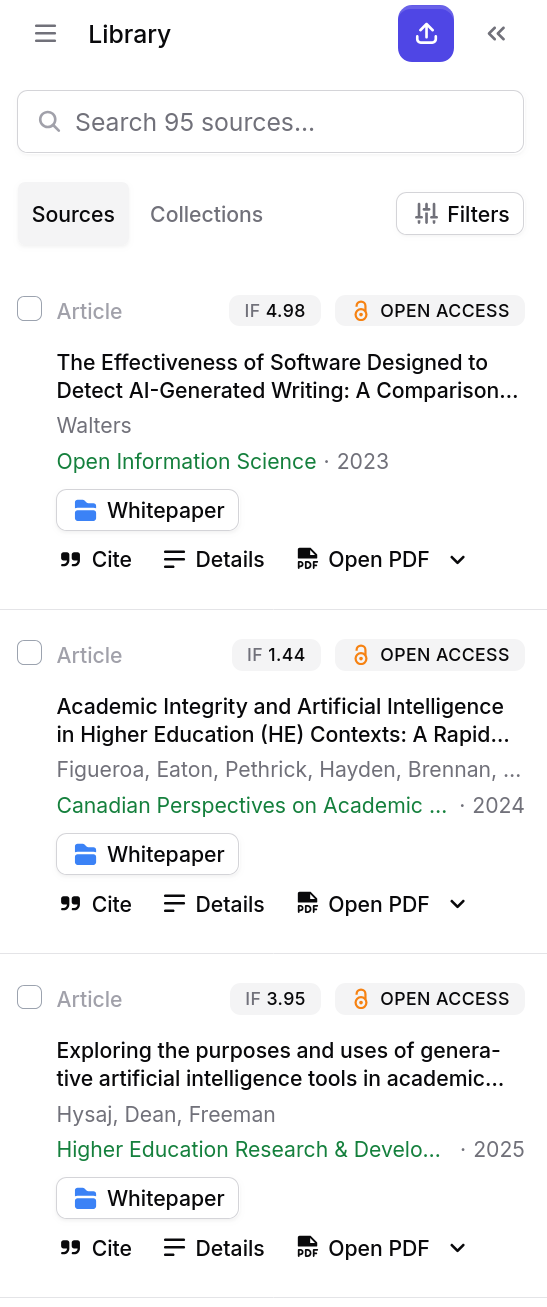
Jenni's Reviews surface also matters for research writing. Proofread can catch language issues. Claim Confidence can flag claims that look unsupported or overstated. Tone of Voice can check style. Peer Review can give academic-review-style feedback. These tools can improve the draft, but important claims still need source checks.
Citation suggestions need verification
Research citations fail in several different ways. A tool can produce a real source and still leave you with an unsupported sentence.
Here are the distinctions I would keep visible while using Jenni:
- A formatted citation means the reference is styled for the manuscript. It does not prove the sentence is true.
- A suggested citation means a source looks relevant to the text or query. It does not prove the exact passage supports the claim.
- An inline AI-chat citation means the answer referenced a source. It still needs to be opened and checked.
- A verified passage means you read the source text, checked the surrounding context, and confirmed the claim's strength.
That last step is where many AI-assisted research workflows become fragile. The sentence may sound academic. The citation may look legitimate. The bibliography may update by itself. None of that tells you whether the cited study measured the same outcome, used the same group, or reached the conclusion the draft now implies.
Use this source-traceability checklist before you reuse a Jenni-assisted claim:
- Open the cited source and read beyond the citation record.
- Find the passage that supports the exact sentence in your draft.
- Check whether nearby text adds a limit or a narrower condition.
- Confirm that the claim is not stronger than the source.
- Check whether another source in the review disagrees.
- Save a note on what you verified if the claim will appear in submitted work.
This is not a reason to avoid Jenni. It is a reason to use it for the right job. Let it reduce writing and citation friction, then slow down when the draft asks you to make an evidence claim.
Atlas source-grounded verification workflow
Atlas fits after the Jenni-assisted draft has produced a claim worth checking. It does not replace Jenni's editor, writing help, reference-list formatting, or source imports. Its job is to bring the source set into a project. Then you can ask grounded questions, compare sources, and inspect citation badges before you reuse an answer.
For example, suppose Jenni helps draft this sentence:
A research chatbot gives more reliable answers when it can cite passages from the papers it uses.
Before that sentence goes into a literature review, check the source behind it. You need to know what the source tested and whether it applies to your project.
Use the image as a reminder of the order of work. The draft claim is not verified because it sounds plausible. It becomes usable after you add the source to the workspace, narrow the question, and open the cited passage.
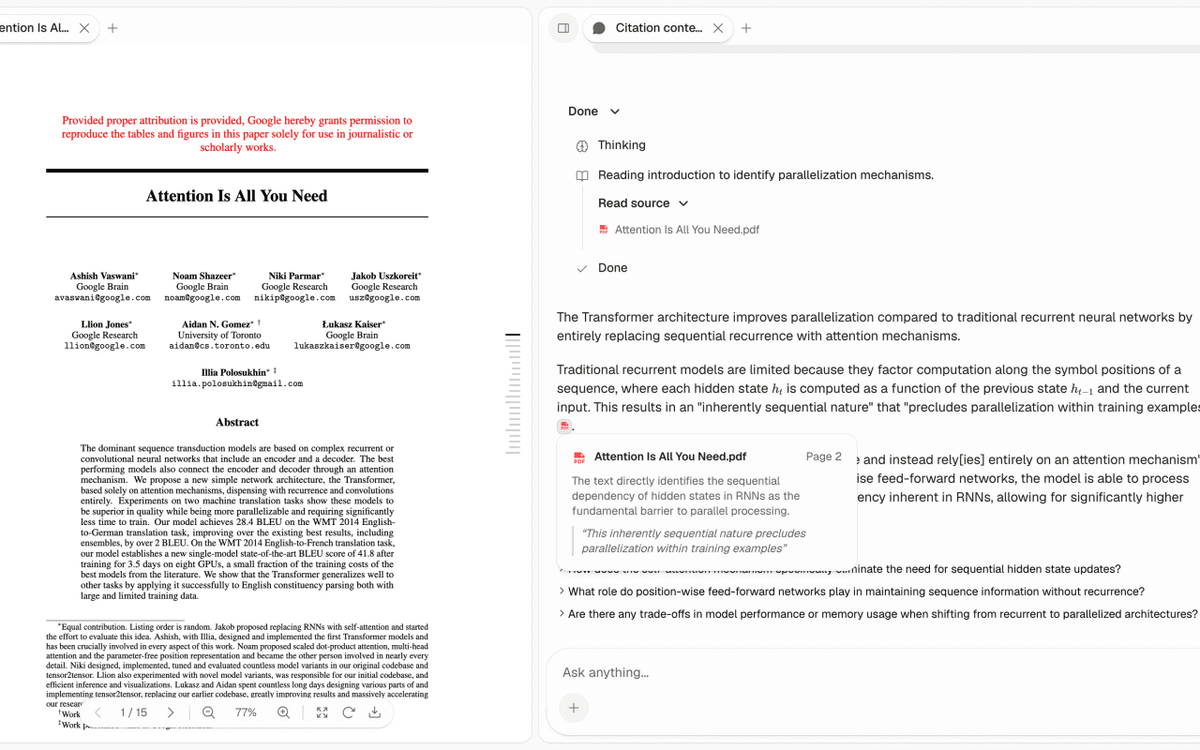
In Atlas, the continuation would look like this:
- Add the cited paper or source set to the project. If you only have a title, DOI, arXiv ID, author, or topic, use paper search. Review the result before adding it.
- Ask a grounded question such as, "Which source supports this claim, and what limit does it mention?"
- Compare sources if more than one paper is involved. Ask where they agree, where they differ, and which evidence is strongest.
- Open the citation badges for the claims that matter. Read the cited passage and the surrounding paragraph before moving the claim back into the draft.
That workflow keeps the writer in control. Atlas citations connect an answer back to source material. They still need review. If a citation is weak, missing, or too broad, narrow the question or inspect the source yourself.
Jenni AI for research workflow table
The table below separates the writing job from the source-checking job. Jenni can help on several rows. The final column shows where a grounded workspace can take over.
| Research task | What Jenni helps with | What still needs checking | Where Atlas can continue the source-grounded work |
|---|---|---|---|
| Start a literature-review section | Writing help, section prompts, AI Chat, and academic phrasing inside the draft | Whether the draft reflects the papers you selected | Add the relevant papers to a project and ask what the sources agree or disagree on |
| Find candidate citations | Source search, DOI or PMID lookup, OpenAlex-backed records, and library results | Whether the candidate source is the right paper and has usable full text | Add the paper by title, DOI, arXiv ID, author, or topic, then review the imported source |
| Draft with existing sources | Library citations, uploaded PDFs, and chat context near the document | Whether the generated sentence matches the cited passage | Ask a grounded question about the claim using only the imported source or source set |
| Review factual claims | Claim Confidence and review suggestions that flag unsupported or overstated claims | Whether the flagged issue is real and how the source qualifies it | Open citation badges, inspect the passage, and ask for a narrower answer if support is weak |
| Compare several papers | Chat questions and manuscript-level synthesis support | Whether the answer separates each source and names conflicts | Ask Atlas to compare sources in a cited table with claim, evidence, limitation, and citation |
| Prepare the final draft | Citation style updates, reference-list help, proofread, and peer-review-style feedback | Whether every important claim is traceable before submission | Save checked findings as notes with the source and passage you read |
Table 1: The table is also a buying guide. If your main bottleneck is writing momentum, Jenni is a fit. If your main bottleneck is source traceability, you need a workflow that keeps the answer tied to the passage.
Recommendation
Use Jenni AI if your research work is blocked by drafting, source insertion, academic phrasing, source cleanup, or draft review. It is most helpful when you already know the paper or section you are working on. In that case, Jenni keeps sources close to the text.
Be more cautious if the research job is broad search, systematic screening, extraction tables, evidence grading, or high-stakes claim checks. Jenni can still help at the writing stage. Those jobs also need a process for source choice, passage review, and research paper summaries that keep claims tied to source text.
My practical recommendation is:
- Use Jenni to move from notes and sources into a structured manuscript.
- Use Jenni's citation and library tools to reduce source cleanup.
- Use Atlas when the draft claim needs grounded Q&A, multi-source synthesis, and citation-badge review.
- Use manual reading for any claim that affects the argument, conclusion, recommendation, or grade.
The best Jenni workflow is not fully automated research writing. It is aided drafting with source checks before the claim leaves the workspace.
Verify research claims in Atlas
Check draft claims against your sources and inspect the cited passages.