
Atlas vs Notion AI (2026) | In-Depth Research Comparison
Atlas is a visual research workspace, Notion AI is the AI add-on inside Notion. Compare paper deconstruction, citation grounding, and project-scoped context.
- Byline

Summary
Use Atlas for source-grounded research synthesis. Use Notion AI for writing help inside Notion pages.
The updated comparison covers citation grounding, Knowledge Maps, Notion export migration, page drafts, and project-scoped context.
Atlas traces claims to source passages, while Notion AI assists with prose inside a workspace.
Notion AI can remain useful for page drafting while Atlas handles research corpora that need evidence trails.
Note: We make Atlas, and our team wrote this comparison. Where Notion AI has the better answer for a research job, the article says so plainly. See the table rows where Notion AI wins and the "When to choose Notion AI" section below.

Atlas

Ask cited questions across your research
Trace answers to passages across your uploaded research corpus.
Quick answer
Atlas provides citation-grounded answers, visual Knowledge Maps, and project-scoped research context. It is a visual research workspace for people who need to understand a body of papers, such as a thesis, treatment decision, major purchase, or literature review.
Notion AI is the AI layer inside Notion. It drafts and edits pages, searches workspace knowledge, and offers Research Mode on Business and Enterprise plans. Its reports can draw from workspace pages, uploaded files, connected apps, and the web.
Use Atlas when the answer must trace back to source passages, each paper needs a Knowledge Map, or one bounded project needs durable research context.
Notion AI fits material that already lives in Notion. Use it to draft pages and clean up a team wiki. It also supports enterprise search and research reports. Notion AI shows the sources used by Research Mode. Atlas adds a passage-level explanation of why a source supports each claim. Atlas does not live inside Notion's page and database workflow.
Criteria and methodology
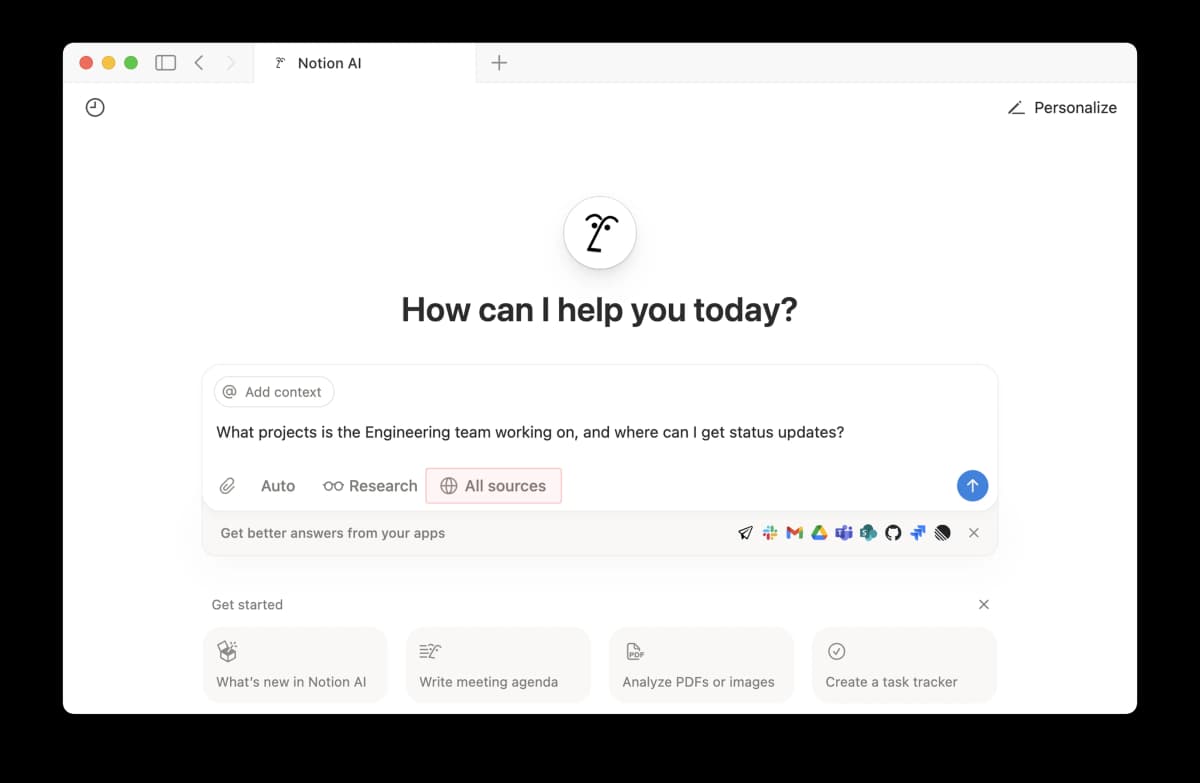
This official Notion product view shows its workspace-search model: the prompt can draw from selected sources and connected team apps. That breadth is useful for company knowledge, while Atlas keeps the research evidence inside one project.
This table uses 5 tests: paper map, project view, source trail, Notion fit, and price. Those are the jobs a searcher weighs when they compare Atlas vs Notion AI, alongside broader choices among second-brain apps.
| Atlas | Notion AI |
|---|---|
| Paper map: Knowledge Map breaks a paper into claims, evidence, and links between ideas. | Paper page: Page summaries, workspace search, and Research Mode work inside Notion. |
| Project view: Semantic Map clusters sources, notes, chats, and citations across a project. | Workspace view: Search and Q&A work over Notion pages and databases. |
| Source trail: Claim-source-justification shows the claim, source passage, and reason the passage supports it. | Source links: Research Mode lists the workspace, file, connected-app, or web sources used for a report. |
| ✗ Standalone workspace: Atlas is separate from Notion and is built for research corpora. | ✓ Inline writing: Notion AI drafts, edits, summarizes, and fills fields inside Notion. |
| ✓ Project context: Sources, notes, chats, maps, and citations stay together inside one project. | ✓ Team docs: Notion keeps the page, database, comment, and permission model in one place. |
| Price: Atlas has an evaluation sample, then Atlas Pro at $20/mo or $204/yr. | Price: Free and Plus include an AI trial. Full AI features are bundled with Business at $20/member/month. |
Table 1: This overview compares source-grounded research with AI inside a team workspace.
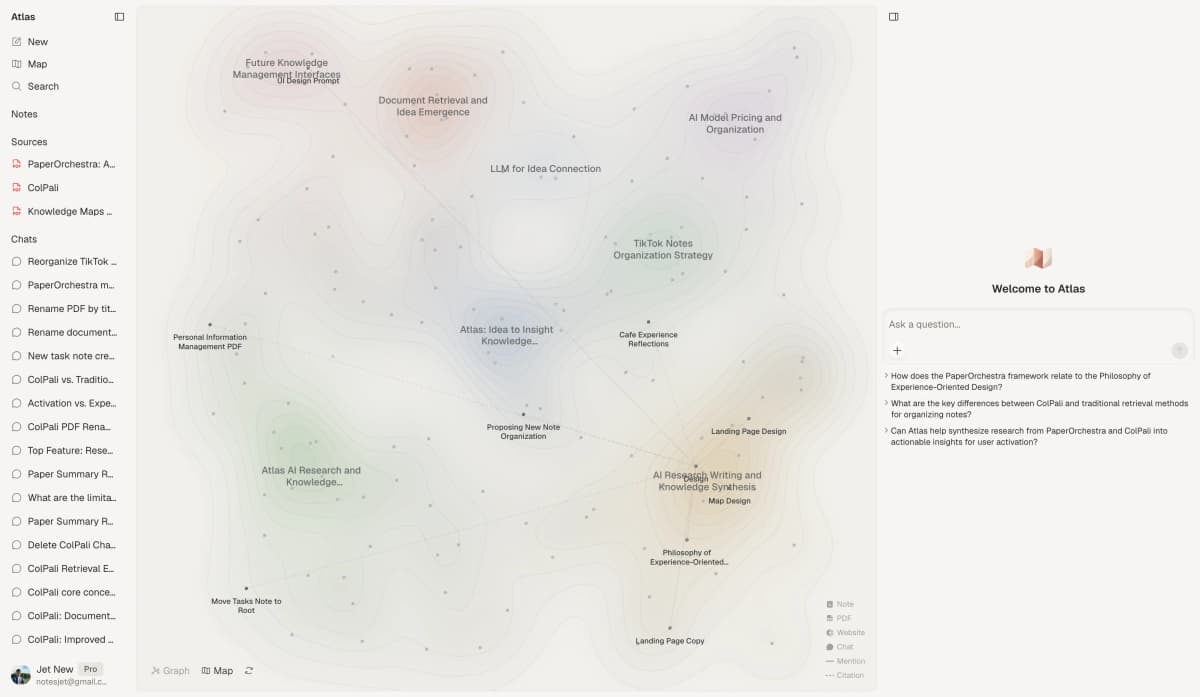
This product view shows how Atlas supports research questions across clustered sources while keeping the source set visible.
How is Atlas different?
Notion AI and Atlas overlap at the surface. Both touch reading, notes, and AI answers. They split on 3 things that decide whether the output is easy to defend.
Visual maps for papers and projects
Atlas builds 2 visual maps as you read. A Knowledge Map breaks a paper into claims, evidence, definitions, and labeled links such as motivates, causes, enables, or contradicts. You see the paper's spine first, then click into the passages behind it.
A Semantic Map turns a project into a canvas where related sources, notes, chats, and citations cluster by topic. It is how 200 papers stop being a folder and start being a corpus.
"It's like an ultimate GPT. I can finally see what I've read." Kyle Lao, CEO & Co-founder of MenSC Labs
Notion AI can read uploaded files and create reports. It does not deconstruct each paper into a claim-and-evidence map or re-map a corpus by topic angle.
If you have tried to recover a paper weeks later, the Knowledge Map is the first Atlas surface that pays for itself. The distinction between a mind map and a knowledge graph explains why this visual structure matters.
Source traces for every claim
Research tools can generate unsupported text or place a citation next to a claim the cited passage does not support. Atlas renders answers with a claim, its passage, and a short reason the passage supports the claim. You can open the source paragraph and read the highlighted text in context.
The benchmark Atlas runs internally is the H/V ratio. It counts AI sentences whose source does not hold up against sentences whose source does. Atlas targets H/V < 0.1 on the source-grounding benchmark. We publish the method in Verifiable AI Research (2026).
Notion's official AI overview confirms that Research Mode shows its sources. Atlas differs by rendering a claim-by-claim reason trace, a stricter form of citation analysis.
Context stays inside the research project
Notion AI uses the current workspace, connected apps, and the web as searchable context. Atlas uses a project-scoped research context for sources, notes, chats, Knowledge Maps, Semantic Maps, summaries, and citations.
Return to the same Atlas project and its source trail remains available without rebuilding the surrounding evidence. Our guide to knowledge graph AI explains the relationship model.
Separate Atlas projects isolate unrelated context. Sources and chats from one project do not enter another automatically. Add a source explicitly when it belongs in both. Notion AI can search a broader workspace, while Atlas exposes citation and map surfaces within a bounded research project.
Comparing Atlas and Notion AI: features
Atlas and Notion AI live in different categories. Atlas spans paper maps, project maps, cited AI answers, and project-scoped research context. Notion AI spans Q&A over Notion pages plus inline writing help. Notion's workspace fit is broader. Atlas's citation surface is deeper.
The practical split is workflow ownership. If the source of truth is a Notion page or database, Notion AI keeps drafting, database work, and connected-app search in the same place.
If the source of truth is a set of papers or PDFs, Atlas gives that corpus a dedicated home. It turns each source into a map, keeps source passages close to answers, and supports the paper-analysis workflow.
The second split is verification. Notion AI can help you get a clean draft quickly, but the check often happens after the draft is written. Atlas moves that check into the answer surface. You see the claim, the passage, and the reason the passage supports the claim while you write. That is slower than casual drafting and faster than manual source recovery.
The third split is the context boundary. Notion AI is strongest when a team wants AI across its current workspace. Atlas is strongest when a researcher wants sources, notes, chats, and maps kept together inside a bounded project. The sections below walk through 5 surfaces where the tools differ, with rows where Notion AI wins or ties.
Paper deconstruction with Knowledge Maps
The Knowledge Map is Atlas's per-paper surface. It breaks one paper into an argument map with claims, evidence, and labeled links. Node text stays faithful to the paper. Breadcrumbs let you move from the main thesis to a specific paragraph, while a research paper organizer keeps the original corpus manageable.
| Atlas | Notion AI |
|---|---|
| Multi-level argument structure ✓ | AI summaries inline on Notion pages |
| Labeled relations (motivates, causes, enables) ✓ | ✗ |
| Faithful-to-source node text ✓ | ✗ |
| Hierarchical breadcrumbs ✓ | ✗ |
| ✗ | Integration with Notion pages and databases ✓. Notion owns this workspace layer. |
Table 2: This table compares paper deconstruction with native Notion workspace integration.
Good to know: The bottom row belongs to Notion AI. Atlas does not ship that surface. The Knowledge Map's payoff is recovering a paper's argument three weeks after you first read it, when topic chips alone are no longer enough.
Project and corpus view with Semantic Maps
The Semantic Map is Atlas's project surface. It places sources, notes, chats, and citations on a canvas where related items cluster by topic. You can view the same project from a new topic angle without uploading it again.
| Atlas | Notion AI |
|---|---|
| Spatial embedding of sources + notes + chats ✓ | Q&A across all Notion pages |
| Auto-labeled topic clusters ✓ | ✗ |
| Topic-angle re-projection ✓ | ✗ |
| Mixed-item project canvas ✓ | ✗ |
| ✗ | Inline writing assistance in any Notion page ✓. Notion edits text in place. |
Table 3: This table compares corpus visualization with in-page writing assistance.
Good to know: Notion AI's strength on that row is genuine. If your work depends on it, that's the boundary. The Semantic Map's payoff is when 200 papers stop being a folder and start being a corpus you can re-project under different topic angles without re-reading.
Citation-grounded answers
Atlas shows the claim, the source passage, and a short reason the passage supports the claim. You can jump to the paragraph, read the highlight, and check the reasoning with an AI citation checker.
| Atlas | Notion AI |
|---|---|
| Claim-source-justification triples ✓ | Research Mode shows the sources used for its report |
| Reasoning traces (why this passage supports this claim) ✓ | ✗ |
| Jump-to-source with passage highlight ✓ | ✗ |
| H/V ratio < 0.1 benchmark published ✓ | ✗ |
| ✗ | Notion templates and integration ecosystem ✓. Notion offers the broader ecosystem. |
Table 4: This table compares passage-level reasoning traces with workspace templates.
Good to know: Both tools can point to sources. Atlas also explains why a passage supports a claim. That extra reasoning trace matters for a thesis sentence or brief paragraph, while routine workspace questions may not need it.
Literature-grounded annotations
Atlas annotates each paper when you upload it. Citations inside the paper become objects you can inspect. When the cited source is open-access, Atlas can pull the relevant passage. That helps you synthesize research papers while keeping each source connection visible.
| Atlas | Notion AI |
|---|---|
| Auto-annotate on ingest ✓ | Manual notes as Notion page properties |
| Multi-citation synthesis (how citations build the argument) ✓ | ✗ |
| Resolve cited sources (open-access) ✓ | ✗ |
| Exact passage / page / paragraph anchors ✓ | ✗ |
| ✗ | AI inside the existing Notion workspace ✓. Notion keeps the page workflow intact. |
Table 5: This table compares source-linked annotations with Notion's embedded AI layer.
Good to know: Atlas resolves citations inside the paper you're reading. When a cited source is open-access, Atlas pulls in the cited passage. The point is simple: you can check how the paper builds its argument.
Ongoing context within one project
Atlas keeps sources, notes, chats, Knowledge Maps, Semantic Maps, summaries, and citations together inside one project. Separate projects isolate unrelated evidence.
| Atlas | Notion AI |
|---|---|
| Project-scoped context ✓ | Workspace-scoped AI context |
| Sources + notes + chats + KMs + SMs stay together ✓ | Workspace pages and connected apps stay searchable ✓ |
| Cited chat remains available inside the project ✓ | Workspace Q&A remains workspace-scoped ✓ |
| Separate projects isolate unrelated context ✓ | Workspace context is broader than a single research project |
| ✗ | Real-time collaboration on AI-generated content ✓. Notion supports shared page editing. |
Table 6: This table contrasts bounded research-project context with collaborative workspace context.
Good to know: Atlas keeps research context inside the project you define. Notion AI searches a broader workspace. Choose the boundary that matches where your source of truth lives.
Price comparison
Atlas is a paid product. There is no perpetual no-cost plan. The evaluation sample includes 10 sources and 5 lifetime AI chats. After that, Atlas Pro is $20/mo or $204/yr with unlimited sources and unlimited AI chats. The paid tier includes Knowledge Map, Semantic Map, claim-source-justification, and project-scoped context.
Notion's current pricing gives Free and Plus users a trial of AI capabilities. Full Notion AI features are bundled with Business at $20 per member per month.
| Atlas | Notion AI |
|---|---|
| Free: ✗ (evaluation sample only: 10 sources · 5 lifetime AI chats) | Free: Limited Notion AI usage in free Notion tier ✓ |
| Pro: $20/mo or $204/yr · unlimited sources · unlimited AI chats · all features | Paid: Business $20/member/month with Notion AI included. Enterprise custom. |
| Pro unlocks Knowledge Map, Semantic Map, claim-source-justification, and project-scoped context ✓ | ✗ |
Table 7: This pricing table reflects current Atlas limits and Notion's bundled AI plans.
Generate a Knowledge Map from one paper before moving a larger corpus into Atlas.
When to choose Atlas vs Notion AI
Choose based on where the source of truth lives and how precisely the final answer must be verified. Atlas owns a research corpus, while Notion AI works across Notion pages and connected team knowledge.
Use these prompts as a practical decision check.
- Need paper structure in a map? Choose Atlas.
- Need answers that explain each source link? Choose Atlas.
- Need sources, notes, maps, and chats kept together for one research question? Choose Atlas.
- Want AI inside Notion pages and databases? Go with Notion AI.
- Tied: summarizing a reading-list page in Notion works in both tools. Notion AI is faster when the summary stays on that page, so both products fit that narrow job.
Recommendations by user type
- PhD researchers: Choose Atlas for years 1-2 of literature review work. The Knowledge Map helps you recover each paper without rereading it. In thesis years, the source trace helps anchor each claim to a passage. Notion AI still works for one-off drafting.
- Students writing a thesis: Choose Atlas for dissertation, thesis, and review work. The maps save time during reading, and sources remain easy to revisit inside the same project.
- Knowledge workers: Choose Atlas when a brief, client memo, or article needs claims you can defend. Choose Notion AI when the daily job is writing inside an existing Notion workspace.
- High-stakes personal research: Choose Atlas when medical, legal, buying, or deep learning work needs a defensible answer. Notion AI is a fine starting tool. Atlas is better once you need to show where the answer came from.
Notion AI is strongest when the knowledge already lives in Notion. It helps draft, summarize, and search those pages. Atlas is strongest when the source set is a research corpus that needs grounded answers and reusable maps. If your work is page and database work, stay in Notion AI. If your work is source defense across papers, move that corpus into Atlas.
Using Atlas after Notion AI
Migrating pages and sources
Migration from Notion AI to Atlas follows Notion's content model because Notion AI is an AI layer over pages, databases, and blocks. There is no separate Notion AI corpus to export. You move the underlying content plus any PDFs or files attached to those pages.
Notion's export guide confirms support for Markdown, CSV, HTML, PDF, and uploaded files, subject to plan and permissions.
What migrates cleanly: Notion page bodies export as Markdown, and Atlas ingests Markdown alongside PDFs. Long notes, reading summaries, and AI-assisted drafts come over as plain text. Database rows export as CSV or flat Markdown tables.
If you used a Notion database as a reading list, the row text imports as a source you can annotate. PDFs attached to Notion pages download with the export. Upload them to Atlas and they become Knowledge Maps.
What does not migrate: Notion AI interactions do not export as a portable Atlas chat history. Prompt presets and custom AI blocks do not have a direct Atlas match. Atlas chat uses the uploaded corpus as its grounding source. AI-filled database columns come over as text values, while the rule that filled them stays in Notion.
For most researchers, move papers and reading notes into Atlas. Keep team writing in Notion. Notion AI helps inside the doc. Atlas owns the sources the doc cites.
Worked example with 8 papers
Here is the concrete scenario. You have 8 papers on one subtopic, such as sleep consolidation in motor-skill learning. You need a 600-word literature review section. It must summarize the field, name the open disagreement, and cite each claim back to a paper.
In the Notion AI path, you create a page for each paper, attach the PDFs, and ask Notion AI to summarize the material. Research Mode can search uploaded files and other selected sources, then create a report with source links.
You can save that report as a Notion page. When a claim needs passage-level defense, you may still need to open the cited file and locate the supporting paragraph.
In the Atlas path, you create a project and upload the 8 PDFs. Atlas turns each one into a Knowledge Map with claims, evidence, and labeled links. The Semantic Map shows how the 8 papers cluster. That cluster boundary often reveals the disagreement you need to write about.
You ask the project chat to draft the section. Atlas returns claims with source passages and short reasons. You jump from a draft sentence to the highlighted PDF paragraph, check it, and move on. The first draft can be slower than Notion AI's, but the verification step is built in. For a section an advisor will read, that is the wedge.
This case can still be a tie. If the section is only for private notes and no one will read it again, Notion AI's faster first draft wins on friction.
Limits and adjacent tools
When Notion AI is the right call
There are real cases where Notion AI is the better choice and Atlas is overkill. Drafting and editing inside an existing Notion doc is the cleanest one. If the deliverable is a team memo, project spec, meeting agenda, or wiki page already in Notion, use Notion AI. Drafting and review remain on the same page.
Summarizing meeting notes already in Notion is the second clean case. The transcript is on the page. The team uses the page. The summary needs to land on the same page. Sending it to a separate research workspace adds friction without payoff.
AI-filled database columns are the third case. A Notion database can fill a summary, category tag, or next action as rows arrive. Atlas does not offer a per-row AI column. If you want a column that fills itself, Notion AI is the matching surface.
Lightweight in-page Q&A on a team wiki is the fourth. When a teammate asks "what was the conclusion of the Q3 strategy doc?" and the doc lives in Notion, Notion AI is the lowest-friction path.
Notion's Research Mode documentation also makes it the stronger option when a report must combine workspace content, connected apps, and web search. Atlas matters when the answer must retain a passage-level evidence trace across a research corpus.
Common objections and edge cases
Existing Notion workflow We do not recommend abandoning Notion. Many researchers use Notion AI for team writing, meetings, and wikis, then use Atlas for the research corpus that informs those documents.
There is no integration between Atlas and Notion AI, so source uploads live in each separately. Writing stays in Notion, while reading and citation work stays in an Atlas project. This split fits sustained research over one bounded corpus. Notion alone is cleaner when research is incidental to the writing.
Uploading papers to Notion You can. Notion AI can search uploaded PDFs, workspace pages, connected apps, and the web, depending on your plan and selected sources.
The distinction appears when an answer must satisfy an advisor, reviewer, or client at the passage level. Notion identifies the sources used for a report. Atlas also renders the supporting passage and a short explanation for each claim, which reduces manual source recovery.
Knowledge Map versus page summary The two surfaces serve different jobs. A Notion AI page summary is generated prose that condenses themes from the page. A Knowledge Map breaks the paper's argument into claims, evidence, and labeled links, using node text drawn from the paper.
Weeks later, a page summary reminds you what the paper covered. The Knowledge Map gives you the spine of the argument and the paragraph you need.
Atlas Workspace and Notion AI
Atlas Workspace and Notion AI both sit close to research notes, source questions, and writing workflows. Atlas specializes in mapped research corpora with passage-level evidence. Notion AI specializes in drafting, search, databases, and reports inside a connected company workspace.
Claude AI and ChatGPT
Claude and ChatGPT are general AI assistants that handle writing, analysis, and broad file-based questions. The Perplexity and ChatGPT comparison covers the adjacent web-research category. These products are relevant when a flexible chat surface matters more than a dedicated Notion workspace or Atlas project map.
Airtable AI, Asana, Guru, Rovo, and Slab
Airtable AI focuses on structured operational data and automations, while Asana centers work and project coordination. Guru and Slab focus on company knowledge, while Atlassian Rovo searches and acts across Atlassian products. They belong in a team knowledge or workflow shortlist. Atlas remains the narrower choice for source-grounded research maps and passage-linked synthesis.
For the broader product comparison, see Atlas vs Notion.
Atlas
Ask cited questions across your research
Trace answers to passages across your uploaded research corpus.
Frequently Asked Questions
Atlas is designed to explain that connection. Every answer is rendered as a claim-source-justification triple: the claim, the passage it draws from, and a one-sentence explanation of why the passage supports the claim. You can click into the source paragraph and read the highlighted sentences in context. Notion AI may cite at the sentence level or link to sources, but it does not render the reasoning trace that connects the claim to the passage. That trace is the move when you need to defend a thesis sentence, a brief paragraph, or a treatment-plan summary. Read more about how Atlas grounds claims in Verifiable AI Research (2026).