


Choose Paperpal when you already have a paper and want to improve it. It focuses on academic language, citation format, PDF reading, and checks before you submit a manuscript.
Choose ChatGPT when the task is more open. It can suggest ideas, make an outline, explain a method, read a file, write code, search the web, or draft many kinds of text.
Neither tool wins every task. Paperpal is a specialist academic writing assistant. ChatGPT is a broad general assistant. Our guide to ChatGPT with citations explains when its cited answers help and what you still need to check.
If a claim depends on a paper, open that paper and read the cited passage. A polished sentence is not proof that the claim is sound.

Check your paper evidence in Atlas
Add selected papers, compare claims, and inspect the cited passages.
Compare by academic workflow stage
Start with the next task in your research work. Paperpal works closest to the manuscript. ChatGPT is more useful while the question, plan, or first draft is still taking shape.
Use these criteria before choosing:
- Do you have a manuscript, or only a rough idea?
- Do you need a citation format, or help with many kinds of work?
- Do you want better wording, or must you check a claim?
- Will you need to show the exact source passage?
| Academic workflow | Paperpal fit | ChatGPT fit | Verification step |
|---|---|---|---|
| Topic ideas | Useful when the topic is already part of a paper. | Strong for questions, angles, and outline options. | Check each suggested claim against a real source. |
| Reading papers | Can answer questions about a PDF. | Can explain a method or theme in an uploaded file. | Open the paper before you reuse a point. |
| First draft | Helps make the tone sound academic. | Helps with structure, examples, and draft options. | Tie the final argument to its sources. |
| Citations | Helps with academic citation and reference tasks. | Can explain or format a reference, but may get it wrong. | Check every reference in the original source. |
| Final polish | Strong for grammar, clarity, and manuscript checks. | Useful for broad feedback and new phrasing. | Reject rewrites that change the meaning. |
| Other work | Focused on academic writing. | Strong for code, data, images, plans, and web search. | Check current features in official docs. |
| Claim checks | Shows citations in parts of its writing flow. | Can give a useful first pass. | Read the passage that supports each key claim. |
Table 1: Paperpal is closest to the final manuscript. ChatGPT is stronger for broad drafting and other tasks. Both still need a separate source check for an important claim.
Writing, editing, and manuscript polish
Paperpal for manuscript polish
Paperpal's main strength is its focus. Its official product page describes an academic writing assistant for researchers and students.
Use it to check grammar, improve academic phrasing, format citations, and review a manuscript. It can also work where you draft the paper, including through its Microsoft Word add-in.
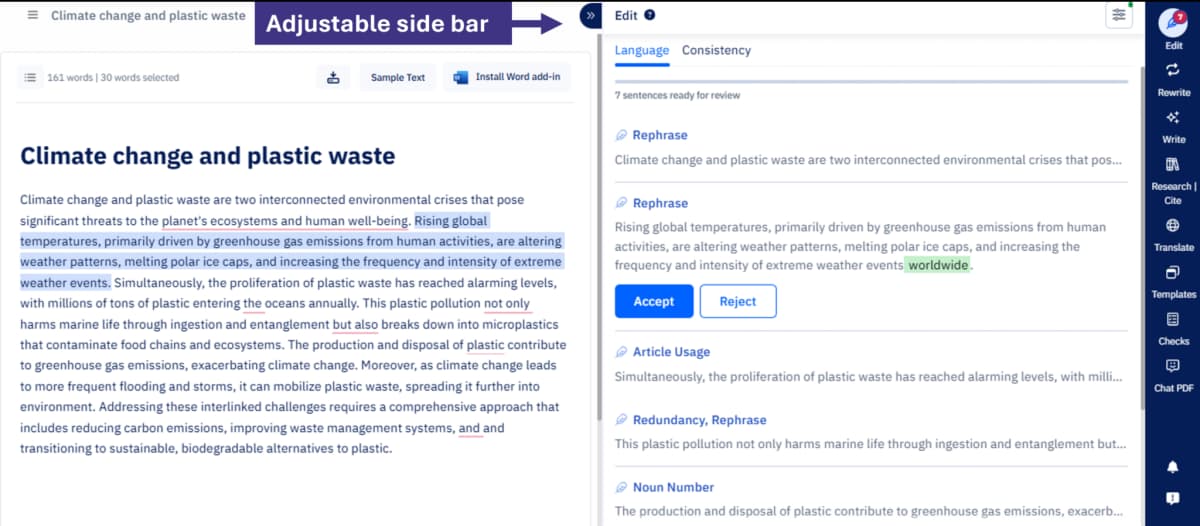
Paperpal’s April 2025 product update shows its editor and adjustable suggestion sidebar; the current interface may differ.
ChatGPT for flexible drafting
ChatGPT can handle more kinds of work. Its capabilities guide covers file uploads, images, data, voice, Canvas, and memory. Access depends on your plan and settings.
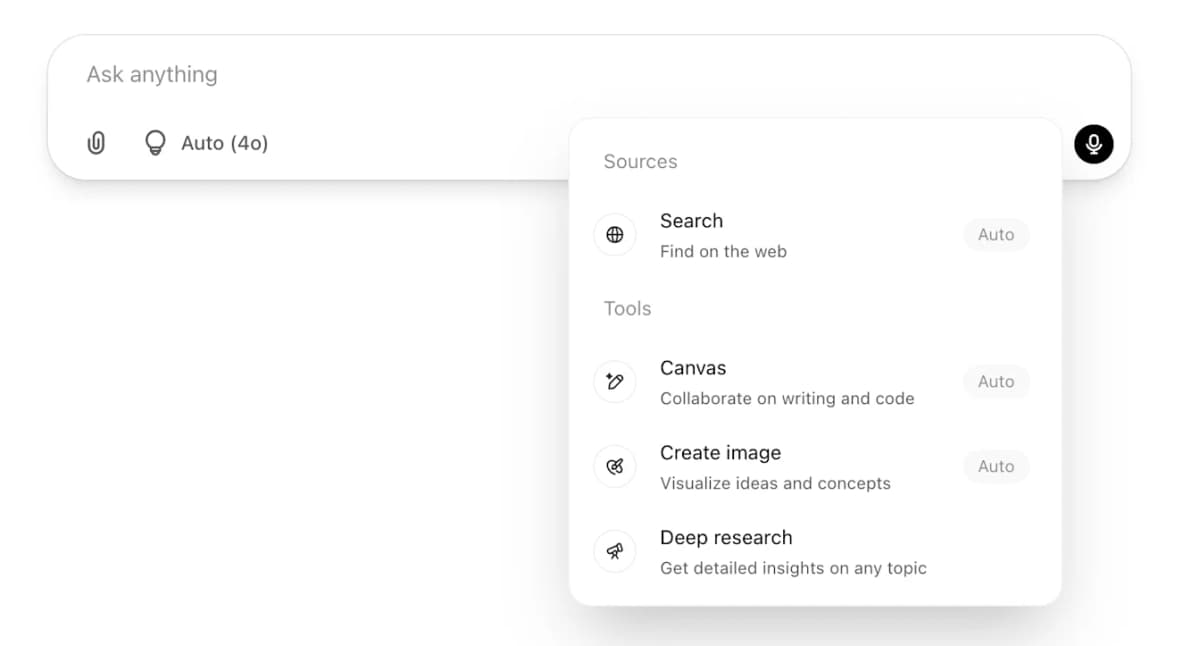
OpenAI’s Search help screenshot shows those tool choices in the April 2025 menu; the current interface may differ.
You can use it to make an outline, explain feedback, rewrite a paragraph, or turn rough notes into a draft. It can also help with code, data, and slides.
That range comes with more risk. OpenAI's truthfulness guide says an answer may include false references, quotes, or details. Give it clear limits, then check any fact that matters.
When to switch tools
Use Paperpal when the document exists and needs academic polish. Use ChatGPT when you need ideas, a file task, or a rough draft. Check either tool's claims against the source.
Sources, PDFs, citations, and verification
Paperpal near citations
Both tools can work with research sources. Neither removes the need to read them.
Paperpal supports PDF reading and citation tasks. Its AI Reference Finder also helps users look for papers.
ChatGPT can read uploaded files, use web search, and make reports with Deep Research. Access depends on the mode and plan. Check all key references, quotes, numbers, and technical details. You can also use an AI citation checker before a reference reaches the final draft.
ChatGPT near source drafts
Good academic writing needs more than smooth prose. You must be able to show why each key claim is fair.
A citation helps only when its source supports the sentence. A paper summary must also keep the method, study group, limits, and result that matter to your point.
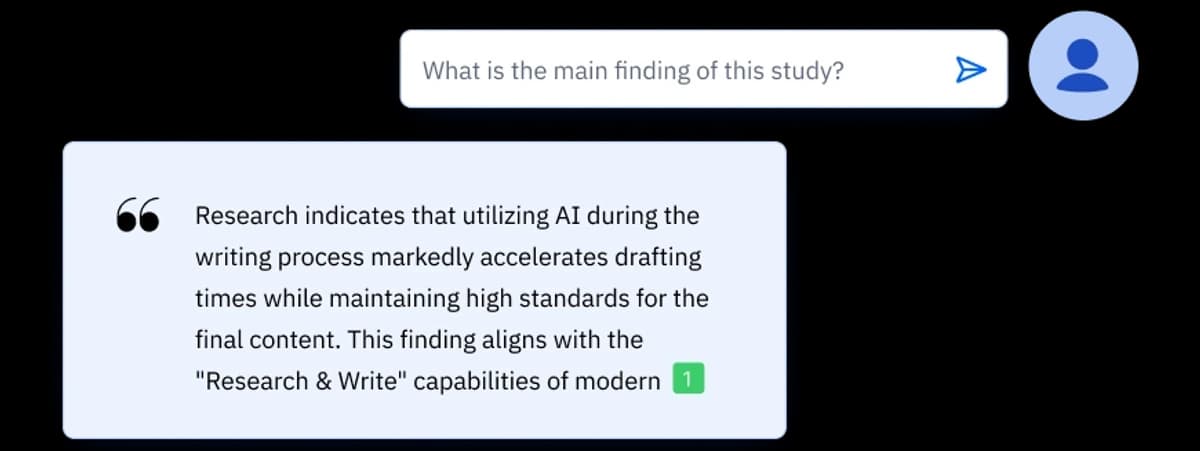
This image comes from Paperpal's Chat PDF page. The number by the answer points to a citation. Open it and read the source before you use the claim.
The same rule applies to Atlas, Paperpal, and ChatGPT. A citation marker is a path to the source, not proof by itself.
Verification after drafting
Keep drafting and source checks as separate steps. Draft or edit in Paperpal or ChatGPT. Then read the sources behind the main claims.
If papers disagree, compare them before you finish the manuscript. Use the same rule when you summarize research papers. Check the source passage before you treat a summary as evidence.
Paperpal vs ChatGPT compared
Paperpal and ChatGPT overlap, but their main jobs differ. Paperpal is made for academic writing. ChatGPT is a general assistant that can also help with academic work.
| Decision point | Choose Paperpal when... | Choose ChatGPT when... |
|---|---|---|
| You need academic tone | The text needs clear, formal prose. | You want several draft options first. |
| You need citation help | You are formatting references or reading a paper. | You want a plain explanation before checking the source. |
| You need broad work | The task stays within academic writing. | The task also needs code, data, slides, images, or web search. |
| You want less setup | You want defaults made for researchers. | You can state the role, limits, sources, and output you want. |
| You need claim support | You can open the cited source in the writing flow. | You will use the answer as a first pass, then check each key claim. |
Table 2: Paperpal is the focused choice for academic writing. ChatGPT is the broader choice. Both require source checks when the work relies on citations.
Where Atlas fits after the comparison
Atlas does not replace Paperpal or ChatGPT. It fits the next step: checking an answer against a set of sources you chose. Our guide to chatting with a PDF shows the same idea for one document.
A practical handoff looks like this:
- Use Paperpal to polish the paper or ChatGPT to make a first draft.
- Save the papers, PDFs, pages, and notes behind your key claims.
- Add those items to one Atlas project.
- Ask: "Which source supports this claim, and what limit does it give?"
- Open each citation and read the passage before using the answer.
Each tool now has a clear job. Paperpal improves academic prose. ChatGPT helps you think and draft. Atlas compares selected sources and links each cited answer to a passage you can inspect.
Which should you choose?
Paperpal makes sense when most of your work is academic editing, manuscript polish, citation help, or PDF reading. Students who want to compare costs and related tools can read our guide to Paperpal for students.
ChatGPT is the better match for ideas, plans, file changes, code, data, web search, and first drafts across many subjects. A paper that needs both kinds of help can use both tools: ChatGPT for a rough outline and Paperpal for the language.
You must still check the sources behind the key claims. When you need to ask, "Does this source support my claim?", add the papers to Atlas. You can compare what they say and open the passage behind each citation.
Check your paper evidence in Atlas
Add selected papers, compare claims, and inspect the cited passages.