

Paperpal for students is worth a look when you already have a draft. It can help polish thesis wording and final checks. It can also help with source lists and AI-use notes. It is less useful when you still need to read papers, compare sources, or check whether a claim has support.
The right choice depends on the writing job. Paperpal sits near the edit and final-check stage. Jenni AI is closer to drafting. Grammarly and QuillBot help with broad writing cleanup. SciSpace helps when the task starts with research papers. Atlas fits later, when you have PDFs or readings to compare and need cited answers you can inspect.

Compare sources in Atlas
Add selected papers, compare claims, and inspect each cited passage.
What Students Mean by Paperpal for Students
Most students searching for Paperpal for students are deciding whether it can help with a paper, thesis, dissertation, or class project. They also need to avoid a policy problem.
Paperpal's student page leans into school and research writing. It covers language help, rewriting, source support, copy checks, translation, paper insights, and final review. That makes it useful when the draft exists and needs more than a basic grammar pass.
The limit is important. A polished paragraph can still have a weak source link. It can still overstate what a paper says. Paperpal can improve the draft, but it does not replace a supervisor, course policy, source checks, or the student's own argument.
Paperpal Student Pricing and Discount Checks
Check Paperpal pricing and discount terms at checkout before you rely on them. Paperpal support and student deal sites answer different parts of the question.
Paperpal support says student discounts can use a school email and a school referral route. It also says student discounts cannot stack with other discounts. Student Beans shows a Paperpal student offer too. Paperpal's support page is one route. Student Beans is a deal site, so terms may vary by country, school, date, or checkout path.
Before paying, check:
- whether the offer works for your school email and region
- whether it applies to monthly or annual billing
- whether source checks, copy checks, AI-use checks, or translation have limits
- whether renewal uses a higher price
- whether the coupon can combine with any school or seasonal offer.
This article avoids exact prices because plans and offers can change. Buy only if Paperpal fixes the task blocking your draft.
What to Look For by Writing Job
Feature lists make student writing tools look the same. They are not. Separate six jobs before you compare paid plans.
- Drafting: turning an outline, notes, or rough idea into prose.
- Editing: improving wording, flow, tone, and final polish.
- Paraphrasing: rewording a sentence or passage you already understand.
- Plagiarism or AI checks: checking risk signals before you submit.
- Source lookup: finding, formatting, or adding source details.
- Source checks: comparing what your readings, PDFs, or papers support.
Paperpal is strongest in editing and final checks. It can also help with sources and thesis-style writing. Do not treat that as the same thing as source proof. If your draft says 2 papers disagree, check whether the source passages show that disagreement. For a direct academic-writing comparison, use Paperpal vs ChatGPT and the broader ChatGPT alternatives guide. For a wider tool view, compare this job map with our guide to AI tools for academic research.
Best Paperpal Alternatives for Students
1. Atlas
Atlas fits after you have readings or PDFs to check. You can import clean PDFs into an Atlas project, ask grounded questions, and open source badges that point back to passages. Atlas also supports questions across more than one source. For the broader source-checking pattern, see our guide to AI tools that cite sources.
Choose Atlas when the draft depends on source claims. That includes claims about methods, causes, limits, and what an author argued. Atlas is not a grammar checker, plagiarism checker, AI detector, or submission editor. It helps when you need to know what your sources support.
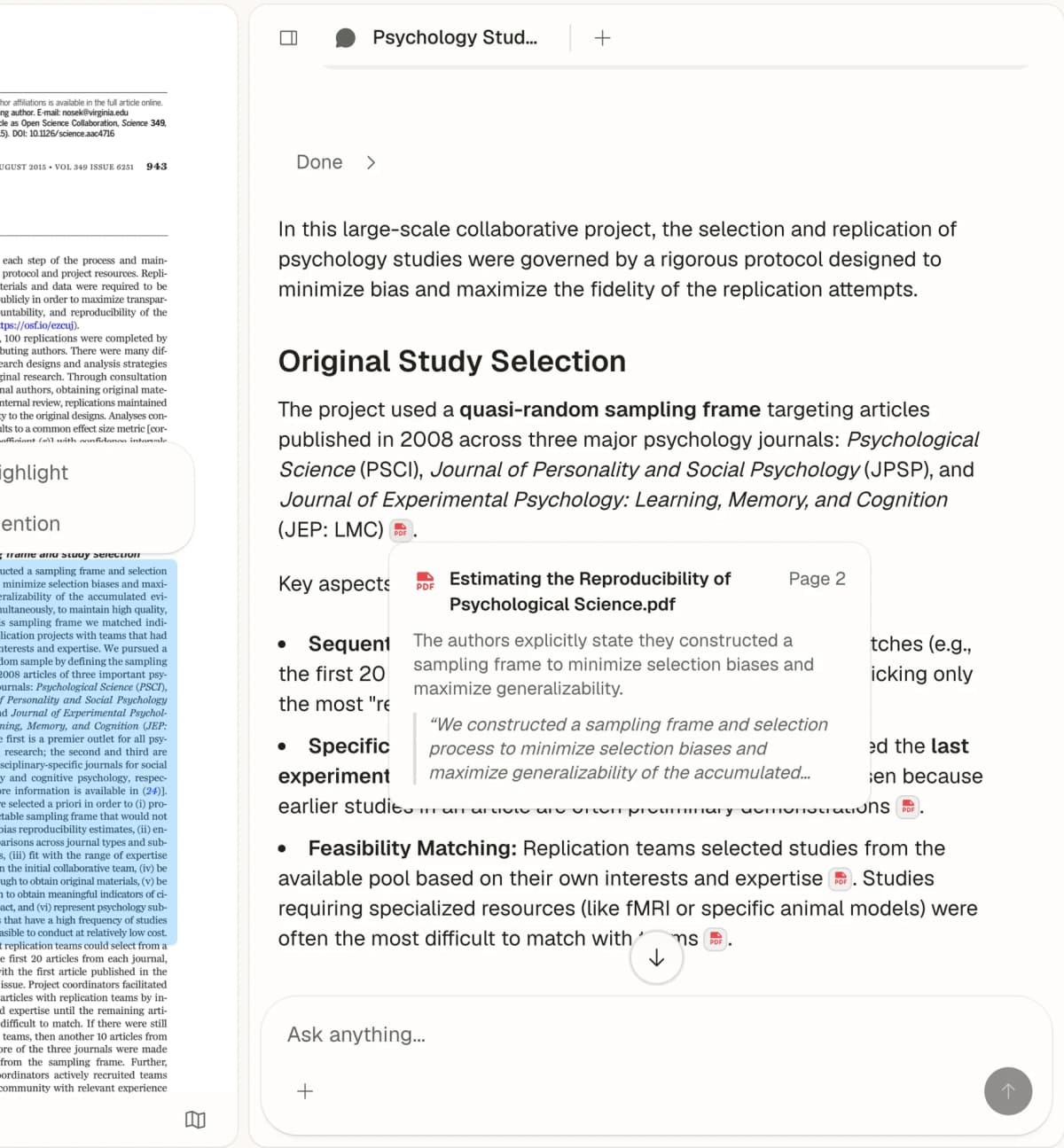
Atlas places an answer beside the source passage it cites. Open the passage to check what the source supports. Source: Atlas Chat with Paper.
2. Paperpal
Paperpal is the best fit when you already have a draft and need school or research writing help. Its student page covers thesis work, rewriting, source help, copy checks, translation, paper insights, and final checks. It also works across Word, Google Docs, Chrome, Overleaf, and the web app.
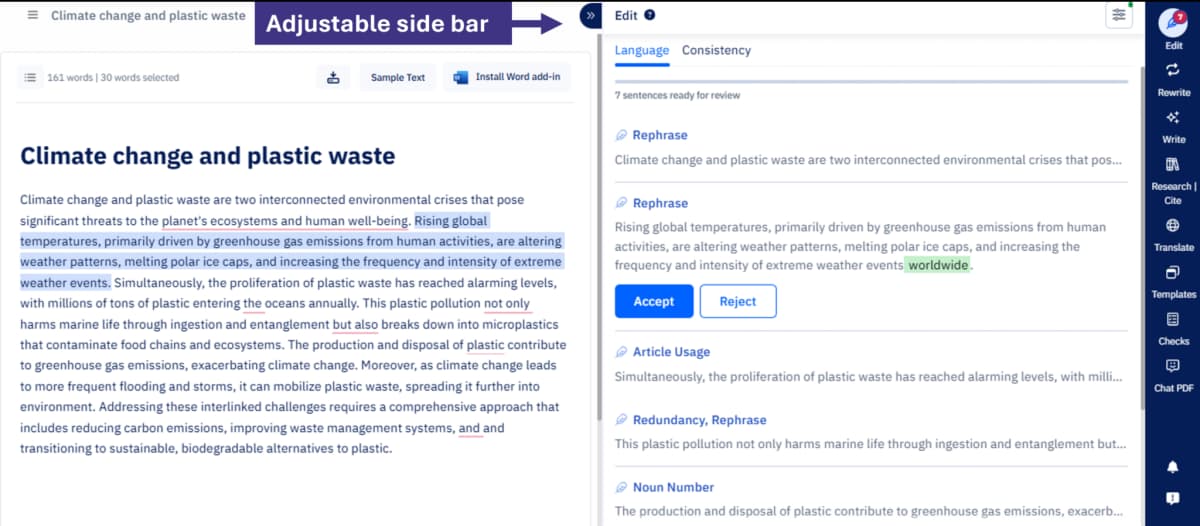
Paperpal’s April 2025 product update shows its Web editor with an academic draft beside language suggestions. It illustrates the editing workflow described here; the current interface may differ. Source: Paperpal’s product update.
Choose Paperpal when the document needs polish before a class deadline, supervisor review, or formal handoff. Still read the source. Check the source link. Confirm that your school allows the AI help you used.
If Paperpal is close but not the right fit, the separate Paperpal alternative guide goes deeper on adjacent research-writing tools.
3. Jenni AI
Jenni AI belongs earlier in the writing process. It is closer to drafting with source help. Use it to move from an outline or idea into cited prose, then review the claims before an edit pass.
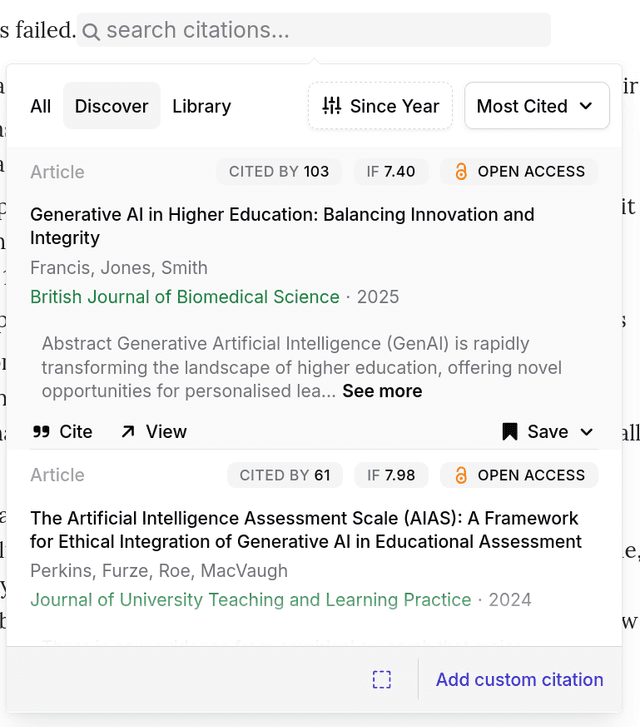
Jenni’s official documentation shows its citation search panel. The sample records and visible citation metrics illustrate the interface; verify sources and metadata before relying on them.
Comparison sources often frame Jenni as stronger for drafting momentum. They frame Paperpal as stronger for edits, copy checks, AI disclosure, app support, and final readiness.
Choose Jenni when the main problem is getting a paper moving. Still inspect each source link before you use a claim in an assignment.
4. Grammarly
Grammarly for students is a broader writing helper. Its student AI page focuses on writing support, responsible AI use, feedback, revision, and skill building. It is a better default for emails, short assignments, posts, and general proofreading than for Paperpal-style final checks.
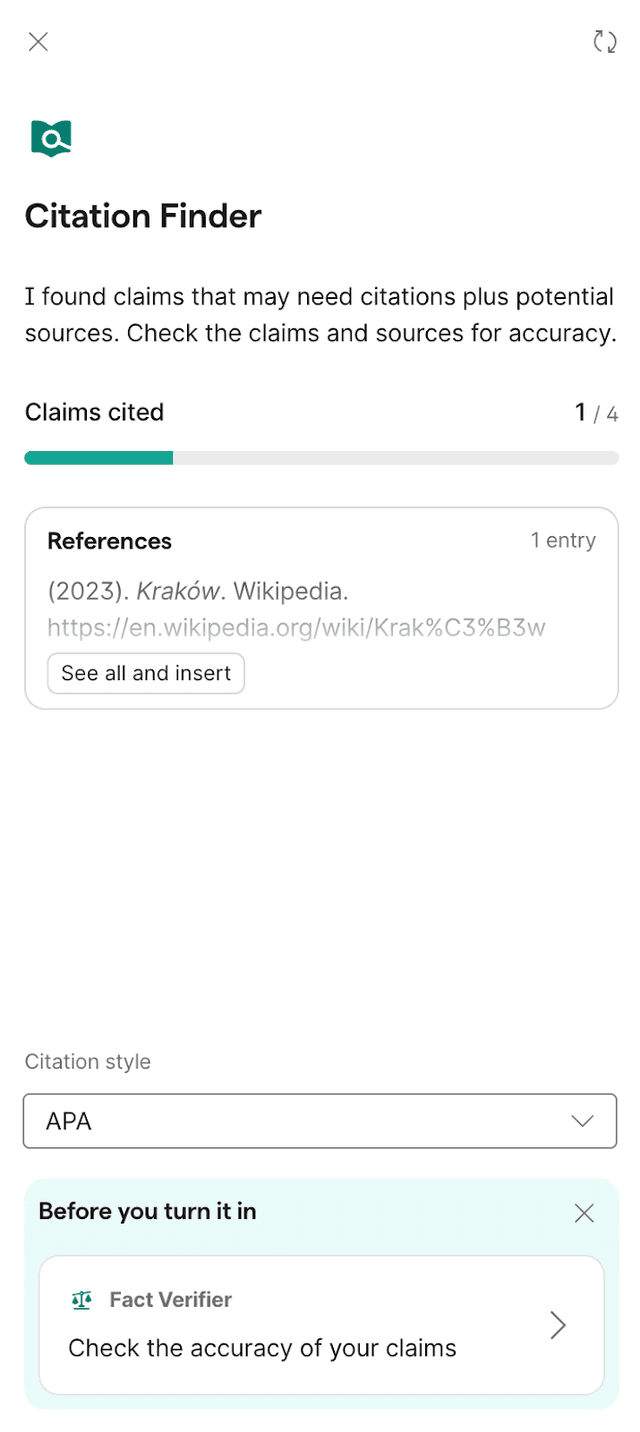
Grammarly’s official help guide shows Citation Finder beside a draft. Its sample Wikipedia reference illustrates the panel, not the accuracy or suitability of that source for an assignment.
Choose Grammarly when you want writing feedback across many surfaces. If the assignment depends on research proof, add a separate source check before you submit.
5. QuillBot
QuillBot student resources are strongest for rewording, grammar, summaries, source formatting, copy checks, and translation. QuillBot is often attractive because it is quick and cheaper than heavier research writing tools.
Choose QuillBot when you understand the source and need help revising wording. Do not use rewording to hide borrowed ideas. A rewritten sentence still needs a source link when the idea came from another source.
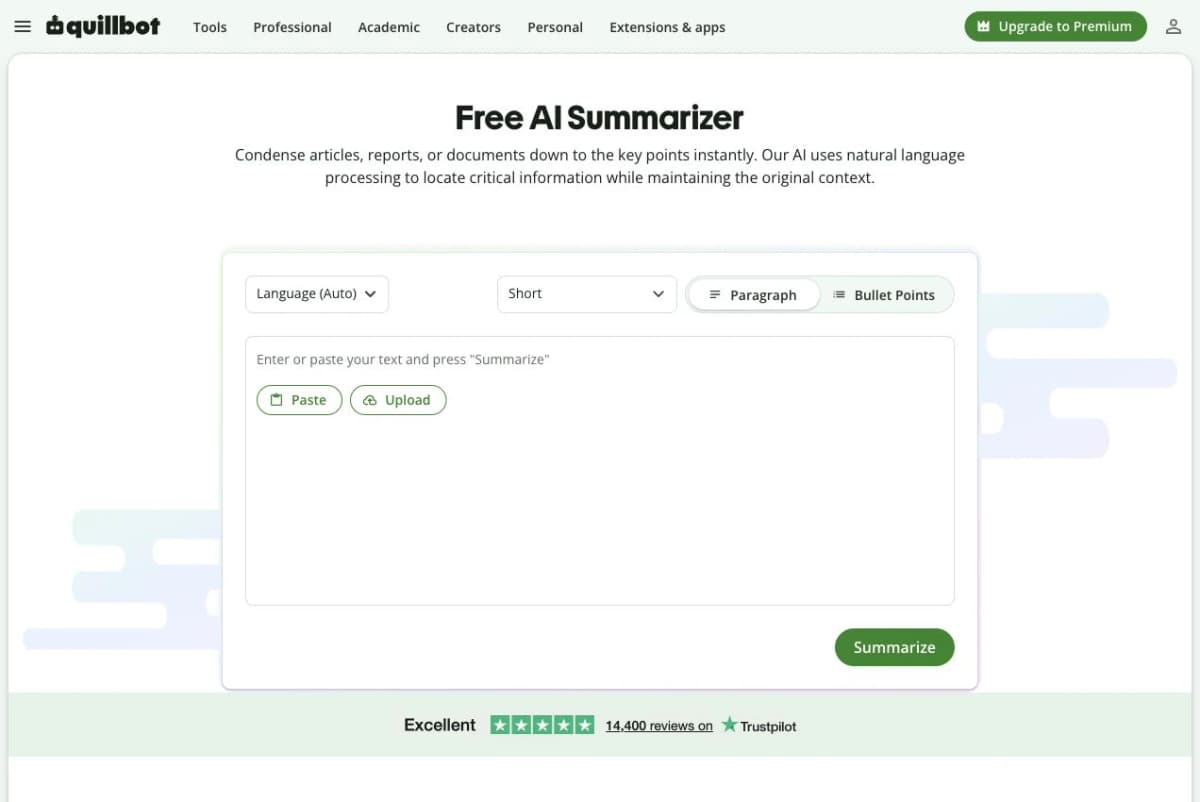
QuillBot’s blank Summarizer shows paragraph and bullet output controls. It does not show a generated summary or paraphrase. Source: QuillBot Summarizer.
6. SciSpace
SciSpace AI Writer belongs in the comparison because many students who look at Paperpal also need paper reading and cited writing. Its page covers writing help, autocomplete, edits, and citations from a large paper index.
Choose SciSpace when the task starts with reading papers and writing from those papers. Check whether the papers you need are available. Also check whether its source support matches your assignment.
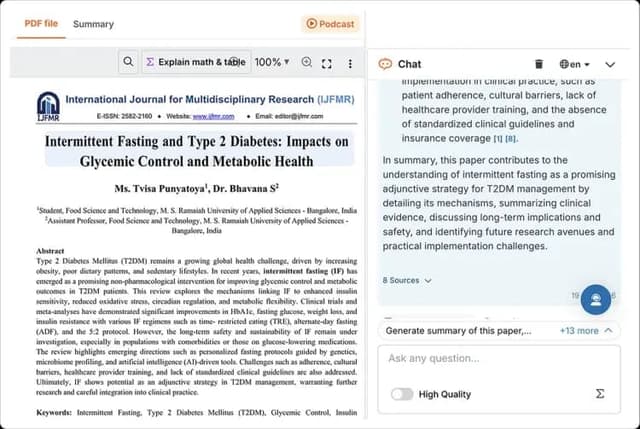
A source-reviewed 2026 SciSpace capture shows a paper beside chat and an 8 Sources control. It illustrates the reading interface, not writing quality or the accuracy of the demo paper. Source: SciSpace PDF Chat comparison.
Paperpal Alternatives Compared
Use this table to match each tool to the stage where it helps most. The right choice depends on where the assignment is stuck.
| Tool | Best student job | Source or citation strength | Writing polish strength | Pricing caveat | Verification risk |
|---|---|---|---|---|---|
| Atlas | Comparing uploaded readings, PDFs, notes, and papers with cited answers | Strong when sources are imported and processed. Citations open evidence for inspection | Built for evidence checks rather than grammar or manuscript polish | Check plan limits for source upload and processing needs | Citations must be opened and checked before a claim is reused |
| Paperpal | Academic editing, rewriting, thesis or dissertation polish, plagiarism and AI-disclosure checks | Citation support and research-article insights, but source claims still need review | Strong for academic-language editing and manuscript-style readiness | Refresh official plan limits and student-discount route before paying | Polished academic prose can still overstate or misread a source |
| Jenni AI | Drafting academic prose, outlines, and citation-assisted writing | Useful for citation-aware drafting and claim review | Good for draft momentum, less focused on final manuscript checks than Paperpal | Verify current plan, export, and citation limits | A cited draft can still need source-by-source verification |
| Grammarly | General student writing feedback, proofreading, revision, and AI-use disclosure | Helpful for writing process and citation-adjacent support. Limited for research synthesis | Strong for everyday clarity, correctness, and tone | Education or student terms should be checked in the current account flow | Better wording does not prove evidence quality |
| QuillBot | Paraphrasing, grammar, summarizing, citation generation, plagiarism checks, and translation | Useful for quick citation and language tasks. Limited for deep source comparison | Strong for sentence-level rewriting and low-friction cleanup | Free and paid limits can affect long documents or premium checks | Paraphrasing can preserve a citation problem or change meaning |
| SciSpace | Reading papers, academic writing, autocomplete, edits, and scholarly citations | Stronger when the needed papers are in its corpus or workflow | Good for paper-centered academic writing | Check access, export, and corpus coverage before relying on it | Corpus coverage may not include every assigned or paywalled source |
Table 1: The table separates writing polish from source proof so students can pay for the stage that is blocking the assignment.
Where Atlas Fits After Paperpal
Move from Paperpal to Atlas when the sentence sounds ready but the source proof is still unresolved. This is common in lit reviews, thesis chapters, and research essays. Watch for claims such as "both studies found," "the authors disagree," or "the strongest limit was."
Choose Atlas if the next decision is whether the uploaded sources support the paragraph.
Use this workflow:
- Finish the writing pass in Paperpal or another editor.
- Mark claims that need proof, such as methods, causes, limits, and claims about an author's argument.
- Import two or more relevant PDFs, readings, or notes into an Atlas project and wait for processing to finish.
- Ask a grounded comparison question, such as: "Compare these 2 papers on their method and cite the passage for each difference."
- Open the citation badges and read the surrounding passages.
- Note conflicts, missing evidence, or weak support before moving the claim back into the draft.
Atlas grounding starts with the sources in your project. It retrieves relevant passages and drafts answers that should cite key claims. That does not make every answer correct. For high-stakes school work, open the source badge. Check the passage. Revise the claim when the source support is weaker than the draft says.
If you are still choosing between source-first tools, the related guides to PDF chat tools and AI research assistants cover nearby workflows.
Choose a Student Writing Tool
Choose Paperpal if the main blocker is final polish. It is the strongest fit when a draft already exists and needs edits, thesis wording, copy checks, or AI-use disclosure.
Choose Jenni AI if the blocker is drafting. Choose Grammarly if you need feedback across many assignments. Choose QuillBot if you need rewording, grammar, summaries, source formatting, or low-cost language help. Choose SciSpace if the task starts with reading papers.
Choose Atlas when the draft depends on what the sources say. If you have readings or PDFs and need cited proof, use Atlas after the writing assistant and before final submission.
Compare sources in Atlas
Add selected papers, compare claims, and inspect each cited passage.