

A research log is a dated record of your questions, sources, findings, and next steps. It lets you return to a research session and see what you checked, what you thought, and what remains open.
Start with one useful entry, not a complex tracking system. Give each finding a source location. Keep your response separate. The worked entry below comes from this article's review of public research-log guides; it is not a new study result.

Keep your research findings linked to sources
Compare selected sources and save a checked dated research log note.
What a research log records
A log records more than a list of sources. It connects a question to the work you did and the next thing to check. Kennesaw State University's Writing Center describes a reading log that keeps source content apart from the reader's response.
That distinction helps you avoid treating your own thought as the author's claim.
A search history records where and how you looked. A source note records what you read. A reflection records what changed in your thinking. These records can sit in one project, but each has a different job. The Oregon weekly-log assignment separates process, results, and reflection in its course context.
Choose a form you will keep using: a note, a document, or a table with links. Oregon's template assignment stresses that the record should make sense to another reader, too. Follow any project or course rules rather than assume one template fits all research.
Choose fields you can maintain
Build around the question you are trying to answer. “Read more about housing” is a task, but it does not tell you what to look for. A question about which sources define a local housing measure gives the session a clearer aim.
Preserve the question, date, and source location
Keep a date for the session, the working question, and the sources used. For each source, record its title, author, date or version, and a stable link or identifier. Add a page, section, or heading for each finding you plan to use.
Use a date you know. If you are rebuilding an old session from notes, label it as reconstructed and state which details are missing.
The source's publication date and the day you read it are different facts. Keep both when they matter.
A research-note organization workflow can help you store these records. The log's job is to explain the path through them. A file name alone rarely tells the next reader which passage mattered or why you kept it.
Keep search history and personal response distinct
If you record a search, keep the tool or database, exact terms, filters, date, and useful result links. Add a result count only if you recorded or can verify it. A selected article cannot prove how many hits the search returned.
The Open University's search guide recommends a diary for long-running searches to trace changing terms and direction. It also warns that techniques and syntax vary across resources.
Keep the search as it was run rather than rewrite it from memory into a cleaner-looking form.
For reading notes, label copied words as a quote. Put a paraphrase in your own words and still give the source location.
Then place your response in a separate field. KSU's double-entry worksheet uses that two-part layout. Your response can disagree, draw a connection, or name a gap; it need not be another summary.
Build a dated entry from checked sources
A useful entry lets you reopen the evidence and resume the work. Here is a real record from preparing this article on October 2, 2026. The question concerns how a log should distinguish a source statement from the reader's thoughts.
Connect the question, finding and next step
The source in this entry is the KSU Research Log guide, under “Steps” and “Research Log Template.” The source finding is paraphrased. The response and next action are the writer's own choices, not instructions claimed to come from KSU.
| Field | Entry from this source review |
|---|---|
| Date and question | October 2, 2026: how can a log keep source content apart from the reader's response? |
| Source and locator | KSU Writing Center, Research Log, Steps and Research Log Template |
| Checked finding | The guide records source details and a quote or paraphrase, then asks for a separate response |
| Response and next step | Keep distinct fields; next compare this reading record with guidance for search history |
Table 1: The next step matters because this source chiefly shows a reading log. It does not give all fields for a database search. The Open University guide supplies a separate reason to keep search terms and changes.
The record preserves that gap instead of pretending one source answers everything.
If a claim needs checking beyond the page you found, use the SIFT method to trace it and keep the outcome in the log. Record which source you checked and what remains uncertain. “Verified” without a scope or reason tells the next reader too little.
Read the original double-entry worksheet
The KSU double-entry worksheet shows source details above two columns. The left column holds a quote or paraphrase and its page location; the right holds the reader's response or reflection. Those columns keep what the source says apart from what you think about it.
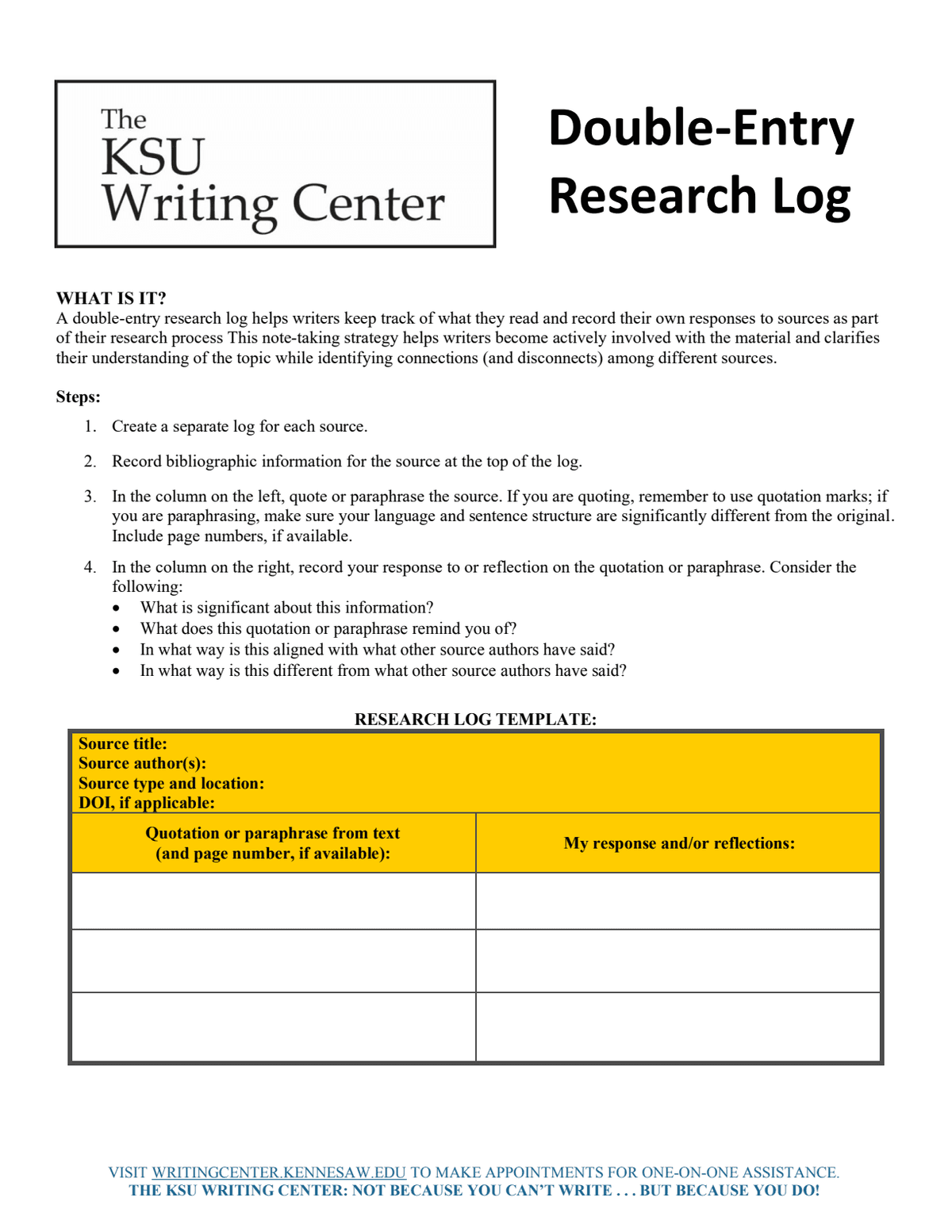
Original KSU Writing Center Double-Entry Research Log worksheet, full-page capture. Licensed CC BY 4.0 under the Writing Center's material-use statement; no edits.
You can retain this distinction in a digital note without copying every field of the worksheet. The ACRL Research Now catalog describes a different classroom log designed for adaptation. Choose fields based on the project and the record you need, while preserving the source and response boundary.
Update the log as the question changes
Research often creates new questions. The ACRL Framework's Research as Inquiry section describes that iterative process. A log should show how your question changed, not make the whole project look planned from the start.
Date corrections and changed questions
When a source changes your scope, add a dated note explaining why. Keep enough of the earlier question to see the change. If the original question was too broad, name what you narrowed and what you now need to find.
Make each correction explicit and traceable. For example, if you confused a paper's study date with its publication date, amend the entry and explain the correction.
Where the change affects a claim in another note, check that note too. A document comparison workflow helps when a source or project document has a new version.
The Open University guide discusses saved searches as well as diaries. A saved search can help you run terms again. It does not replace a note explaining why the terms changed or what the earlier results contributed.
Review open questions before starting again
At the end of a session, name a concrete next action. “Continue research” gives little direction. “Check whether the source defines the measure for the same population” names a gap you can work on.
Keep that task separate from the finding. A question is not a result, and a planned check has not yet happened. The Oregon weekly-log guide uses reflections to examine process and progress.
Its weekly schedule is a course rule; your project may need entries after each session instead.
Review the latest open questions before you search again. Close a task only after recording what you found and where. If it no longer matters, say why you dropped it. You can keep a concise working log while retaining the reasons behind important changes.
Check what the log cannot establish
A well-filled log does not prove that you found every relevant source. It shows the work recorded within its scope. A formal review may require a much fuller search record and reporting method. Do not label a few selected sources as exhaustive coverage.
Check the source evidence before turning a note into a claim. Open the passage, inspect its context, and confirm that your paraphrase fits. A source-checking workflow helps catch a note that is merely related to the topic rather than support for the precise claim.
Keep private or sensitive records only where you may use them. Do not paste identifying details into a shared log just to make it complete.
The log also cannot certify a sound method, a valid statistical result, or legal correctness. A specialist must review those questions where relevant.
Before accepting an entry, check its date, question, source location, finding, separate response, and next task. State missing details openly. The next reader should be able to follow the evidence and tell what still needs work without guessing what you meant.
Save a checked research log in Atlas
Atlas can compare selected sources and help keep a working note. You enter and verify the session date, search history, and decisions. It does not automatically capture every search or ensure complete provenance.
- Add retained sources and your working notes to one project. Wait for the sources to finish processing.
- In chat, type
@and select the sources relevant to the question. Choose Project only to prevent new web or literature retrieval. Earlier chat context remains available, so name the files for this entry. Ask for cited findings and open questions, with source content kept apart from your response. - Open each important citation and read the passage. Correct unsupported claims. Add only dates and search details you know, and label missing information.
- Create a New Note, save the checked dated record, and confirm the Saved state. Add your next action and return to it before the following session.
Try this request: “Using @selected sources, help draft a research log entry for this question. Give checked findings with citations and source locations. Keep my response and next steps separate. Leave missing dates, search history, and unresolved claims marked for me to complete.”
Keep your research findings linked to sources
Compare selected sources and save a checked dated research log note.