


Tana and Notion are both knowledge work tools, but they reward different habits. Tana starts from an outliner. Notes can gain links, fields, and supertags as you work. Notion starts from pages, docs, projects, and shared tables. The right choice depends on where your work breaks down.
If your notes begin as messy meeting threads, daily logs, or loose research ideas, Tana is the more natural fit. If your team needs shared pages, table views, project tracking, and low training time, Notion is usually safer.

Compare source evidence in Atlas
Add sources, compare their claims, and inspect the cited evidence.
Quick verdict
Choose Tana when the core job is linked thinking. Choose Notion when the core job is shared workspace management. Use both only when each tool has a clear job. Syncing the same knowledge base across both apps creates upkeep.
| Scenario | Better fit | Why |
|---|---|---|
| Fast capture that becomes structured later | Tana | Tana's outliner, nodes, fields, and supertags are built for gradual structure. |
| Team docs, project dashboards, and shared databases | Notion | Notion is broader: docs, wikis, projects, databases, calendar, mail, AI, and connected apps. |
| Personal research notes with many linked ideas | Tana | The graph/outliner model makes relationships visible while you write. |
| Company operating system or client-facing workspace | Notion | Permissions, templates, databases, and familiar page structure matter more than graph flexibility. |
| Evidence-heavy research decisions | Atlas alongside either tool | Tana and Notion can store conclusions. Atlas is better for asking cited questions across source documents before you save those conclusions. |
Table 1: That last row matters. A notes app and a source-checking app do different jobs. Tana and Notion help you store what you know. Atlas helps you inspect a claim before you turn it into a note, memo, or decision.
Criteria by workflow fit
The fastest way to choose between Tana and Notion is to name the weekly job. Feature lists are useful, but they hide the central difference. Tana lets notes gain structure while you work. Notion places notes inside a broader workspace system.
Pick Tana for capture-first connected thinking
Tana's knowledge graph page centers on an outline editor backed by a graph. Tana's basics guide teaches daily notes, supertags, fields, feeds, commands, and AI. That makes Tana strong when you do not know the final setup at capture time.
Use Tana when you want to:
- capture rough ideas quickly, then tag and structure them later
- turn meeting notes, people, tasks, readings, and projects into connected nodes
- use supertags to give repeated note types shared fields and views
- keep personal knowledge work close to an outliner rather than a page builder
- try AI commands over a graph note system.
The tradeoff is learning curve. Tana asks you to think in nodes, supertags, fields, and views. For some users that removes friction. For others it turns system design into extra work.
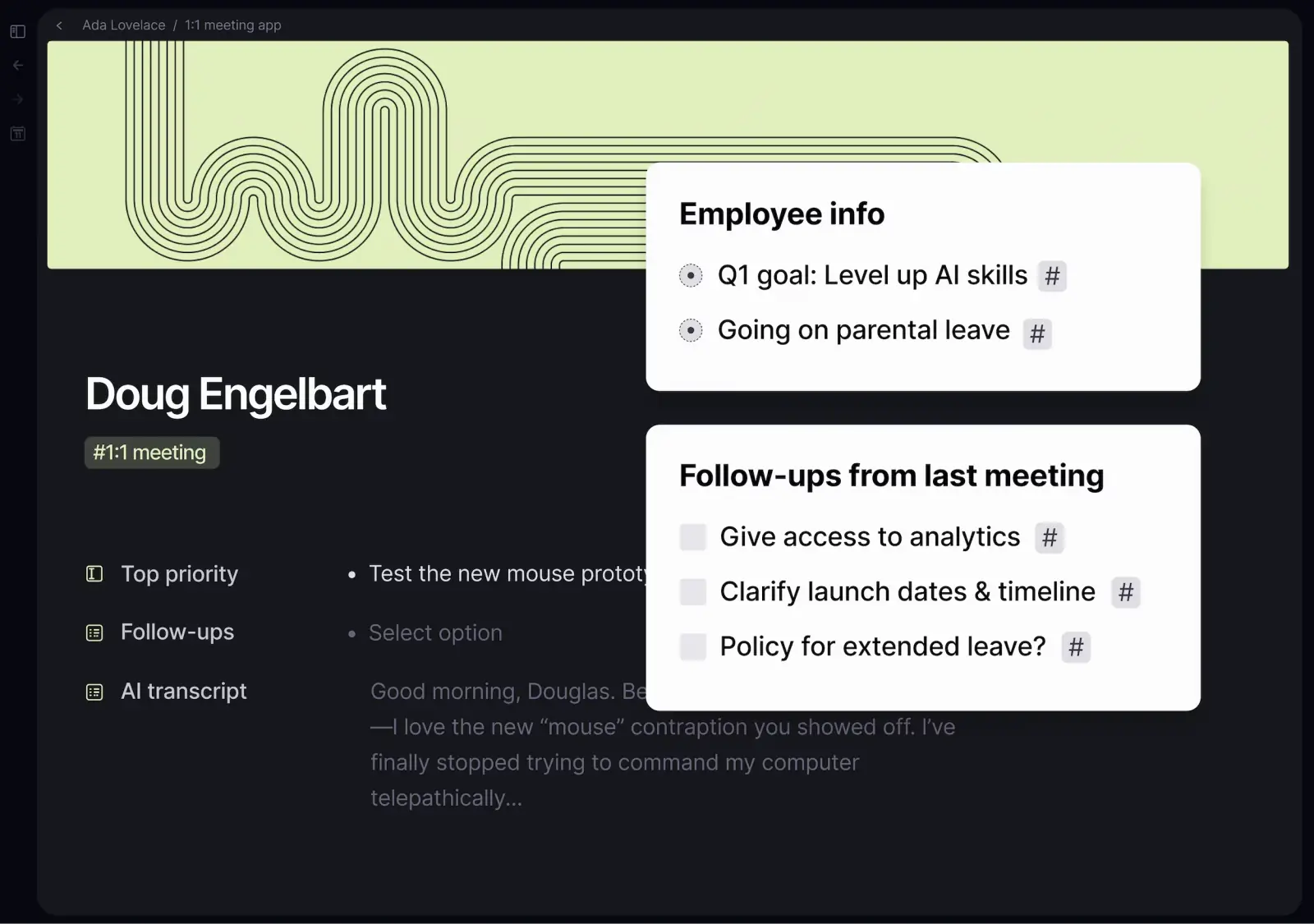
Tana's official product screenshot shows its capture-first model: one meeting page combines linked fields, follow-up tasks, and transcript text without first turning the note into a database or polished document.
Pick Notion for workspace breadth
Notion's homepage presents the product as an AI workspace for docs, wikis, projects, calendar, mail, search, and connected apps. Notion Projects and Notion's wiki guides explain why many teams stay with Notion after trying a more graph-native tool.
Use Notion when you want to:
- build team docs, wikis, and operating pages
- manage projects with filtered views and task workflows
- share dashboards with people who do not want to learn an outliner
- use tables as the backbone for content, CRM, hiring, planning, or ops
- keep docs, tasks, and team knowledge in one familiar workspace.
Notion's tradeoff is that structure often comes first. A database can be powerful, but it can also make early thinking feel heavier than it should. If your work begins as fragments that only later become categories, Tana may feel faster.

Official Notion product interface. Source: www.notion.com.
Use Atlas for source evidence
Neither Tana nor Notion should be treated as a substitute for checking sources. If you are reading papers, interviews, policy PDFs, vendor docs, or long reports, store the answer only after you check which source supports which claim.
Atlas fits this handoff when source checks matter. Add the files to a project. Ask a grounded question. Open the citation badges. Compare the cited passages before copying the finding back into Tana or Notion. Atlas citations are not automatic truth. They point you to source passages so you can inspect support, context, and conflicts.
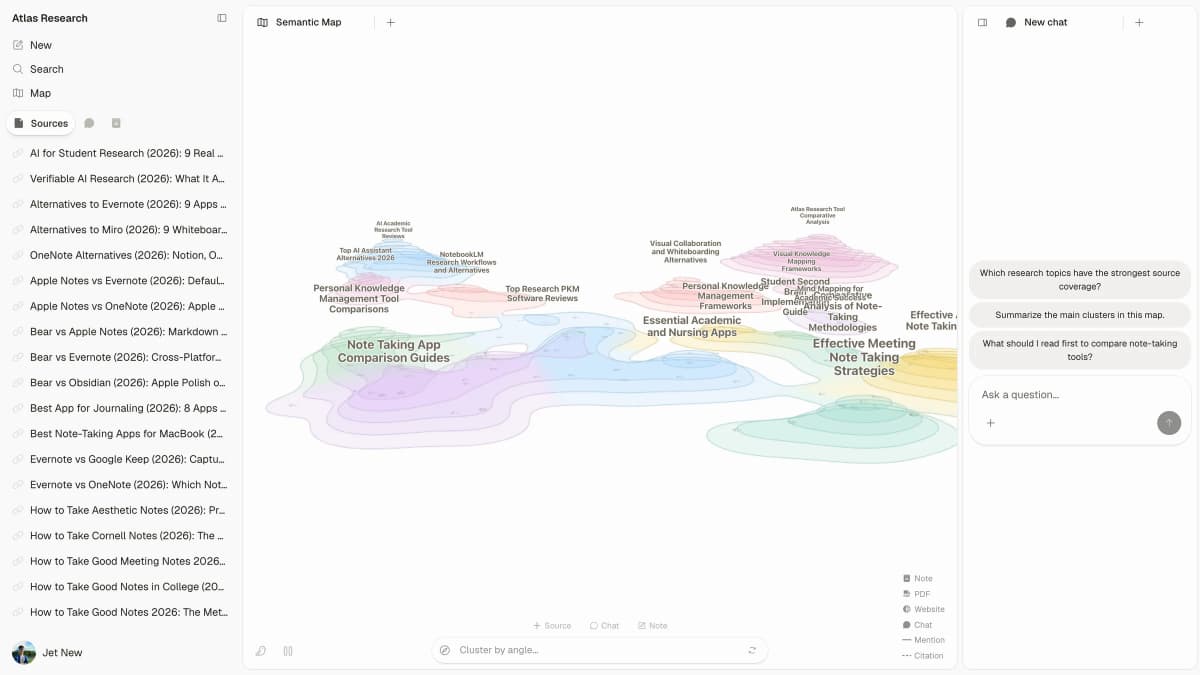
First-party Atlas product interface; example source set is illustrative. Source: atlas.com.
Tana vs Notion feature table
Use this table as a workflow rubric. The best tool changes when the job changes.
| Criterion | Tana | Notion | Practical decision |
|---|---|---|---|
| Capture model | Outliner-first, graph-backed notes that can become structured nodes. | Page-first workspace with blocks, docs, and databases. | Choose Tana when capture is messy. Choose Notion when the destination page or database is already clear. |
| Structure | Supertags, fields, views, commands, and daily notes support gradual structure. | Databases, properties, linked views, templates, and page hierarchy support planned structure. | Tana is better for emergent personal systems. Notion is better for stable shared systems. |
| Team workspace | More specialized around connected notes and personal/team knowledge workflows. | Stronger workspace breadth across docs, wikis, projects, and collaboration. | Notion is usually safer for a mixed team that needs low onboarding friction. |
| Databases and projects | Useful fields and views, but not the same broad database ecosystem as Notion. | Mature database and project-management patterns with many templates and integrations. | Choose Notion when the database is the product of the workflow. |
| AI fit | AI sits close to notes, commands, and graph-based structure. | AI sits inside a broader workspace that includes docs, projects, and enterprise search. | Tana feels more personal-knowledge-native. Notion feels more workspace-native. |
| Migration risk | Tana has a Notion-import story, but the mental model still changes. | Staying in Notion preserves familiar pages, templates, and database conventions. | Migrate only when graph/outliner benefits outweigh retraining and cleanup. |
| Source verification | Helpful for organizing research notes, but not built mainly around cited source inspection. | Helpful for saving research dashboards and summaries, but not mainly a cited evidence checker. | Use Atlas with either tool when claims need citation review across sources. |
Table 2: For source-heavy work, keep the proof step separate from the notes app choice. Tana can hold linked observations, and Notion can present the decision, but a claim from a paper, interview, policy PDF, vendor doc, or report should be checked before it becomes a polished note.
Atlas can support that narrow pre-handoff check when the relevant sources are imported. Ask a grounded question, keep each source separate, open citation badges for important claims, and then save the verified synthesis back to Tana or Notion with the original source context.
The source mix behind this comparison is uneven by nature. Tana and Notion product pages are strongest for product claims. XDA's Notion-leaning Tana review, Ron Liu's switcher review, and the Reddit Tana or Notion thread are useful for objections. They are not product truth. Community comments show where the product model feels fast, hard, mature, or overbuilt.
The real difference is when order appears
Tana is useful because order can come after capture. A note can start as a bullet in a daily page. Later it can become a task, gain fields, link to people or projects, and appear in views. That helps when work starts as fragments.
Notion is attractive because structure can be shared. A table, project board, wiki, or page tree can become a stable place for a team. That helps when the system has to survive handoff, new hires, and repeat team use.
This is why "Tana vs Notion" often splits by temperament. Tana appeals to people who want a living thinking system. Notion appeals to people who want a reliable workspace.
When to migrate or use both
Migrating from Notion to Tana only makes sense if you want your notes to behave differently. Tana's Notion import guide frames Notion as planned up front and Tana as capture first. That is a real difference. It also means an import is not the finish line.
Before moving, check these risks:
- You may rebuild too much. Both tools can become productivity-system projects. If you spend more time designing tags, dashboards, or views than using the system, pause the migration.
- Database-heavy work may not translate cleanly. A Notion workspace built around databases, permissions, and project views is more than a pile of notes.
- Team adoption may drop. Tana can work well for committed users and confuse casual teammates.
- Duplicated systems decay quickly. If the same tasks, notes, or decisions live in both apps, one version will become stale.
- Research evidence still needs a separate check. Moving a note does not verify the source behind the note.
Use both only with a strict split. A clean split might be Tana for daily capture, meeting notes, and connected personal thinking. Notion can own team-facing docs, dashboards, and project pages. A messy split is "everything goes in both." That becomes synchronization work.
A good two-tool setup
For a founder, analyst, student, or researcher, a workable setup might look like this:
- Capture rough notes, tasks, and relationships in Tana.
- Publish polished team pages, project trackers, and shared dashboards in Notion.
- Use Atlas for source checks before the answer enters either workspace.
- Save only the checked answer and citation note back to the chosen system of record.
The important rule is that each tool owns a different stage. Tana owns connected thinking. Notion owns shared workspace presentation. Source review should happen before a claim becomes a polished note.
Which should you choose?
Choose Tana if you mostly work alone or in a small committed group. It fits notes that begin as fragments and later need links, fields, and views. It is a good fit for meeting notes, daily notes, research trails, and work where links matter more than polish.
Choose Notion if other people need to use the workspace. It is the better default for team docs, project hubs, shared databases, client-facing pages, and operating systems. Choose it when upkeep and teamwork matter more than graph-native capture.
Choose both only when the boundary is obvious. Tana can own thinking and capture. Notion can own publishing and team operations. If you cannot explain the split in one sentence, start with one tool.
Choose Atlas alongside either one when your notes depend on source evidence. Ask the cited question in Atlas, inspect the source passages, then save the verified result where your broader knowledge system lives. For adjacent choices, compare Tana vs Obsidian and NotebookLM alternatives.
The decision criteria point to three jobs. Tana is better for linked notes. Notion is better for shared workspaces. Atlas is better for checking sources before an answer enters either system.
Compare source evidence in Atlas
Add sources, compare their claims, and inspect the cited evidence.