

This guide was updated in July 2026 to compare Obsidian with the research tools that usually sit around it.
Obsidian is good for research when you need a durable note system for papers, concepts, projects, and drafts. It is weaker when the job is source capture, paper search, or cited AI answers.
The practical answer is not "use Obsidian for everything." Use Obsidian as the vault. Then pair it with the tool that owns the next job.
For most researchers, the stack is split. Zotero keeps the source record and final cite. Obsidian holds your paper notes and concept notes. Elicit or ResearchRabbit help find papers. Atlas handles answers with source links when you need to ask questions across uploaded sources.

Ask cited questions across your sources in Atlas
Check cited passages, then save verified findings in Obsidian.
Quick Verdict
Use Obsidian first if you want local Markdown files, internal links, backlinks, graph view, and Canvas boards.
It is strong for turning reading into notes you can reuse. You can link a source note to a concept note. You can connect that concept to a project and keep the trail in files you control.
Do not make Obsidian carry the whole research stack by itself. Research has several jobs that look similar but need different tools.
Those jobs include saving papers, marking up PDFs, adding cites to a draft, finding related papers, checking proof, and writing your own notes. Obsidian can support several of them. It does not replace a source manager or a cited answer workspace.
The decision point is the research job. Obsidian works well when it receives clean inputs and sends work to the right next tool. It becomes fragile when it has to handle capture, citations, search, synthesis, and final writing at the same time.
What to Look For in Obsidian
Obsidian's research strength starts with file ownership. Your notes live as Markdown files in a local vault, so the core knowledge base is readable outside the app.
That matters when a PhD project, book chapter, lab notebook, or long-running literature review has to survive tool changes.
Its second strength is linking. Obsidian supports Wikilinks and Markdown links, including links to files, headings, and blocks. A source note can link to a method note, a theory page, a project outline, and a disagreement note.
Backlinks show which notes point back to the active note, including linked and unlinked mentions. Graph view visualizes those note relationships as nodes and links.
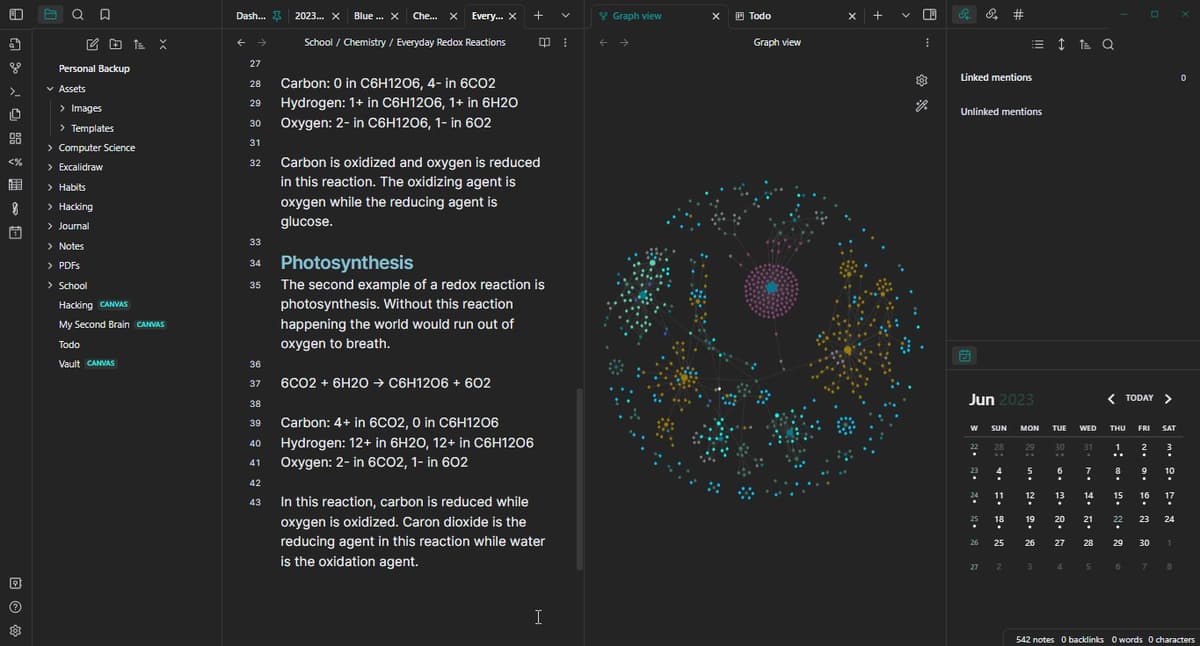
The screenshot supports the following workflow steps for a research vault.
The Obsidian screenshot shows a 4-part research workflow:
- The file tree keeps source, concept, and project notes recoverable.
- The active note is where the researcher writes the current source or concept note.
- Backlinks help you find other notes that mention the same source or idea.
- Graph view supports note navigation by showing links between notes.
Use those surfaces to navigate research material, then verify draft claims against the source note or citation record.
Those features are useful for research because academic work rarely moves in a straight line. A paper you read for one chapter may later matter for a methods section. A concept note may connect 5 sources that were never in the same folder.
A project page can gather the notes, claims, unanswered questions, and next reading list for a single article or thesis chapter. For source-heavy projects, compare that setup with the broader research paper organizer workflow.
Canvas gives Obsidian another research surface. It is a visual board for arranging notes, sources, PDFs, images, webpages, and argument sketches. Use it when you need to see clusters or plan a section before writing.
Treat Canvas as an organizing surface. A Canvas connection can show that two ideas belong near each other, but the citation trail still has to come from the underlying source notes.
Plugins are the last major advantage. Obsidian's community lets researchers add source import, vault search, dashboards, calendar views, and writing tools.
That flexibility helps you adapt the vault to your habits. It also creates maintenance cost. When you add a plugin, write down which research job it owns.
Obsidian Research Workflow Tools Compared
The cleanest Obsidian research setup is job-based. Pick the tool by the risk in the task. Preserving the source trail matters more than keeping every step inside one app. If you are comparing the product category more broadly, use PKM apps for researchers as the adjacent shortlist.
| Research job | Best first tool | Why it fits | Handoff risk |
|---|---|---|---|
| Cited answers | Atlas | Atlas can answer focused questions across project sources with source badges that open passages. | The source link still needs human review before you rely on it in writing. |
| Capture references | Zotero | Browser capture, metadata, collections, and later bibliography support belong in the source manager. | Imported notes can drift if the Zotero record changes and the Obsidian note is not refreshed. |
| PDF annotation | Zotero | Zotero's reader and notes keep highlights near the source record and page context. | An exported highlight is not enough unless it keeps a citation or page trail. |
| Literature notes | Obsidian | Markdown files, internal links, and backlinks make source notes easy to connect to concepts and projects. | Notes can become orphan summaries if they do not link back to the exact source. |
| Concept linking | Obsidian | Internal links, graph view, and Canvas help researchers connect ideas across papers. | A graph edge shows a relationship. Source support still has to come from the paper or source note. |
| Vault search | Omnisearch or Obsidian search | Search helps recover notes, authors, and concepts inside a growing vault. | Search finds text. The researcher still has to check whether the passage supports the argument. |
| Structured dashboards | Dataview | Queries over frontmatter and fields can turn a vault into reading queues or project lists. | Metadata dashboards are only as good as the fields you maintain. |
| Paper discovery | Elicit or ResearchRabbit | Discovery tools are better suited to screening papers and exploring citation networks. | Discovery results still need source reading before they become claims. |
| Final writing handoff | Zotero plus your editor | Final citations and bibliographies usually belong in Word, LibreOffice, Google Docs, or a citation-aware writing flow. | Copying from notes into a draft can lose the source trail if citation keys are missing. |
Table 1: If the task is "find more papers," start outside Obsidian. If the task is "remember and connect what I read," use Obsidian. If the task is "which source supports this claim?" use a source-grounded tool. Check the source links before copying the finding into your vault.
Best Obsidian Research Tools
1. Atlas
Atlas fits after you have a source set and a question that needs proof. Add the relevant PDFs, webpages, Markdown notes, or other supported sources to one Atlas project. Ask a focused question. Then check the source badges before saving anything back into Obsidian.
For example, after reading 8 papers on a method, ask Atlas: "Which sources give the strongest proof for this method, and what limits do they name?" A good answer should separate sources, cite key claims, and let you open the source passage behind each cite. If a cite is missing or weak, narrow the question or ask for one cited claim per bullet.
The Obsidian handoff is deliberate. Do not paste a whole AI answer into your vault. Save the verified finding. Also save the question you asked, the citations you checked, and the caveat that matters for your project.
That keeps Obsidian as your thinking system while Atlas handles the source-checking step.
2. Obsidian
Obsidian should own your thinking layer: source notes, concept notes, project notes, reading logs, outlines, and the links between them. It is best when you want durable personal knowledge rather than a temporary paper-screening table.
For a direct product tradeoff, read Atlas vs Obsidian. For a notes-first path, compare Obsidian alternatives.
Use a small note taxonomy before adding plugins. A workable starting point is:
Sourcesfor one note per paper, book chapter, report, or webpage.Conceptsfor reusable ideas that connect many sources.Projectsfor the article, thesis chapter, grant, or review you are writing.Questionsfor claims you have not verified yet.
That split prevents a common Obsidian failure. Every paper can become a polished isolated note while no claim survives into a draft with a source trail. Your source note should answer "where did this come from?" Your concept note should answer "what does this mean across sources?" Your project note should answer "how will I use it?"
3. Zotero
Keep references, PDFs, notes, and final cite handoff in Zotero. It keeps source data close to the paper record.
Zotero's PDF reader supports notes and markups. Its word processor plugins support in-text cites and bibliographies in common writing apps.
Use Zotero when the source must later appear in a works-cited list. Use Obsidian when you are turning that source into your own connected understanding. The handoff can be light. Create a source note with the cite key, a short summary, page-linked claims, and links to concept notes.
4. Zotero Integration
The Zotero Integration plugin helps when you want Zotero source data, cite keys, reading lists, notes, and PDF markups inside Obsidian. It can reduce manual copying. That matters if you mark up many PDFs in Zotero and then write source notes in Obsidian.
The tradeoff is setup. The plugin depends on the Zotero import chain, including Better BibTeX, and plugin details can change. Use it if you are willing to maintain a repeatable template for imports. If you only read a few papers a month, a manual source-note template may be easier to trust.
5. Dataview
Dataview is useful when your vault has structured metadata. You can turn fields such as status, author, year, project, method, or read-next into reading dashboards and project views.
Use it for operational questions such as unread papers, chapter source lists, and concept notes that still need source checks. Do not use it as a substitute for judgment. A Dataview table can show that a note is marked verified. It cannot prove that the underlying claim is still faithful to the source.
6. Omnisearch
Omnisearch belongs in large vaults where built-in recovery starts to feel slow or too narrow. It helps you find author names, phrases, old notes, and source references across a growing research archive.
Its best use is recovery. When you remember a phrase from a paper or a project note, search can get you back to the note quickly. The next step is still a source check. Open the source note, follow the cite key or page note, and check whether the claim says what you remembered.
7. Canvas
Canvas is best for visual planning. Use it to group papers by theme, sketch a chapter argument, map tensions between concepts, or arrange sources before writing a section.
Keep Canvas connected to notes that contain the actual evidence. If a Canvas card says "retrieval reduces hallucination," the linked note should show the source, claim, and page or passage. Otherwise the board becomes a visual memory aid that looks persuasive but cannot support a draft sentence.
If your visual board is becoming the primary research workspace rather than a planning surface, compare Heptabase vs Obsidian before committing the project to Canvas.
8. Elicit
Elicit is a fit when the problem is paper search, screening, and data pull. It belongs before Obsidian when you are still deciding which sources deserve full reading. For a broader AI-research-tool comparison, use best AI research assistants or AI tools for academic research.
Use it to build a candidate set, compare abstracts, or pull fields that help with first-pass review. Then move selected sources into Zotero and write your own notes in Obsidian. If the source later supports a claim in your draft, check the paper rather than relying on a screening table alone.
9. ResearchRabbit
ResearchRabbit is a fit when you need a map of related papers. It can help you find related work and follow author trails. It can also surface papers that do not show up from a keyword search alone.
If citation maps are the main job, compare that workflow with Litmaps for research before deciding where Obsidian belongs.
Use it near the start of a project or when a literature review feels too narrow. Once you choose papers, bring them back into the source-management flow. ResearchRabbit can expand the reading map, but Zotero and Obsidian should still own source records and notes.
A Safer Obsidian Source-Trail Workflow
The safest Obsidian workflow keeps 5 things apart: source records, source notes, concept notes, checked claims, and draft text.
- Collect the source in Zotero. Keep the source data, PDF, cite key, and notes in one source record.
- Create a source note in Obsidian. Include the cite key, a short source summary, key quotes or paraphrases, and page notes.
- Turn important ideas into concept notes. Each concept note should link back to the source note that supports it.
- Write claim-level notes. A claim-level note is a sentence you may later use in a draft, plus the source and page or passage that supports it.
- Link claims to projects. Put the claim in the project note only when you know where it came from.
- Verify before drafting. Open the source trail and check that the cited passage still supports the claim in context.
This workflow is slower than dumping highlights into a vault. It prevents the costly failure: a draft paragraph that sounds right and has no source path. The same rule matters in verifiable AI research, where the source path is part of the answer.
A source note template that scales
# Author Year - Short title

Citation key:
Source type:
Project:
Status:

## Why I read it

## Main claim

## Evidence I may use

- Claim:
  - Source passage or page:
  - Caveat:
  - Linked concept note:

## Questions to verify later
When to Continue the Research in Atlas
Move from Obsidian to Atlas when the question crosses several sources and the answer needs source links you can check. Obsidian can help you find your notes.
Atlas is the better next step when you need to compare sources and check source links. Use it to decide which finding is safe to move back into your notes. The same boundary appears in NotebookLM vs Obsidian vs Atlas, and a broader NotebookLM alternatives shortlist covers adjacent source-chat tools. This article keeps the focus on the Obsidian research workflow.
Inspect the cited passage before copying a finding back into Obsidian.
A practical Atlas handoff looks like this:
- Add the relevant PDFs, webpages, or Markdown notes to the same Atlas project.
- Ask a focused source-based question, such as "Where do these sources agree and disagree on the intervention's effect?"
- Ask for source separation if the answer blends evidence together.
- Open source badges for the claims that matter most.
- Save only the checked finding back into Obsidian, with the source names and caveat.
This keeps Atlas in the role it can support: cited answers across project sources. It also respects Obsidian's strengths.
Your vault remains the long-term writing and note system. Atlas helps when a question needs source checks before the note is worth saving. For a paper-specific version of this handoff, read how to synthesize research papers.
Which Research Workflow Should You Choose?
Choose Obsidian-first for long-term notes
Choose Obsidian-first when you mainly need local notes, Markdown files, concept links, and project pages. It is also a fit when you want a personal system you can shape over time.
This is the right home base for reading notes, thesis thinking, book projects, and long-running knowledge work. If the question is broader than research, compare best second brain apps.
Choose Zotero-first for citation work
Choose Zotero-first when cite accuracy matters more than note structure. If the source has to become an in-text cite, start with Zotero. Let Obsidian receive only the notes that help your thinking.
Choose Atlas for cited synthesis
Choose Atlas when the research question depends on cited synthesis across uploaded sources.
It is the right next step when your Obsidian vault has notes, but you still need to ask 2 source questions. Which source supports this? Where do these papers disagree? Check the cited passages before writing.
Choose Discovery Before Vaulting Sources
Choose Elicit when you are screening a paper set. Choose ResearchRabbit when you are following related-paper trails. Then bring the selected sources back into the Zotero and Obsidian system.
The best Obsidian research workflow is not a maximal plugin stack. It is a clear split of labor. Source records stay in Zotero. Thinking stays in Obsidian. Discovery tools help find papers. Atlas handles cited answers when the proof spans more than one source.
For a direct product comparison, read Atlas vs Obsidian. For a broader personal knowledge management shortlist, compare PKM apps for researchers and best second brain apps.
Ask cited questions across your sources in Atlas
Check cited passages, then save verified findings in Obsidian.