

Choose an AI video summarizer by the kind of video you have and what you need from it. Use a YouTube tool for a public link, an upload tool for a saved file, and a meeting tool for calls. Creator tools are better when you want clips, captions, or posts.
Use Atlas when a YouTube transcript is available and you need to ask cited questions about what the speaker said. Atlas reads the transcript, not the video frames. Open each citation and check the source text before you reuse an answer.
For more YouTube tools, see YouTube summary AI. The videos AI guide covers tools that create, edit, or inspect video as well as tools that sum it up.

Turn video summaries into cited notes
Add a YouTube source, ask what matters, and verify the transcript passage.
What searchers need
People use these tools for six different jobs:
- Quick skim: turn a public video into a short overview before deciding whether to watch.
- Find a key moment: jump to where a speaker explains an idea, method, or choice.
- Sum up a saved video: review a class, interview, training video, or other file.
- Meeting notes: convert a call recording or transcript into decisions, action items, and follow-up notes.
- Make new content: turn a long video into clips, captions, chapters, and social posts.
- Check a research claim: ask a question and compare the answer with the source transcript.
One tool will not do all six jobs well. A clip maker can be great for short posts but may not show the source text behind a claim. A YouTube tool may work with public links but reject a private file.
Atlas fits the last job when the video has a usable transcript. Watch the video when the answer appears only in a slide, chart, demo, gesture, or scene.
How to choose an AI video summarizer
Start with the source. Some tools accept only YouTube links, while others accept saved files, cloud links, audio, or meeting records. Check the current product pages for AI Video Summarizer, Mindgrasp, HappyScribe, and Notta before you choose.
Then check how you can review the result:
- Can you read the transcript beside the short account?
- Do links take you back to the right point in the video?
- Can you ask more questions about the same source?
- Can you export notes in a format your workflow accepts?
- Does the tool say whether a claim came from spoken words or the video frames?
- Does your privacy review allow the upload or link you plan to process?
For a quick scan, a short account may be enough. For class or research, make sure you can read the words behind any number, method, legal point, or advice you plan to reuse.
Atlas verification workflow
Use this Atlas workflow to check a claim from a YouTube transcript:
- In an Atlas project, choose Add source and paste the YouTube URL for the lecture, interview, or talk.
- Open the source after Atlas has processed it. Make sure the transcript is present and easy to read.
- Skim the source overview, then mark any number, limit, term, or piece of advice you need to check.
- Ask one narrow question, such as "What warning does the speaker give before this advice?"
- Open the citation badges and read the source text around the answer.
- Save the claim only when that text supports it. Watch the video when the answer depends on a slide, demo, or chart.
Each citation card opens the source text behind the answer.
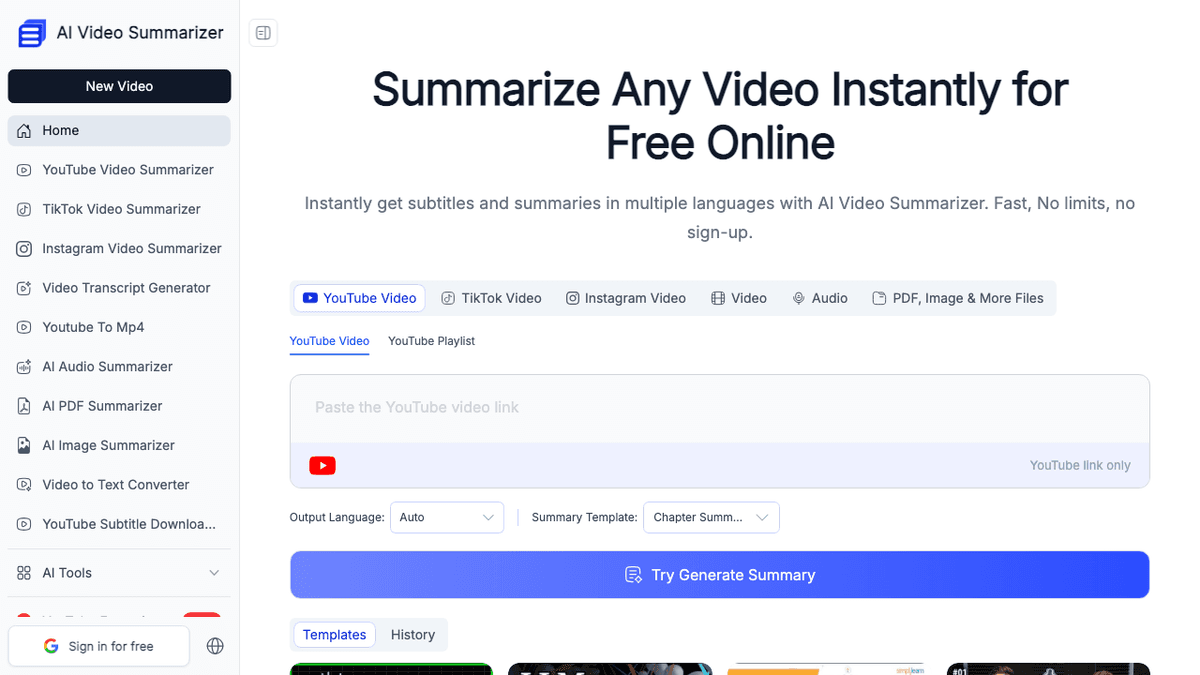
The next image shows the steps in AI Video Summarizer. Choose a source, paste a link or upload a file, choose a format, and make the short account. Check the source before you reuse a claim.
Use Atlas when you need to ask questions such as:
- Which caveats did the speaker give before the recommendation?
- What definition did the video use for a method or concept?
- Where did the speaker mention the limitation, number, or source?
- Does the transcript support the summary's conclusion?
Atlas does not inspect raw video files, read frames, label speakers, or record meetings. Watch the video when the answer is on a slide, chart, face, gesture, demo, or scene.
AI video summarizer workflows compared
| Workflow | Video job | Typical input | What to check before reuse |
|---|---|---|---|
| Atlas source workflow | Ask cited questions about a transcript-backed video | YouTube source with readable transcript text | The cited transcript passage and any claim that depends on slides or demonstrations |
| YouTube-link summarizer | Skim a public lecture, talk, tutorial, or interview | YouTube URL and available captions | Caption completeness, transcript language, and timestamps |
| Uploaded-video summarizer | Review a private lecture, webinar, or training recording | Local video file or cloud link | Upload policy, file limits, transcript quality, and visual-only evidence |
| Meeting or transcript tool | Extract decisions, action items, and follow-ups | Call recording, meeting bot, or transcript | Speaker labels and the transcript around each decision |
| Creator clipper platform | Produce clips, captions, chapters, or social posts | Long-form video URL or file | Whether the clip preserves the speaker's meaning and context |
Table 1: Five AI video summarizer workflows compared by job, input, and the source check needed before reusing the output.
YouTube-link summarizers
Use this workflow for a public class, talk, guide, or interview. Check that the captions cover the whole video and use the right language. Open the key moment before you reuse a claim.
Uploaded-video summarizers
Use this workflow for a saved MP4, class, interview, or training video. Check the file limit, accepted file types, privacy terms, and caption quality before you upload it.
Meeting and transcript tools
Use this workflow for calls, interviews, tasks, and team notes. Check that each speaker is named correctly. Read the source text around a decision before you share the note.
Creator clipper platforms
Use this workflow when you want a clip, caption, chapter, or social post. Review the source around each cut so the new content keeps the speaker's meaning.
Atlas source workflow
Use this workflow when a YouTube transcript must support a research note. Ask one question, open the citations, and compare the answer with the source text.
A YouTube tool may be enough to scan a long talk before class. If you plan to reuse a claim in a report, choose a tool that lets you inspect the source behind it.
AI video summarizer tools to consider
These tools serve different needs. Check each official page for current file types, languages, limits, privacy terms, and plans.
-
Atlas answers from a YouTube transcript and lets you open the source text behind a cited answer.
-
AI Video Summarizer works with several kinds of source and can make transcripts, chapters, templates, and mind maps.
-
NoteGPT focuses on YouTube transcripts, captions, and short accounts.
-
Decopy appears in search results for this job, but check that its public tool page is live before you rely on a feature claim.
-
Mindgrasp accepts links or files for class, meetings, interviews, events, and training.
-
HappyScribe joins video summaries with tools that turn speech into text.
-
Notta makes shareable notes from audio and video transcripts.
-
WayinVideo and OpusClip add captions, time links, search, clips, and new posts for creators. See chat with a YouTube video when questions matter more than a fixed summary. The guides to taking notes from a video and using an AI transcript summarizer cover the next steps.
Video summary limits to verify
The transcript may be missing or the captions may get names and numbers wrong. A time link may point near a claim instead of to the exact moment. The speaker may also correct a claim later or show a key fact only on a slide.
Video trust checklist
Before you reuse a summary, check that:
- The tool had good source text or clear audio.
- The captions got names, terms, initials, and numbers right.
- Important claims link to a time or source passage.
- You watched the video for facts shown only on screen.
- The short account kept the speaker's limits and doubts.
- Your rules allow you to upload the file.
- You checked any claim that could cause harm against the source.
For research, use the summary to find the important parts. Check those parts in the source before you use them.
Which workflow should you choose?
Choose a YouTube tool for a quick view of public content. Choose an upload tool for a saved or private file, after checking that your rules allow the upload. Meeting tools fit calls that need named speakers, tasks, and notes to share.
Choose a creator tool for clips, captions, chapters, posts, or outlines. Choose Atlas when a YouTube transcript needs to support cited questions and research notes.
For a claim used in research, school, policy, or public advice, read the source text behind the answer. Watch the video when the claim depends on what appears on screen.
Turn video summaries into cited notes
Add a YouTube source, ask what matters, and verify the transcript passage.