

To organize a literature review, group your papers by theme instead of going paper by paper. Each theme becomes a section of the chapter. Then build a matrix with one row per paper and the page where each finding is stated. Turn each theme name into a sentence that makes a point, put the sections in order, and check that every claim has papers behind it.
I tried this on 7 November 2026 with nine open-access papers on hallucination in language models. Atlas grouped them into four themes, built the matrix and checked one claim. All nine page numbers were right. Checking also caught one stretched finding and one wrong number, so the last step is not optional.
Sort your papers into chapter themes
Upload papers, get themes and a matrix with pages, then check each citation.
Quick answer: 5 steps
- Pick a structure. Thematic is the usual pick when your papers share a few themes. Chronological and methodological are the other two common choices.
- Sort your papers into three to five themes. One theme becomes one section.
- Build a matrix. One row per paper. Columns for theme, method, main finding, limitation and page number.
- Turn each theme into a claim, then order the sections. "Retrieval" becomes "Retrieval reduces hallucination but does not remove it."
- Check each claim against the papers. List the papers that support it, the ones that complicate it, and the ones that say nothing.
Keep a page number from the first step to the last. It saves a second search when you cite.
Pick a structure for the chapter
Two widely used guides name the same three structures. Here is when each one fits, based on Purdue OWL and the UT Dallas library guide.
| Structure | Use it when | Example sections |
|---|---|---|
| Thematic | Your papers share a few recurring themes | Definitions, measurement, fixes, open problems |
| Chronological | The field changed over time and readers need the story | Early work, a turning point, recent work |
| Methodological | Your papers use different methods you want to compare | Surveys, experiments, case studies |
Table 1: Three common ways to organize the body of a literature review, from Purdue OWL and UT Dallas.
UT Dallas adds the frame around the body: an introduction that names the topic and your pattern, then the body, then a conclusion on what the literature shows and where it could go next. You can mix structures. A thematic chapter can open with a short history.
Step 1: Sort your papers into themes
Read the title, abstract and conclusion of each paper. Write two or three words for what it is about. Then sort the papers into piles where the words overlap. Aim for three to five piles. A pile with one paper is either a gap worth noting or part of a bigger theme.
For my test, I used a QA account on a local Atlas build and uploaded nine arXiv papers, including Shuster and colleagues (2021), Gao and colleagues (2023) and Dhuliawala and colleagues (2023). I asked Atlas to group them into three to five themes that could become sections, with a heading and a short argument for each.
The answer, about 50 seconds later, had four themes with citations:
- Foundations and model self-knowledge (2 papers)
- Measuring factuality and hallucination (3 papers)
- Retrieval to ground the answers (2 papers)
- Checking drafts after they are written (2 papers)
I also used Classify on the project map to color the papers by four draft sections. The map and the chat did not split the papers the same way. Classify put one paper in "Other". That is useful: a paper that fits two piles is a choice you have to make.
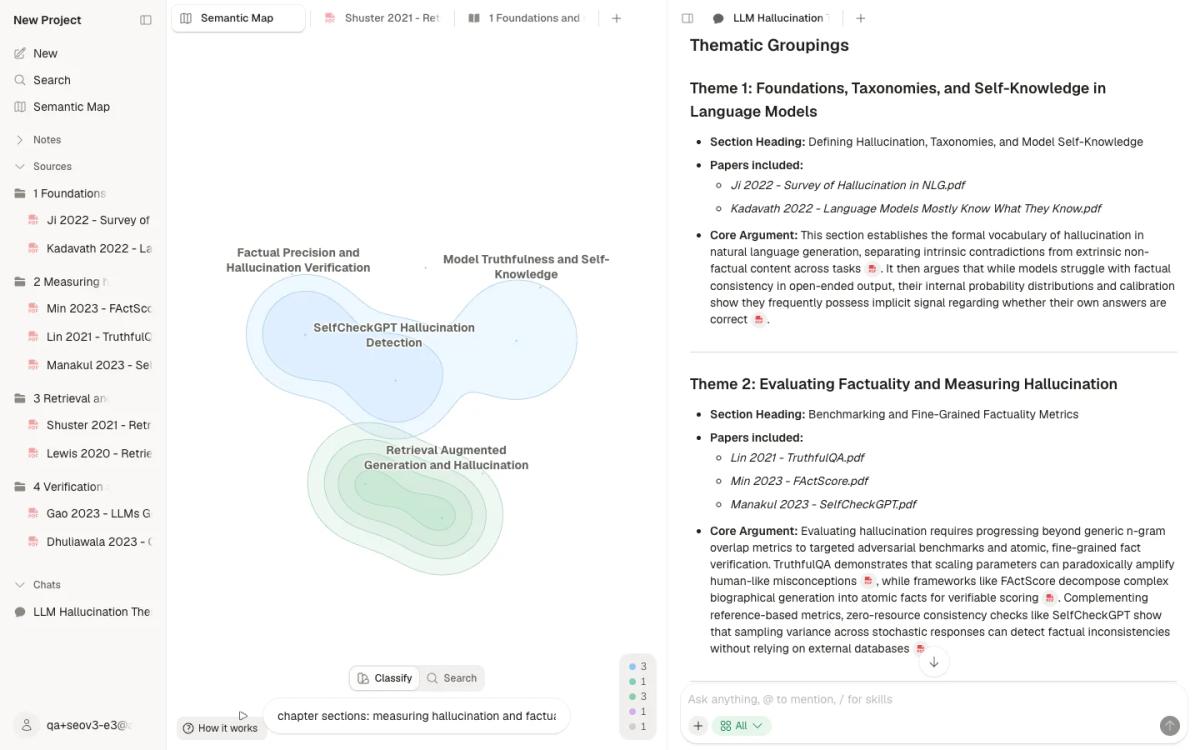
Then I made one folder per section in the Sources panel and dragged each paper into it by hand. You can also ask Atlas to create a folder per theme and move the papers in; check where each one landed. The folders are a quick way to see which section is thin. For other ways to keep a large library tidy, see the research paper organizer guide.
Step 2: Build a matrix with pages
A matrix is a table with one row per paper and one column per thing you want to compare. The GMU Writing Center calls it a grid. It lets you see your material away from the papers, and see patterns across them. Give it these columns:
- Paper
- Theme
- Method or data
- Main finding
- Limitation
- Page where the finding is stated
The page column is the one most people skip, and filling it now saves a hunt when you cite. I asked Atlas to turn the four themes into this matrix and cite every row, and the answer came back in about 80 seconds.
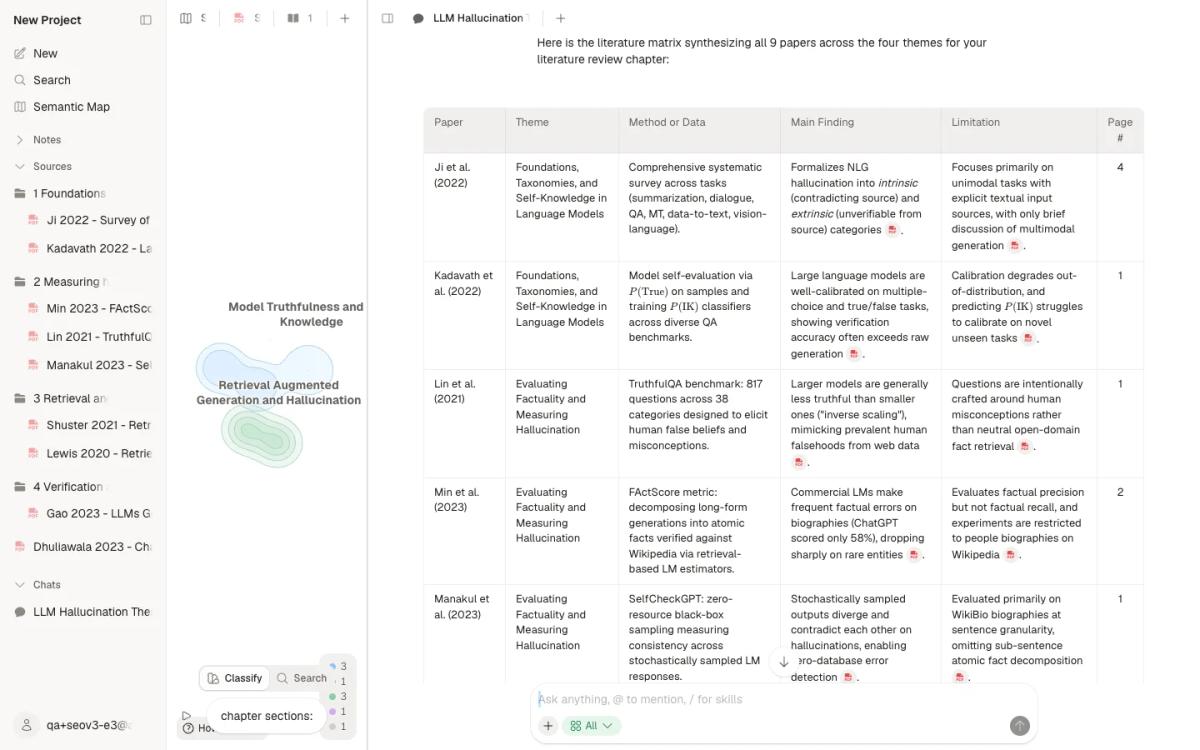
Then I checked every page against the text of the PDF.
| Paper | Page given | Finding on that page? |
|---|---|---|
| Ji et al. 2022 | 4 | Yes |
| Kadavath et al. 2022 | 1 | Yes |
| Lin et al. 2021 | 1 | Yes |
| Min et al. 2023 | 2 | Yes |
| Manakul et al. 2023 | 1 | Yes |
| Lewis et al. 2020 | 1 | Yes |
| Shuster et al. 2021 | 2 | Yes |
| Dhuliawala et al. 2023 | 1 | Yes |
| Gao et al. 2023 | 2 | Yes, but the row overstates it |
Table 2: Page numbers from the Atlas matrix, each checked against the text of that PDF page on 7 November 2026.
For tools built only for matrices, see the synthesis matrix generator guide.
Step 3: Turn themes into section claims
A theme name like "Retrieval" tells the reader what a section covers, but it does not tell them what the papers show. GMU's advice is to change each label from a noun phrase to an assertion: a sentence that makes a point tied to your question.
- "Measuring hallucination" becomes "Benchmarks show that bigger models are not always more truthful."
- "Retrieval" becomes "Retrieval reduces hallucination but does not remove it."
- "Checking drafts" becomes "Models can catch some of their own errors when they check facts one at a time."
Now order the sections so each one sets up the next. Atlas suggested definitions first, then measurement, then retrieval, then checking. It picked the Ji survey to open the chapter, because it sets the terms the other papers use. That order is a fair default, but it is your call.
Step 4: Check each claim against papers
This step turns a matrix into a review. Take one claim sentence and sort the papers into three lists: support, complicate, and silent.
I asked Atlas which papers support "retrieval reduces hallucination but does not remove it", with a quote and a page for each, and which papers complicate it or do not address it.
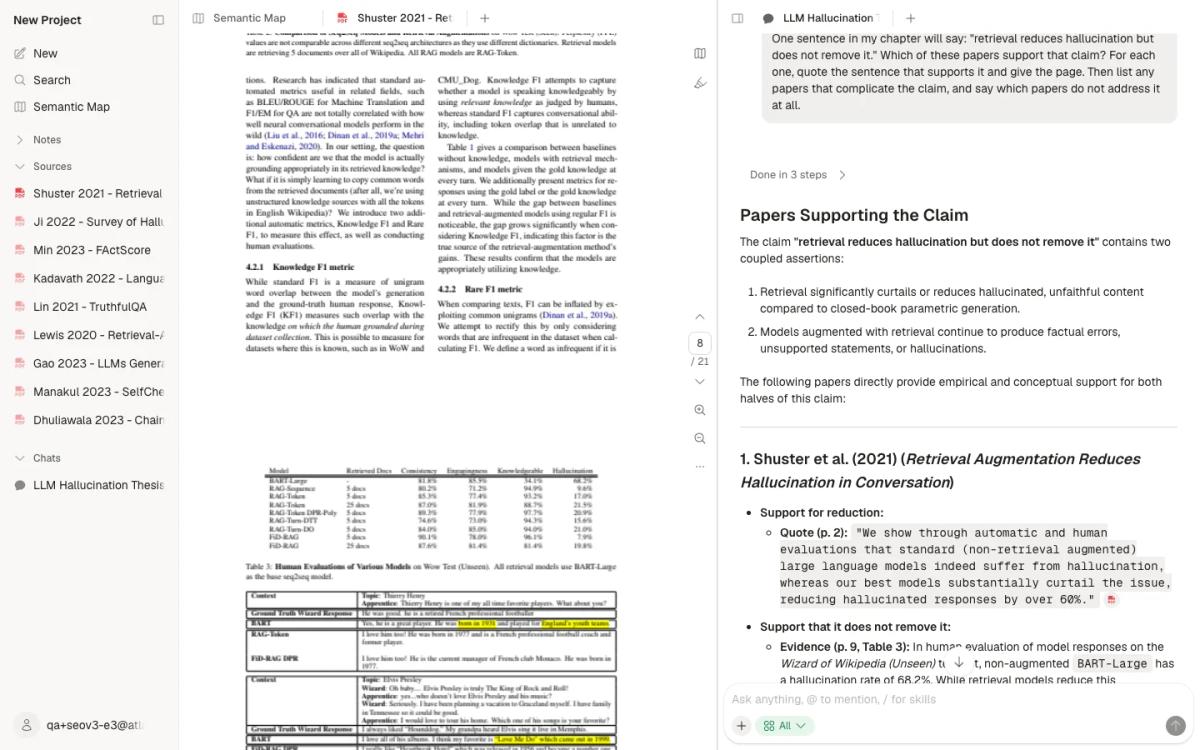
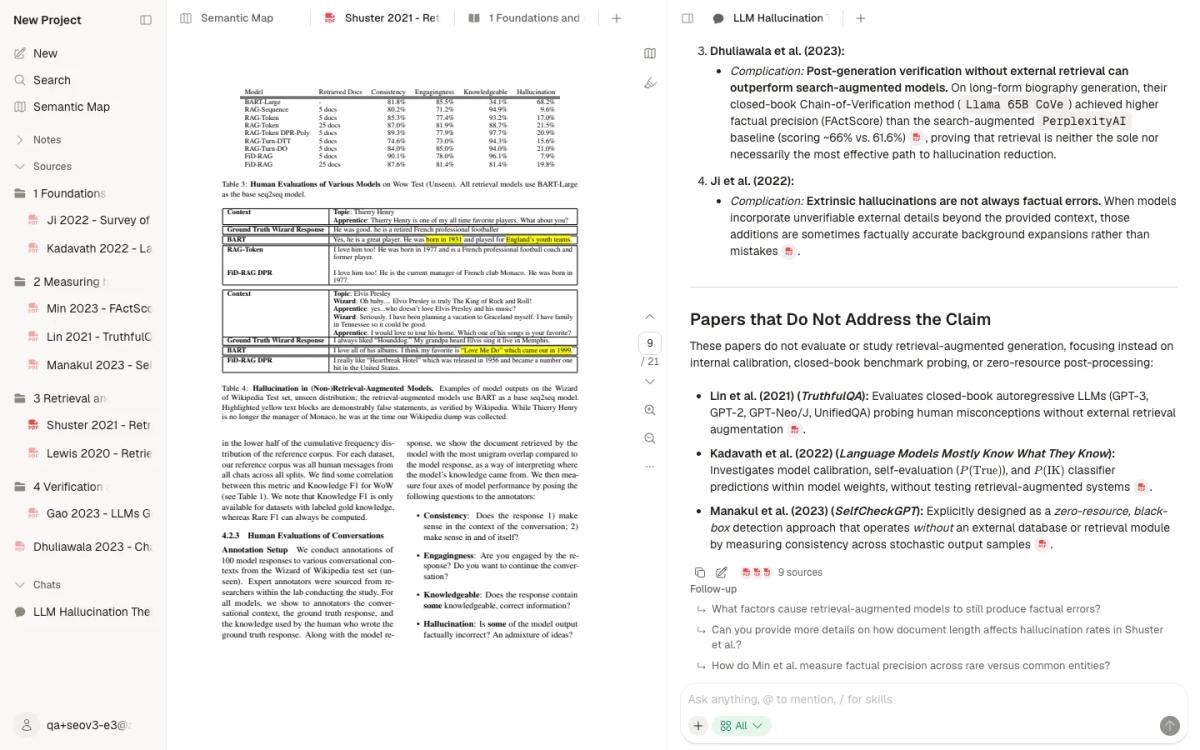
It named four supporting papers, four that complicate the claim, and three that do not address it. Shuster and colleagues appeared in both of the first two lists. Their page 2 reports a drop in hallucinated responses of over 60 percent. But their own results show more retrieved documents can raise it again. That is exactly the nuance a good section needs.
Then open the citation. Clicking the Table 3 citation opened the Shuster PDF at page 9. Table 3 shows 68.2 percent hallucination for the base model with no retrieval, 7.9 percent for FiD-RAG with five retrieved documents, and 19.8 percent for the same model with 25.
What checking the AI's work found
I checked every page and number against the PDFs with a text search of each cited page. The full log is kept with the test files. Three things were wrong or weak.
- One matrix row stretched a finding. The Gao row said top models lack full citation support about half the time "on complex open-ended QA". The paper says that for one dataset, ELI5. The claim-check answer had the scope right.
- One support was weak. For "does not remove it", the Lewis quote is about models without retrieval. It does not measure what is left after retrieval.
- One number was wrong. The claim check said a checking method by Dhuliawala and colleagues scored about 66 against 61.6 for a search-based system. Their Table 3 on page 7 shows 63.7 and 71.4 for two versions and 60.8 for a third. The point held for two of the three versions, and the number was wrong.
So the pages were right 9 of 9 times, and the mistakes were in how findings were worded. Read the cited page before a row or a number goes into your chapter.
Organizing 50 to 300 papers
The steps are the same at scale, but the order of work changes.
- Sort before you read deeply. Use titles and abstracts to make rough piles. Read in full only what you will cite.
- Work one theme at a time. Build the matrix for one section, write that section, then move on.
- Keep the page column filled. With 200 papers, a missing page costs real time later.
- Watch for piles that grow too big. A theme with 60 papers is probably two sections.
On the Free plan, Atlas holds 10 sources and 5 AI messages, which is enough to try these steps on one theme. A full library needs a paid plan, and Billing shows its limits. For more on reading a large set, see how to synthesize research papers and the AI for literature review guide.
What Atlas does not do
- By default it can also search the web and scholarly literature. Choose Project only in the chat composer to keep answers to the papers in your project.
- It files papers into folders only when you ask, and you decide which theme a paper belongs to.
- It does not write your chapter or choose your argument.
- Its answers can stretch a finding or get a number wrong. Open the citation.
- Distance on the map shows similar content. It is not a citation and not agreement.
Next step: start with 10 papers
Pick the 10 papers you know best for one theme. Upload them, ask for themes and a matrix with a page per finding, and check three rows by hand. If the pages hold up, add the next theme. For the writing itself, see how to write a literature review with AI. To compare tools for each stage of the work, see the best AI research assistants by research phase.
Sort your papers into chapter themes
Upload papers, get themes and a matrix with pages, then check each citation.