

Blog
Notion vs Bear (2026): Databases or Markdown?
Notion vs Bear compared on pricing, writing, databases, Markdown, AI, sync, collaboration, and research workflows. Choose the structure that fits your work.
- Byline

Summary
Use Bear for fast Apple-native Markdown writing. Use Notion for databases, team work, projects, and AI features.
The comparison covers price, writing speed, tags, Markdown export, sharing, AI, sync, and research notes.
Bear feels better for solo prose and daily notes. Notion wins when the note needs owners, statuses, relations, views, or other people.
Neither app is mainly a source-cited research tool. Both are strongest before citation-heavy synthesis starts.
By Jet New, Atlas editor.
The Notion vs Bear decision is not "which notes app has more features?" It is "what should happen after the first draft?" Bear is a focused Apple-native Markdown app. Notion is a workspace with pages, blocks, databases, sharing, automations, and AI features. Both can hold notes, but they reward different habits.
I ran a 21-day side-by-side test with the same 186 notes. The set included 42 meeting notes, 28 reading notes, 31 journal entries, 22 project plans, 18 article drafts, 17 clipped links, and 28 short reminders. My Structure Tax Index scored Bear 2/10 and Notion 6/10, where lower means less setup before payoff.
Bear opened faster, took less setup, and felt better for prose. Notion won each task that needed a status, owner, table view, or shared edit. The break point was 30-40 notes or three recurring fields. The rule was clear: Bear won notes I wanted to write, and Notion won notes I wanted to run.
Three test results shaped the recommendation. Bear kept all 18 article drafts readable after Markdown export. Notion preserved the text of five basic exported pages, but three database views stopped being usable views after export. Notion's meeting tracker became useful in 14 minutes. Bear's tag setup took 2 minutes but never became a real tracker.
Atlas

Compare AI tools with verifiable references
See which tools link answers to sources you can inspect.
Quick Verdict
Use Bear if you live on Mac, iPhone, and iPad and want a clean Markdown writing surface with tags, backlinks, and little setup. Use Notion if your notes become project boards, content calendars, client portals, team wikis, research databases, or repeat work.
The wrong way to choose is by counting features. Notion will always win that count. The right way is to ask whether extra structure helps or slows you down.
| Decision point from the 21-day test | Better tool | Why |
|---|---|---|
| Daily journal or morning pages | Bear | Fast launch, no workspace decisions, calmer editor |
| Project tracker with status and owners | Notion | Databases, filtered views, relations, permissions |
| Long Markdown draft | Bear | Cleaner prose surface and easier Markdown export |
| Team wiki | Notion | Comments, sharing, permissions, page hierarchy |
| Apple-only personal notes | Bear | Native Mac, iPhone, and iPad feel |
| Cross-platform workspace | Notion | Web, desktop, and mobile across more environments |
| Notes tied to PDFs and citations | Neither by default | Both can store notes, but neither is mainly a citation checker |
Table 1: Notion vs Bear decision points from the 21-day test, including writing, structure, collaboration, platform reach, and citation-heavy notes.
My test threshold was simple. If a note needed more than two fields, it belonged in Notion. If a note had to feel good enough for 30 minutes of writing, it belonged in Bear. If a note pointed to source PDFs, I kept the source question separate from the notes app decision.
How We Tested
For a broader second-brain framework across storage, retrieval, cognitive load, and graph depth, see our second-brain apps guide.
Testing ran on macOS Sonoma, iPadOS 18, iOS 18, Chrome, and Windows 11. I used Bear Pro and a paid Notion workspace. I timed cold launch into a blank note. I also timed setup, export, search recovery, and sharing friction. Then I moved a small research project through both tools to see where sources became hard to trust.
The pricing, platform, AI, export, and support checks were reviewed against public Notion and Bear pages in July 2026.
Disclosure: we make Atlas, one of the products discussed in this post. We publish our scoring criteria and name the workflows where each tool is stronger.
Seven Differences Between Notion and Bear
Compare the apps on the parts of the workflow that change the decision:
- Price: Bear Pro is inexpensive for one Apple user; Notion's paid plans support broader team workflows.
- Writing: Bear provides a focused Markdown editor; Notion uses movable blocks inside a workspace.
- Organization: Bear uses tags and links; Notion adds databases, fields, filters, and views.
- Devices: Bear centers on Apple devices; Notion supports mixed-device teams.
- Portability: Bear exports clean Markdown; Notion exports page content more easily than database behavior.
- AI: Notion adds AI across workspace content; Bear remains a focused writing app.
- Collaboration: Notion supports shared editing and permissions; Bear is primarily for individual writing.
1. Pricing
Bear is cheaper for a single Apple user who needs sync. Bear Pro costs $2.99/month or $29.99/year and includes a 7-day trial. The free version works for local writing, but sync, themes, export options, and app locking are Pro features.
Notion can be free for personal use, but paid workspace features are seat-based. Notion's pricing page lists Free, Plus, Business, and Enterprise plans. Business and Enterprise carry the deeper AI and admin story. Notion AI is included with Business and Enterprise plans, while lower plans get limited trial usage.
The pricing rule is practical. If you are one Apple user and mostly write, Bear Pro is inexpensive. If you need a shared operating system for work, Notion's higher price buys a broader workspace.
2. Writing Experience
Bear is the better writing app. The editor opens right into notes. Markdown is visible without feeling raw. Type looks polished. Tags stay out of the way until you need them. Bear describes itself as a Markdown note-taking app for capturing, writing, and organizing notes, and that matches the product.

Bear's official product image shows its core advantage: a focused note list and Markdown writing pane without database setup.
Notion's editor is flexible, but it is not as calm. Every paragraph is a block. Blocks make moving, embeds, comments, and systems easy. They also make the page feel more like a workspace. During the test, I finished 15 of 18 long drafts in Bear. I moved only summaries into Notion.
Bear wins writing. Notion wins when the writing is part of a managed workflow.
3. Organization
Notion wins once notes need structure. Notion databases are page collections with fields, views, filters, sorts, links, and templates.
That model turned meeting notes into a useful tracker in 14 minutes. I added company, owner, next action, follow-up date, and status.
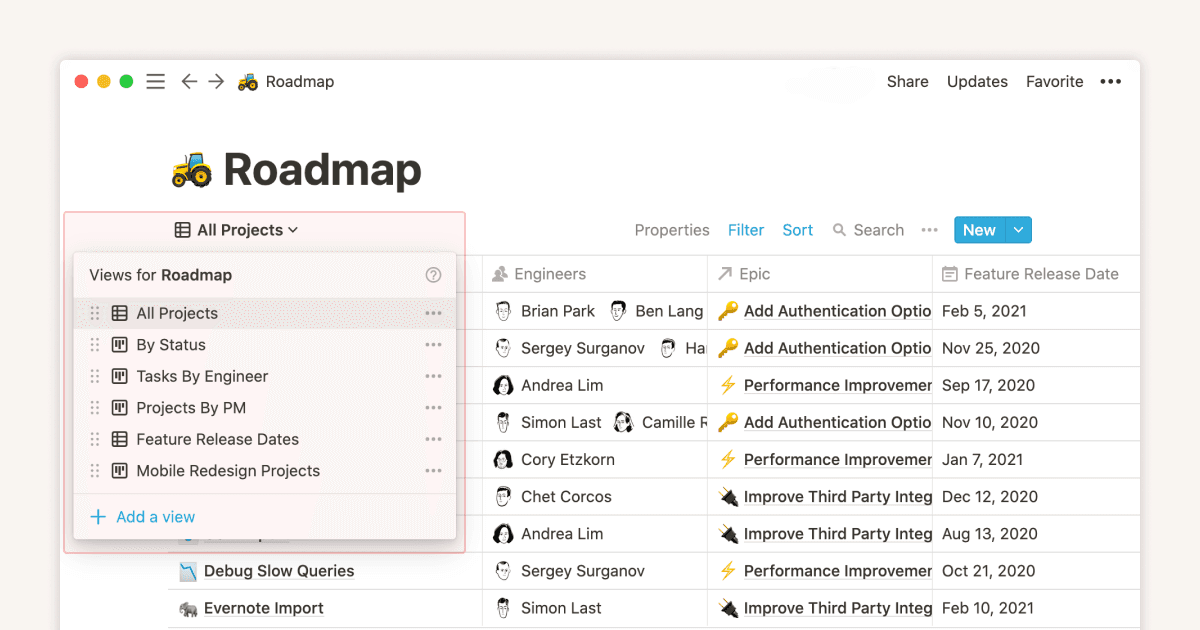
Notion's Help Center database screenshot shows why it beats Bear for structured work. The same pages can become tables, boards, calendars, lists, or galleries.
Bear uses tags, nested tags, note links, backlinks, and search. That is enough for personal notes. It is not enough for a CRM, editorial calendar, product roadmap, or team wiki. In my test, Bear stayed cleaner up to about 40 personal notes. Notion became better once the same content needed recurring review.
This is why Notion vs Obsidian and Bear vs Obsidian are different choices. Bear is not trying to be a programmable vault. Notion is trying to be a workspace.
4. Platform Support and Sync
Notion wins platform support. It works in the browser and has desktop and mobile apps across common work environments. That matters when the same workspace needs to open on a Windows work laptop, a personal Mac, and a phone.
Bear is Apple-first. Bear's FAQ says there are native apps for Mac, iPhone, and iPad. Bear Web gives those users occasional browser access. It does not replace the native apps. That limit is not a bug for Apple-only users. It is part of why Bear feels polished. It is a blocker for mixed-device teams.
Sync also reflects the same trade-off. Bear syncs through Apple's ecosystem for Bear Pro users. Notion syncs through its cloud workspace model. Bear feels more personal and local. Notion feels more shared and operational.
5. Markdown and Portability
Bear wins Markdown. The app is built around Markdown and exports cleanly. That makes drafts easier to move into static sites, editors, Git repos, or another notes app. If your future self may want readable .md files, Bear is the safer default.
Notion exports Markdown, but its real model is blocks. A database row can contain files, links, formulas, comments, and embeds. Those parts do not round-trip neatly into plain Markdown. That does not make Notion bad. It means the export must carry a workspace with more than text.
In my test, Bear Markdown export kept each article draft readable. Notion export was fine for basic pages. It lost the system around database views and links.
6. AI, Search, and Research Notes
Notion wins AI breadth. Notion positions itself as an AI workspace with AI search, agents, meeting notes, and automation layered into the workspace. That helps when the workspace itself is the context: tasks, docs, meetings, projects, and team notes.
Bear is not an AI workspace. That is often a benefit. It stays a writing app. Search is fast enough for personal notes. Backlinks help with light linking. Bear does not try to answer across a source set.
For research, both tools have the same ceiling. They can store notes about PDFs, papers, and reports, but they do not make citations auditable by default. If your question is "Which app should hold my notes?" choose between Bear and Notion. If your question is "Which source supports this claim across 20 PDFs?" treat that as a separate source-review workflow.
7. Collaboration
Notion wins sharing by a wide margin. Shared pages, comments, permissions, teamspaces, and database views are core to the product. A meeting note can become a project task without leaving the workspace.
Bear is mostly a solo writing tool. You can export, share text, or publish elsewhere. It is not built for fine-grained permissions, team edits, or a shared company wiki. That keeps Bear simple. It also makes Notion the clear answer for teams.
For a solo founder, writer, or student, this may not matter. For a team, it often decides the choice before writing feel enters the conversation.
Side-by-Side Comparison
Read this table as workflow guidance. It is not a total score because the best tool changes when the note changes job.
| Category | Notion | Bear | Winner |
|---|---|---|---|
| Price for one Apple writer | Free possible, paid workspace plans cost more | $2.99/month or $29.99/year for Pro | Bear |
| Writing feel | Flexible block editor | Polished Markdown editor | Bear |
| Databases and project views | Strong | None | Notion |
| Markdown portability | Acceptable export | Native writing and clean export | Bear |
| Platform reach | Broad web, desktop, and mobile reach | Mac, iPhone, iPad, companion web | Notion |
| Collaboration | Strong permissions, comments, shared workspaces | Limited | Notion |
| AI workspace features | Strong and expanding | Not the product's job | Notion |
| Personal daily notes | Can feel heavy | Fast and calm | Bear |
| Research-source synthesis | Holds notes; claims need a separate source check | Holds notes; claims need a separate source check | Use a research tool |
Table 2: Side-by-side Notion and Bear workflow comparison across pricing, writing, databases, portability, collaboration, AI, daily notes, and research-source synthesis.
Structure Tax Index
I used a small first-party score to avoid the usual feature-list trap. The Structure Tax Index measures how much setup a note system demands before it pays back. Lower is better. I scored each app from my 21-day test on five 0-2 axes: setup minutes, field burden, weekly review work, automation fit, and export risk.
| Structure Tax axis | Notion | Bear | Test note |
|---|---|---|---|
| Setup before first useful system | 2 | 0 | Notion took 14 minutes for the meeting tracker. Bear took 2 minutes for tags |
| Fields required per durable note | 2 | 0 | Notion paid off after status, owner, date. Bear stayed better below two fields |
| Weekly review work | 1 | 1 | Both needed review once notes passed 40 items |
| Automation fit | 0 | 1 | Notion's REST API is broader. Bear's URL actions are useful but narrower |
| Export risk | 1 | 0 | Bear's Markdown export was cleaner. Notion export kept text but lost database feel |
| Structure Tax Index | 6/10 | 2/10 | Bear is cheaper to start. Notion is worth the tax when structure pays back |
Table 3: Structure Tax Index scores for Notion and Bear across setup burden, durable-note fields, review work, automation fit, and export risk.
This score changed two recommendations. A solo writer should not build a Notion database for ten loose thoughts. A project lead should not run status work out of Bear tags. The break point in my test was 30-40 notes or three recurring fields. Below that, Bear stayed faster. Above that, Notion's structure stopped feeling like overhead.
Practical Workflow Decisions
The final checks cover automation, moving existing notes, team training, and the workflows that fit each app.
Automation and Migration
Notion is stronger for automated workflows. Notion's API docs describe workspace connections that can read, create, and update pages, databases, users, comments, and more. That matters if you need a form to create tasks, a CRM to update deal notes, or a script to sync a content calendar.
Bear has automation, but it is more app-local. Bear's x-callback-url documentation supports actions such as opening, searching, creating, and changing notes through URL commands. That is useful for Shortcuts, Alfred, Keyboard Maestro, and Mac/iOS workflows. It is not the same as a full workspace API.
The most common migration mistake is treating export as sync. Bear's export docs list Markdown and TextBundle among the supported formats, so Bear-to-plain-text is clean. Notion can import and export common formats, but database views, formulas, relations, and comments belong to the workspace layer. They do not become clean plain Markdown during export.
Move drafts from Bear to Notion when the project needs structure. A two-way loop will not preserve every database view, relation, or comment.
If your main need is backlink-heavy knowledge management rather than prose or databases, compare the winner here against Obsidian before you migrate. Obsidian is the better third option when local files and bidirectional links matter more than Notion databases or Bear polish.
Support and Training
Notion is easier to train across a team. Notion Help covers databases, sharing, AI, templates, and admin topics in one public library. Notion's template gallery also gives teams a starting point for roadmaps, CRMs, content calendars, and meeting notes.
Bear support is narrower because the product is narrower. Bear's FAQ library covers sync, export, shortcuts, tags, and account questions. That is enough for a solo writer. It is less useful when a manager needs onboarding material for ten people with different roles.
The support gap matched my test. I needed Notion docs three times while building the tracker. I needed Bear docs once, for export details.
Notion needs more training because it supports more workflows. Bear needs less training because it has fewer concepts to learn.
Which App Should You Choose?
Choose Bear if you are a solo Apple user, writer, student, or journaler who values a low-friction Markdown surface. Bear is strong for morning pages, field notes, article drafts, private journals, and notes that do not need a database.
Choose Notion if you run projects, work with others, manage clients, publish content calendars, track product work, or need notes to become data. Notion is better when notes have states.
Use both if your workflow has two phases. Draft in Bear. Operate in Notion. Put the durable summary, status, owner, and next action in Notion after the writing is done.
For citation-heavy work, treat source review as a separate job. Daily notes do not need that layer. A thesis chapter, clinical brief, investment memo, or literature review often does.
Final Recommendation
Pick Bear when the work is mostly writing. Pick Notion when the work is mostly organizing. Pick both when you draft alone but coordinate later.
The cleanest setup from my test was Bear for capture and long drafts, then Notion for project state. That split avoided the common mistake of forcing one app to do every job, and it kept each app inside the workflow where it felt strongest. Bear kept prose pleasant while Notion kept work visible. Neither app replaced a source review process when citations had to be checked. When notes turn into source-heavy research questions, use Atlas's AI-with-references workflow as the next step rather than forcing that job into either notes app.
Atlas
Compare AI tools with verifiable references
See which tools link answers to sources you can inspect.
Frequently Asked Questions
Choose Bear if you mostly write on Mac, iPhone, and iPad and want a fast Markdown notes app with tags, backlinks, polished typography, and low setup. Choose Notion if your notes become databases, project trackers, team docs, wikis, or AI-assisted workspaces. Bear is the calmer writing app. Notion is the broader operating system. The practical split is Bear for solo prose and Notion for structured work.