

The SPIRIT checklist sets out what authors should report in a trial protocol. That document describes the planned trial.
SPIRIT 2025 is the current version, with 34 minimum items plus a schedule figure. Start with the official resources and the expanded checklist.
To review a draft, match each item that applies to the text that covers it. Record gaps and conflicts as questions for the investigators, the people responsible for the trial. This map shows what the text supports. It does not approve the trial or prove its methods are sound.

Check the passages behind your protocol map
Compare selected protocol passages with the current reporting requirements.
Get the current SPIRIT checklist
SPIRIT stands for Standard Protocol Items: Recommendations for Interventional Trials. The 2025 statement updates the 2013 guideline. Use the current official checklist for a trial protocol. For an individual case report, use the CARE checklist guide.
Keep the short checklist and its fuller guide together with the explanation and elaboration document. The explanation page explains why each item matters and points to examples from published protocols. Use these to check all parts of an item. A heading on the right topic does not show that the text beneath it covers every part.
Check the official extensions list for guidance that fits the trial. Extensions add guidance for certain designs or groups. The list separates newer 2025-based guidance from older versions. Record which base version your extension uses, and check the journal's rules. If its form still names 2013, ask the journal how to handle the mismatch before filling it in.
SPIRIT and CONSORT have different jobs
SPIRIT covers the protocol: what the trial team plans to do. CONSORT covers the report of trial results. The joint resource hub has both sets of materials. Text in a protocol does not prove what happened during the trial. The results report has a different job from the account of the planned methods.
Set up the coverage review
Choose a fixed protocol version and list the files you will review. Include other files when they are part of the review package, but keep their names and versions distinct. If the plan appears only in a separate file, record where to find it. Check that the people who review the package can access that file.
For each item that applies, including its lettered parts, record:
- The current identifier and the detail being checked.
- The protocol version, page or section, and exact supporting passage.
- What the passage addresses and what remains unclear.
- The question or edit needed, its owner, and review status.
Use labels that preserve uncertainty
Located means you found text for a person to check. Partial means the text covers only part of the item. Not located means no support was found in the files reviewed. Conflict means two parts of the text disagree.
These are working labels for this review, not official SPIRIT scores. The trial team must decide which items apply and check every part before closing a row.
For a registered report, also check the accepted plan version and the recorded scope of later changes. SPIRIT coverage labels cannot stand in for the journal's decision about a plan or change.
Keep reporting separate from design decisions
Do not fill a gap with a method you think the team should use. If the text gives no reason for the sample size, ask the team how it chose that size. If two dates differ, ask which plan is intended.
The EQUATOR record links the protocol reporting guideline. A completed form does not grant ethics approval or prove that people taking part will be safe.
Worked protocol coverage example
The excerpts below are fictional. They show five review decisions for a protocol labeled v0.3, dated 1 October 2026. This example covers only part of the checklist. A real review must cover all 34 items, the parts within each item, and any extension that applies.
The item numbers come from the SPIRIT 2025 expanded checklist. These excerpts are not advice on which measures, visit times, sample sizes, or data-sharing plans to use.
| Item | Fictional passage and location | Review status | Investigator query or check |
|---|---|---|---|
| 2: Protocol version | Cover: “Version 0.3, 1 October 2026.” | Located | Confirm this identifier and date match the full review package. |
| 6: Data sharing | Section 12: “Data may be shared on request.” | Partial | Specify what will be available and where or how access will work; check the remaining item elements. |
| 16: Outcomes | Section 7: “The primary outcome is the task score at week 12.” | Partial | Confirm the analysis metric and aggregation method, plus all secondary outcomes and their time points. |
| 18: Participant timeline | Schedule: “Final assessment: week 16.” Section 7 says week 12. | Conflict | Confirm whether these refer to the same assessment and resolve the intended timing in both locations. |
| 19: Sample size | Section 8: “The recruitment target is 120.” | Partial | Locate how the sample size was determined and the calculation assumptions; the target alone is insufficient. |
Table 1: For item 16, naming an outcome and time point does not give all the detail required. For item 19, a target does not explain how the team chose it. Leave those rows open even if the document has headings called “Outcomes” and “Sample size.” A heading helps you find text to read. It cannot show whether that text covers the whole item.
Write a question the team can answer. “Please add the missing methods” gives little direction. “Where are the calculation assumptions for the stated target?” names the gap without filling it with a guess.
When the team supplies the text, check it against the item. Record the person's review result in place of the draft label.
Check the schedule against the text
Item 18 covers the participant timeline, which shows when trial events take place. The expanded checklist highly recommends a diagram of enrolment, interventions, assessments, and visits.
Check the schedule beside the text for those events. A clear figure can still disagree with the text.
For the fictional week-12 and week-16 conflict, first check whether both entries name the same event. One could be an outcome measure and the other a separate visit. Read the labels, footnotes, and text around each entry. Record what you find, then ask the team to confirm the plan.
If the team confirms that both entries describe the same event, update the text and schedule together. If they describe different events, make that clear in both places.
Keep item 18 open while the conflict remains. This method checks whether the accounts agree. It does not judge whether the schedule is suitable for the people taking part.
After an edit, check the rows that depend on timing again. A changed date may affect the outcome section or other text. Keep the old question and the team's response in the review history. Read the new version before carrying an earlier “located” label forward.
Compare selected items in Atlas
Atlas can compare supplied documents and produce a draft coverage note. The trial team still checks each item, the text that supports it, and the final review result. Start with a small set of items that you can read in full. A long table can look complete while missing a part of an item or pointing to the wrong text.
Prepare the sources and question
Add only documents you have permission to use, and wait for them to finish processing. Use the current protocol and the official guideline source. Start a fresh chat if an earlier chat includes material outside this review. Select Project only beside the plus button to keep new web or literature searches out of this comparison.
Choose Ask a question, type @ to select the protocol and guideline sources, then send a bounded request such as:
Compare SPIRIT 2025 items 2, 6, 16, 18, and 19 with the selected protocol. For each item, show the requirement's source, the protocol passage and location, what is addressed, and what remains unclear. Cite both documents. Keep missing details and conflicts unresolved; do not infer methods or call the protocol compliant.
Naming sources helps keep the question focused. If you need to compare several files, name each one and ask which file supports each match. The approach used in research synthesis also helps here: check what each source says and keep differences visible when they disagree.
Inspect both sides of every match
Open the numbered citations in the draft answer. First check that the guideline source shows the right item and all the parts that matter. Then check that the protocol source supports the match. Read the nearby text, including limits and links to other files. A numbered marker alone does not prove that a claim has support.
For the fictional item 19 row, a citation to “target is 120” supports the stated target. It does not explain the calculation. Correct any answer that marks the whole item covered on that basis.
If a citation opens the wrong text, ask for support from the named source or remove the match. The source-checking workflow explains why you need to read the text behind each claim.
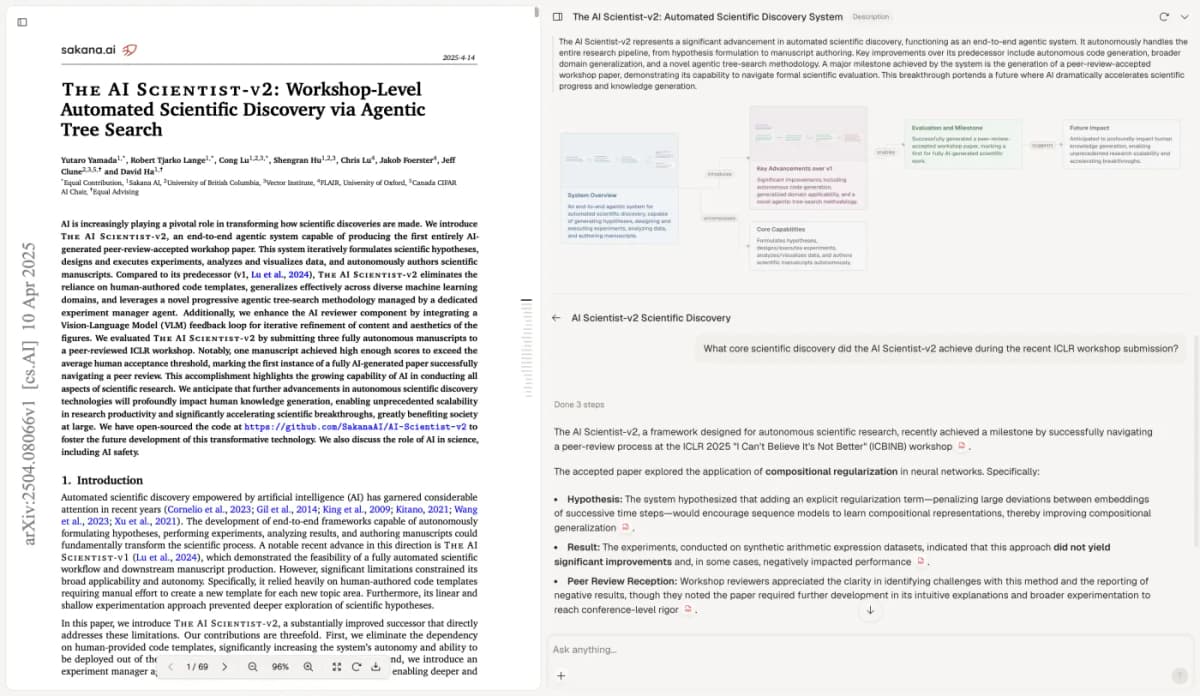
Unchanged Atlas archive screenshot. Visible paper: Yutaro Yamada and colleagues, The AI Scientist-v2, CC BY 4.0. This view shows citation inspection using a different paper, not a SPIRIT protocol review or a test of the tool's accuracy.
Save the checked coverage note
After checking the draft rows, select New, then Note, to keep the work. Include both document versions, source locations, open questions, and each person's review result. Wait for Saved. Label it as a working coverage note so a reader can tell it still needs review. It is not an approved protocol or a completed form.
Keep each question beside the evidence in its row. “Not located” means you did not find the text. It does not mean the item does not apply. Ask the team to explain that decision.
The broader paper-analysis workflow can help organize reading, while this note checks protocol text against named SPIRIT items.
Resolve queries with the investigators
Assign each open question to the person who can confirm the plan. Check their response against the current checklist, then read the new text in the protocol or named file. Keep the row open if the team has only promised to make an edit. A chat answer alone does not change the document that readers will review.
Before sending the protocol to a journal, update page and section links. Check that the schedule and text agree, and use the journal's required form.
Start at the official resource hub for the current checklist and related materials. Record who reviewed which version and which questions remain open.
The result is a map that another reviewer can check: each item, the text that supports it, and the team's decisions. It helps make the protocol clear. Trial design, safety, ethics, and judgments about methods remain with the people and review processes responsible for those decisions.
Check the passages behind your protocol map
Compare selected protocol passages with the current reporting requirements.