

The CARE checklist helps authors write a clear, full case report. Use it to find where your draft covers each item, then flag what is missing or needs checking. Text in the draft shows what the author wrote; it does not prove that the event happened as stated.
This guide shows how to map items to text through a made-up draft. Use only a draft your institution allows you to use, after its privacy review and removal of patient identifiers. Clinicians and authors still own the checks on care, facts, privacy, and consent.

Find CARE passages in Atlas
Review a permitted manuscript against named reporting items.
What the CARE checklist covers
CARE stands for CAse REport. Its official checklist has 13 main items, from the title and abstract to the patient's view and informed consent. Some items have more than one part, so a heading alone does not cover every detail.
Think of CARE as a writing aid. Check whether a reader can follow what the draft says happened and why the authors reached their view. This task does not tell you what care to give a patient or how to score the case's quality.
For example, a section headed “Follow-up” may have only one vague sentence. The heading tells you where to look; the text tells you which details are there. An author still needs to check those details against the case record.
The original CARE paper makes a key point: good case details do not settle cause and effect. A clear report does not, by itself, prove that a treatment caused a change. Keep that limit in mind when you write or review the closing claims.
Choose the right checklist and instructions
Choose the reporting criteria before you start the review. Use the official English checklist PDF, which the site currently calls the 2013 CARE Checklist. Note the file and version so all authors can check the draft against the same source.
The 2017 explanation and elaboration paper is a separate source. Its abstract says it explains each item with examples from published cases. Use it to learn more about the method, rather than rename the English form “CARE 2017.”
If you need another language, use the official downloads page. Check that the chosen form and your working copy refer to the same items. Keep the form beside the draft while you review it.
The EQUATOR CARE record links extensions that add detail for fields such as radiology and physiotherapy. Choose the right one with the lead author and the journal's rules in view.
The document type also matters. A planned trial protocol calls for the SPIRIT checklist, while the TIDieR checklist details an intervention. CARE keeps the focus on reporting an individual case.
Journal rules can add to the main checklist. For example, BMJ's consent policy requires a signed patient consent form for every case about a living person sent to BMJ Case Reports. Check the rules for your chosen journal; one publisher's rules do not apply to them all.
Build a manuscript passage map
Name the draft version before reviewing it: for example, “Draft 3, 2 October.” Add the checklist item, where you found the text, a short excerpt or summary, and the open question. Section names and paragraph numbers help when page breaks change.
Check each part of an item when it asks for more than one detail. One paragraph may cover several points, while an item may need text from more than one section. Give enough detail for another author to find and check the text.
Use simple working flags: found, needs detail, not found, and author check needed. These labels belong to your review note; they are not CARE scores. Text you found may still need an author check, since finding a claim does not make it true.
When you cannot find a detail, note where you looked. “Not found in Draft 3, case section and supplement” is more useful than “not done.” It states what is missing from the text without inventing a fact about patient care.
Keep background papers apart from the case record. A published paper may support a claim in the discussion but cannot fill a gap about this patient's case. If you need to compare background papers, the guide to synthesizing research papers covers that task.
Work through a fictional draft
The table below uses made-up draft text and page references. It contains no patient data and does not show a real case, an Atlas result, or a full CARE review. Four rows show the method; a real review must cover the whole checklist that applies to the case.
Fictional teaching example: CARE items mapped to draft passages, reporting gaps, and author-owned follow-up.
| CARE item | Fictional Draft 3 passage | Working flag | Question for the author |
|---|---|---|---|
| 7: Timeline | p. 2, paragraph 3: “Assessment preceded the intervention.” | Needs detail | Where is the dated or relative-time sequence readers can follow? |
| 8: Diagnostic assessment | p. 3, paragraph 1: “An assessment was completed.” | Needs detail; author check needed | Which requested details does the case record support? |
| 10: Follow-up and outcomes | p. 4, paragraph 2: “The patient improved.” | Needs detail | What recorded change, check, and follow-up time does this refer to? |
| 13: Informed consent | p. 5, paragraph 4: “Consent was obtained.” | Found; author check needed | Has the lead author checked consent to publish against the journal's rules? |
Table 1: Use the checklist wording to decide which details to seek. Here, the timeline row needs a clearer sequence, while the follow-up row needs detail about the claimed change. Neither row proves that an event or check did not happen.
The diagnostic row gives very little text. You can see that it lacks detail, but cannot work out the missing facts from general knowledge of medicine. The clinician must check the record and decide what belongs in the draft.
In the consent row, you found text but still need an author check. If you marked it “passed” because the sentence exists, change the flag to “found; author check needed.” Keep the text and the open question together so readers can see the limit.
Resolve gaps without inventing facts
Turn each open row into a question for the person who can answer it. For example, “Please check the recorded follow-up time and update paragraph 2” gives the author a clear task. “Make this more complete” does not say what you need.
Do not fill a gap with a typical care sequence, a guessed date, or a detail from a similar published case. That would change the report's facts. If a fact is not known, the lead author must decide how to explain the gap under the journal's rules.
If an item seems not to apply, note the reason and ask the author to review it. A blank cell hides whether you checked the item or missed it. Do not use “not applicable” to avoid a gap in the text.
The patient's view should be their account, not words you invent for them. The CARE patient-perspective item asks for that view. Authors must work with the patient and journal on this part rather than write a voice to stand in for theirs.
Consent and privacy need separate checks. BMJ's de-identification guidance calls for limiting personal details even when there is consent to publish.
Checking a draft against CARE does not prove it is safe to upload. Follow your institution's approved process before using a document tool.
Find and check passages in Atlas
Atlas can help find text in a draft and keep checked notes together. Use only a draft your institution permits, after its privacy review and removal of patient identifiers. Atlas cannot make that privacy decision, prove the case facts, or establish consent from a sentence in the draft.
In a project chat, type @ and select the draft. Ask: “Using only this draft, find text for CARE items 7, 10, and 13. Cite each passage, state which requested details you cannot find, and flag claims that need author checks. Do not infer missing case facts.”
Use Project only to stop new web or literature searches. Earlier outside context can remain in a chat, so start a fresh project chat if the old one has unrelated sources. Name the draft to keep your question tied to the version you want to check.
Open each citation and read the text around it. Check that it supports the answer and comes from the right draft. A PDF opens at a precise place only when that source location is available.
If the citation does not open, find the named source and text yourself. The citation tracking guide goes further into checking claims against sources.
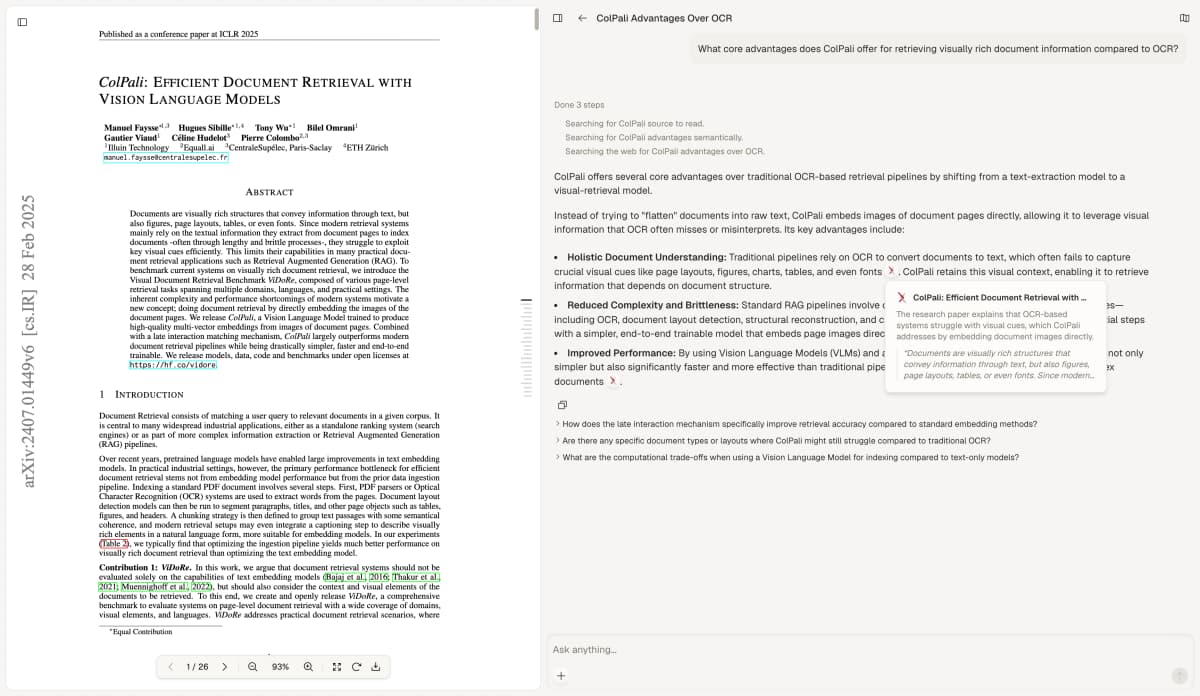
Atlas source check with Faysse and colleagues' ColPali paper, dedicated to the public domain under CC0 1.0. The unchanged capture illustrates citation inspection; it does not show the made-up draft or a CARE test.
Check the proposed map before saving it. If Atlas labels the made-up consent sentence “verified,” change it to “found; author check needed.” The source proves the sentence is there, not that consent to publish is valid.
For other reading tasks, the AI PDF reader guide covers checking answers beside documents. Choose New, then Note, save the checked text and open questions, and wait for Saved before closing.
Review the final submission version
After each round of edits, check the map against the new draft. A page number from an earlier draft can become wrong even when the wording stays the same. Update the version, text locations, open flags, and the person who will answer each question.
Read the abstract, case text, timeline, and discussion together. Look for details that conflict and claims that go beyond the case record. The CARE paper's limits still apply here: a full account does not prove cause and effect.
Before sending the report, authors must check the case facts, checklist, forms, privacy review, and consent to publish against the journal's current rules. Keep consent records in the institution's approved place. Your map needs the status of that check, not a copy of the patient's form.
Your finished map should let another author find each detail and see what is still open. Send the checklist in the format the journal asks for. Keep the reviewed draft with the map so you can check later edits against the same record.
Find CARE passages in Atlas
Review a permitted manuscript against named reporting items.