

A transcript analyzer reads text and pulls out themes, key points, tone, codes, or answers. Yet the word "transcript" can mean a meeting record, interview, court deposition, tax file, research dataset, or student record. A tool built for one of these jobs may be useless for another.
Match the tool to the kind of transcript you have:
- Interviews, meetings, or research text: start with Speak AI.
- Customer interviews for a product team: Aha! Discovery turns them into quotes and learnings.
- Legal depositions and case transcripts: use Steno Transcript Genius.
- UX research repositories: Looppanel fits the workflow.
- Research coding: MAXQDA supports a full coding project.
- IRS tax transcripts: use Taxr.ai.
- Student record checks: the UMBC transcript-analyzer project reads grades and degree rules, not spoken dialogue.
- Questions about transcripts you have: Atlas answers across added files and links each answer to the supporting text.
No tool covers every job. The sections below compare what each one reads, what it returns, and how you can check a result.

Analyze transcripts with cited answers in Atlas
Add transcripts, compare findings, and inspect citations before reuse.
How to choose a transcript analyzer job
The term "transcript analyzer" covers at least seven jobs. Identify yours before comparing products.
- Turn speech into text. This happens before analysis. Recording a meeting and labeling speakers are separate jobs.
- Create a short recap. AI transcript summarizers help you skim, but may leave out the quote or speaker behind a point.
- Code research data. A researcher marks parts of interviews with codes and groups those codes into themes. MAXQDA supports this method.
- Study customer interviews. Aha! Discovery and Looppanel turn interviews into themes, quotes, and product learnings.
- Review court testimony. Steno Transcript Genius searches depositions and keeps page and line links for legal review.
- Read IRS records. Taxr.ai explains tax codes and account entries. These records are not speech transcripts.
- Check student records. The UMBC project compares courses and grades with degree rules.
- Ask questions about the text. Atlas answers across transcripts you add and links each answer to the passage it used.
If the transcript is a scan or a messy file with tables, a tool must first extract clean text; see AI document summarizers for that file problem. A paper that quotes an interview needs research analysis tools, while Atlas starts after speech has become text and you want to ask questions about it. Use the other tools above to create the transcript, read a tax file, code research, or handle court work.
Transcript analyzer tools compared
The table shows what each tool reads, what it returns, how it links a finding to the transcript, and its main limit.
| Tool | Best use case | Input / source fit | Output type | Traceability | Main caveat |
|---|---|---|---|---|---|
| Atlas | Ask questions about added transcripts | Text files, PDFs, web pages, YouTube transcripts, or notes | Answers across one or more sources | Each citation opens the matching passage | Does not create transcripts or handle tax and court work |
| Speak AI | Study interviews and meetings | Transcript, audio, or video uploads | Themes, tone, keywords, exports, and chat | Quality depends on the transcript text | Check the current features and price |
| Aha! Discovery | Study customer interviews | .VTT files or linked meeting tools | Recaps, quotes, learnings, and highlights | Results stay with the interview record | Built for product teams |
| Steno Transcript Genius | Review depositions and cases | Court transcripts | Search, custom recaps, comparisons, and conflict flags | Links use court-style page and line numbers | A lawyer must review the result |
| Looppanel | Store and study UX interviews | Interview and test transcripts | Theme tags, searchable findings, and notes | Findings link to its research library | Built for UX teams |
| MAXQDA | Code research interviews | Imported text or linked media | Codes, groups, and time-linked analysis | Keeps a record of the coding work | Takes more setup than one quick check |
| Taxr.ai | Read IRS records | Tax files | Explanations of tax codes | Tied to the uploaded tax file | Does not handle spoken transcripts |
| ChatGPT transcript analyzer GPT | Explore pasted text | Pasted transcript text | Free-form answers | You must find and check the source text | Best for a casual first pass |
| UMBC transcript-analyzer | Check degree progress | Student records | Degree-rule and grade checks | Compares the record with degree rules | Does not analyze speech |
Table 1: 9 transcript analyzer tools ranked by input source, output type, and how far you can trace each finding back to the original transcript.
Where Atlas fits: analyzing transcript evidence
Use this Atlas workflow after you have the transcript text and need to check an answer.
- Add the transcript. Upload a text file, PDF, web page, YouTube transcript, or note to an Atlas project. Clean text works better than a scan or a video with missing captions.
- Ask a focused question. Instead of asking for a broad recap, ask where two speakers agree or what one person said about a named issue. This is the same method used by AI tools that cite sources.
- Keep sources apart. When you compare files, ask for a table with the claim, supporting text, and source. This prevents several speakers from blending into one answer.
- Open each citation. Read the passage and check that it supports the answer and names the right speaker.
- Read the nearby lines. They may add a limit or show that another person said the words.
- Save the checked finding. Keep the question, the points of agreement or conflict, and the citations with your note.
Speak AI, Aha! Discovery, and MAXQDA solve broader tasks in their fields. Atlas handles the narrower step of turning a transcript you have into an answer you can check.
Best transcript analyzer tools
Atlas
Atlas is best for questions about transcripts added to a project. It can keep several sources apart and link each answer to a passage. Use another tool to create the transcript, read tax records, handle a case, or code research. Clean text also works better than a scan or video with missing captions.
Speak AI
Speak AI studies interviews, meetings, focus groups, and research data. Its page lists themes, tone, keywords, named items, batch jobs, exports, and chat over uploaded text. Check its current price, language list, and accuracy claims before buying a plan.
Aha! Discovery
Aha! Discovery turns customer interviews into recaps, quotes, learnings, and highlights linked to product records. Aha! says Elle reads an uploaded .VTT file or a linked meeting tool, then adds the result to the interview record. Check that it supports your meeting app.
Steno Transcript Genius
Steno Transcript Genius helps legal teams search, shorten, and compare case transcripts. Its links use court-style page and line numbers. A lawyer should review each generated finding. Check Steno's page for its current conflict and comparison features.
Looppanel
Looppanel gives UX teams speech-to-text, theme tags, searchable findings, and a place to store research. Test its theme tags on a few interviews before moving your full research library.
MAXQDA
MAXQDA lets researchers import transcripts, link text to media time codes, and apply codes across a study. It takes more time to learn than a simple chat tool, so it fits a full coding project better than one quick check.
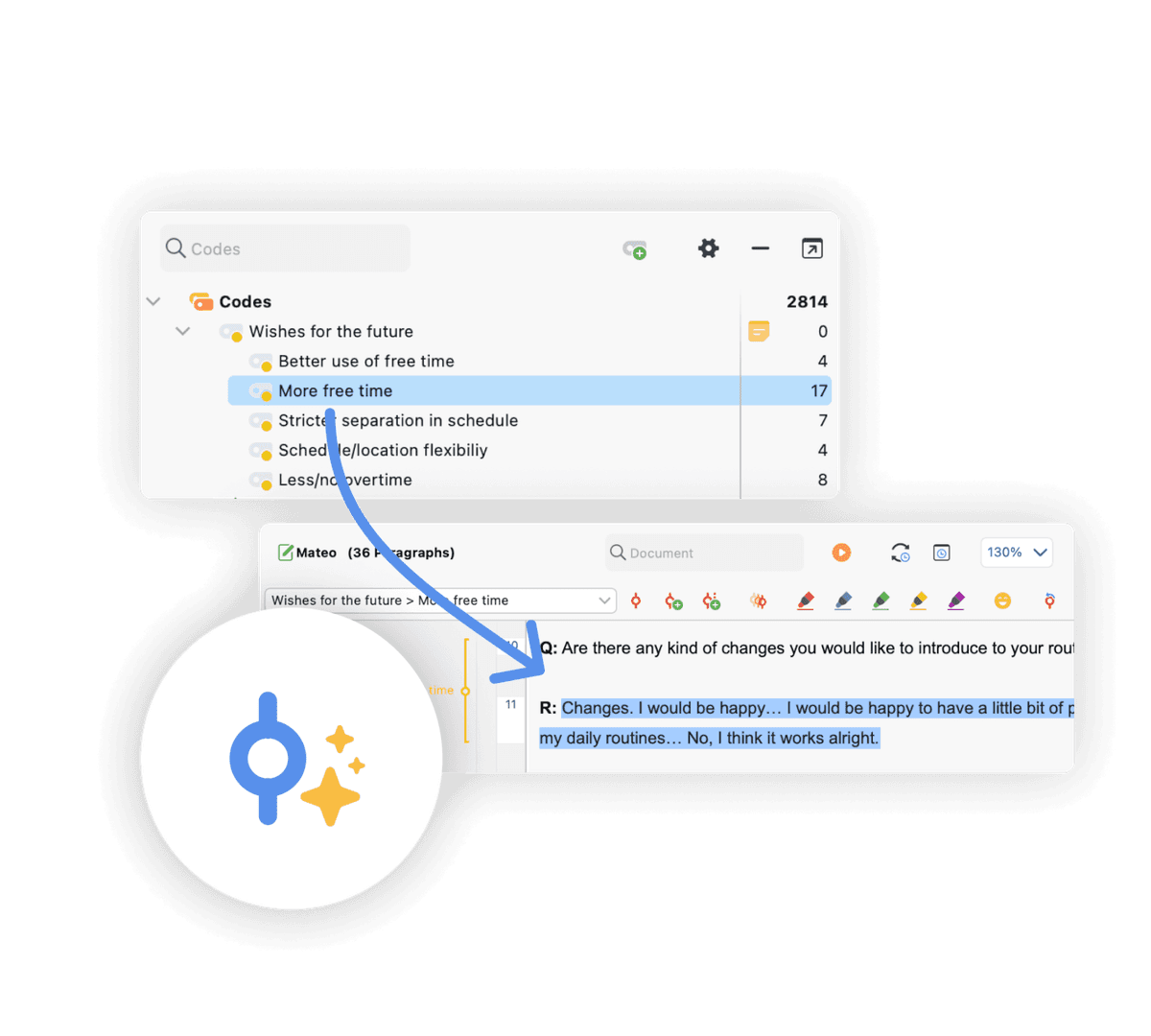
MAXQDA's official screenshot shows a transcript segment highlighted under a named code while the code hierarchy remains visible. That is the auditable coding record needed for a full qualitative project; it is a different output from a one-off AI answer.
Taxr.ai
Taxr.ai reads IRS codes and account records, which has little in common with an interview or meeting transcript. Do not treat its output as tax advice. Check any refund date or account status against your IRS record.
ChatGPT transcript analyzer GPT
The ChatGPT transcript analyzer GPT answers simple questions about pasted transcript text. It suits a quick first look when you do not need a set process or export. It does not give each claim a clear path back to the passage, so check facts in the transcript yourself.
UMBC transcript-analyzer
The UMBC transcript-analyzer project checks student records for degree progress and grade trends. It does not analyze spoken words.
What to verify before trusting transcript analysis
Check each important finding against the transcript. Use the first list for one file and the second when you compare several.
Checks for any single transcript
- Right source: Does the link open the transcript you expected?
- Exact quote: Do the words match, including terms that narrow the claim?
- Right speaker: Did the named person say it, and do the nearby lines support that reading?
- Exact location: Can you find the time, page, or line instead of searching the whole file?
- Nearby warning: Does the next line limit or conflict with the claim?
- Supporting text: Does the finding link to any source passage at all?
Additional checks when comparing multiple transcripts
- Conflicts: Does the tool show where transcripts disagree, or blend them into one answer?
- Same question: Did you ask each transcript the same thing?
You can skip this work for a quick skim. Do it before a claim enters a report, court filing, tax choice, or research finding.
Which transcript analyzer should you choose?
Choose by the job:
The input and the stakes should decide the tool. Court, tax, and student records need tools built for those rules, while interview and meeting text needs speaker context and a path back to the exact words.
- If you need to record speech and turn it into text, start with a speech-to-text tool. The tools above do not all record audio.
- For research coding across a full project, MAXQDA fits better than a light chat tool.
- For a product team turning interviews into backlog items, use Aha! Discovery or Looppanel.
- If you're reviewing legal depositions, use Steno Transcript Genius and keep attorney review in the loop.
- If you're looking at an IRS tax transcript, use Taxr.ai and treat its interpretation as a starting point rather than tax advice.
- To check a student record against degree rules, use a tool like the UMBC transcript-analyzer project.
- If you have the transcript and need answers linked to its text, use Atlas. Add the files, ask a focused question, and open each citation before saving the finding.
The best tool depends on whether you have speech to process, research to code, a court record to search, a tax file to read, or transcript text to question.
Analyze transcripts with cited answers in Atlas
Add transcripts, compare findings, and inspect citations before reuse.