

The right transcript summarizer depends on what you start with. Sonix accepts audio and video and keeps its recap beside the full text. Evernote accepts text, audio, and video and offers several note styles. QuillBot, NoteGPT, and Summarizer.org suit text that is ready to paste. Decopy accepts several file and media types. Atlas fits when you need to ask a question and open the transcript passage behind the answer.
Before a quote, number, task, or choice leaves your notes, check it against the transcript or audio.

Check transcript summaries with citations
Add a transcript source, ask a focused question, and verify the cited passage.
How to choose a transcript summarizer
Start with what you have. Pasted text needs a different tool than an hour of audio, and meeting notes need a different shape than class notes.
AssemblyAI's roundup, Notta's comparison, and Otter AI's guide all split tools by their source. The result may be a short meeting note, class outline, or list of tasks. You still need to check names, numbers, and context. See Otter AI alternatives for similar meeting tools.
Once the source is settled, compare tools on:
- What it accepts: pasted text, a text file, audio, video, or a saved project source.
- How much it accepts: check the current text, file-size, and time limits with a normal file from your work.
- Who said what and when: speaker names and time codes help you return to the right moment.
- What it creates: choose between prose, bullets, chapters, tasks, key points, or your own format.
- Whether you can ask questions: chat helps when a fixed recap leaves out a detail.
- How you can save it: make sure you can copy or export the result to the place where you work.
- How it handles private files: read the storage and use terms before uploading health, legal, client, or staff content.
- Whether you can check a claim: look for a link back to the exact transcript passage.
Use the first pass to find what matters. Check the transcript before the result affects a paper, legal review, client reply, or team choice.
Transcript summarizers compared
The table uses each vendor's product page. Check the current price, limits, accuracy claims, and privacy terms before choosing.
| Tool | Best fit | Input lane | Output style | Verification caveat |
|---|---|---|---|---|
| Atlas | Ask questions and check the answers | Transcript text in a note, document, or other supported file | Short overviews and answers with citations | Add the text first. Atlas does not record speech or turn audio into text |
| Evernote | One tool for text, audio, and video transcript summaries | Transcript text plus audio/video files, with 100 MB and 60-minute limits on this page | Paragraph, bullet, meeting, and email styles | File-based summaries still need a transcript read for high-stakes claims |
| Sonix | Audio and video summaries reviewed beside the full transcript | Transcripts generated from audio/video files | Paragraph, bullets, chapters, action items, and key quotes | Built for review beside the source transcript, so pair it with a transcript read for high-stakes claims |
| QuillBot | Shorten transcript text | Long text, web pages, and pasted transcripts | Prose or bullets with a length control | Check audio, video, and time-code support on a current page |
| NoteGPT | Create study notes | Pasted or typed text | A recap, key points, highlights, and questions | Best for text. Check audio and video support before use |
| Summarizer.org | Lightweight text, DOCX, or URL summaries | Pasted text, TXT, DOCX, image text, and URLs | Paragraph, bullet, and custom summary modes | A light first pass. Pair it with a transcript check for anything that matters |
| Decopy | Summaries across mixed source formats in one project | Text, Word, PDF, PPT, video, image, and audio | Custom prompts, multiple summary modes, and mind-map output | Broad format coverage. Confirm current transcript-specific claims before relying on it |
Table 1: Pick the row that matches what you have. A paste box will not handle an hour of audio like Sonix or Evernote. Use Atlas when you need to open the text behind an answer before reusing it.
Check a transcript summary in Atlas
Atlas starts after speech has become text. You can add an interview, class transcript, meeting notes, or another supported file to a project.
- Add the transcript file to the right project.
- Let it finish processing.
- Read the short overview and mark a claim to check.
- Ask a focused question about that claim.
- Open the citation beside the answer.
- Read the cited passage and the nearby lines.
- Save the answer only if the passage supports it.
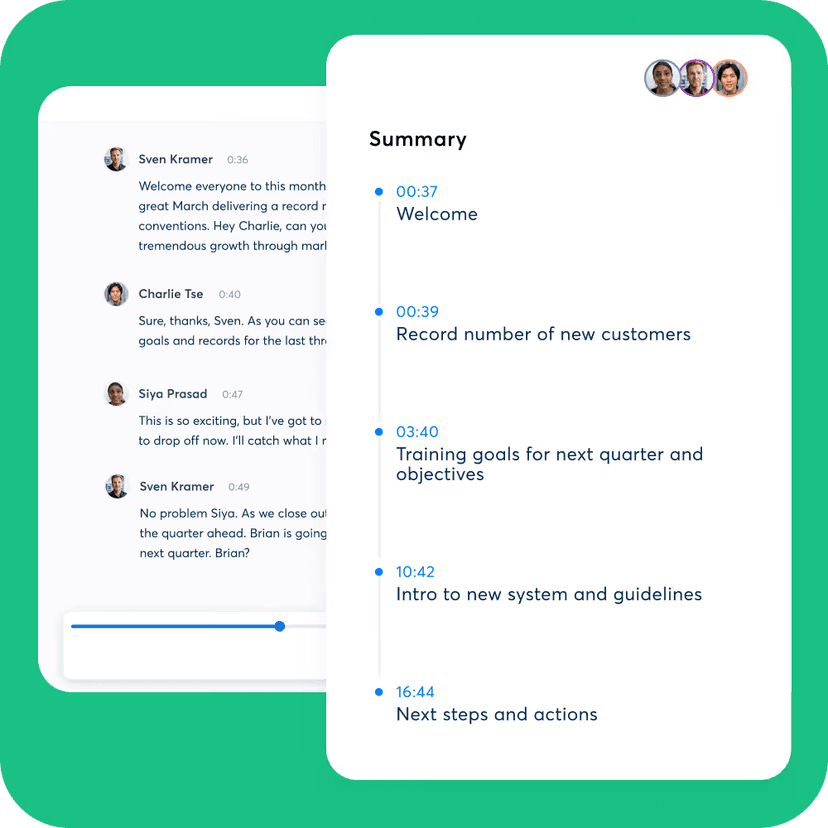
Otter's official interface shows one useful review pattern: keep speaker-labeled transcript text beside timestamped summary points. This makes names, numbers, and omitted context easier to check before the summary becomes a note or report.
Suppose an interview recap names a result. Ask: "What support does the speaker give for this claim, and what warning follows it?" Open the cited text and read the exchange. If a nearby line limits the claim, keep that limit in your note.
Run this check before a recap becomes a note or brief:
- The transcript includes the part needed to answer your question.
- The right name appears wherever credit or blame matters.
- Numbers, dates, and quotes match the exact wording in the transcript passage.
- Nearby warnings do not change what the recap implies.
- The recap stays marked as a first pass until you check the text.
- You have checked the privacy terms before moving a private file.
A recap tells you where to look. Atlas links an answer to the passage so you can check it before another person relies on it.
Best transcript summarizer tools
1. Atlas
Atlas suits an interview, research call, class, workshop, or long note that will support later work. Read the overview, ask about a named claim or warning, then open the citation and check the passage.
Use another tool first if you still need to turn audio or video into text.
2. Evernote
Evernote's transcript summary page covers transcript text, audio, and video files with paragraph, bullet, meeting, and email output styles, and lists 100 MB and 60-minute limits for audio and video files.
It suits someone who keeps notes in Evernote and wants one tool for a meeting file, an audio interview, and pasted text.
Read the transcript before sharing a note about client data, legal terms, or research findings.
3. Sonix
Sonix's summary feature builds on transcripts and returns paragraph summaries, bullets, chapters, action items, and key quotes, with the full transcript kept beside the summary for review.
The side-by-side view helps with a long podcast or panel because you can jump from a chapter back to the full text.
Use Sonix for audio or video. Check quotes and tasks against the transcript while you review.
4. QuillBot
QuillBot is built for long-form text, articles, and content you already have as text, with paragraph or bullet output and adjustable summary length.
It fits a typed or exported transcript, such as a webinar, class discussion, or interview copied from another tool.
Check its current page before expecting it to handle audio, video, time codes, or speaker names.
5. NoteGPT
NoteGPT's text summarizer accepts pasted or typed long text and returns a summary, key points, highlights, and related questions and answers.
It suits class notes or a discussion that a student wants to review before an exam. Its related questions can suggest what to study next.
Check its current file limit and privacy terms before using it beyond private study notes.
6. Summarizer.org
Summarizer.org supports pasted text, TXT, DOCX, image text, and URL summaries, with paragraph, bullet, and custom summary modes plus length controls.
It is a simple choice for a fast first pass over text. Paste the transcript and choose a format.
It does not link a claim back to the source passage, so keep the transcript open.
7. Decopy
Decopy covers text, Word, PDF, PPT, video, image, and audio in one summarizer, with custom prompts, multiple summary modes, and mind-map style output.
It fits a project that mixes an interview with slides or a video transcript with a written brief.
Check its current audio and video limits and accuracy claims before using it for many transcripts.
Transcript summary risks to check
A transcript summarizer saves time but can fail in common ways.
Noisy or incomplete transcripts
Speech-to-text tools can miss names, short forms, terms from a field, and some accents. The recap will repeat those errors. Play the audio before reusing a name, number, or key term.
Speaker attribution
A recap can blend two speakers or put a task under the wrong name. Read that part of the transcript when credit or blame matters.
Timestamp drift
Time codes can drift in long or edited files. Use the code to navigate, then listen around that point.
Long-file splitting
Long transcripts may be split into parts, which can hide a late correction or less common view. Ask about the part that matters instead of relying on one broad recap.
Missing visual context
A transcript captures speech, not slides or screen shares. If a speaker points to a chart, open the video or slide deck. For a video walk-through, use a video summary tool that keeps time and visual context.
Summary compression
Any recap loses detail. One short block cannot keep every warning from an hour of speech. Ask a focused question when one detail matters.
Privacy and high-stakes use
Meetings, court files, health talks, and client calls may hold private data. Read the tool's current privacy terms before upload. Check legal, medical, money, or staff claims against the text or audio before acting on them.
Which transcript summarizer should you choose?
- Use QuillBot, NoteGPT, or Summarizer.org when the transcript already exists as text and you need a fast first pass.
- Use Evernote or Sonix when the source is a recording. Evernote covers text, audio, and video in one tool. Sonix keeps the transcript next to the summary for review.
- Use Decopy when transcript material shows up alongside documents, slides, or other media in the same project.
For structured meeting notes, use the AI transcript summarizer guide. If you start from YouTube, a video summarizer with time codes and visual context is a closer match.
Use Atlas when you need to question the transcript and show where an answer came from. Add the file, ask a focused question, open the citation, and keep only what the passage supports. Related guides cover chatting with PDFs and AI tools that cite sources.
Conclusion
Choose based on whether you start with text, audio, or video. Atlas fits after the transcript exists and you need an answer linked to its source. A recap may be enough for a private skim, but check any claim or quote against the transcript before it leaves your notes.
Check transcript summaries with citations
Add a transcript source, ask a focused question, and verify the cited passage.