

A usability test report turns finished sessions into findings a team can check and act on. It shows what was tested and what people did. It explains how tasks were scored and which next steps the evidence supports.
Start with the records you have already reviewed. Build a finding-to-evidence link before writing the executive summary or proposing a fix. The example below uses a public study report; your own report needs your own checked session records.

Connect usability findings to checked evidence
Compare verified session notes and task outcomes with supporting passages.
What a usability test report should establish
A report lets readers judge whether the test applies to the choice they face. NIST's description of the Common Industry Format includes the tested product, study goals, participants, setting, design, and results. It sets out how to report a test, rather than how to run one.
A usability test plan describes intended work. The report describes what happened, including departures from the plan.
An expert review gives another kind of evidence. It records the expert's checks, rather than people trying tasks. The Xtensio reporting guide contrasts these deliverables. Keep those kinds of evidence distinct in a wider project.
Write for the decision your reader faces. A short opening can state the main findings and next steps. Keep the full records below for readers to check. The UXQB example report illustrates that arrangement. It includes strengths, too. These help the team see what worked in that test.
Check the study context and task records
Before drafting findings, make a compact study record. A reader should be able to tell which interface and task the finding concerns. A screenshot from one build should not quietly stand in for another version.
Preserve the tested version and setting
Record the product version, dates, and setting. State whether a moderator was present. Add the traits of the people tested that matter for the question. Remove identifying details and use IDs in place of names. Share only sources you may use.
The Maze report-writing guide lists these fields and separates the overview from task detail.
Its platform scores and automated reports are Maze features; they do not define what every report must contain or what Atlas can do.
For each source, keep a place the team can reopen. This could be a note heading, session ID, or checked timestamp in a recording you may use. When comparing the test plan and completed notes, compare the documents for changes in task wording, tested screens, and conditions.
Keep task outcomes and assistance explicit
A task record needs the instruction, the rule used to judge success, and what happened. State when a moderator helped. Reaching the final screen after guidance is not the same event as completing a task alone.
NIST's modified CIF guidance for voting manufacturers, sections 3.4.1.1 and 3.4.1.3, asks for success criteria and records of assistance.
Its scoring rules apply to that context. Use the rules set for your study and state them. Do not choose a new scoring rule after the test to make the result look better.
If a record is missing, mark it missing. Silence in notes does not prove success, lack of confusion, or absence of an error. Have the team check unclear results before using them in a metric. Keep checked metrics beside their meaning and source data.
Build a finding record from observed evidence
Keep a finding's evidence distinct from your reading of it. That makes it easier to review. Maze's guidance recommends recording where the issue occurred, what the person was trying to do, what they did, and relevant comments. Use those fields to let readers trace each claim.
Separate the event from its proposed meaning
Start with what the person did in the task. Then add the participant's words if they help explain the experience. Mark your reading of the event as such. A proposed fix needs its own review.
A quote can show that a person was confused. It does not prove a hidden motive or a pattern in all users. Nor does it prove a drop in sales.
If an AI draft adds one of those claims, use a source-checking workflow to compare the sentence with the actual passage. Remove what the source cannot support.
Read a published timeout example
The NIST mDL report, recommendation R2, describes a browser QR code changing while participants were still working on the phone. Here is a compact record of that published finding, not a new test result:
| Record field | Checked source content | Review still needed |
|---|---|---|
| Task context | Bank-account application with phone-based identity verification | Which step matters for your own study? |
| Observation | A replacement QR code confused participants | Inspect the relevant session evidence |
| Participant quote | “That part was confusing. The website could have had a note.” — Participant 03 | Preserve the quote's context |
| Proposed action | Extend the timeout; source recommendation R2 | Researcher assigns severity and reviews the action |
Table 1: The record leaves severity blank because the source gives no rating. The proposed change is not yet a tested fix. Keep that separation when writing your own finding record.
Group findings so readers can find the affected flow. Keep task and session IDs inside each evidence record. The UXQB report, page 8, favors affected functions or problem categories over ordering the whole report by session. A working note can still index tasks. This lets you trace evidence while choosing a useful report layout.
Review severity and reported measures
A severity label should show how a problem affects the task. Explain the judgment behind the number. Keep the scale, reasons, evidence, and reviewer together.
Explain the rating decision
Jakob Nielsen's severity guidance considers frequency, impact, and persistence. It offers one possible scale.
The UXQB example's legend and commentary, pages 9–10, uses named categories and notes the limits of agreement about ratings.
Choose a scale and state what each rating means. Ask what the problem blocks, whether the person can recover, and whether it recurs. Keep the record of the event distinct from its rating.
A problem seen once may still be serious. A frequent mild delay need not get the same rating.
Researchers own this decision. Treat an Atlas suggestion as a question to check. It is not a final severity rating. Leave the review slot blank if evidence or a rating is missing.
Label the measure and its study context
The source chart below shows completion time for Task 1 across two rounds. A legend names the rounds. Bold labels give their mean times. Use the chart to show that measure. Keep notes about errors and help alongside it.
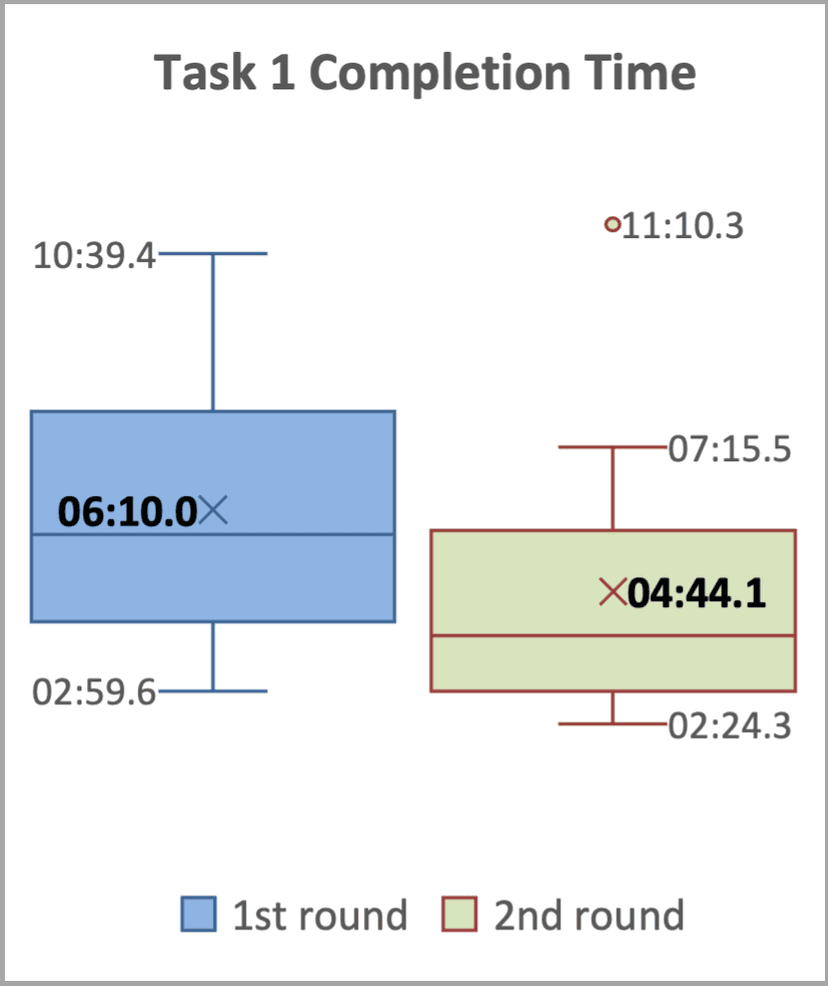
Original Task 1 chart from NIST's mDL usability report. Republished courtesy of the National Institute of Standards and Technology.
The blue plot is round 1; the green plot is round 2. Time labels are minutes and seconds. The bold mean labels are 06:10.0 and 04:44.1. Participants repeated tasks with the other wallet in the second round.
These are reported study values, not a redesign benchmark or a new statistical test.
For your chart, state the task, unit, rules for what is included, and data source. If you give a percentage, state its base count and how attempts were scored. This article makes no new calculations. Use only metrics your team has checked. State their uncertainty and limits.
State limits before recommending a change
Keep the report's method and source evidence visible when writing conclusions. Which users and tasks were tested? Which versions were covered? Where are recordings or outcomes missing? Do the findings concern observed sessions or an expert's separate inspection?
Treat each recommended fix as a proposal tied to a finding. The Contentsquare report guide links prioritized issues to evidence and proposed actions.
Your team chooses what to change, who owns it, and how to check the result. A plausible fix has not become a successful fix until it is checked.
Before review, check that each main finding has a source locator and a checked task outcome. Keep the observed event distinct from your reading of it. Keep strengths scoped to the test setting. A successful session does not prove that every future user will succeed.
Handle recordings, transcripts, and quotes under the study's consent and access rules. Removing names does not grant every sharing right. Put only sources you may share into writing and review tools.
Atlas cannot run the test, recover absent evidence, certify compliance, or approve a product decision.
Save a checked report note in Atlas
Use Atlas to compare checked notes you may share. Save a cited outline for the team to review. Use task records and measures you have checked. Keep open questions about outcomes and severity in the note.
- Add session notes you may share, study context, and checked task records to one project. Wait for sources to finish processing.
- In Ask a question, type
@and select the relevant sources. Ask for a finding record for each observed issue. Request citations and mark unknowns. - Open each citation. Check what happened, the quote, task outcome, and source context. Correct claims that sources do not support, as you would when synthesizing research papers.
- Select New, then Note, and save the corrected report outline. Confirm Saved. Leave severity, evidence gaps, and proposed actions for the researcher to review.
Try this prompt: “Use these checked task records and session notes to draft finding records. Use distinct fields for the task, what happened, the exact quote, your reading of it, and a proposed action. Cite each claim. Mark missing outcomes and severity as pending. Do not invent behavior, calculate rates, infer motives, or claim that a proposed fix has worked.”
Connect usability findings to checked evidence
Compare verified session notes and task outcomes with supporting passages.