

A UX research plan sets out what a study needs to learn, who will take part, and how the findings will help the team choose its next step. It also names the people, tools, consent forms, and time needed to run the study.
Start with the choice your team faces. If you want to change how new users set up a workspace, first check what earlier work shows. Then name what you still need to learn. A blank template helps organize the plan, but it cannot tell you whether a method fits your question.

Build your research-plan rationale
Check earlier evidence before choosing your next study questions.
Start with the product decision
Name a choice the team can act on, such as whether to change the setup flow before the next release. State what blocks that choice: the team does not know where new users get stuck or what help they need. This gives the study a clear purpose without presuming the cause.
The product choice, research question, and task prompt have different jobs. GOV.UK's guide to research questions separates what the team needs to learn from what it will ask users. A task prompt is one way to learn about the question; it is not the question itself.
Keep the question open
“Will users like a shorter setup?” treats length as the problem before the study starts. Ask where new users get stuck and what they need at that point. You may find unclear text, a missing access right, or a step that depends on a colleague.
Narrow the group, task, and setting. Instead of a broad aim to study onboarding, focus on first-time workspace owners who need a colleague's approval to finish setup. That scope helps you choose who to invite and which tasks to test. It also makes clear which users the findings will not cover.
Separate evidence from assumptions
Read earlier reports, product notes, support records, and team requests before planning more fieldwork. Keep the source and page or passage for each claim. A report about long-time users may offer background but say little about first-time setup.
The guide to synthesizing research papers explains how to compare sources while keeping their scope clear.
Separate what a source reports from what your team thinks it means:
- Evidence: what someone did or said, with the task and setting kept intact.
- Interpretation: the team's suggested reason for what happened.
- Assumption: a belief the next study still needs to test.
A support note about a blocked invite shows that one person asked for help. It does not show that all new users have that problem. A manager's belief that fewer steps will fix setup belongs in the plan as a belief, with a question that can test it. Use a stakeholder interview guide to trace the reasons, constraints, and owners behind team requests.
Keep conflicts in view. An earlier test may show people struggling to find a control, while support notes point to missing access rights. Plan to explore both rather than choosing the story that favors a redesign. If an earlier report already answers one question well, record its limits and use session time for what remains unknown.
Write the study plan
A plan should let a colleague see how the study will run and why each part belongs. NN/g's research-plan guide groups the core content around purpose, people, method and procedure, and linked documents. Use those fields, then add the owners and next steps your team needs.
Purpose, questions, and scope
Record the product choice, why it matters now, and the questions you will study. Link each question to the earlier findings or team belief behind it. State what is outside this round, such as price, other markets, or long-term use.
For each question, explain how an answer would help the team choose what to do. If no one can name that use, discuss whether the question belongs in a later round. GOV.UK's planning guidance starts with agreed aims before moving to methods.
Participants and recruitment
Describe who should take part through their role and recent experience. First-time owners who have set up a workspace are a better fit than people with a broad interest in software. Include access needs and explain any groups you leave out. GOV.UK's participant guide ties this choice to actual or likely users of the service.
Name who will find people, screen them, and arrange payment for their time. User Interviews' planning guide includes these tasks with the method and schedule.
A recruitment brief gives the recruiter clear requirements. Choose the count to fit your method, groups, and claims; do not copy a number from another study.
Method and procedure
Explain what each method can tell you. In-depth interviews explore people's accounts of their lives and work. Moderated usability tests let you watch people try tasks with a service. Neither, on its own, proves how often a problem occurs across all users.
Name the question, what you need to see or hear, the chosen method, and what will remain unknown. For interviews, use a UX research interview guide to turn study questions into open prompts and optional probes. Link the task script, test version, and notes for observers. Run a practice session to check that the tasks make sense and the test works before you invite users.
Consent, analysis, and logistics
Use your team's approved consent process and state what you will record. Link the forms, name who may access the files, and follow the rules for storage and personal details. GOV.UK's informed-consent guide offers practical context; it does not replace your team's requirements.
Plan how you will review the notes and compare cases. For an open-ended study, you might group problems and check how they differ across user roles. Keep cases that challenge the main pattern.
If you plan to code notes, the guide to source-checked qualitative coding explains why each code needs a link to the text it describes.
Assign people to lead sessions, take notes, review findings, and bring the result to the team. Leave time between sessions for notes and after the last session for review. Name a useful output, such as a task-level problem summary with links to the sessions that support it.
Worked example of a UX plan
Consider a fictional team that wants to change workspace setup. Its earlier report covered returning workspace owners. A support note describes a blocked invite, and a manager wants fewer steps. These inputs are invented for the example; they are not findings from an Atlas study.
This table shows how each input changes the next study while keeping the unanswered parts in view.
| Earlier input | Research question | Method and reason | Choice still open |
|---|---|---|---|
| Earlier report covers returning owners | Where do first-time owners look for the next step? | Watch a setup task because the earlier group differs | Define first-time users and the test version |
| Support note describes a blocked invite | What stops an owner from inviting a colleague? | Watch the task and ask about access rights | Check that the test can show the same access states |
| Manager wants fewer steps | Which steps cause doubt or extra work? | Watch progress and ask neutral follow-ups | Agree what would justify changing a step |
| No report covers a pause in setup | How do owners resume after leaving? | Ask about a recent pause before planning a test | Decide whether this fits the current round |
Table 1: Fictional planning example: each method has a stated reason, and each open choice needs a team decision before the study starts.
The aim is to learn where first-time owners struggle so the team can choose which parts to change. The study will not estimate the share of all users who fail setup or prove an effect on long-term use. Those claims need other data and a design that can support them.
Invite people who would plausibly do the owner's task. If the test cannot show the access state that blocks an invite, change the test or narrow the question. More sessions will not fix a task that cannot reveal the problem.
Compare what you observe with the possible causes: hard-to-find controls, missing facts, access rights, and pauses. Keep cases that fit none of those ideas. The final advice should point to the sessions behind it and state which choices the study leaves open.
Check the rationale in Atlas
Atlas can help compare permitted earlier reports and team notes while you draft the reason for the next study. The UX research AI workflow places that source work around the researcher's tasks. Use the output as a draft, then check each proposed link between a passage and a study question.
For the fictional setup study:
- Create a project and add the earlier report and team notes in supported source formats. Use files your team allows you to process, with names and other personal details handled under its rules.
- In chat, type
@and select the report and notes. Ask for a split between observed setup problems and team beliefs, with study questions and citations for the passages behind them. - Open each citation and check the user group, task, and setting. Keep a passage about returning owners labeled that way; it cannot establish what first-time owners do.
- Correct claims that turn a manager's wish for fewer steps into a user finding. Keep the team note as its source and mark the claim as untested.
- Save the checked rationale in a note. Include each question's source, scope limit, method, and choice still open.
Check the passage, then save
A citation can point to real text while the answer still says more than that text supports. Ask whether the passage backs the whole claim or only part of it. The researcher chooses the method; a source comparison cannot supply findings from people you have not studied.
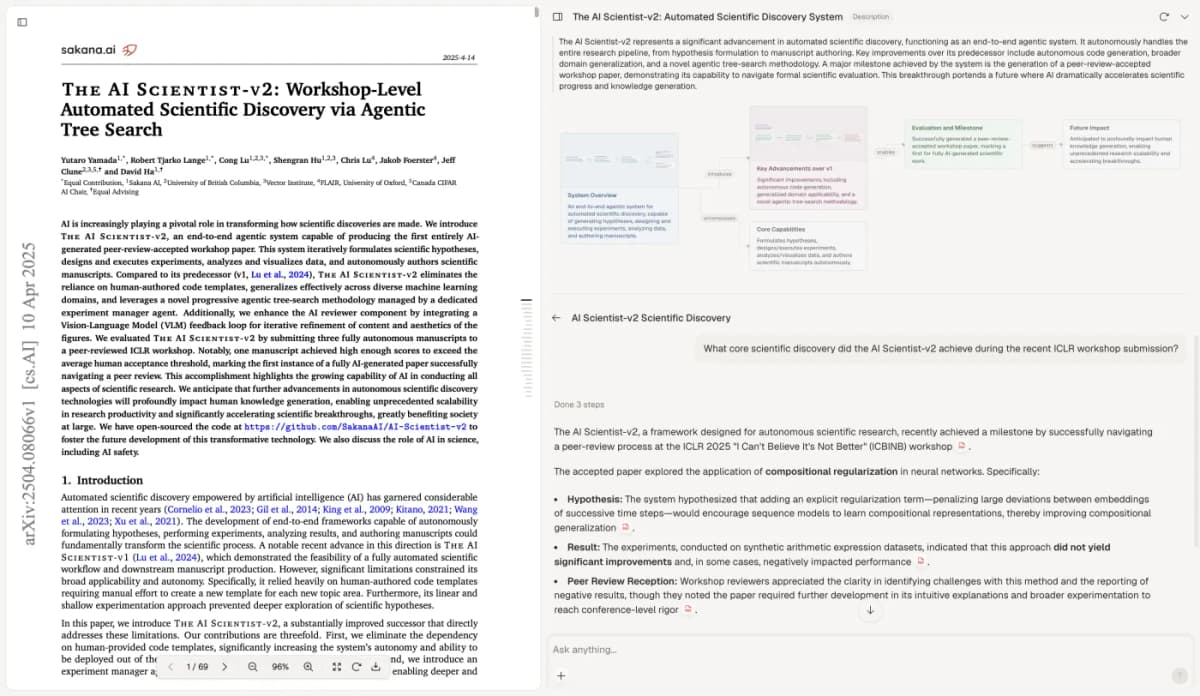
Atlas citation check with Yutaro Yamada and colleagues’ The AI Scientist-v2 (2025, v1), licensed CC BY 4.0. Reused without pixel changes; the paper is unrelated to the fictional UX study.
Keep the cited passage open beside the answer to compare their scope. This screenshot illustrates that inspection step; it does not show a test of planning accuracy.
When another report arrives, revisit the note and plan. New findings may narrow a question, challenge a cause, or remove the need for a task. Keep the earlier rationale so colleagues can trace why the plan changed.
Review before recruitment
Read the plan with the people who will use the findings. Agree on the choice it will inform, what the study can answer, and what it will leave open. A plan to find task problems should not become a promise to endorse a preferred design.
Before inviting users, check that:
- Each question has a method and a stated limit.
- The people you plan to invite fit the task and setting.
- The test, script, screener, and consent forms have owners and working links.
- Someone has time to review findings and bring them to the team.
- Untested beliefs and conflicting earlier findings remain clear.
Revise the script or test after the practice session if it fails to show what you need. Record why you changed it. After the study, update the plan with what happened and keep it beside the findings so a later reader can judge where they apply.
Build your research-plan rationale
Check earlier evidence before choosing your next study questions.