

Use AI to suggest codes, find passages, and draft a coding table. Do not let it decide what the data means. The researcher must define the codes, read the source text, revise weak matches, and explain the final method.
Choose MAXQDA AI Coding when you need a formal coding project with code memos and review tools. Choose Evidano when you want an AI-first tool for themes and coding. Use Atlas when you already have the source files and need a cited table across them. Use a general chatbot only for low-risk tests that your data rules allow.

Build a cited coding table in Atlas
Build a coding table, inspect passages, and revise weak codes.
AI qualitative coding criteria
Start with the codebook. Each code needs a plain name, a clear meaning, rules for what belongs, rules for what does not, and at least one example. A vague code will produce vague matches at scale.
Check these points before you choose a tool:
- Code control: Can you enter and revise your own definitions?
- Passage size: Does the tool code a sentence, quote, turn, paragraph, or whole file?
- Human review: Can you accept, reject, rename, split, and merge suggested codes?
- Source check: Can you open the exact passage behind each coded row?
- File fit: Can it handle your interviews, notes, PDFs, or reports?
- Data rules: Do your consent form, school, client, and study plan allow this upload?
- Record of changes: Can you keep the prompt, code version, and reviewer decision?
MAXQDA's guide starts with a code name and memo, then tells the researcher to test the code on known material. That is a sound pattern for any tool. A Child Trends case study also treats AI as support for interview analysis, not a replacement for human judgment.
Write a clear code memo
A code memo should tell the tool and the reviewer the same thing. For a code called "setup uncertainty," write what counts as uncertainty. A user who cannot find the next step may fit. A user who knows the next step but sees an error may not. Add one positive example and one case that looks similar but should be rejected.
Decide how much text counts as one segment. A single sentence may be too short if the speaker explains it in the next turn. A whole page may be too long because it contains several ideas. For an interview, a question and the full answer often preserve more meaning than a sentence alone. Test this choice before the full run.
Test the code on a known transcript
Use one transcript that the researcher has already coded by hand. Then run this check:
- Give the tool one code, its definition, and the examples.
- Ask it to return every matching passage from that transcript.
- Mark each result as correct, weak, or wrong.
- Add passages the tool missed.
- Revise the definition when the same error appears more than once.
- Run the code again and compare the new set with the first set.
This is not a test of universal accuracy. It is a test of whether one code and one setup work on material you know. Repeat it for each important code before you apply the codebook to interviews you have not reviewed.
Qualitative coding AI tools compared
| Option | Best use | What you review | Main limit |
|---|---|---|---|
| Atlas | A cited coding table or comparison across files you chose | The passage, reason for the code, exceptions, and final decision | It is not a full qualitative coding suite or method checker |
| MAXQDA AI Coding | Applying a defined code inside a formal MAXQDA project | Coded segments, code memos, and rules for inclusion or exclusion | A weak memo can spread a weak code across the project |
| Evidano | AI-first themes, content analysis, assisted coding, and comparison between groups | Linked source material and analysis output | Check current file, export, privacy, and plan terms |
| ChatGPT or another chatbot | Testing a prompt or drafting code ideas with low-risk text | Every quote, code, and theme in another tool | You must create the source links and review record yourself |
Table 1: Test any option on one transcript you know well. Apply one defined code, then count correct matches, missed passages, and weak matches. This small test exposes a bad code definition before it affects the full set.
Also test the handoff. Export or copy ten reviewed rows and make sure the source name, passage, code, and reviewer note remain together. A tool that finds good passages can still create extra work if the export drops the link back to the interview.
If more than one person codes the material, agree on the review process before using AI. Decide who can change a code, how the team records a split or merge, and how disagreements are resolved. AI suggestions should enter the same review process as human suggestions.
Build a source-linked coding table in Atlas
Add the transcripts, notes, papers, or reports to one Atlas project. If the project contains unrelated files, name the files to use in your question.
Atlas can work across several sources, but the question should still name the job. Its supported source types cover several common research files. Ask a grounded question, then use the citation system to open the source text. A knowledge map can help you find clusters, but each important claim still needs a passage check.
Ask for a table with these columns:
| Column | What to check |
|---|---|
| Code and definition | Is the label clear enough for another reviewer to apply? |
| Source and cited passage | Does the quote come from the right file and retain its meaning? |
| Reason | Why does this passage fit the code? |
| Contrary evidence | Does the source also contain a case that does not fit? |
| Researcher decision | Accept, revise, split, merge, or reject the row |
Table 2: For example, ask: "Using only the selected interviews, make a table about barriers to adoption. Include the code, definition, source, cited passage, reason, contrary evidence, and researcher decision."
Suppose the first three rows contain these statements:
- "I could not tell which button came next."
- "The import failed twice, so I stopped."
- "I expected the folders to work like my old app."
All three concern setup, but they do not describe the same problem. The first may support "unclear next step." The second may support "technical failure." The third may support "mismatch with past habits." Keeping them separate prevents one broad code from hiding three different causes.
Ask Atlas to show the source and the lines around each statement. The surrounding text may change the decision. The first speaker may have found the button a moment later. The second may have used an unsupported file. The third may prefer the new system after a week. Those facts belong in the reason or reviewer note.
Open the citation in every row you plan to use. Read the lines around the quote, not only the quoted sentence. If two studies involve different groups, keep those groups in separate rows. The same review works for an interview transcript, a transcript analysis, or a synthesis matrix.
When a row has no useful citation, do not repair it from memory. Remove the row or search the source again. When two sources disagree, keep both. A coding table should show the disagreement instead of forcing a single theme.
After the first pass, sort the table by source. This makes it easier to see whether one long interview supplies most of the evidence. Then sort by code to look for thin codes that rely on one passage. These checks do not prove that the sample is sound, but they reveal where the draft needs more review.
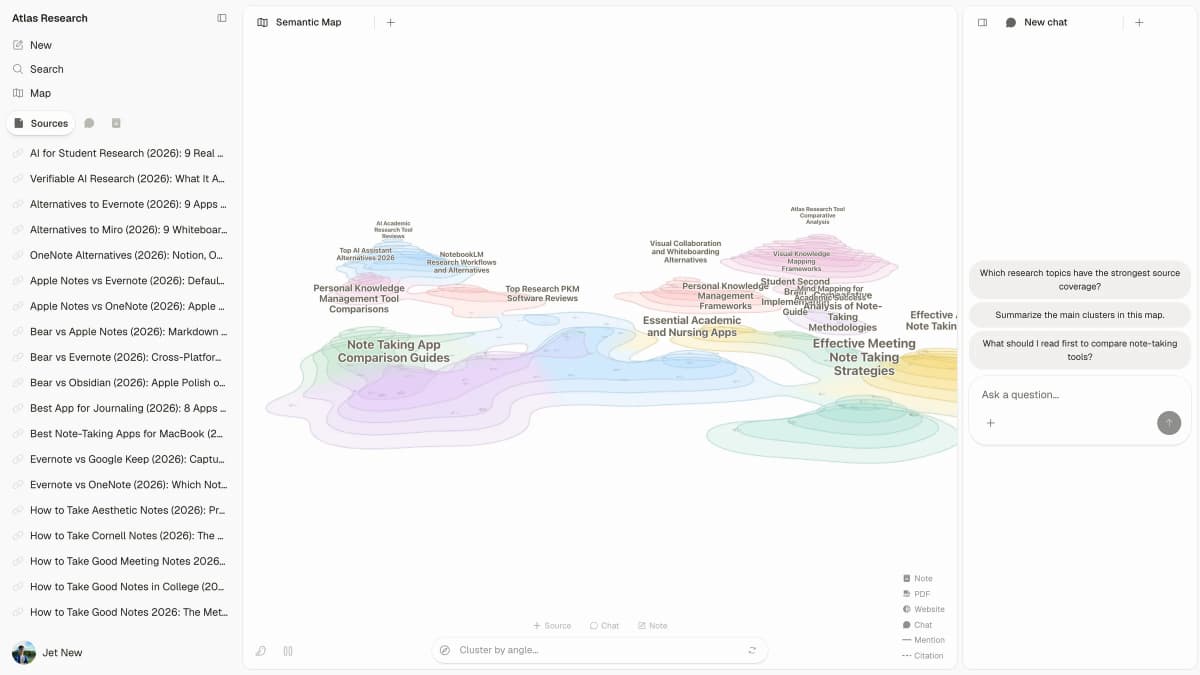
This view keeps the source list, map, and questions together. Use the map to find possible patterns, then open the cited source text before accepting or changing a code.
Best fit by coding workflow
Atlas
Atlas is useful after you have a codebook or a clear question. You can ask for passages that fit a code, passages that conflict with it, and sources where the code is absent. The same source-checking method applies when you use AI to analyze research papers.
Suppose 30 onboarding interviews use the code "setup uncertainty." Do not group every negative setup comment under that label. Ask whether each quote shows unclear next steps, missing instructions, a failed import, or a mismatch with past tools. Those may need separate codes.
Atlas can help compare those cited passages, but it does not manage a full coding audit or work between several coders.
Use Atlas for a bounded question such as, "Which interviews describe a failed import, and what happened next?" This is easier to check than a broad request to find every theme. Once the narrow rows are sound, ask a second question about exceptions or differences between groups.
Keep the accepted rows in a note or export that records the date, source set, prompt, and code definition. If the definition changes later, rerun the affected code. Do not mix rows produced by two different definitions without marking the change.
MAXQDA AI Coding
MAXQDA is the stronger fit when the team already works in MAXQDA and needs AI help with a defined code. Test the code memo on a small known sample. Revise it before you apply the code to more material. The qualitative data analysis guide explains where formal coding software fits beside AI-assisted analysis.
This route also makes sense when the project needs code memos, document groups, comments, and a record of coding changes in one place. The formal project does not make the AI suggestion correct. It gives the team a better place to review and record that suggestion.
Evidano
Evidano is an AI-first option for themes, content analysis, assisted coding, and comparisons between groups. Test whether its source links, review tools, exports, and data terms fit the real study.
Run a trial with the file type and output you will use in practice. A product page may show a theme view, while your team may need quotes, case labels, reviewer notes, or a spreadsheet export. Confirm that those details survive the full path from upload to review.
Generic chatbots
A general chatbot can suggest code names or test a prompt on text that is safe to share. The ChatGPT alternatives guide compares tools and their source-checking limits. Keep a separate note with the prompt, text sample, codebook version, and rows you accepted or rejected. Do not upload private interviews unless your rules and consent terms allow it.
Remove names alone only if that is enough for the risk. A quote can reveal a person through a job title, event, location, or rare experience. Follow the rules for the study rather than assuming that edited text is safe.
General chatbots are most useful before or beside the formal coding work. They can help rewrite a confusing code definition, invent a hard negative example, or format a blank review table. They are a poor place to keep the only copy of the coding record.
Where qualitative coding AI breaks down
AI coding becomes unsafe when the codebook is vague or the review is weak. It may separate a quote from the turn that explains it, miss a rare but important case, invent or alter a quote, or apply a broad code too often.
Counts also need care. A code that appears 40 times is not always more important than one that appears twice. The count depends on the sample, passage size, code rules, and reviewer choices.
Long interviews create another problem. A comment near the end may refer to a story told much earlier. If the tool sees only short pieces, it may assign the wrong code. Check the full turn and nearby exchange for any row that will support a finding.
Quotes need the same care. Some tools shorten or restate text when they explain a result. A paraphrase may be useful in a note, but it must not appear as a direct quote. Copy direct quotes from the source passage, not from the AI explanation.
Look for what the model did not return. Ask for passages that oppose the main pattern, cases where the code almost fits, and sources with no match. A result that only lists supporting examples can make a weak theme look settled.
Method guidance stresses human judgment, clear disclosure, consent, and awareness of bias. Treat every AI code as a suggestion until a researcher checks the passage and records a decision.
A simple review log can record the source, codebook version, prompt, tool, reviewer, and decision. Add a short reason when a row is rejected or a code is changed. A research paper organizer can keep the source files beside that review record. The record helps another researcher understand how the final table differs from the first AI draft.
At minimum, keep these fields:
- the source file and passage;
- the codebook version;
- the prompt and tool used;
- the reviewer and decision date;
- the reason for any rejection, split, merge, or code change.
Choose a coding workflow
- Choose MAXQDA or another formal coding suite for codebooks, memos, review records, and work between several coders.
- Choose an AI-first tool such as Evidano when you want built-in themes and assisted coding, but test its evidence links and exports first.
- Choose Atlas when you need a cited table or comparison across a source set you already chose.
- Choose a general chatbot only for safe, low-risk tests that you can check in another system.
If the work affects publication, hiring, clinical choices, school rules, or private interview data, require a human review and a clear record of every source and change.
For broader tool choice, see qualitative data analysis AI, thematic analysis tools, and AI interview analysis.
For studies that combine interviews with usability sessions, compare UX research AI tools.
Build a cited coding table in Atlas
Build a coding table, inspect passages, and revise weak codes.