

Choose interview transcript AI based on the job. Use Otter or Notta for meeting calls. TurboScribe suits large batches of files. Maestra handles subtitles and more than one language. Sonix offers a full editing space. Evernote keeps the text with your notes. Jamie works without a meeting bot. TicNote offers a quick web upload.
Atlas fits after the text exists. Use it to ask sourced questions across interviews. You can open each citation before you use a finding.
A correct transcript can still lead to a weak answer, so treat transcription and analysis as separate jobs.

Ask cited questions over interview transcripts
Add transcripts, ask a focused question, and inspect citations before reuse.
How to choose interview transcript AI
Start with the source. A phone call, Zoom file, YouTube video, live meeting, and pasted text may need different tools.
List what you need next: speaker names, time marks, translation, subtitles, summaries, exports, shared editing, or sourced answers.
Before you upload a private interview, read the tool's current privacy and data terms. Also test it on your own audio. Noise, accents, people speaking at once, names, and jargon can all change the text's meaning.
Use this decision order:
- Choose a transcription product first if you still have audio or video to turn into text.
- Choose by export path if the transcript must move into a research, reporting, or legal workflow.
- Choose Atlas after transcription when the question is "what do these transcript sources support?" rather than "can this tool transcribe my recording?"
Interview transcript AI comparison table
The table separates transcription capture from evidence follow-up. Vendor pages support the listed product positioning.
Refresh current plan limits, security terms, and exact language counts before treating them as purchasing facts.
| Tool | Best for | Input path | Transcript output | Evidence or verification support |
|---|---|---|---|---|
| Atlas | Cited follow-up after transcripts exist | PDFs, websites, YouTube transcripts, text notes, or attachments as source material | Cited answers, source-separated synthesis, and saved findings | Open citations, inspect passages, and verify claim strength before reuse |
| Otter | Meeting-style interview transcription | Imported audio or video and meeting workflows | Searchable editable transcripts, summaries, exports, and AI chat | Useful transcript workspace, but important quotes still need source checks |
| TurboScribe | Upload-heavy transcription | Audio and video file upload | Transcripts, speaker recognition, translation, and exports | Good when file throughput matters. Verify names and speaker turns |
| Maestra | Multilingual transcript and subtitle work | Uploaded interviews and media files | Editable transcripts, subtitles, collaboration, exports, and API workflows | Strong fit when localization matters. Review translated meaning carefully |
| Notta | Browser-based interview transcription | File import or live meeting transcription | Editable transcripts, exports, sharing, translation, and summaries | Practical for collaborative review. Inspect summaries against transcript text |
| Sonix | Professional transcript workflows | Record, upload, edit, export, and share workflow | Timestamps, speaker labels, transcripts, exports, and AI analysis | Useful for polished transcript handling. Verify analysis claims before reuse |
| Evernote AI Transcribe | Notes-first transcript storage | Audio, video, image, link, or recording inside Evernote | Text inside an Evernote workspace with editing and summaries | Best when the transcript should live with notes rather than a research evidence trail |
| Jamie | Bot-free meeting and interview notes | Desktop audio capture and meeting-note workflow | Notes, summaries, action items, transcript-style outputs, and speaker identification | Fits meeting documentation. Check source passages before quoting |
| TicNote | Quick online transcription | Online interview file upload | Formatted text output with broad language positioning | Good for fast conversion. Confirm speaker labels, formatting, and privacy fit |
Table 1: Use Atlas once transcript evidence is ready for cited answers. Use a transcription tool while the recording still needs to become text.
Cited transcript answers in Atlas
Add the finished transcript to an Atlas project. You can use a text file, PDF, note, website, or YouTube source. Then ask a focused question such as, "Which interviewees mention onboarding friction, and what evidence supports each pattern?"
Ask Atlas for a table with the claim, source passage, source, caveat, and citation. This keeps each answer tied to proof from the transcript.
Open each citation before you keep a finding. If the passage gives weak support, narrow the claim or leave it out.
| Step | Atlas action | Verification rule |
|---|---|---|
| 1 | Add or select the transcript sources in one project | Confirm the source is processed and is the material you intend to analyze |
| 2 | Ask a narrow question over the selected transcripts | Avoid broad prompts that invite unsupported synthesis |
| 3 | Request source-separated evidence | Each finding should name the source or speaker context when available |
| 4 | Open citations for important claims | Check passage relevance, claim strength, context, and conflicts |
| 5 | Save only verified findings | Keep the question, key findings, caveats, and checked citations together |
Table 2: This process gives each saved finding a source, caveat, and checked citation.
Best interview transcript AI tools
Atlas
Atlas is best for cited follow-up once interview transcripts exist. It can work with source material such as PDFs, websites, YouTube transcripts, markdown or text notes, and attachments, then produce cited answers across selected sources. Use it when the transcript question is analytical: which participants agree, what evidence supports a theme, where sources conflict, or which quote can be reused after citation review.
Do not choose Atlas as the recorder or transcription engine. Pair it with a transcription tool first, then use citations to inspect the passages behind the answer.
Otter
Otter is a strong fit for meeting-style interview transcription. Its page covers imported audio and video, transcript search and edits, text exports, and summaries.
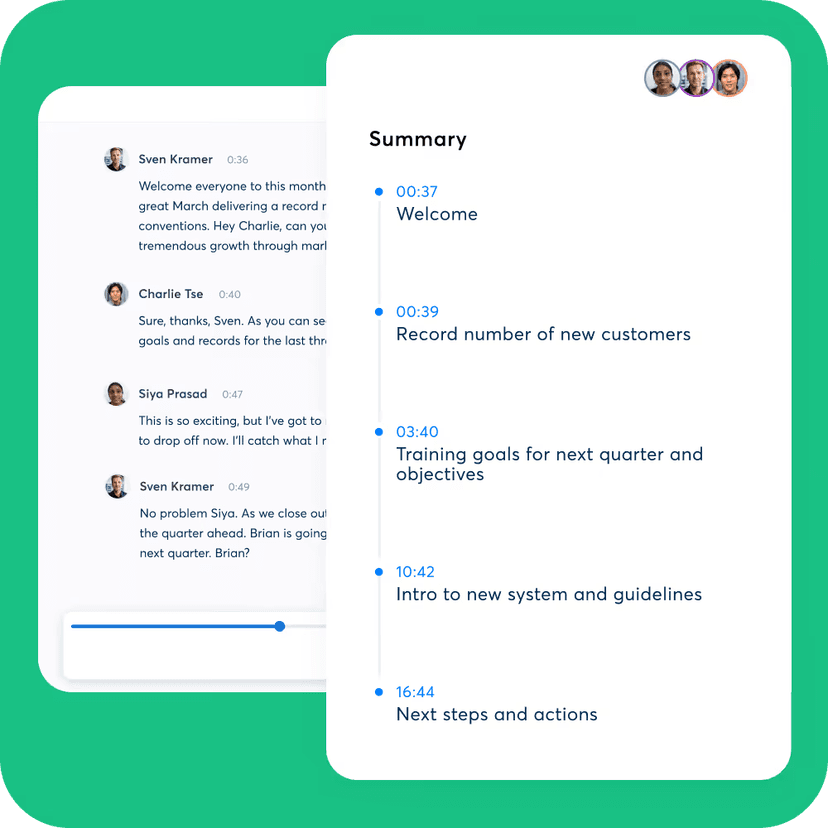
Otter's official interface keeps speaker-labeled transcript text beside a summary whose items link to times in the recording. That makes names, quotes, and omitted context easier to check than a detached recap.
It also covers follow-up email creation and AI chat.
Choose it when the interview already runs like a meeting and you want transcript review plus meeting AI.
TurboScribe
TurboScribe helps when you have many files to transcribe. Its official interview page lists audio and video upload.
It also lists speaker labels, file exports, and Whisper modes.
Use it when the main job is turning many files into transcript text before another analysis step.
Maestra
Maestra suits interviews that need translation or subtitles. You can upload a file, edit the text, work with others, and export it. Its page also lists an API, speaker detection, and timecodes.
Notta
Notta runs in a browser and supports shared review. Its page covers imports, edits, exports, summaries, and live meetings. Choose it when a team needs to edit and share meeting text.
Sonix
Sonix joins recording, upload, editing, exports, sharing, time marks, speaker names, and analysis in one place. Choose it when you need a polished result and a full editing flow.
Evernote AI Transcribe
Evernote AI Transcribe suits people who keep interview notes in Evernote. It turns audio, video, images, links, or recordings into text inside a note. You can edit, mark, sum up, and sort the result. Choose it when the transcript should stay beside your notes.
Jamie
Jamie makes meeting and interview notes without a bot joining the call. Its page lists desktop audio capture, summaries, tasks, speaker names, platform support, offline use, and privacy claims. Choose it when the notes are the main result.
TicNote
TicNote offers quick online transcription. Its page lists file uploads, formatted text, many languages, and use without sign-up. An account adds larger files and YouTube links. Check the text before you use it as proof.
Verify AI interview transcripts
A clean transcript can still mishear a name or lose a speaker turn. It can also miss sarcasm or make a cautious claim sound firm.
Check these before quoting or synthesizing interview evidence:
- Names, groups, product terms, and field-specific words.
- Speaker names when people talk at once or in a group.
- Timestamps or surrounding context for any quote that will be reused.
- Punctuation that changes the meaning of hesitant or cut-off speech.
- Accents, background noise, weak mics, and overlapping speech.
- Summaries or AI answers against the source passage.
- Consent, privacy, and tool terms before you upload private interview data.
For high-stakes work, treat AI output as a draft. Check the text against the recording. Then check each claim against its cited passage.
Which tool should you choose?
Choose the tool that matches the next action:
- To turn audio into text, choose by file type, language, speaker support, export format, and privacy terms.
- To check claims across finished transcripts, use Atlas for cited questions and source-linked answers.
Use transcript AI for broader transcript work.
For other jobs, see UX research AI, qualitative data analysis AI, and AI that cites sources.
Ask cited questions over interview transcripts
Add transcripts, ask a focused question, and inspect citations before reuse.