

The best thematic analysis tool depends on how you plan to study the material. Features matter only when they support that method.
MAXQDA and NVivo are built for detailed coding, notes, maps, and team review. Taguette offers a lighter, free way to tag quotes. Thematic groups customer feedback. Evidano uses AI to help find themes. Atlas compares themes across a set of transcripts, notes, reports, PDFs, or web sources and links claims back to cited passages.
No tool can decide what a theme means for your study. Software can sort text, suggest themes, or group similar feedback. You still set the question, read the source material, and decide which themes the data supports.

Synthesize themes in Atlas
Add your source set and build a cited theme table you can verify.
Quick verdict
Choose MAXQDA or NVivo when you need to code interviews, documents, or field notes in depth. They support notes, maps, team review, and a record of how the coding changed.
Choose Taguette for free tagging and quote export. Choose Thematic when a business team needs to group large amounts of written customer feedback. Choose Evidano when you want AI to suggest themes that a person will review.
Choose Atlas when you have already gathered the sources and need to compare their themes, conflicts, and gaps. Each cited claim can be opened in the source before it reaches your paper or report.
What to compare in thematic analysis
Start with the kind of study and the files you need to read. An interview study, a short UX project, and a stream of customer comments may all use thematic analysis, but they need different software.
For a formal study, check the tool's tags, code groups, notes, exports, edit history, and review steps. Make sure each theme can stay linked to the quotes or passages that support it.
For customer or market feedback, first check that the tool accepts your surveys, transcripts, PDFs, web pages, audio, or video. Then look at shared projects, access controls, charts, and reports if your team needs them.
Decide what AI is allowed to do. It may suggest a theme, draft a code, group similar comments, or help you search. Treat those results as ideas to check, not as final findings.
Before you buy, confirm the current price, plan limits, security terms, file support, and data rules on the vendor's site.
Thematic analysis tools compared by job
Use this table to match each tool to the job it was built to do.
| Tool | Best job | Core strength | Evidence traceability | AI role | Key caveat |
|---|---|---|---|---|---|
| Atlas | Comparing themes across a source set | Answers across sources, theme tables, gaps, and cited passages | Strong when sources are in one project | AI compares selected sources and cites passages | Not a full coding suite |
| MAXQDA | Full qualitative and mixed-methods projects | Coding, notes, maps, transcripts, and broad method support | Strong inside a coded project | AI Assist helps with analysis tasks | More tool than a small tagging project may need |
| NVivo | Research teams with detailed coding needs | Coding, summaries, maps, and team tools | Strong for coded projects | AI Assistant can suggest early ideas and draft codes | A person still needs to review and explain the result |
| Lightweight coding guide | People learning how to code and build themes | A simpler introduction to coding | Depends on the tool | Check the vendor page for current AI support | Comparison pages may not show current limits |
| Taguette | Free open-source tagging | Import, highlight, tag, local or server use, and export | Good for tagged excerpts | Not positioned as an AI analysis suite | Lacks the depth of enterprise CAQDAS platforms |
| Thematic | Customer feedback | AI-made groups, charts, and trend views | Strong for feedback groups and reports | AI groups written feedback | Not the usual choice for an academic coding study |
| Evidano | AI help with qualitative analysis | Documents, spreadsheets, transcripts, and group comparisons | Promotes citations and human review | AI suggests themes and summaries | Check current limits, privacy, and source-link claims |
Table 1: You may need more than one tool. You might code transcripts in NVivo, MAXQDA, or Taguette, then use Atlas to compare the coded notes with reports and other sources.
Source notes behind the shortlist
The tool descriptions come from the product pages for MAXQDA, NVivo, Taguette, Thematic, and Evidano. The UCSF guide to qualitative software adds a method-based view. A PhD community discussion helped identify the questions people ask, but it is not proof that one tool is better.
Atlas has a narrower role than a coding suite. It compares selected sources, answers questions with citations, and lets you open the cited passages. It does not manage a full coding study.
Best thematic analysis tools
MAXQDA
MAXQDA fits a large qualitative or mixed-methods project. It imports research data and supports coding, notes, maps, transcripts, and AI Assist.
Choose it when you need to track code changes, keep research notes, and review the work with a team. A short list of themes is not enough for that kind of study. Check current security claims with your school or team before you upload private data.
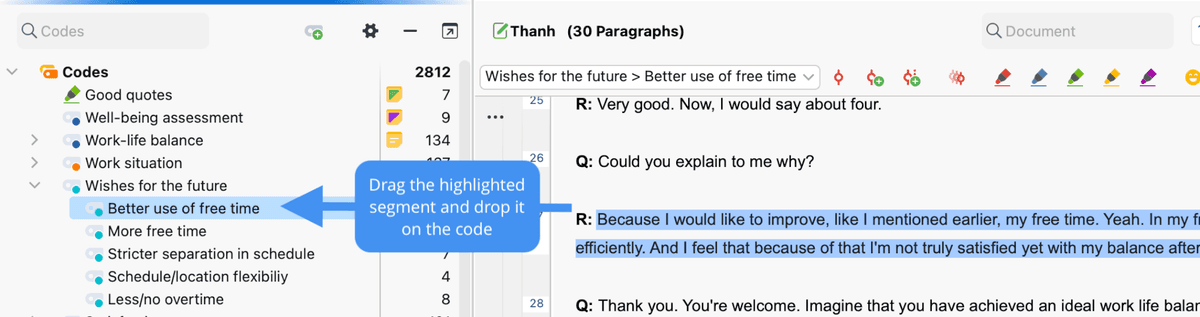
MAXQDA's official help screenshot shows what formal thematic coding adds: the researcher selects a transcript passage and assigns it to a named code. That record is more auditable than accepting a detached list of AI-generated themes.
NVivo
NVivo also fits detailed coding projects and teams that already know the software. Its AI Assistant can suggest early ideas, draft codes, make maps, and write summaries.
Those suggestions still need a person to read and explain them. Choose NVivo when detailed coding and team review are central to the study.
Lightweight thematic coding
A lightweight coding tool can suit a small project or someone learning the method. It should make it easy to mark quotes, add tags, and export the results without the setup of a large research suite.
Check the vendor's current page for price, export options, and AI features. A third-party comparison can help build a shortlist, but it may not show current limits.
Atlas
Atlas fits after you collect the source set. Add transcripts, field notes, reports, PDFs, web pages, or text notes to one project. Then ask a question that compares them.
Do not ask Atlas to “do my analysis.” Ask for a table of possible themes, text that supports each theme, text that conflicts with it, gaps, and citation status.
Atlas can compare several processed sources in one answer. Each citation opens a source passage. Read those passages: a citation does not prove that a theme is correct or complete.
Taguette
Taguette is free and open source. You can import material, highlight quotes, tag passages, run it on your own computer or a server, and export the results.
It fits small studies, teaching, and projects that need clear quote tagging without a large platform. If several people will code the same data, compare its review tools with MAXQDA or NVivo first.
Thematic
Thematic is for customer feedback rather than an academic coding study. It uses AI to group written feedback and show themes, trends, and charts for product, support, and market teams.
Choose it when you have a large, repeated stream of customer comments and need results for business decisions. If you need to build and maintain a research codebook, choose a coding tool instead.
Evidano
Evidano uses AI to suggest themes and codes across documents, spreadsheets, and transcripts. Its site also describes file chat, group comparisons, charts, summaries, citations, and human review.
It may help you find possible themes across many files. Before you accept them, open the cited source, look for text that disagrees, and check that its data rules meet your school or client's needs.
Where Atlas fits for source-grounded theme synthesis
Build the source set
Start by adding the transcripts, notes, reports, PDFs, web pages, or text files you want to compare to one Atlas project. Ask for a table that keeps the support for each theme in its own row.
Ask for a theme table
For example, ask: “Across these interview transcripts, find possible themes about setup problems. For each theme, include text that supports it, text that conflicts with it, gaps, and citation status.”
Open the source behind each key claim. Change or remove a weak claim, and save only the findings you checked.
| Theme table column | Why it matters |
|---|---|
| Possible theme | Reminds you that the AI suggestion still needs review. |
| Supporting text | Links the theme to quotes or passages from named sources. |
| Conflicting text | Keeps exceptions and less common views visible. |
| Gap or limit | Shows where the sources are thin or the question is too broad. |
| Citation status | Marks which claims you have opened and checked. |
Table 2: These columns keep the possible theme, support, exceptions, gaps, and source checks separate. That makes each claim easier to review before you report it.
Verify before reuse
Atlas does not replace coding, reflection on your own role in the study, ethics review, or a sound research method. It helps you turn a pile of documents into a list of possible findings that you can trace back to the source.
What software cannot decide for you
Software cannot choose the research question, decide whom to study, explain your role in the work, or set the standard for a final report. It also cannot promise that two coders will agree or that the study meets ethics and journal rules.
Treat an AI-made theme as a suggestion. Read the passages, look for facts that disagree, improve the label, and record why the final theme belongs in the study. If a tool cannot show the source text behind a theme, use it only for an early scan.
Coding suites, AI helpers, feedback charts, and source tools each save time on a different task. You remain responsible for the method and what the results mean.
How to choose
Choose MAXQDA or NVivo for deep coding, research notes, and team review. Choose Taguette for free tagging and quote export.
Choose Thematic for large sets of customer feedback and business charts. Choose Evidano when you want AI to suggest themes that your team will check.
Choose Atlas when the sources are ready and you need to compare themes, gaps, and conflicts without losing the cited text. Define the study first, choose a coding tool if you need one, and use Atlas when you need a checked comparison across sources.
For a more specific task, see tools for summarizing legal documents, organizing video research, building a synthesis matrix, coding qualitative data, or analyzing interviews.
Synthesize themes in Atlas
Add your source set and build a cited theme table you can verify.