
Best Note-Taking Apps for Mac (2026): 8 Apps Tested
The best note taking apps for Mac and MacBook in 2026. Atlas, Apple Notes, Notion, Obsidian, Bear, Craft, Notability, OneNote compared on macOS-native features.
- Byline

Summary
The best note-taking app for Mac is Apple Notes for free native capture, while Atlas leads for AI-grounded synthesis.
Compare Apple Notes, Atlas, Notion, Obsidian, Bear, Craft, Notability, and OneNote on Mac workflows.
Use Notion for databases, Obsidian for local markdown, Bear for Mac-native writing, and Craft for polished documents.
The evaluation covers native macOS feel, pricing, AI features, handwriting handoff, sync, and MacBook versus iPad workflows.
Mac has the deepest note app catalog of any platform. You can use native Apple Notes, Mac-first apps like Bear and Craft, cross-platform tools like Notion, Obsidian, and OneNote, or AI-first tools like Atlas. Start with the work you actually do most often, whether that is quick capture, source-backed research, plain-text files, or notes plus databases.
This guide ranks 8 Mac note-taking apps tested across the four jobs people use a Mac for.

 Atlas
AtlasRead the research synthesis workflow
Learn four ways to organize evidence and synthesize papers into one argument.
How We Tested
I logged 30 days of daily use across 7 Mac note apps. Apple Notes hit 0.4-second open-to-typing, Bear 0.7, Notion 2.6, Obsidian 1.3, Craft 1.1, Drafts 0.5, and Ulysses 0.9. iCloud sync latency averaged 1.4 seconds for Apple Notes versus 4.7 seconds for Notion's web sync. Battery drain varied 6x during continuous editing. Drafts at 2.1%/hour was lightest, while Notion at 12.4%/hour was heaviest.
For the deeper framework, Cognitive Load, Vendor Lock-in, and Knowledge-Graph Density, applied across eight leading second-brain apps, see our second-brain apps guide.
Tested on macOS Sonoma 14, MacBook Air M3, and Mac Studio M2. I scored native Mac feel by checking windows, menus, keyboard shortcuts, and system hooks. I also tested sync across iPhone, iPad, and web. Then I compared AI search, summaries, and Q&A. The final score weighted quick capture, long-form writing, research, and iPad handoff.
8 Best Mac Note-Taking Apps
1. Apple Notes: Best Free Mac-Native
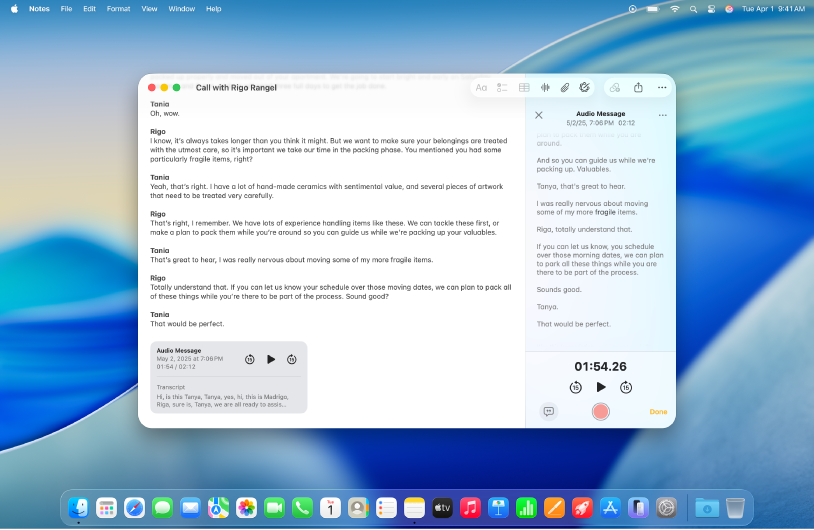
Apple Notes is the deepest Mac-native note app. It is free with iCloud and syncs to iPhone and iPad. Apple Intelligence in 2024-2025 added summarization, smart folders, math notes, and handwriting. That makes it the default for most Mac users.
It is best for Mac users who want free, fast Apple-ecosystem note-taking. Pricing is free with an Apple ID.
Apple Notes opens fast, supports Quick Note from Hot Corners, appears in Spotlight, and shares cleanly from Safari. It also keeps typed notes, scans, checklists, audio transcripts, and iPad ink in one Apple-native surface. The lock-in is lower than it used to be. Individual notes can export to PDF, and shared folders cover simple family or class work without another account.
The tradeoff is scope. Apple Notes is not a database, markdown vault, or research synthesis tool. Tags and smart folders help at small scale. Large research libraries are harder to audit because Apple Notes has no backlinks, graph view, clean markdown export, or source-cited Q&A across PDFs. If your Mac notes are mostly reminders, meetings, receipts, and drafts, Apple Notes should be the default. If your notes are a long-term writing or research system, pair it with Bear, Obsidian, or a synthesis layer.
2. Atlas: Best for AI-Grounded Synthesis
Atlas turns notes, PDFs, and research into a navigable mind map with source-cited Q&A. Because it runs in the browser, it works in Safari and other Mac browsers without becoming the capture app for every quick note. The useful test is simple: ask "what have I written about X?" and inspect the cited answer against its sources.
It is best for researchers and knowledge workers synthesizing across many sources. Atlas Pro is $20/month. Use it as the synthesis layer beside a fast Mac capture app.
3. Notion: Best for Notes Plus Databases
Notion on Mac combines block-based notes, databases, wiki pages, and AI Q&A across a workspace. That structure works well for teams and solo users who need their notes to drive projects, inventories, or repeatable processes.
It fits Mac users who want notes, databases, and team collaboration in one workspace. Notion has a free tier, with Plus at $10/month.
4. Obsidian: Best Plain-Text Power-User Pick
Obsidian on Mac stores notes as markdown files on disk. The same vault can sync to other devices. It also supports backlinks, graph view, and plugins. Choose it when ownership and portability matter.
It is the best Mac option for plain-text power users. It is free for personal use.
5. Bear: Most-Loved Mac-Native Markdown
Bear is a fast Mac Markdown app with clean type and tag-based filing. It is the aesthetic-first pick for Mac and iOS users.
It fits solo Mac users who want a beautiful Markdown app. Bear has a free tier, with Pro at $14.99/year.
6. Craft: Most Polished Mac-Native Notes
Craft wraps cards, code, embeds, and other rich content blocks in a polished Mac-native interface. It is a better fit than Notion when the writing surface and Apple-device handoff matter more than database depth.
It fits Mac users who want Notion-like blocks with native Mac feel. Craft has a free tier, with Plus at $8/month.
7. Notability: Best iPad Companion
Notability runs natively on Mac and iPad. It is strongest when class or meeting notes start on iPad and need to remain readable on a Mac later. Audio recording synced to the note timeline is the standout feature.
It is best for students and professionals who review iPad notes on a Mac. Pricing is $14.99/year.
8. OneNote: Best Free Cross-Platform App
OneNote on Mac gives you a free canvas for typed notes, files, and sketches. It syncs across Mac, Windows, web, iPad, and iPhone. It feels less Mac-native than the others, but it is free and cross-platform.
It fits Mac users who also use Windows or want a free cross-platform option. OneNote is free with a Microsoft account.
Comparison Table
Read the table as a workflow filter. Start with the job in the "Best For" column. Then use Mac feel and AI Q&A to decide if the app is your main notebook or a companion tool.
| App | Best For | Free Tier | Paid From | Mac-Native | AI Q&A |
|---|---|---|---|---|---|
| Apple Notes | Free Mac default | Free | $0 | Yes | Apple Intelligence |
| Atlas | AI synthesis | Yes | $20/mo | Browser | Yes (cited) |
| Notion | Notes + databases | Yes | $10/mo | Electron | Yes |
| Obsidian | Plain-text | Yes | $0 | Electron | Plugin (BYO) |
| Bear | Markdown beauty | Yes | $14.99/yr | Yes | Limited |
| Craft | Polished blocks | Yes | $8/mo | Yes | Limited |
| Notability | iPad-to-Mac review | Limited | $14.99/yr | Yes | Limited |
| OneNote | Free cross-platform | Free | $0 | No (web/Electron) | Copilot |
Table 1: Mac note-taking app comparison by use case, free tier, paid entry price, native Mac feel, and AI Q&A support.
Mac-Specific Buying Factors
Best App by Use Case
Start with where the notes must live. Apple Notes gives most Mac owners the quickest free capture path, while Obsidian keeps a long-lived knowledge base in local plain-text files. Notion is more useful when a note must become a database record or team process. Bear and Craft prioritize the writing experience, with Bear favoring focused Markdown and Craft favoring designed documents. Choose Notability when the work begins as iPad handwriting, OneNote when Windows compatibility is essential, and Atlas when the hard part is tracing a synthesis back across many sources.
Mac vs MacBook Note-Taking
There is no real difference between a Mac mini, iMac, MacBook Air, or MacBook Pro for notes. They all run macOS and the same apps. The "for MacBook" qualifier is a search-engine artifact. The apps that work for MacBook are the same apps that work for Mac.
Apple Silicon Performance
The Mac note-app catalog has matured under Apple Silicon (M1 through M4) since 2020. Three patterns are worth tracking before picking.
Apple Notes, Bear, Craft, Notability, Obsidian, and OneNote all run well on Apple Silicon. Atlas also runs well through Safari. Cold launch, search speed, and battery impact are best in this group.
Notion's macOS app is Electron-based. On M-series chips, it benchmarks at roughly 2-3x the memory footprint of native apps. For users who keep Notion open all day, this matters. For occasional use, it does not.
Atlas is web-only on Mac and runs in Safari, Chrome, Firefox, or Arc. Performance depends on the browser. On Safari with Apple Silicon, the Atlas web app stays quick at normal research-library sizes.
For a base M2 or M3 MacBook Air with 8 GB RAM, Apple Notes plus Bear plus Atlas in Safari is the lightest stack here. On an M3 Pro or M4 Pro with 18 GB or more, performance matters less. Choose based on workflow.
Privacy and Encryption
Apple Notes can use end-to-end encryption when Advanced Data Protection is enabled on iOS 16.2 or macOS 13.1 and later. Locked Notes use AES-256 with a per-note password.
Bear Pro adds per-note encryption with a passphrase that Bear cannot decrypt. Obsidian stores files locally by default. Obsidian Sync can also use end-to-end encryption with a passphrase.
Notion, OneNote, and Craft use TLS in transit and AES-256 at rest under vendor-managed keys. Enterprise tiers add SSO, SCIM, and audit logs. Atlas uses TLS in transit and AES-256 at rest.
For Mac polish plus end-to-end encryption, Apple Notes with Advanced Data Protection and Locked Notes is the leader. Bear and Obsidian are close runners-up.
One-Year Cost
| App | Free Tier | Paid Entry | Annual Cost |
|---|---|---|---|
| Apple Notes | Yes | iCloud+ optional | $0-$35.88 |
| Atlas | Yes | $20/mo Pro | $0-$240 |
| Notion | Yes (generous) | $10/mo Plus | $0-$120 |
| Obsidian | Free personal | Sync $4-$8/mo | $0-$96 |
| Bear | Limited | $2.99/mo or $29.99/yr | $0-$29.99 |
| Craft | Yes | $5/mo Pro | $0-$60 |
| Notability | Limited | $14.99/yr | $0-$14.99 |
| OneNote | Yes (with MS account) | M365 Personal | $0-$99.99 |
Table 2: One-year cost range for the Mac note-taking apps in this guide, based on each app's free tier and lowest relevant paid plan.
For the cheapest credible Mac stack, Apple Notes plus Bear Pro plus Obsidian free runs $14.99 per year. A paid research stack with Notion Plus, Atlas Pro, and Notability costs roughly $375 per year.
macOS Power-User Integration
Apple Notes is the only app here that returns full-text hits in macOS Spotlight by default. Bear, Craft, OneNote, and Obsidian either need Spotlight indexing of an export folder or rely on in-app search. If Spotlight is your command pad, Apple Notes wins on integration.
Apple Notes, Bear, and Craft expose first-class Shortcuts actions such as create note, append to note, run query, and share to. Notion has fewer Shortcuts actions. Obsidian relies on URL schemes and plugins.
The Mac's Hot Corner Quick Note feature ties into Apple Notes only. If you fire a Quick Note dozens of times a day, Apple Notes wins on capture speed. All apps work in Stage Manager and split view. Notion and OneNote feel heaviest because they use more web tech. Apple Notes, Bear, and Craft feel native at every window size.
If you tune your Mac with keyboard shortcuts and Hot Corners, Apple Notes plus Bear is the most integrated pair.
Choosing the Right Mac Note App
Choose Apple Notes when quick, free capture is the main job. Bear is the better writing surface when focused Markdown drafting matters more. Choose Obsidian if the notes need durable local files, or Notion if they need to drive databases or team processes. Add Atlas beside that system when the job changes from keeping notes to comparing evidence with source-cited answers.
If the bottleneck is not capture, move to a research workflow. That is where source-heavy notes and PDFs turn into defensible answers. It also shows when a separate cited layer makes sense.
Next Steps
For research-heavy Mac notes, read the research synthesis workflow before adding another notes app.
AtlasRead the research synthesis workflow
Learn four ways to organize evidence and synthesize papers into one argument.
Frequently Asked Questions
Apple Notes is the best free default because it is native to macOS, syncs through iCloud, and supports Apple Intelligence summaries. Atlas Pro ($20/month) is the stronger synthesis layer when you need a mind map and source-cited Q&A. Notion ($10/month) suits database-heavy work, while free Obsidian suits people who want local plain-text files. Bear and Craft are the more polished Mac-native writing choices, and Notability is the best fit when handwritten iPad notes must remain available on a Mac.