
Rapid Qualitative Analysis: Build a Checked Case Matrix
Rapid qualitative analysis turns focused interviews into short case summaries and a checked matrix. See the workflow, a worked example, and its limits.
- Byline

Summary
Rapid qualitative analysis starts with a clear question and a short form for each case, then compares the cases in a matrix.
Summarize each case close to the source, then compare across cases; keep source locations, gaps, and exceptions visible.
The researcher designs and checks the method. Atlas can help compare supplied sources with citations and save a checked note.
Rapid qualitative analysis turns interviews and other guided accounts into short case notes and a matrix. The team picks the topics, checks each note against its source, and uses the matrix to answer a timely question.
Imagine three fictional clinic staff interviews about a new appointment system. Two staff members describe shorter queues. One reports a shorter queue only on the morning shift. A quick matrix makes the difference visible, but the team must reopen each source before calling it a finding.
Atlas can help compare the selected records and show citations for that check. The researcher still decides whether the interviews asked the same question, whether a summary is fair, and what the evidence means.

Atlas

Check selected case summaries in Atlas
Compare your selected sources, open citations, and save a checked note.
What rapid qualitative analysis produces
Rapid qualitative analysis helps a team use people's accounts while a choice can still be made. In one common form, the team writes a short note for each case. It then puts cases in matrix rows and study topics in columns.
A case might be one interview, focus group, or site. A domain is a topic from the study question and guide, such as access or staff workload. Each cell tells what that case says about the topic and where to find the source.
The PARRQA methods guide links the steps. Define the question. Try the interview guide and case form. Keep a path to the raw data. Review the matrix and write the answer. Its authors offer a plan for the work and for reporting it. They do not claim every rapid study is sound.
The word rapid sets no fixed number of days. In Gale and colleagues' study, a team used a trial case form to sum up each transcript. It then grouped the notes by staff type in a matrix. This shows one way to do the work. The UMass Chan research center describes its use with interviews, focus groups, and community talks.
Choose when rapid analysis fits
Start with a bounded question, an evidence plan, and a real decision date. For example: “Which parts of the appointment change do staff say improved access, and where do they report remaining problems?” That question gives the team domains to ask about and an audience for the answer.
Rapid analysis fits best when semi-structured records address comparable questions across cases and the team can review them as they arrive. It still needs piloting, checking, and discussion. The Social Research Association's guide links timely findings with iterative design and collaboration.
Decide what the matrix can answer
Before collecting data, state the decision question. Whose accounts do you need, what material can you use, and who will act on the answer? If you mainly compare cases, use the comparative analysis guide to choose what to compare and how to mark gaps. Match each interview prompt to a draft topic. Leave room for topics the guide missed.
The PARRQA guidance recommends that question, guide, template, matrix, and final product be planned together. That link prevents the team from making an attractive matrix that cannot answer its own question. It also makes later changes visible.
Know when to take more time
A small matrix may be a poor fit when the aim is to build theory or study the full shape of lived experience. Fixed columns can miss a late surprise. The team can change its plan, but it should say why.
For a broader pattern-finding method, read the thematic-analysis guide. This page concerns primary accounts summarized for a timely applied decision. A rapid review, by comparison, synthesizes published studies.
Pilot a case summary template
Make a short template before filling the full matrix. Give every domain a plain label, the interview prompt it relates to, space for a descriptive summary, and a field for the source location. Add a separate place for information outside the planned domains.
For the fictional clinic project, the initial domains are queue time, staff workload, and who may be missed. Those labels reflect the team's question; they are not findings.
A summary should say what a person reported. Explaining the whole clinic requires a later analysis of the checked accounts.
Try the template on real records
Test the template with a small number of permitted records. Ask two analysts, when available, to summarize the same case and compare the passages and words they chose.
Revise labels that are too broad, questions that were never asked, and fields that invite premature interpretation.
In Gale and colleagues' study, the team tested a summary table on one transcript, revised it, and tested it again. A second review checked consistency across interview summaries.
Their reported procedure shows how to align a team's notes. PARRQA also calls for a trial and regular checks so the form stays useful across analysts.
Keep summary and source together
For each case, write a short account under each domain and retain a line number, timestamp, or other stable source location. A source link lets someone reopen the full answer when a few words in the summary sound too tidy.
The PARRQA authors ask teams to link each short note to raw data. They also ask teams to keep what a person said apart from what it means. If a team has notes and audio, it can record a time mark and who checked it.
Nevedal and colleagues describe a notes-and-audio rapid approach with a second analyst reviewing the matrix in one evaluation. The source form must still fit the project and be reported.
Build a case-by-domain matrix
Transfer checked case summaries into a matrix. Keep each cell short enough to scan and specific enough to reopen its source. Do not fill an empty cell with a guess.
The table below is fictional teaching material. The staff, quotes, source IDs, and findings were invented for this guide; they are not research participants or Atlas output.
| Case | Queue time | Staff workload | Who may be missed |
|---|---|---|---|
| C1, morning receptionist | Reports the morning queue shortened after the change (C1:12–16). | Says booking calls shifted into the first hour (C1:27–31). | Notes people without online access still call (C1:35–38). |
| C2, afternoon nurse | Reports fewer waits at the desk, but no comparison for late clinics (C2:9–14). | Says rescheduling takes longer when a patient arrives late (C2:21–25). | No answer: the guide did not ask this question in C2. |
| C3, evening administrator | Says the evening queue stayed long on two observed days (C3:6–11). | Reports extra time explaining the new screen (C3:18–22). | Says callers who need an interpreter are delayed (C3:29–33). |
Table 1: This sample matrix keeps good news beside a case that differs. C1 and C2 describe shorter queues in some shifts. C3 says the evening queue stayed long. C2 was not asked about access gaps, so that cell stays open.
The source IDs stand for locations in the team's own permitted record. A real matrix needs actual line or time references.
Gale's matrix example kept quotes as proof while the team compared groups. PARRQA's matrix guidance asks teams to keep cells short and check that they answer the study question.
Distinguish three different gaps
When a cell looks empty, check which kind of gap it represents.
- Not asked: The guide or interviewer never covered the topic.
- No response: The question was asked but the person did not answer it.
- Negative response: The person explicitly said the issue did not occur for them.
These are different evidence states. A summary that turns “not asked” into “no problem” can create a false pattern. Keep a short gap marker, then return to the original record before using the matrix for a decision.
Compare cases and test exceptions
Read across a row to retain one person's context. Then read down a column to compare cases. In the fictional matrix, C3 is an exception to a broad statement that the new system shortened all queues.
The team should check the cited evening passage and decide whether the comparison concerns all shifts or only the morning desk.
This cross-case step calls for more than a count of positive cells. The team should look at who was interviewed, when, and under what conditions. A matrix of three staff accounts cannot establish the queue time for every clinic day.
PARRQA's synthesis guidance asks analysts to review domains within and across cases and return to source material to check key points.
Write the decision trail
A short memo for the fictional example might read: We changed “the new system shortened queues” to “two staff reported shorter waits in their shifts, while the evening administrator reported long waits on two days.” We will check evening arrival records before recommending a clinic-wide conclusion. The C2 access cell remains unassessed because that interview did not ask the question.
This memo separates the reported accounts, the team's interpretation, and work still needed. It also preserves a challenge to the easy story.
A broader qualitative data analysis workflow may fit better when the team needs themes to grow from the data in more depth.
Recheck as interviews arrive
If a new case brings up a topic absent from the original template, add a provisional field and look back through earlier records for it.
Document the change and any records that cannot answer the new question. An older interview may not have covered the topic.
The SRA guide describes iterative work while context changes. PARRQA likewise recommends ongoing review of summaries and matrices. The point is to keep the study responsive without hiding when the team changed what it was looking for.
Check selected sources in Atlas
Atlas can assist with one bounded part of this workflow: comparing selected material against domains the researcher has already defined. First confirm that the team's permissions allow those records in the project. Add the source documents, then use @ to mention the particular cases you want the answer to cover.
Ask a focused question such as: “Using the domains queue time, staff workload, and who may be missed, give one short descriptive summary per selected case. Cite each source passage. Mark any domain that was not asked or cannot be supported. Keep reported experience separate from your inference.” This output is a draft input to a rapid matrix; the interview-analysis guide covers broader transcript reading.
Inspect each cell before reuse
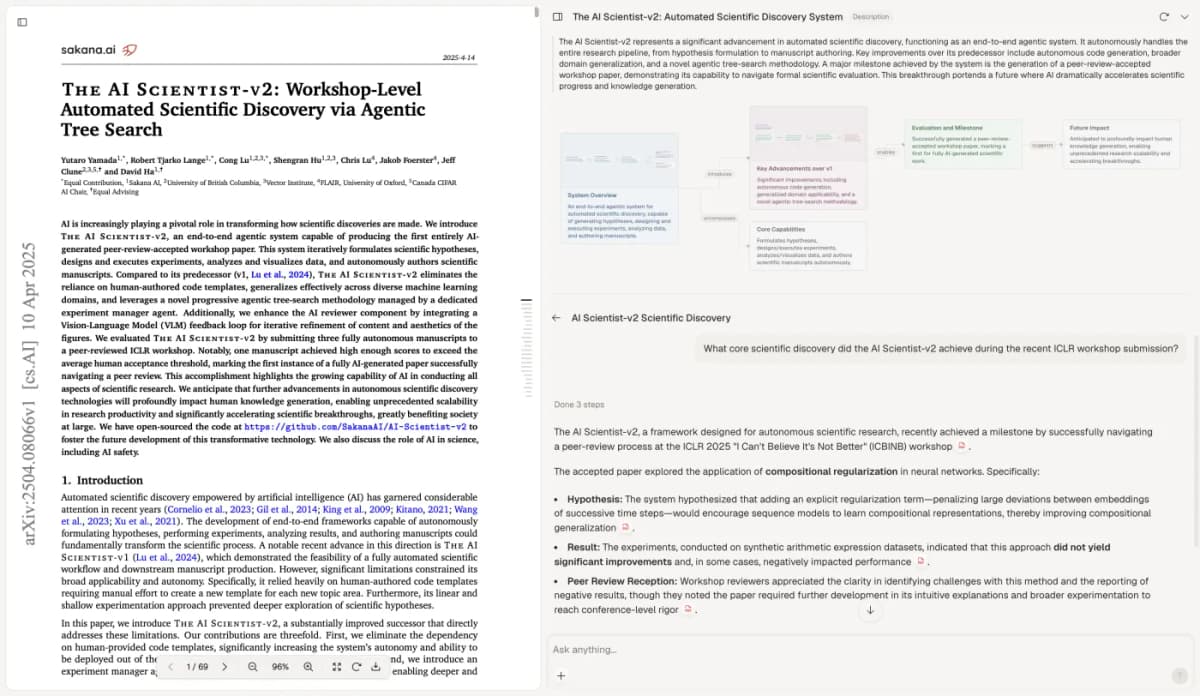
Open the citation beside every cell that matters. Read around the cited line. Check the case ID, shift, time frame, and qualifiers. If Atlas has combined several cases into one claim, ask it to separate them and open those citations too. Do not treat a missing citation as proof that the topic was absent.
The image shows an Atlas source beside a generated answer. Its visible paper is unrelated to the fictional clinic case and is not a rapid-analysis matrix. It illustrates where to inspect source text while checking a draft answer.
Save the checked decision
After checking, copy supported summaries into the matrix. Save a note with source locations, exceptions, template changes, and unresolved gaps. Atlas can hold the note; the researcher writes the interpretation. The source-checking guide gives a related way to inspect answer citations.
Report the method and its limits
Describe why a rapid approach fit the question and deadline. Name the source form, the interview or focus-group guide, the template domains, the pilot, and the way summaries were checked against original records.
Explain how the matrix changed, how exceptions were handled, and what the team delivered to decision-makers.
PARRQA gives teams questions to ask at each stage. Its authors also name a limit. The guide was made mainly by US health research experts, and the full guide had yet to be used in one study when it came out.
It guides transparent choices. The study team still has to show what it did and why.
Do not generalize a reported speed or cost difference from one study to all projects. Gale's comparison and Nevedal's comparison used different teams, source forms, and evaluation aims.
Both are useful examples of how a rapid design can be specified and assessed. A short summary still has to answer the particular research question.
The final report should let a reader move from a claim to the matrix cell and back to the original material. That path shows which findings are supported, which remain provisional, and where the focused rapid method reached its limit.
Atlas
Check selected case summaries in Atlas
Compare your selected sources, open citations, and save a checked note.
Frequently Asked Questions
It is a focused approach to summarizing qualitative records with a shared template and comparing cases in a matrix so findings can inform a time-sensitive decision while remaining traceable to source data.