

“AI video analyzer” covers several jobs. Memories.ai and ScreenApp can find scenes, objects, and words shown on screen without code.
Twelve Labs, Google Cloud Video AI, and Azure AI Video Indexer help developers build video search. Use Atlas when you need to ask a clear question about what the transcript says and open the source behind the answer.
Atlas works from a video's transcript. It does not inspect each frame. If the detail appears only in a slide, gesture, or image, watch that part of the video yourself.
If you already have the transcript as text, see the AI transcript summarizer guide.

Check video claims against transcripts
Add a transcript-backed video, ask a question, and inspect the cited passage.
What an AI video analyzer can mean
Search results for “AI video analyzer” mix four types of tools:
- No-code video tools. Memories.ai and ScreenApp accept an upload or link. They can return scenes, objects, words shown on screen, transcript clips, times, and reports.
- Tools for developers. Twelve Labs, Google Cloud Video AI, and Azure AI Video Indexer provide code tools for video search, safety checks, and labels inside another product.
- Chat tools. The ChatGPT Video Analyzer lets users ask a chatbot about a video. Check its current upload rules and plan limits while signed in.
- Research workspaces. Atlas answers questions from a video transcript and cites the passage behind each claim. It does not inspect frames on its own.
The first two groups compete on how well they find details in the picture, sound, and on-screen text. Atlas solves a different problem: it links an answer about the transcript to the passage that supports it.
How to choose an AI video analyzer
Match the tool to the job using these criteria:
- Input method. Does it accept a direct upload, a public URL, or both? Some no-code tools support links only for certain platforms.
- Transcript quality. Atlas and other transcript tools need usable captions. Missing or poor captions limit the answer.
- Scenes and objects. Vision tools can split a video into scenes and label what they see. Transcript tools cannot.
- OCR (on-screen text). Useful for slides, captions, or on-screen labels. Confirm whether OCR is included or a separate feature.
- Timestamped output. Check whether results link back to specific moments in the video rather than only a general summary.
- Search and questions. Some tools search a large video set. Atlas answers questions about sources you add.
- Code access. An API is needed when you want to add video analysis to your own product.
- Exports. Check whether you can save a report, JSON file, or table of labels.
- Privacy. Read the current storage and access terms before you upload private video.
- Source checks. Prefer results that link back to a time or transcript passage you can inspect.
AI video analyzer comparison
The table matches each tool to its main job. A no-code tool, an API, and a research workspace serve different users.
| Tool | Best for | What it does | Check before you commit |
|---|---|---|---|
| Atlas | Cited questions over a transcript-backed video source | Imports YouTube transcript text as a source, answers focused questions, and returns citation badges linking to the transcript passage | Not a frame-level vision tool. Needs a usable transcript, and visual-only details still require watching the original video |
| Memories.ai | No-code multimodal video analysis and reports | Processes links or uploads across visual, audio, and text layers to return scenes, speech, OCR, entities, timestamps, and structured output | Refresh current plan limits, free tier, and processing speed before relying on specifics |
| Twelve Labs | Developer-grade semantic video search and understanding | Positions itself as an enterprise video AI platform and API across vision, audio, and language | Confirm current API modules, pricing, and model behavior directly before implementation |
| ScreenApp | No-code analysis with scene and object detection | Upload or public-URL ingest, shot detection, categorization, object/face detection, OCR, timestamped reports | Refresh security, retention, and pricing claims before publishing sensitive footage |
| Google Cloud Video AI | Developer video metadata at scale | Recognizes objects, places, and actions in stored or streaming video, with video-, shot-, and frame-level metadata | Requires cloud integration work. Confirm current quotas and pricing |
| Azure AI Video Indexer | Media-library indexing and search | Extracts insights from stored audio and video for search across person, visual text, spoken word, entity, and topic | Built for library-scale indexing more than one-off consumer analysis. Confirm cloud/edge availability |
| Magica | SERP presence for an all-in-one AI platform's analyzer page | Appears as an AI video analyzer product entry | Public feature detail was limited at review time. Refresh the current page before citing specifics |
| ChatGPT Video Analyzer | Chat-based analyzer intent inside a custom GPT | Supports an "ask a chatbot about a video" workflow | Verify current availability, upload behavior, and plan limits with a logged-in check |
Table 1: 8 tools across no-code analysis, developer platforms, and cited-question workflows, each suited to a different video-analysis job.
Analyze video sources with citations
Atlas fits the narrow but important slice of this category where an answer about a video needs to stay checkable. Here is how the cited-question workflow works:
- Add a YouTube video, or another transcript-backed video source, to an Atlas project.
- Wait for the transcript to finish processing. Atlas works from the transcript text, so a missing transcript or a video with poor captions gives it less to work with.
- Skim the auto-generated summary to confirm the transcript captured the content you care about, rather than only an intro or a sponsor read.
- Ask a focused question, such as "What method does the speaker describe for reducing false positives?" A specific question returns a more checkable answer than a vague "summarize this video" prompt.
- Look for citation badges on the claims that matter to your decision.
- Open a citation badge to jump to the exact transcript passage, and confirm it supports what the answer says before you reuse the claim in a note or report.
This is a different proof model than a scene-detection report. A multimodal analyzer tells you what appears in the frame. Atlas tells you what the transcript says, and lets you check the exact passage behind an answer before you rely on it.
Best AI video analyzer tools
Atlas
Atlas fits questions about what a video says. It adds YouTube transcript text to a project, answers clear questions, and links each cited claim to the transcript passage.
Atlas does not scan each frame, label objects, edit video, or make video. Watch the source when the answer depends on something shown only on screen.
Memories.ai
Memories.ai is best represented as a no-code multimodal analyzer. It accepts a link or an upload and processes visual, audio, and text layers to return scenes, speech segments, on-screen text, detected objects and entities, timestamps, summaries, and structured, searchable output.
Refresh current plan limits, free-tier terms, and processing speed on the product page before relying on specifics. These change frequently across video AI products.
Twelve Labs
Twelve Labs provides an API that searches and reads the picture, sound, and speech in video. It fits teams adding video search to their own product. Check its current code modules, model access, and price before you build with it.
ScreenApp
ScreenApp accepts uploads and public links. It can split shots, group scenes, find key moments, detect objects and faces, read text on screen, and export timed reports.
Check its current price and storage rules before you upload private footage.
Google Cloud Video AI
Google Cloud Video AI helps developers find objects, places, and actions in saved or live video. It returns labels for the whole video, a shot, or one frame.
It requires cloud integration rather than a ready-made UI for casual use. Confirm current quotas, regional availability, and pricing before scoping a project around it.
Azure AI Video Indexer
Azure AI Video Indexer searches saved sound and video for people, words on screen, speech, names, and topics. It fits a media archive better than one quick video question. Microsoft's Video Indexer FAQ explains its deployment and billing model; check those details before you adopt it.
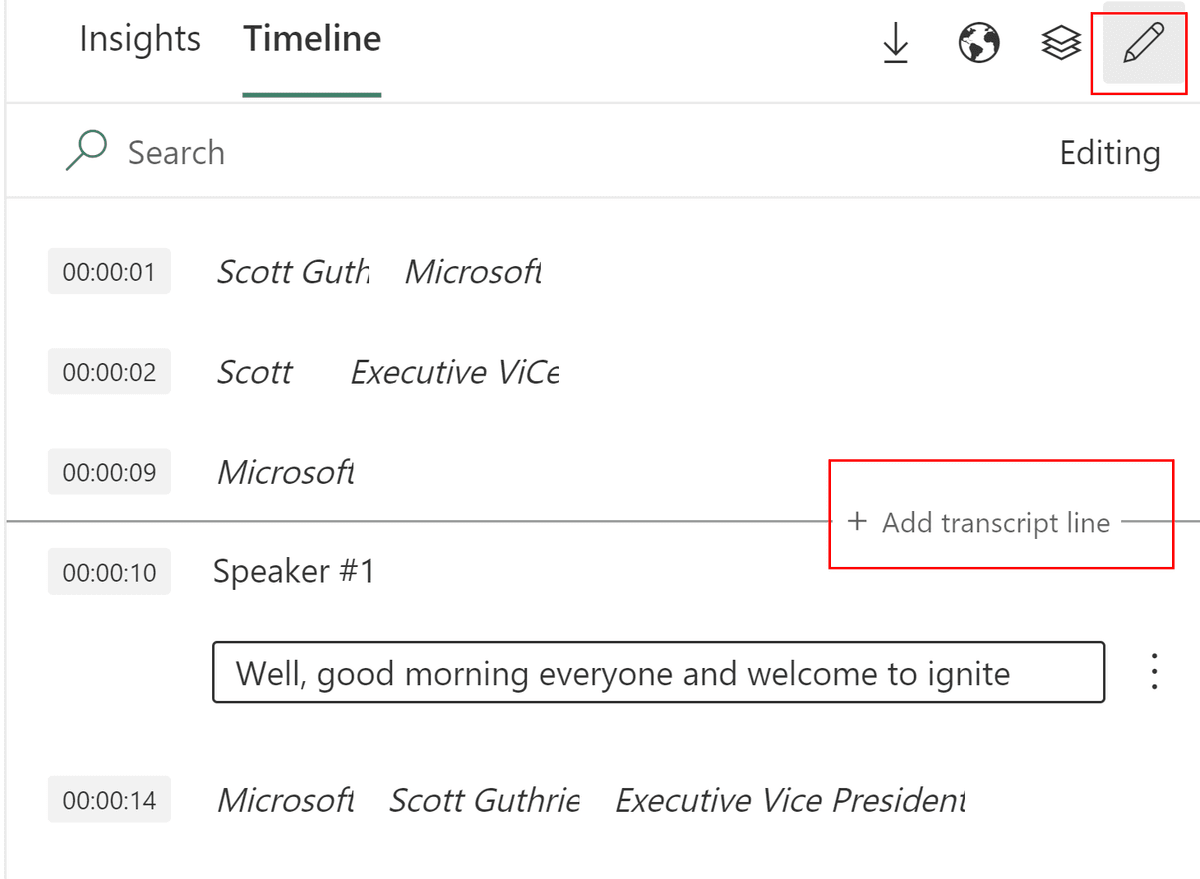
Microsoft's documentation screenshot shows the Timeline in editing mode. Timestamps, speaker text, and the “Add transcript line” control make one limitation visible: transcript output may need correction before later topic or claim analysis is reliable. See the official transcript editing guide for the source workflow.
Magica
Magica's video analyzer appears in search results, but its public page gives few clear details. Test the current tool and check its price and privacy terms before you rely on it.
ChatGPT Video Analyzer
The ChatGPT Video Analyzer custom GPT lets users ask questions about a video inside ChatGPT. Sign in and check its current uploads, access, and plan limits because custom GPT listings can change.
Limits of AI video analysis
Most failures in this category trace back to the source material or to over-trusting a summary rather than to the tool itself.
Transcript and caption problems
- Missing or poor transcripts. Atlas depends on usable transcript text. Auto-made captions can mishear names, technical terms, and words such as “not.” Research on speech recognition shows that noise and field-specific words raise the error rate.
- Weak or approximate timestamps. Some tools round timestamps to the nearest scene or segment rather than the exact moment a claim was made.
Visual and detection problems
- Visual-only content. A slide, chart, gesture, or on-screen detail that the speaker never describes out loud will not appear in transcript text, no matter how good the transcript is.
- Text and object mistakes. Vision tools can misread words or objects in blurry, fast, or busy frames.
Trust and account problems
- Overconfident summaries. Treat any AI summary, including Atlas's, as a way to decide what to watch or read closely next rather than as something to cite directly.
- Private uploads. Check how long a tool keeps video, where it stores it, and who can open it before you upload people, meetings, or secret work.
- Stale pricing and plan limits. Free tiers, processing minutes, and API quotas change often across this category. Check the current page rather than relying on this or any other article for exact figures.
A citation points to related source text. It does not prove the whole claim. Open the passage and check it before you reuse the answer.
Choose the right analyzer for your job
Match the tool to the job:
- Fast, no-code analysis and a shareable report: use Memories.ai or ScreenApp.
- Adding video search, safety checks, or labels to your app: use Twelve Labs or Google Cloud Video AI.
- Making a large saved video set searchable: use Azure AI Video Indexer.
- Chatting casually about a single video without needing citations: a custom GPT-style analyzer may be enough, but verify current behavior first.
- Asking a research question and opening the cited transcript passage: use Atlas.
If your question depends on something only visible in the frame, a transcript-grounded workflow will not answer it. Reach for a multimodal or vision-based analyzer instead, and reserve Atlas for the video sources you need to question, cite, and verify.
If you also work with PDFs or long documents alongside video transcripts, chat PDF and AI document summarizer cover the same citation-first pattern for document sources.
Conclusion
AI video analyzers include no-code vision tools, services for developers, chat tools, and research workspaces. Vision tools compete on what they can find in the picture, sound, and on-screen text.
Atlas answers questions from a video transcript and links claims back to passages you can check.
To inspect what appears on screen, choose a vision tool from the table. To ask what the speaker said, add the video to Atlas, ask a clear question, and open the cited transcript passage.
For adjacent workflows, see chat with YouTube video and AI that cites sources.
Check video claims against transcripts
Add a transcript-backed video, ask a question, and inspect the cited passage.