

A case chronology is a dated list of events that matter to a case, with a source for each entry. At minimum, each row needs an event date, a plain account of what is said to have happened, and a locator to the record that supports it. Keep the date on a document apart from the date of an event it describes.
If a letter dated 12 March says a call took place on 8 March, the call belongs on 8 March, with the letter cited as its source. If another record says 9 March, show the conflict. A chronology is a working research aid until a human checks the underlying files and decides how each entry may be used.
Atlas can help compare a set of permitted records and show citations for a draft event table. A case team still checks each line and owns the legal judgment.

Check case events in Atlas
Compare permitted case files and inspect cited passages for each event.
What belongs in a case chronology
A chronology orders events by when they happened. A document index orders files by title or date. One file may mention several events; one event may appear in several files.
A court calendar is different again. It tracks filing and hearing dates that must be checked against the rules and orders that apply.
The American Bar Association's trial-notebook guidance treats a chronology as a way to organize case facts for review. A court-filed example from the Federal Court of Australia shows the event-by-event format. Neither example makes a draft table complete for a new matter.
For each material row, keep the event date, short description, source ID and page or paragraph, and a status such as checked, disputed, or lacking support. Add the document date when it differs from the event date. If the source is a person's allegation, label it as that person's account; do not silently turn it into an established fact.
Set the case-file boundary
Start with the question the team needs the timeline to answer. It might be the sequence of notices before a contract change or the dates around an injury claim.
Decide which files are in scope and record how they were obtained. Keep versions and attachments together so a later draft does not quietly replace an earlier record.
The evidence boundary is the set of records the team has checked. A missing email, unreviewed attachment, or gap in a production set can change a timeline. Do not describe the chronology as the full case history when the file set is still open.
The LexisNexis chronology guidance discusses building a timeline from case materials. A legal document organizer guide covers the related job of keeping files findable.
The timeline should point back to that file set, so a reviewer can open the actual source behind a row.
Extract events and attach source locations
Read each file for dated acts, statements, and changes. Record the exact source words or a faithful short account. Give each event a locator: page, paragraph, exhibit, timestamp, or file section. If a scanned record lacks clear page numbers, use a stable internal label and note that limit.
Do not infer a date from the order of paragraphs alone. A memo written in April may recount a meeting from February and a call from March. Put each event on its claimed date; keep the memo's own date in a separate field.
The Fileread legal chronology guide calls for entries a reviewer can trace back to the source.
Make an initial pass for possible events, then review the text around each cited line. A quote can omit a condition, a negation, or the fact that the writer had only heard about the event. If the file is a draft or an unsigned statement, keep that status visible beside the row.
Separate event dates from document dates
Use the date the source assigns to the event when it is clear. Record the document date too, because it tells a reviewer when the account was made. When a source says “early March,” preserve that range rather than choosing 1 March for a neat sort order.
If two sources disagree, keep both claims. “8 March, per F-01” and “9 March, per F-02” are more useful than one unexplained date. A reviewer may later resolve the difference by checking the original metadata, an attachment, or another witness account. Until then, mark it disputed. When that account comes from testimony, a deposition summary can help locate the relevant page and line before the event is entered; the reviewer still checks the transcript.
The ClerkSafe chronology guide recommends recording source support and gaps. An event timeline must keep doubt about dates visible.
A legal document analysis guide covers the broader job of reading and comparing file contents. That work may feed a chronology, but the dated event table has its own proof rule.
Worked case chronology example
This example is fictional. F-01 through F-03 are made-up files. Their dates, people, and locators are teaching aids; no real case or Atlas test produced the rows. Imagine a team reviewing when a supplier told a client about a delivery delay.
| Event date | Event or account | Source and locator | Competing account or open question |
|---|---|---|---|
| 8 March, claimed | Supplier says it called the client about a delay. | F-01, supplier letter dated 12 March, paragraph 2 | F-02 places the call on 9 March. Check call records before choosing a date. |
| 9 March, claimed | Client note records a call about the delay. | F-02, client note dated 10 March, line 4 | The note may refer to the same call as F-01; identity of the call is unverified. |
| 15 March, proposed | Undated draft gives 15 March as the revised delivery date. | F-03, undated draft schedule, row 7 | No approval mark; the draft's creation date is unknown. Check whether the schedule was sent or adopted. |
Table 1: The first two rows may describe one call, or they may describe two. The third row records a proposed delivery date, not a completed delivery or a known revision date. The undated draft does not show when the proposal was made or whether anyone accepted it.
For each row, a reviewer should open the cited line and check the event date against the document date. Mark the row checked, disputed, or missing support.
Add a short reason. “Disputed: letter says 8 March; client note says 9 March” is more useful than a colored cell with no explanation.
Resolve duplicates, conflicts, and gaps
Sort the rows by event date, then look for events described more than once. Check whether two accounts concern the same act before merging them. Compare people, place, subject, and timing. If the link is uncertain, keep separate rows with a note.
List the records you still need. A missing attachment might contain a date; a later email might show whether a draft schedule was sent. A gap does not prove that no event occurred. It tells the team which claim remains open.
The Fileread guide treats conflicts as part of chronology work. A compare-document guide helps when two versions of one file must be checked side by side.
Keep the event table tied to the version that actually supports the row. A later edit should not silently change what the team believes the earlier file said.
Check cited events in Atlas
Add only case files the team is permitted to use to an Atlas project. Select the bounded file set with @. Ask: “List dated events about the delivery delay. Keep each file's account separate, cite every row, and flag uncertain or conflicting dates.”
Open the citation for each material row and read nearby text. Check whether Atlas used an event date or merely the date on the file. If the source says “about 8 March,” keep that uncertainty. Edit the table and save a checked note with the source IDs and unresolved questions.
The Atlas view below shows where an answer can be checked against an open source. The pictured research paper is unrelated to the fictional supplier files and gives no evidence for the example table.
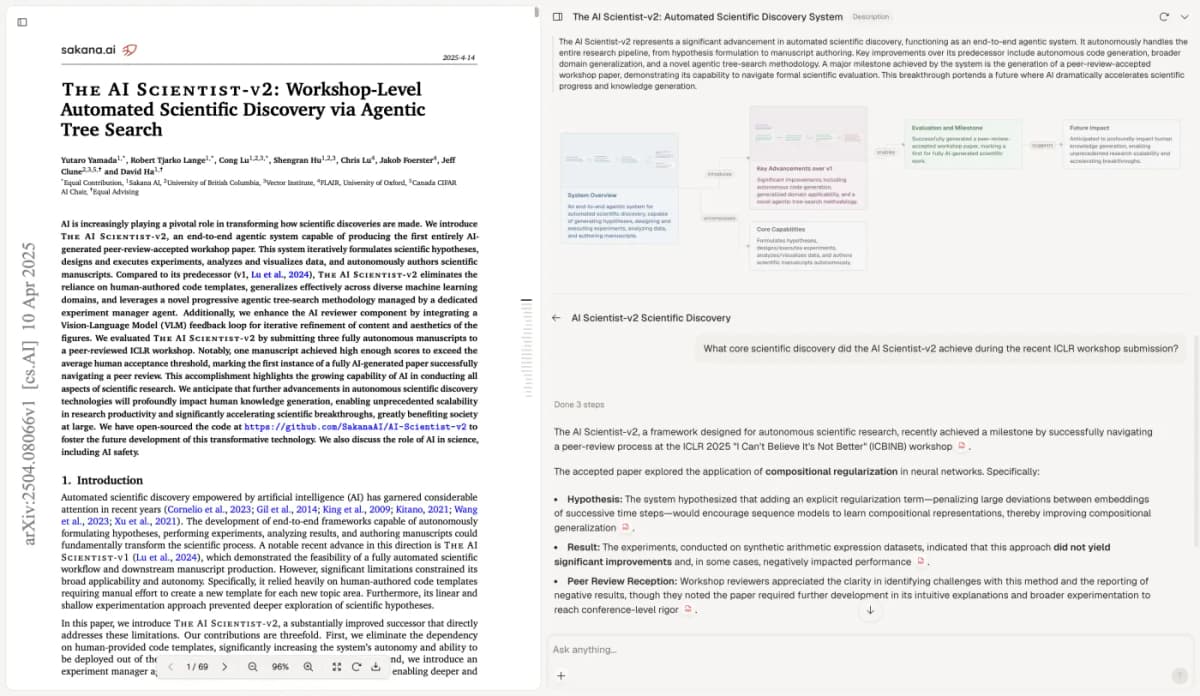
Atlas citation inspection beside The AI Scientist-v2 by Yamada and colleagues, whose paper is licensed under CC BY 4.0. The screenshot is unchanged; the supplier chronology is a separate teaching case.
Atlas can help draft a source-linked table from selected material. It does not find every case file or decide whether an event happened. A legal research memo guide covers the later job of framing an issue and supporting an analysis with checked sources.
Review the chronology before legal use
Have the responsible legal team check the scope, each cited passage, file versions, missing records, and any date that affects a decision.
Counsel decides how to handle privilege, confidentiality, filing rules, evidence use, and case strategy. A citation in a research note points to a file for review; it is not a finding that a court will accept.
As new files arrive, add or revise rows and record why. Keep the old date claim in the note when a conflict is resolved, so the team can retrace the change.
The ABA trial-notebook guidance treats organized records as preparation for human review. The timeline remains only as strong as the files and checks behind it.
Check case events in Atlas
Compare permitted case files and inspect cited passages for each event.