

Competitive product analysis compares how selected products meet a defined user job. A useful comparison keeps each feature claim beside its source and limits. It helps you see what the docs establish, what needs a trial, and which questions remain open.
Start with the work people need to do, then choose criteria that matter for that work. A long feature list can look complete while missing a condition that makes a feature unusable for the team.
If you have product docs and checked competitor publications, compare those texts first. Keep missing facts marked as unknown so new sources can fill the gaps without changing earlier facts into guesses.

Check selected product claims in Atlas
Compare selected product docs and inspect the support for each claim.
What competitive product analysis should tell you
The analysis asks how products support a job and where they differ. It can cover a feature, a workflow, a plan condition, or a required handoff. The SBA's competitive-analysis guidance starts with product lines, market segments, and the alternatives customers can choose.
A product page tells you what the vendor wants people to know. A help page may explain the procedure and its conditions. A test shows what happened in a particular setup. Keep those source roles distinct when making a claim.
ProductPlan's guide warns that marketing may differ from what a product can do. It points to tutorials and help docs as useful sources when direct access is limited. Documentation can guide a trial, with actual use still to be checked.
For the broader question of which firms and substitutes belong in the review, use a competitive landscape analysis. This guide focuses on the product claims within a selected comparison.
Define the user job and comparison criteria
Write the job in plain terms. In a fictional shift-handoff project, a team needs to assign an unfinished task, let the next shift see its status, and retain a record of changes. Product A and Product B are possible tools for that job.
Use the job to choose criteria before looking for a winner. Here, ownership, access, history, export, reminders, and plan scope matter. GOV.UK's user-needs guidance starts with what people are trying to do and how they do it today.
Set evidence criteria for each row. An export claim needs a source that names the export format and what is included. A statement that a tool is easy to use needs more than a feature page. It may require a trial with people doing the actual job.
Record product version, plan, region, and date where they affect the claim. Comparing an entry plan with an enterprise feature can hide the real choice. A page's current wording also may differ from the version used by the team.
Keep the scope manageable and record exclusions. The SBA includes indirect competitors, so a shared file or manual process may matter too. Name what the review leaves out so readers can judge its reach.
Collect and label the source evidence
Collect sources that answer the specific criteria. ProductPlan's source guidance distinguishes help and tutorials from broad positioning. Give each source a short ID so the table can point back to it.
- Find owner-authored docs. Review current help, release notes, and plan details for the selected products. Keep the exact source location.
- Record the scope. Add the review date and any version, role, plan, or regional condition. Retain the wording around each claim.
- Label vendor claims. A promised benefit remains vendor-stated until suitable evidence supports it. Note what would be needed to check it.
- Record permitted observations. If a trial has been run, save the task, setup, account role, and result. Do not describe a planned test as an observation.
- Retain unknowns. If the sources do not answer a criterion, name the missing fact and next check. Do not fill the gap with a guess.
For price comparisons, define the basis before recording a number. Seats, billing period, tax, add-ons, and included features can change what is being compared. A listed price does not by itself establish the full cost for a team.
GSA's market-research page points to contract records and price lists for its procurement context. These illustrate why source type matters. Contract or price data answers a different question from whether users can complete a task.
Keep the collection boundary visible. The literature review process guide explains how to retain source scope and selection decisions. Here, the same habit helps another reviewer see which product records you inspected.
A worked product comparison with unknowns
All products, documents, dates, plan names, and claims below are fictional teaching examples. No vendor has been tested. Suppose the review contains A-Help, dated 28 September 2026, B-Help, dated 29 September, and B-Page, dated 30 September.
A-Help describes task assignment, change history, and CSV export by an admin. B-Help describes assignment, guest viewing, and reminders on its fictional Team plan. B-Page promises easy handoffs but provides no supporting trial. The reviewed B sources do not state an export procedure.
| Criterion | Product A source record | Product B source record | Status or open check |
|---|---|---|---|
| Assign an unfinished task | A-Help, Assignment: a named member can be assigned | B-Help, Assignment: a named member can be assigned | Documented in both, still to be tried in the team workflow |
| Next-shift access | A-Help does not describe guest access | B-Help, Guests: invited guests can view tasks | A access is unknown, B role limits need checking |
| Change history | A-Help, History: records status changes | B-Help does not state retained history | B history remains unknown |
| Export records | A-Help, Export: admin can export CSV | No export procedure in the reviewed B sources | A is conditional on role, B export remains unknown |
| Send reminders | A-Help does not describe reminders | B-Help, Reminders: requires Team plan | A is unknown, B is conditional on plan |
| Easy handoffs | No claim in the selected A sources | B-Page: easy handoffs, with no trial basis supplied | Vendor-stated for B, no usability result for either |
Table 1: The table has no score or winner. It shows the support and the work still needed. A documented procedure may fit the job, but the conditions could prevent the intended team from using it. If the review will become a purchase decision, the vendor comparison matrix shows how to keep requirements and proposal evidence visible before scoring.
Correct "Product B has no export" to "Export is not established by the reviewed B sources." That wording preserves the gap without claiming the feature is absent. Check other current docs or a permitted trial before drawing a stronger conclusion.
The SBA distinguishes existing-source research from direct research. Use the table to decide which type you need next. A missing role condition calls for source review, while a question about a difficult handoff may call for observation.
Keep documentation separate from test results
A feature name does not show how well the feature works. It also does not show whether the people in your setting need it. The GOV.UK user-needs guide treats views that do not come from users as assumptions to check.
Use a voice of customer template to retain the customer account and context behind a proposed need before turning it into a comparison criterion.
If several comments suggest a need, customer feedback analysis helps trace the pattern to supporting examples and exceptions. Check repeat contacts before treating comment counts as customer counts.
Use clear evidence states so readers know what supports a claim:
- Documented: The source says what the feature does and when it can be used.
- Vendor-stated: A promise still to be tested.
- Observed: A result from a recorded trial.
- Unknown: The sources leave the point open.
NN/g's comparison methods distinguish expert reviews from tests where people try tasks across products. A feature page can describe the tool, but it leaves those outcomes open. Choose a method that can answer the actual question.
If you use scores, define the scale and priorities before rating. Preserve the source facts beneath each score and leave missing evidence unknown. A precise-looking total can hide a weak basis or a criterion that does not matter for the job.
For later tests, keep the task and setup comparable. NN/g discusses relevant tasks and presentation order because earlier use can affect later performance. Record the conditions instead of calling a casual trial a general benchmark.
Check the comparison in Atlas
Atlas can compare the supplied texts and point to their sources. The analyst chooses which docs to include and checks each claim. People still run trials, verify facts, and make the final choice.
- Add selected sources. Bring the product docs and checked reports into the project. Use sources you have permission to process.
- Name the comparison set. In Ask a question, use @ to select the docs and criteria. Project only keeps new retrieval within the project, while earlier chat context can remain.
- Request a bounded table. Ask: "Compare these products against the handoff criteria. Cite each claim, retain role and plan conditions, and mark missing evidence unknown. Separate vendor promises from observed results."
- Inspect each citation. Read the passage and nearby text to check the product, date, scope, and limits. Exact locations depend on the source.
- Correct and save. Remove claims that lack support, then choose New and Note. Save the checked table with source locators and open questions, and wait for Saved.
In the fictional export row, an answer that says B has no export goes beyond the selected docs. The note should keep export unknown in this set of sources. Assign a current-doc or trial check to the researcher.
The source-view capture below shows the review habit: a document is open beside an answer with citation markers. Reading the source lets you check whether the answer preserves the original claim and its limits.
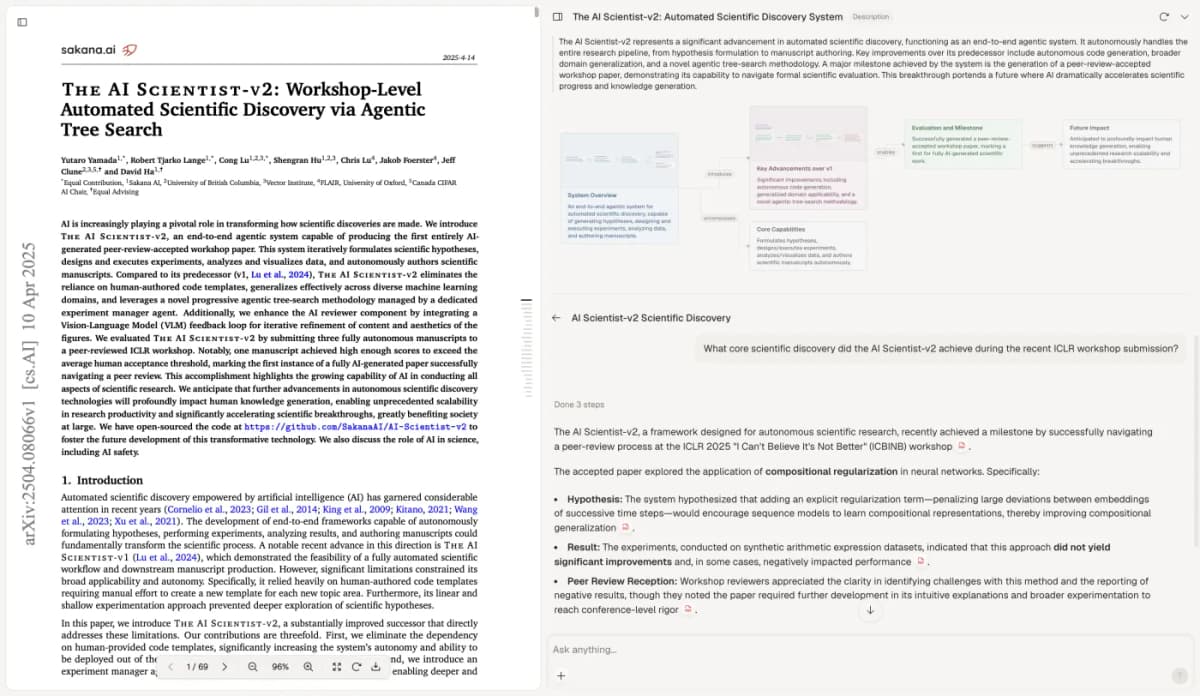
Existing Atlas capture reused unchanged. The AI Scientist-v2 paper by Yutaro Yamada and coauthors is licensed under CC BY 4.0. The paper is unrelated to Product A and B. The image shows how to inspect a source, with answer accuracy still requiring human review.
Keep the checked table and unresolved claims together. A source-backed draft remains useful only when readers can inspect the passages and see where the conclusion stops.
Turn the checked table into follow-up work
Give each open question a next check and an owner. In the fictional comparison, one researcher can inspect B's export docs while an operator checks the access role needed by the next shift. Record what support would let each point change from unknown.
Use your research objectives to choose which questions matter for the decision. The SBA's segment-based approach helps keep the comparison tied to the people and work you mean to support.
Save the table, reviewed sources, and decision note where the team can return to them. The guide to organizing research notes helps keep that record usable as plans and docs change.
The decision owner can then judge the checked facts, remaining risks, and next tests. A comparison with visible gaps gives them a clearer basis than a winner chosen from unverified feature claims.
Check selected product claims in Atlas
Compare selected product docs and inspect the support for each claim.