


Litmaps can help students find academic papers and see how sources connect. Use it early, before you start writing.
The next job is slower. Read the papers, judge the evidence, check citations, and write your own argument. Atlas fits after Litmaps when you want to ask cited questions, compare sources, and check the passages behind a claim.

Read papers you found with Litmaps in Atlas
Download papers as PDFs, add them to Atlas, and inspect cited answers.
Quick answer
Litmaps is useful when you need a visual way to explore connected papers. It helps most when you already have one good paper and need to find older work, newer work, or close neighbors. The official Litmaps student page frames the product around finding papers, staying organized, and seeing the bigger picture, while the Litmaps features page explains discovery, maps, sharing, and alerts.
It is less useful when the class asks for a clear database search. The same is true for a formal review method or exact citation checks. In those cases, keep a search record outside Litmaps and use the map to find leads. Prove coverage with the method your class requires.
For most student papers, use this sequence before you start drafting:
- Use a library database, Google Scholar, instructor materials, or a known paper to find a seed source.
- Use Litmaps to explore related papers and source links.
- Screen papers against the class question.
- Add the selected papers to one Atlas project.
- Ask cited questions, compare sources, and open citation badges.
- Write the final argument yourself. Follow the class citation rules.
What students can use Litmaps for
Litmaps is most useful before writing. It can help when you have one paper but do not know what else to read. It can also help you explain how papers connect before you narrow the topic. For a broader tool context, compare this workflow with the student sections in AI tools for academic research and best AI tools for students.
Good student use cases include these early research jobs:
- Finding related papers after a professor gives you one starting article.
- Seeing older and newer work around a topic.
- Understanding whether a paper is isolated or part of a larger conversation.
- Building a candidate reading list for a literature review.
- Preparing for a thesis or capstone topic meeting.
- Showing a class how sources connect before asking students to compare them. Litmaps' own teaching guidance names class use for source links, research views, source types, review methods, and search strategies.
The student risk is collecting too much. A map can make every nearby paper look important. Before saving another source, ask whether it helps answer the actual assignment question.
How Litmaps works for student research
Start with a seed paper, topic, or paper you trust. The official Litmaps literature-review guide starts with one or more papers. Then you search related work, expand the search, judge sources, organize the set, write, and cite. In the product, that usually means finding a starting paper, opening related papers, checking the Litmap, and saving good candidates.
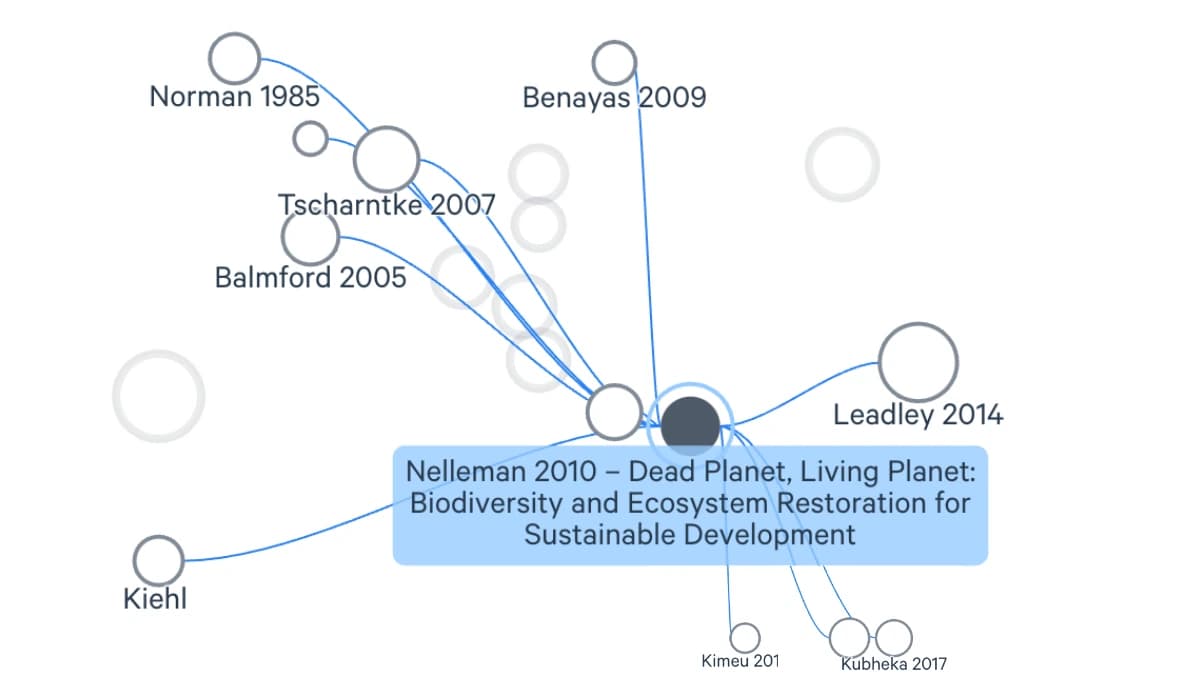
The screenshot above comes from the official Litmaps student page. It shows the core student job: start from a seed paper, inspect nearby papers, and use the map to decide what deserves a closer read.
Use tags or notes that describe why each candidate matters before you keep it:
methodfor papers whose design you may compare.backgroundfor sources that explain the field or concept.opposing argumentfor sources that complicate your likely claim.recent studyfor newer work that may have fewer citations.definitionfor papers you may quote or paraphrase carefully.
After that, screen the candidates against the class task:
- Does the paper match the assignment question?
- Is it scholarly enough for the course?
- Is the date range acceptable?
- Does the paper add a method, finding, theory, or disagreement you need?
- Can you access enough of the paper to read and cite it responsibly?
Litmaps can also support classroom research because it makes the source network visible. That visual context helps students see research as a conversation among sources. If the task is a full review, pair this map work with a process like the one in literature review process.
Student research jobs by tool
This table is the decision boundary I would use for a student paper or thesis chapter. Litmaps handles discovery. Later research jobs need different tools and more student judgment.
| Student job | Best fit | Why |
|---|---|---|
| Ask cited questions | Atlas | Grounded answers can link back to source passages that the student can inspect before using a claim. |
| Synthesize evidence | Atlas plus student judgment | Atlas can compare selected sources, but the student must decide which evidence belongs in the argument. |
| Discover connected papers | Litmaps | Citation maps help reveal related studies from a seed paper, topic, citations, and references. |
| Check required coverage | Library databases | Course, thesis, or review methods may require specific indexes, filters, and search records. |
| Manage bibliography | Zotero or another reference manager | Citation files, folders, style formatting, and bibliographies need a dedicated reference workflow. |
| Submit final writing | Student and instructor rules | No tool replaces academic integrity, citation style, assignment requirements, or final authorship. |
Table 1: This split prevents a common student mistake. A search tool can help choose papers. It has not read them, judged them, or turned them into your class argument.
How to use Atlas after Litmaps
Once you have 5 to 10 useful papers, move from search to source work. Atlas projects group sources, notes, chats, maps, summaries, and citations for one topic. Keep the class paper or thesis chapter in one focused project. For more on the Litmaps side of this handoff, see Litmaps for literature review.
- Add the selected papers to one Atlas project.
- Wait for the sources to process.
- Ask a grounded question such as "Which papers define this idea differently?" or "Which sources disagree about the method?"
- Ask for a table with source, claim, method, limit, and citation.
- Open citation badges before saving a claim. A citation means Atlas found related source evidence. It does not make the claim correct by itself.
- Generate a knowledge map for a dense paper when you need a reading guide. Then check key nodes against the source.
- Save checked points as notes before writing.
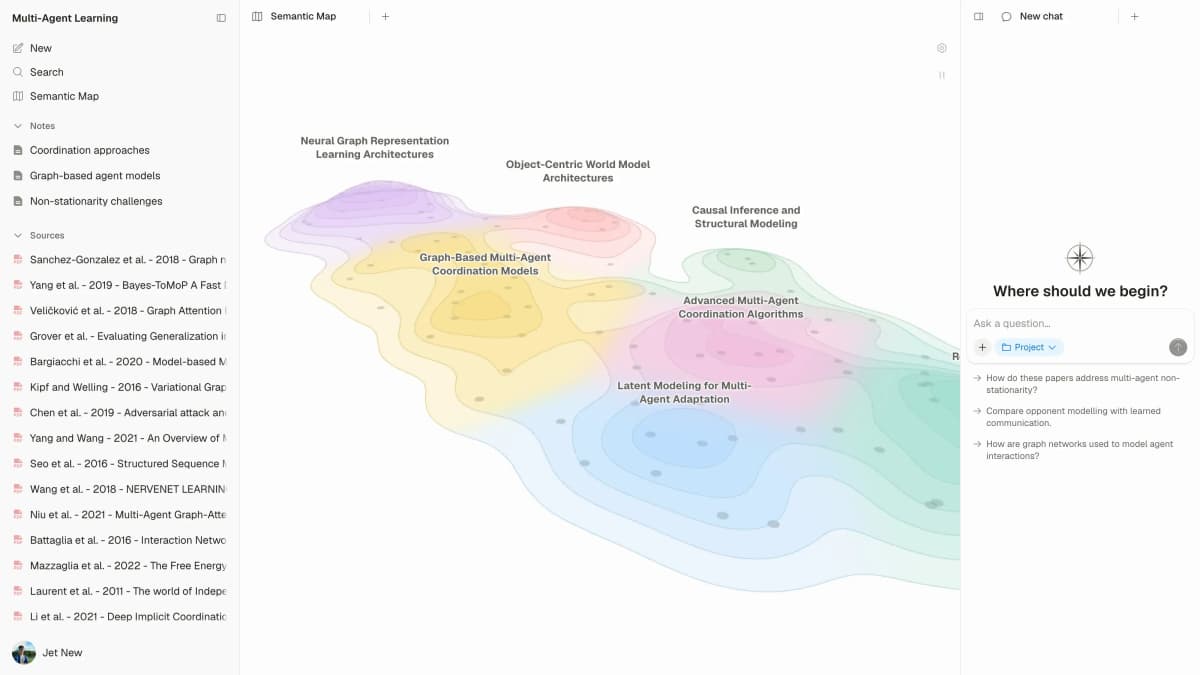
This first-party Atlas interface shows a project map and connected sources, illustrating the synthesis step after discovery. It is not a Litmaps graph. View Atlas’s Semantic Map overview.
This Litmaps-to-Atlas handoff slows down the jump from "I found sources" to "I can make a claim." Use a claim only after the source passage supports it and the class context allows it.
Limits, pricing, and classroom caveats
Litmaps promotes student and academic use, including education access and discounts. As of July 5, 2026, the Litmaps pricing page lists a free plan, an education Pro price, and team or school options. Plan limits and discount rules can change. Check the current page before a class, thesis group, or lab depends on a specific limit.
The more durable caveat is coverage. Official Litmaps database guidance says its database uses open metadata from sources such as Semantic Scholar, OpenAlex, and Crossref. Records can be missing when metadata, citations, references, versions, or newer indexing are incomplete. For a student paper, that means:
- Do not claim your search is complete just because a map looks full.
- Use required library databases when the instructor names them.
- Keep a search note showing how you found each source.
- Read the paper before citing it.
- Check whether a source supports the claim you want to make.
Litmaps can make search easier, but it does not remove the reading work. If an instructor asks for a database plan, inclusion rules, or a PRISMA-style record, treat Litmaps as an extra search route. Use it as the main search only if the class allows that. If you are still choosing tools for the reading stage, literature review software covers the broader stack.
Next steps after Litmaps
Use Litmaps when you are still choosing what belongs in the source set:
- You have a starting paper and need related sources.
- The topic has enough academic papers to form a map.
- You want a visual overview before choosing what to read.
- You are learning how papers connect within a field.
Use a library database when the class asks you to prove search coverage:
- The assignment requires a specific database.
- You need transparent coverage for a literature review.
- You need filters by discipline, peer review, date, or source type.
Use Atlas after Litmaps when the selected sources need closer reading:
- You have selected sources and need cited answers.
- You need to compare findings across papers.
- You want to inspect the passages behind each claim.
- You need a source-grounded map or synthesis note before writing.
My recommendation is to use Litmaps only until you have a source set that answers the assignment question. After that, stop expanding the map and move into reading, synthesis, citation checking, and writing. If the next task is the draft itself, use the source-checking habits in how to write a literature review.
How I would stop expanding a student map
Stop adding papers when the next five candidates repeat the same method, theory, or finding. Keep expanding when a new paper changes your answer. Also keep going when a paper adds a required source type for the class.
Conclusion
Litmaps is a good student search tool when you need to see how papers connect. It helps you find candidate sources before you commit to a reading list.
It does not replace source checks, library search, citation rules, synthesis, or writing. Use Atlas after Litmaps when your chosen sources need cited questions, source comparison, citation checks, and source-backed notes.
Read papers you found with Litmaps in Atlas
Download papers as PDFs, add them to Atlas, and inspect cited answers.