
Atlas vs Reflect (2026): An In-Depth Research Comparison
Compare Atlas, a visual research workspace, with Reflect note-taking apps on citation grounding, local Markdown, privacy, AI chat, migration, and pricing.
- Byline

Summary
Use Atlas to compare research sources and trace claims back to them. Use Reflect for private daily notes and personal backlinks.
Atlas supports cited answers and visual research maps; Reflect supports encrypted daily notes, backlinks, and Markdown export.
Atlas traces claims to source passages, while Reflect organizes personal notes and connected ideas.
Reflect can remain useful for daily capture while Atlas handles research libraries that need evidence trails.
Disclosure: We make Atlas. Reflect wins when local Markdown, daily capture, or the existing app's end-to-end encryption matters most.

Atlas

Ground your research synthesis in cited sources
Upload research sources, ask cited questions, and inspect supporting passages.
Quick verdict: Atlas vs Reflect
Choose Atlas when you start with a set of research papers and must check the claims you write. It turns each paper into a Knowledge Map. A project-level Semantic Map shows the full source set, while cited answers link back to their source passages.
Atlas gives citation-grounded answers: each answer links back to a source passage. Its visual maps keep the source structure in view, and all related work stays inside one research project.
Reflect centers personal writing and a network of notes. The existing service includes daily notes, backlinks, calendar links, voice transcription, web capture, and end-to-end encrypted notes. Reflect Open launched as a separate beta in July 2026. It stores plain Markdown on your device and adds cited AI chat through a model key you provide.
There are three products to compare. Atlas is a research workspace. The existing Reflect app is a hosted service for encrypted notes. Reflect Open is its local, open-source successor. This guide keeps the Reflect versions separate because their privacy, price, device support, and AI features differ.
How we compared Atlas and Reflect
WrenAI, Vanna, Cube, Flyway, and Liquibase
The query has unrelated Atlas results. WrenAI, Vanna, and Cube work with data systems. Flyway and Liquibase manage database changes. We excluded those products from the feature test below.
We checked what each product accepts and how it supports AI output. We also checked visual organization, privacy, storage, and current price.
Feature claims come from the Reflect homepage, the official Reflect Open announcement, and Reflect's AI search release.
For Atlas, we ran the research test available to a new account with exactly 10 sources and 5 lifetime AI chats. We uploaded papers to one project, inspected their Knowledge Maps, asked cited questions, and reviewed the project Semantic Map. Atlas Pro is $20 per month or $204 per year after that evaluation sample.
The comparison rewards Reflect for local ownership, fast capture, and encryption where the exact version provides it. It rewards Atlas for paper maps and source checks.
A feature only counts when the product offers it today. We identify features that are limited to the Reflect Open beta.
How is Atlas different?
Reflect and Atlas overlap at the surface because both touch reading, notes, and source work. They split on 3 things that decide whether the output can be checked and shared.
| Atlas | Reflect |
|---|---|
| Best default job: source-grounded research synthesis across uploaded documents | Best default job: private daily notes and personal knowledge capture |
| Paper structure: Knowledge Maps deconstruct claims, evidence, and relations | Paper structure: notes, backlinks, and AI summaries |
| Project navigation: Semantic Map clusters sources, chats, notes, and citations inside one project | Project navigation: backlinks, search, and a note graph |
| AI evidence: cited answers with highlighted source passages and explanations | AI evidence: existing Reflect chats across notes. Reflect Open adds cited AI chat |
| Storage: cloud workspace encrypted in transit and at rest | Storage: hosted E2E-encrypted service, or local Markdown in Reflect Open |
| Primary visual: paper and project maps | Primary visual: note editor, backlinks, search, and graph |
| Pricing: evaluation sample, then Atlas Pro | Pricing: hosted plan or free Reflect Open Mac beta |
| ✗ | Reflect wins: local Markdown in Reflect Open ✓ |
Table 1: Atlas organizes evidence from a defined research corpus. Reflect organizes the user's own notes and capture stream.
Visual maps for papers and projects
Atlas builds two kinds of map as you read. A Knowledge Map turns one paper into claims, evidence, terms, and links between them. You see the paper's spine first. Then you click down into the source passages.
A Semantic Map shows the whole project: sources, notes, chats, and cited passages. Related items cluster by topic. You can view the same map from a new angle without reading it all again. That is how 200 papers stop being a folder and start being a corpus.
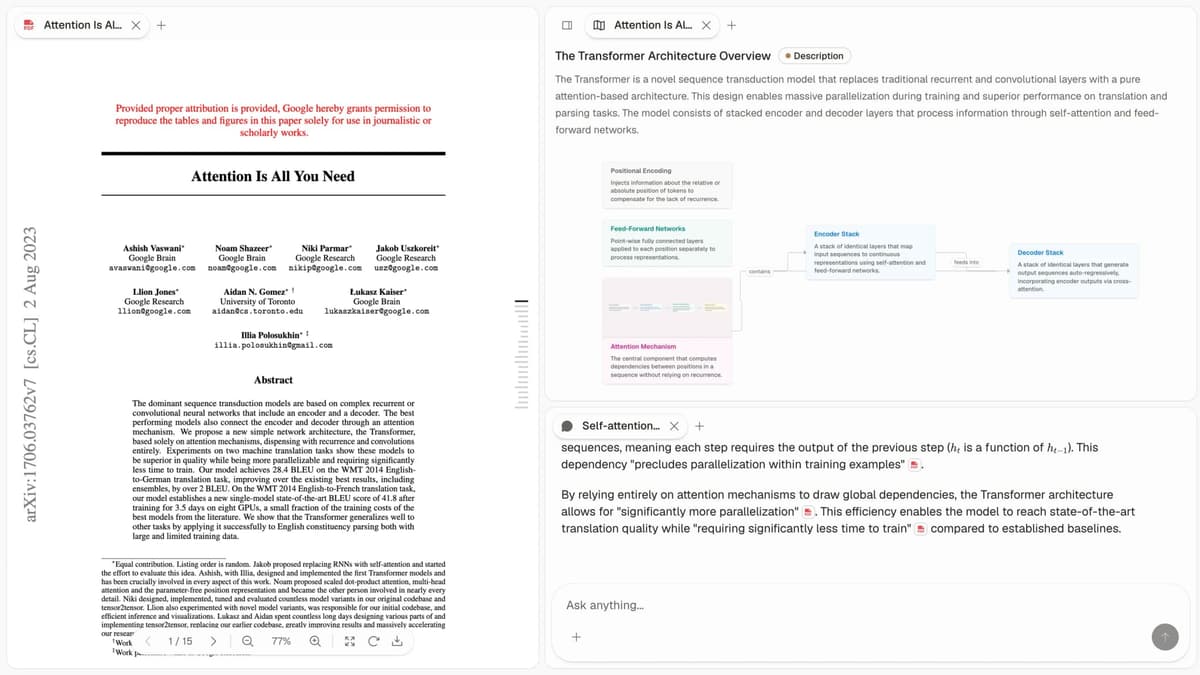
This first-party Atlas screenshot shows the same paper in three connected surfaces. The left pane preserves the readable source. The center reconstructs its argument as a Knowledge Map with labeled relationships.
The chat pane keeps citations beside generated claims so the reader can open a supporting passage. See how to organize research notes for the surrounding workflow.
Reflect does not break one paper into claim and evidence nodes. It also does not redraw a whole project map from a new topic angle. If you have spent an afternoon trying to recover a paper you read three weeks ago, the Knowledge Map is the first Atlas surface that pays off. Visual maps make a body of papers legible at a glance.
Cited answers with inspectable passages
An AI citation is useful only when the cited passage supports the sentence beside it. Atlas presents cited claims with a source passage and a short explanation. You can then open the highlighted text.
The reader remains responsible for checking the evidence. AI citation checking explains why the source-to-claim match matters more than the presence of a citation marker.
Reflect Open changes the evidence comparison because its launch post lists AI chat with citations across notes. An older claim that Reflect lacks citations would be wrong.
Atlas remains more focused on research papers because cited chat sits beside Knowledge Maps, Literature-Grounded Annotations, and the project Semantic Map. Reflect Open cites the user's Markdown note graph.
Context stays inside the research project
Atlas keeps sources, notes, cited chats, and maps together within the current project. A thesis chapter can retain the same evidence set for weeks without asking the model to search unrelated work. Separate projects remain separate.
Reflect organizes a personal graph made from notes. In Reflect Open, that graph is a folder of Markdown files with backlinks, tags, attachments, and local search.
Its AI can search those notes when the user enables a model provider. Choose the Atlas boundary when the corpus must be explicit. Choose the Reflect graph when personal notes should remain the center.
Comparing Atlas and Reflect
Feature summary
Both tools touch daily research, but they live in different categories. Atlas is for paper maps, project maps, cited AI answers, and reuse across a source set.
Reflect is for daily personal knowledge management, backlinks, AI voice notes, and summaries. Reflect is stronger for private notes. Atlas goes deeper when each claim needs a source.
Reflect's voice-capture workflow is:
- Start the red recorder from the note interface.
- Speak while the waveform and elapsed-time counter run.
- Stop the recording when the thought is complete.
- Let Reflect transcribe the audio into note text.
- Find that text later through daily notes, all-notes search, tasks, or the map.
A spoken thought becomes note text through transcription, then joins the same searchable graph as typed work. Reflect's networked note-taking guide explains how saved notes later connect through backlinks.
The sections below compare paper maps, project maps, cited answers, citation notes, retained context, and price. Every table includes a genuine Reflect or Reflect Open advantage.
Paper deconstruction with a Knowledge Map
The Knowledge Map is Atlas's per-paper surface. It deconstructs a single paper into a multi-level argument structure with labeled relations between claims. Node text comes from the paper and stays faithful to the source. Hierarchical breadcrumbs let you read down from the high-level thesis to a specific paragraph.
| Atlas | Reflect |
|---|---|
| Multi-level argument structure ✓ | Notes with AI summarisation |
| Labeled relations (motivates, causes, enables) ✓ | ✗ |
| Faithful-to-source node text ✓ | ✗ |
| Hierarchical breadcrumbs ✓ | ✗ |
| ✗ | Reflect wins: local Markdown in Reflect Open ✓ |
Table 2: This table compares how each product represents one research item after capture.
Good to know: The bottom row belongs to Reflect. Atlas does not ship that surface. The Knowledge Map's payoff is recovering a paper's argument three weeks after you first read it, when topic chips alone are no longer enough.
Project view with a Semantic Map
The Semantic Map is Atlas's per-project surface. It projects all the sources, notes, chats, and citations in a project into a spatial embedding where related items cluster by topic. Re-project the same canvas under a different topic angle without re-ingesting anything.
| Atlas | Reflect |
|---|---|
| Spatial embedding of sources + notes + chats ✓ | Backlinks graph |
| Auto-labeled topic clusters ✓ | ✗ |
| Topic-angle re-projection ✓ | ✗ |
| Bounded project context ✓ | Personal note graph across the selected Reflect graph |
| ✗ | Daily-note workflow with AI integration ✓ |
Table 3: The table separates Atlas's source-project view from Reflect's personal note graph.
Good to know: Reflect's strength on that row is genuine. If your work depends on it, that's the boundary. The Semantic Map's payoff is when 200 papers stop being a folder and start being a corpus you can re-project under different topic angles without re-reading.
Citation-grounded answers
Atlas produces claim-source-justification triples. Each answer shows the claim, the passage, and a one-sentence explanation of why the passage supports the claim. You can jump to the source paragraph, read the highlighted sentences, and check whether the reasoning holds.
| Atlas | Reflect |
|---|---|
| Cited claims with supporting passages ✓ | Reflect Open offers cited chat across notes |
| Short explanation of why the passage supports the claim ✓ | Follow cited answers back to source notes |
| Jump-to-source with passage highlight ✓ | ✗ |
| Paired with per-paper Knowledge Maps ✓ | ✗ |
| ✗ | Audio transcription and meeting notes ✓ |
Table 4: Both products now expose citations in their AI surfaces. Atlas adds research-paper maps and passage-focused review.
Good to know: Both tools now have a citation surface. Atlas also explains why a passage supports a claim and places that answer beside the source's argument map. For a thesis sentence, inspect the passage in either product before reusing the generated wording.
Literature-grounded annotations
Atlas adds notes to each paper when you upload it. Citations inside the paper become clickable objects. If the cited paper is open, Atlas pulls in the useful passage, so you can see how one paper builds its case from other sources without leaving the page.
| Atlas | Reflect |
|---|---|
| Auto-annotate on ingest ✓ | Manual notes per source |
| Multi-citation synthesis (how citations build the argument) ✓ | ✗ |
| Resolve cited sources (open-access) ✓ | ✗ |
| Exact passage / page / paragraph anchors ✓ | ✗ |
| ✗ | Native Mac and iOS access in the existing app ✓ |
Table 5: This table focuses on evidence attached to an uploaded academic paper.
Good to know: Atlas resolves citations inside the paper you're reading. When a paper cites an open paper, Atlas pulls in the cited passage. This shows how the paper builds its case from the sources it cites.
Ongoing context within one project
Atlas retains sources, chats, notes, cited passages, and maps inside one project. This is useful when a research question develops over several weeks.
| Atlas | Reflect |
|---|---|
| Persistent project context ✓ | Persistent personal note graph ✓ |
| Citations, notes, Knowledge Maps, and Semantic Map stay together ✓ | Backlinks, tags, tasks, and attachments stay together ✓ |
| Cited chat remains available in the project ✓ | Cited AI chat is available in Reflect Open ✓ |
| Separate projects preserve corpus boundaries ✓ | A graph can span broad areas of personal knowledge ✓ |
| Cloud-hosted project | Local files in Reflect Open ✓ |
Table 6: The right persistence model depends on whether you want a bounded source corpus or a broad personal note graph.
Good to know: A project boundary prevents an unrelated source from entering the next answer automatically. Reflect's broader note graph is preferable when cross-topic personal recall matters more than a tightly defined evidence set.
Price comparison
Atlas offers an evaluation sample of exactly 10 sources and 5 lifetime AI chats. Atlas Pro costs $20 per month or $204 per year. The paid tier continues the Knowledge Map, Semantic Map, cited chat, and project workflow.
The existing Reflect service advertises one plan at $10 per month when billed annually, after a 14-day trial. Reflect Open for Mac is free and open source.
Its iPhone build is free during TestFlight. Reflect has not set the later mobile price. AI and transcription in Reflect Open use services chosen and paid for by the user.
| Atlas | Reflect |
|---|---|
| Evaluation access: exactly 10 sources and 5 lifetime AI chats | Reflect wins on free Mac access: hosted trial plus a free Reflect Open Mac beta |
| Paid price: Pro is $20/month or $204/year | Hosted price: $10/month billed annually. Reflect Open mobile price is undecided |
| Model cost: included in the Atlas plan | Reflect Open: uses the user's paid or free model-provider key |
| ✗ | Reflect Open Mac beta: available free ✓ |
Table 7: Prices and free access differ between the hosted Reflect service and the separate Reflect Open beta.
Which Reflect version are you choosing?
Existing Reflect service
The hosted Reflect product remains in use. Its $10 monthly price when billed annually includes networked notes, the browser clipper, Kindle sync, iOS access, and end-to-end encryption.
The web product also links to Google and Outlook calendars. Choose this version when hosted sync and Reflect-managed E2E encryption are required.
Reflect Open beta
Reflect Open is a separate app and the destination for new development. The Mac app is free, open source, and local-first. Its graph is a folder of Markdown files, with attachments stored as ordinary files. AI chat can cite notes, local semantic search is optional, and users connect their own OpenAI, Anthropic, Google, or OpenRouter key.
The beta changes the privacy claim. Reflect Open does not add an end-to-end encryption layer. Files can remain on the Mac or sync through iCloud or Git. Private notes can be blocked from AI services.
The launch post also says the beta lacks a web app, Windows and Android versions, and some links offered by the existing service.
Test Atlas with one source
If the tables point toward Atlas, test it with one real source before moving a library. The evaluation sample includes exactly 10 sources and 5 lifetime AI chats. Run a Knowledge Map on one paper and ask one cited question.
Use a paper you know well. Check whether the Knowledge Map recovers its central claim and supporting evidence. Ask a question you can verify from the PDF, open the cited passage, and judge the explanation. That loop tests the distinctive Atlas workflow without spending the entire evaluation allowance.
When to choose Atlas vs Reflect
Choose Atlas for source-led research
Choose Atlas when your starting material is a set of papers, reports, or PDFs and the output must carry an evidence trail. Knowledge Maps reduce rereading at the paper level. The Semantic Map organizes the current project. Cited answers help a researcher move from synthesis back to the exact passage.
This workflow fits a literature review, an evidence-heavy brief, or a research memo. It is especially useful when the same bounded corpus will support several questions. Atlas keeps that context project-scoped instead of blending unrelated projects.
Choose Reflect for personal capture
Choose the existing Reflect service for hosted daily notes, backlinks, calendar-linked meeting notes, voice transcription, and end-to-end encrypted note storage. Choose Reflect Open when local Markdown, open-source code, a user-selected AI provider, and file-level ownership outweigh beta limitations.
Reflect is also the cleaner choice when the source material is already distilled into your own notes. A personal journal or meeting log rarely needs a Knowledge Map. The best second-brain apps guide compares more options for that use case.
- Want hosted, end-to-end encrypted daily notes? Go with Reflect.
- Want local Markdown and your own AI key? Go with Reflect Open.
- Tied: Atlas and Reflect both work fine for keeping selected research notes. Choose based on whether source passages or daily capture should remain central.
Recommendations by user type
- PhD researchers: use Atlas for thesis papers. Keep Reflect for personal notes if both jobs matter.
- Students: use Atlas when a literature review needs source checks. Use Reflect Open when you mainly need free local Markdown notes.
- Consultants and analysts: use Atlas for reports that must cite their sources. Use Reflect for meeting notes and personal recall.
- Journal keepers: choose Reflect. Atlas is designed around external sources rather than daily reflection.
- Researchers with strict privacy rules: check where each product stores files and sends AI requests. The two Reflect products use different security models. Atlas runs in the cloud.
Migration and worked example
Migrating selected Reflect notes to Atlas
The export path depends on the version. The existing Reflect service exports Markdown and HTML. It also has a dedicated, non-destructive export for Reflect Open. Reflect Open already stores daily notes, regular notes, and attachments as ordinary local files.
For Atlas, move only the material that belongs to a research project. Export selected hosted notes as Markdown or copy the relevant files from a Reflect Open graph.
Upload original PDFs when they are available. A derived note adds context, while the source paper provides stronger evidence for a PDF chat.
Three kinds of content do not move one-to-one. Reflect [[wikilink]] syntax remains text inside the Markdown source instead of becoming an Atlas map edge. Reflect's graph structure and per-note privacy settings do not map to an Atlas project.
AI chats and note history are also separate records. Reflect says they do not transfer from its hosted app into Reflect Open.
Create one Atlas project for the research question, add the original sources, and upload only the Reflect notes that add interpretation or context. Review the resulting maps before asking a cited question. The research paper organizer guide covers a larger source-library setup.
Keeping Reflect for journals and Atlas for the source corpus is often simpler than moving a complete note history. The 2 tools can cover separate jobs. Reflect Open makes that split easier because the selected Markdown files are already visible in the file system.
Worked example with 8 papers
Say you are writing the literature review for a thesis chapter, and you have 8 papers on one sub-question. Here is how the 2 tools guide the review.
In Reflect, the usual pattern is daily note plus backlinks. You open today's note, create a [[Paper Title]] page for each paper, and paste your reading notes into each page. As you read, you add links between papers. The backlinks panel shows those cross-links.
In the existing Reflect product, AI can chat across filtered notes. Reflect Open can return cited answers across the Markdown graph. The evidence quality therefore depends on what the notes contain. If a note paraphrases Paper 5 without preserving a passage, you still reopen the paper and locate the evidence.
In Atlas, the 8 papers go into 1 project as sources. On upload, each paper becomes a Knowledge Map that shows claims, evidence, key terms, and links drawn from the paper. You scan the maps to recover each paper without reading cover to cover.
Then you open the Semantic Map for the project. The 8 papers cluster by topic. You can view the same map by another angle, such as "methods" instead of "findings." The clusters help you find the consensus and the outlier without reading 3 papers again.
When you ask Atlas to draft a paragraph, cited claims point back to source passages and include a short explanation. Click the citation to inspect the highlighted paragraph. If an uploaded paper cites a ninth open-access paper, Literature-Grounded Annotations can expose the relevant cited passage. The citation analysis guide explains how to inspect that chain.
Three months later, continue in the same project when the next chapter uses this corpus. The 8 papers, maps, and cited chats remain available inside that project. Start a separate project when the evidence set changes and you need a clean boundary.
This worked example is the proof surface for the comparison. Try it with one paper you already summarized in Reflect, then decide whether direct passage checks improve the research workflow.
Common objections and edge cases
Should I migrate old Reflect notes?
A full move is rarely necessary. Keep the daily-note history in Reflect and start an Atlas project for the source set that needs maps or cited answers. Reflect's Markdown export lets you move selected research notes later. Reflect Open also offers a non-destructive import from the existing app.
Which product fits sensitive research?
Atlas encrypts data in transit and at rest through its cloud provider. Sources and chats are private to the account and are not used to train Atlas models. Atlas does not provide end-to-end encryption at rest today.
If a legal or medical workflow requires client-side keys, use a product and storage path approved by the organization. The Reflect versions have different security models, so the product name alone does not settle the review.
Can I avoid content lock-in?
Atlas notes export as Markdown, and uploaded sources remain downloadable. Knowledge Maps and Semantic Maps are computed surfaces that another tool would need to rebuild.
Existing Reflect exports Markdown and HTML. Reflect Open stores plain Markdown and files on disk. In every case, verify exports before making one system the only copy of important research.
For adjacent options, compare Atlas with Notion, review Zotero alternatives, or see how to synthesize research papers.
Atlas
Ground your research synthesis in cited sources
Upload research sources, ask cited questions, and inspect supporting passages.
Frequently Asked Questions
Atlas explains how each citation supports the answer. A cited response shows the claim, its supporting passage, and a short justification. You can open the highlighted passage and judge it in context. Reflect Open also offers AI chat with citations across notes. Atlas goes further for uploaded research papers by pairing cited chat with per-paper Knowledge Maps and a project-level Semantic Map. The distinction matters when a thesis or brief must survive source checking. See verifiable AI research for the Atlas method.