


Copilot is the better default when files, meetings, messages, and approvals already live in Microsoft 365. Choose it for Word, Excel, PowerPoint, Outlook, Teams, SharePoint, Graph context, and tenant-controlled tasks.
Gemini is the better default when docs, email, storage, meetings, and search start in Google. Choose it for Gmail, Docs, Drive, Calendar, Meet, Search, image prompts, and Google Workspace teams.
Neither tool removes the need to check important sources. Copilot or Gemini may help you find, sum up, or draft from files. Move the key files into Atlas before you rely on them in a memo, review, client deck, or choice. Atlas is strongest when you need to compare PDFs, web pages, notes, or reports. Open the cited passage before you reuse the claim.

Compare sources from either assistant in Atlas
Bring Microsoft and Google sources together, then verify each claim in context.
Decision criteria: ecosystem fit matters most
The Copilot vs Gemini choice depends on where your files, meetings, messages, and searches already live.
Microsoft says Microsoft 365 Copilot works inside its app stack. That includes chat, docs, meetings, email, search, agents, Word, Excel, PowerPoint, Outlook, and Teams. Its own page also focuses on rights, security, admin tasks, and app-native work.
Treat the head-to-head claims on Microsoft's page as vendor positioning. The direction is still useful. Copilot is built to sit where Microsoft 365 files and chats already happen.
Google says Gemini for Google Workspace works across Gmail, Docs, Sheets, Meet, Drive, Calendar, Chat, Slides, and Vids. The Gemini app can also analyze files. Google help notes upload limits, account rules, and context limits. Gemini is a strong fit for Google app tasks and search-heavy prompts. Check the plan, account, and admin settings before assuming a feature is available.
For most teams, the wrong question is "Which assistant is smarter?" Ask which tool can see the right files. Ask which tool follows the right controls. Ask which answer you can check.
Copilot vs Gemini workflow matrix
This matrix uses Microsoft and Google pages for product facts. It uses practitioner reviews for buyer language. It avoids price and quota claims because those details change fast.
| Workflow decision | Atlas follow-up | Copilot fit | Gemini fit |
|---|---|---|---|
| Microsoft 365 apps | Import the final doc, report, PDF, or page when the claim needs cited comparison. | Best for Word, Excel, PowerPoint, Outlook, Teams, SharePoint, and Graph context. | Useful when files can be brought into Gemini. More app switching is likely. |
| Google Workspace apps | Bring chosen Google files into Atlas when the team needs a citable evidence base. | Useful as a general helper. Less natural when Gmail, Docs, Drive, Calendar, or Meet hold the source of truth. | Best for Google Workspace context and Google-led team tasks. |
| Everyday assistant tasks | Use Atlas only when the answer needs passage checks. | Good for drafts, meeting follow-up, sheets, and work chat inside Microsoft apps. | Good for search-heavy questions, image prompts, email, docs, and Google app help. |
| Research and files | Add PDFs, sites, notes, videos, or papers. Then ask a grounded comparison question. | Best when the research files already sit in Microsoft 365. | Strong when Search, Drive, Docs, uploads, or image inputs matter. |
| Enterprise governance | Use Atlas after approved sources are chosen. Keep the system of record intact. | Microsoft stresses tenant rights, Microsoft 365 controls, and admin work. | Google Workspace has business and admin surfaces. Check edition, account type, and settings. |
| Source checks | Compare sources, ask for cited bullets, open badges, and check the passage. | Useful for a first pass. Important claims still need source review. | Useful for a first pass. File and context limits can affect the answer. |
| Best-fit user | Researchers, students, analysts, and teams that need checked source notes. | Microsoft-first teams, Office-heavy workers, and Teams or Outlook users. | Google-first teams, search-heavy users, students, and Drive or Meet users. |
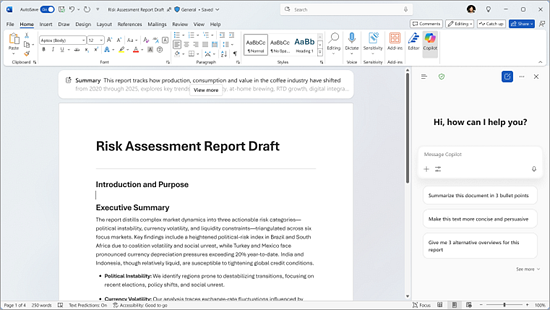
Copilot Chat beside a Word document, with prompts to summarize and revise its contents. Source: Microsoft Support.
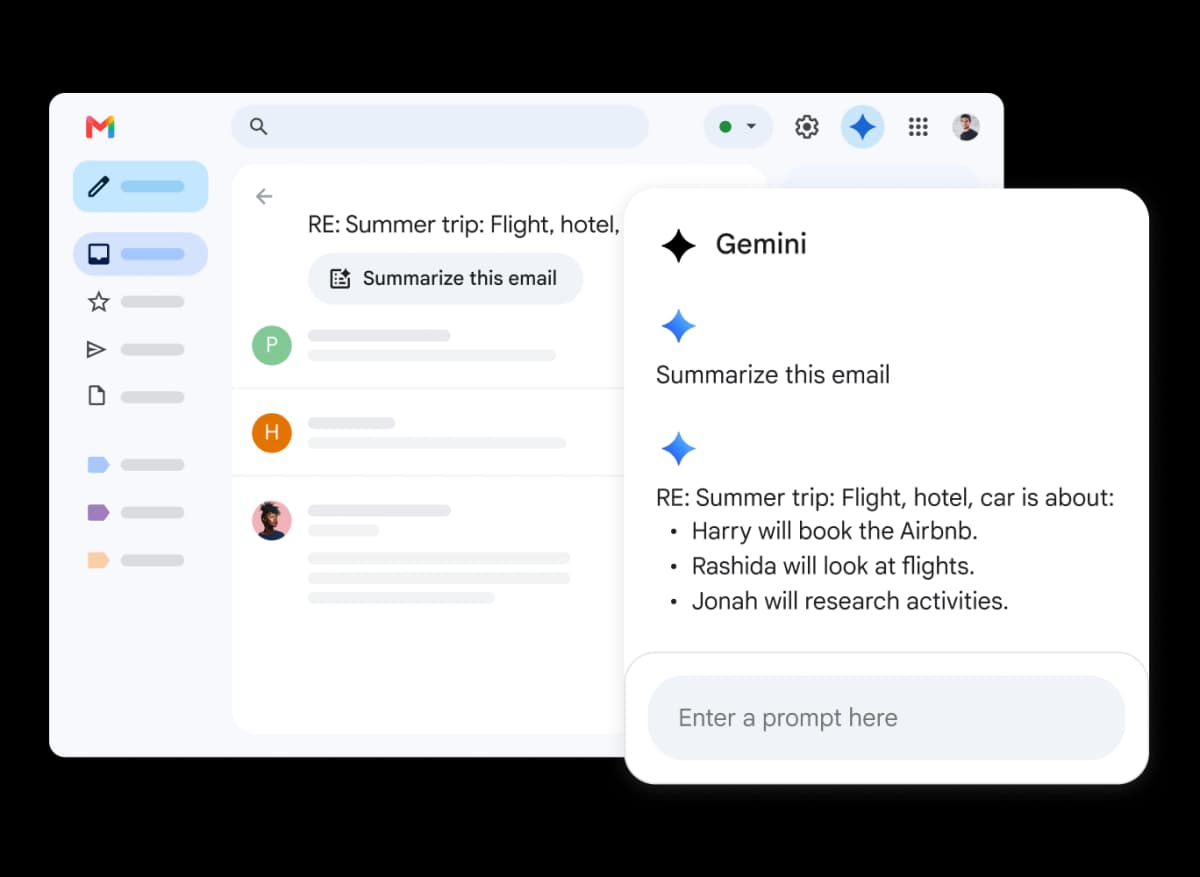
Gemini in Gmail summarizing an email thread. Source: Google Workspace.
The decision starts with the app stack, then moves to source checks when the answer will support a memo, report, review, or team choice.
Where Atlas fits after Copilot or Gemini
Use Atlas if the answer is no longer just a draft. It fits when you need to check sources after Copilot or Gemini. Atlas does not replace Copilot, Gemini, Microsoft 365, or Google Workspace. It helps compare docs, pages, papers, notes, and reports against cited passages.
The Atlas path is different from asking a general assistant for a quick answer:
- Add the key sources: PDFs, web pages, notes, transcripts, papers, or project files.
- Ask a focused question. For example: "Compare these two reports on revenue risk" or "Which source supports this claim?"
- Ask for source separation when an answer blends files together.
- Open the citation badges for the claims that matter.
- Save only the findings whose passages support the sentence you plan to reuse.
This source-checking step matters in mixed Copilot and Gemini setups. Copilot may sum up a Teams meeting and draft a Word brief. Gemini may search, inspect a PDF, or work through a Drive folder. In Atlas, the same sources become project evidence before the answer becomes a note, report, or choice.
Enterprise apps, admin controls, and data context
For companies, Copilot's strongest case is its link to Microsoft 365 data and controls. Microsoft says Copilot works across Microsoft 365 apps and uses work context through Work IQ. Microsoft also says Copilot uses Microsoft 365 rights and controls when it reads business data.
Those claims matter most for teams whose docs, meetings, email, and rights already live in Microsoft.
Microsoft's Copilot-vs-Gemini page is a vendor comparison. Use it to understand Microsoft's case for Copilot. Then test the claims against your tenant, data rules, connectors, old file stores, and review process.
Gemini's strongest enterprise argument is the same pattern on the Google side. Google Workspace buyers already use Gmail, Docs, Sheets, Drive, Calendar, Meet, Chat, and Slides as the team layer. Gemini can be the more natural assistant when those apps hold the docs and comments.
Google also treats personal Gemini and work or school Gemini differently. Check Workspace edition, admin controls, data settings, region, and file limits first.
For a mixed team, use both with boundaries. Let Copilot handle tasks in Microsoft apps. Let Gemini handle tasks in Google apps and search. Then set a separate source-check path so the final note does not depend on the fastest draft.
Research, files, and source checks
Copilot and Gemini can both help with research tasks. They usually enter at different points.
Use Copilot when the research files are already in Microsoft 365. That includes Teams transcripts, Word briefs, Excel sheets, Outlook threads, and SharePoint files. Copilot is useful when the output must stay close to those apps.
Use Gemini when the research starts with Search, Drive, Docs, images, screenshots, or mixed media prompts. Gemini can also analyze uploaded files. Google lists rolling limits and context limits for file upload. That matters when a prompt asks Gemini to connect details across a long report or several files.
For source-dependent tasks, the risky handoff is "draft to decision." A summary can sound reasonable and still miss a caveat. It can overstate a weak source. It can also blend sources and hide disagreement. Before you use either tool's output in a deliverable, check the source link. Read the exact passage. Judge the strength of the claim.
For additional comparisons, see Section AI, ZDNET, G2, and Nextplane.
Which should you choose?
Choose Copilot if your team lives in Microsoft 365. That means the key files, meetings, messages, calendars, sheets, decks, rights, and approvals live there. Start there when your org already uses Microsoft controls for identity, data loss, records, and compliance.
Choose Gemini if your team lives in Google Workspace. That means the key docs, mail, meetings, storage, search habits, and comments live there. Start there for search and image tasks where Google context matters more than Office editing.
Use both if the team is mixed. Assign Copilot to Microsoft app work and Gemini to Google app work. This cuts app switching. It also keeps each tool near the files and messages it can use best.
Use Atlas after either tool when the output depends on evidence. For a research note, client memo, or strategy doc, stop and inspect the source passage. Do the same for a literature review or decision log. Polish the summary after that check.
For nearby guides, read Atlas vs Copilot, Atlas vs Gemini, Copilot vs ChatGPT, and ChatGPT vs Gemini. For a broader tool set, use ChatGPT alternatives. Those pages cover related choices without turning this page into a broad AI-tool ranking.
Final pick by workflow
Copilot is the stronger default when Microsoft 365 is the main work hub. Gemini is the stronger default when Google Workspace is the main work hub. Mixed teams usually need a boundary instead of one winner.
-
Choose Copilot for Word, Excel, PowerPoint, Outlook, Teams, and SharePoint work.
-
Use Atlas after either assistant when the output needs source checks before it goes into a memo, review, or decision.
-
Choose Gemini for Gmail, Docs, Drive, Meet, Search, and Google-led workflows.
Compare sources from either assistant in Atlas
Bring Microsoft and Google sources together, then verify each claim in context.