

An AI notes organizer can sort, shorten, find, connect, or map notes you already have. The best tool depends on the job. You may need help with study notes, a personal archive, source files, text edits, or meeting notes.
NoteGPT can turn lectures and PDFs into study notes, while Mem helps you save personal notes and find them later. NotebookLM can make a Mind Map from sources in one notebook. Revisely edits note text, and Microsoft 365 keeps meeting notes and next steps in Teams and OneNote. Atlas fits when your project has both notes and source files: ask a question, make a Knowledge Map, and open the source text behind a key point.

Map source-backed notes in Atlas
Ask grounded questions, inspect citations, then map links across your notes.
The AI notes organization jobs to separate
First, define what “organize my notes” means for you. A reader in a community thread had 73 pages and 12 years of notes. A short summary would not solve that problem. The reader needed a way to find topics and browse the old archive.
Microsoft's guide treats taking notes, making transcripts, and writing summaries as different jobs. The same rule helps with the tools in this guide.
Summarize and categorize
One tool may shorten a document or meeting. Another may sort notes into folders, tags, or topics.
A neat folder or summary can look complete even when the AI has missed a key point. Check the result before you rely on it.
Retrieve and connect
Large note archives are hard to browse by folder. Some tools let you ask a plain-language question instead of guessing the exact search word. They may also show notes that cover the same idea. This helps when you know the note exists but cannot find it.
Verify and map
Most tools do not link a claim back to the exact source text. Some can show notes as a map, but the map still needs a source check.
No tool here does every job well. A strong summary tool may not show its source. A source-checking tool may be slow for quick daily notes.
Choose the job first, then compare tools.
What to look for
Ask what must happen to your notes. Do you need to save them, sort them, find them, check their sources, map them, or edit the text? The table matches each tool to one of those needs.
AI notes organizer examples
The table shows the main job for each tool and whether you can trace a result to its source. Check current prices and plan limits on the product page.
| Tool | Best fit | Organization primitive | Retrieval or map model | Source traceability | Caution |
|---|---|---|---|---|---|
| Atlas | Source-backed notes that need cited answers and maps | Knowledge Map generated from notes and sources | Grounded chat with @mentions to scope context | Citation-linked: map nodes trace back to source passages | Doesn't function as a capture-first personal notes app, recorder, or transcription tool |
| NoteGPT | Students and learners across lectures, PDFs, and study material | AI-generated summaries and visual notes | Search within generated study content | Ties output to the uploaded lecture or file | Refresh pricing, file limits, and account requirements before relying on it |
| Mem | Personal note memory with low-friction capture | AI-assisted organization and collections | Natural-language retrieval, related-context surfacing | Retrieval stays within your own saved notes with no external source citation | Confirm current organization and sharing features before switching workflows |
| NotebookLM | Working across a focused set of uploaded sources | Mind Map of topics and related ideas | Visual branching diagram plus source-grounded chat | Tied to the uploaded notebook's sources | Scoped to a notebook: confirm current source-count limits |
| Revisely | Editing note or document text itself | Text transformation (extend, shorten, rephrase, translate) | Skips retrieval across a note archive | No source-citation layer | Functions as an editing tool rather than an organization workspace |
| Microsoft 365 | Teams already using Microsoft for meetings and productivity | Smart categorization, contextual understanding, keyword extraction | Search and retrieval inside OneNote, Teams, and related apps | Ecosystem-dependent: confirm per-app citation behavior | Refresh current plan names and feature availability by app |
| Nearity-style workflows | Clipping and summarizing web pages into thematic folders | Auto-categorized summaries into folders or notebooks | Searchable knowledge base of summaries | Describes one workflow pattern rather than a single verified product | Confirm claims on whichever specific product follows this pattern |
Table 1: Use the caution column to spot what you still need to check. Features, file support, and prices can change.
Source checks behind the table
The feature claims come from product pages. Each row below explains why the tool appears in the table.
- Study notes: NoteGPT lists class notes, short summaries, PDF translation, study aids, audio lessons, and writing help.
- Personal notes: Mem focuses on saving notes, sorting them with AI, and finding them with plain-language search.
- Source maps: Google's help page shows Mind Maps made from the sources in a notebook.
- Text changes: Revisely can make text longer or shorter, rewrite it, translate it, and change its tone.
- Meeting notes: Microsoft's guide covers notes, transcripts, summaries, labels, search, and links between Microsoft apps.
AI notes organizer decision path
Atlas helps after your notes are tied to source files and you need to compare them. Use this process:
- Add your Markdown notes, papers, web pages, or reports to a project.
- Open a note and connect it to the source files in the project.
- Use an @mention to ask about one note or source instead of the whole project.
- Ask a clear question and request an answer based on those sources.
- Open the cited text before you accept the answer.
- Make a Knowledge Map to see links among claims, ideas, methods, and sources.
- Open key nodes and check them against the source.
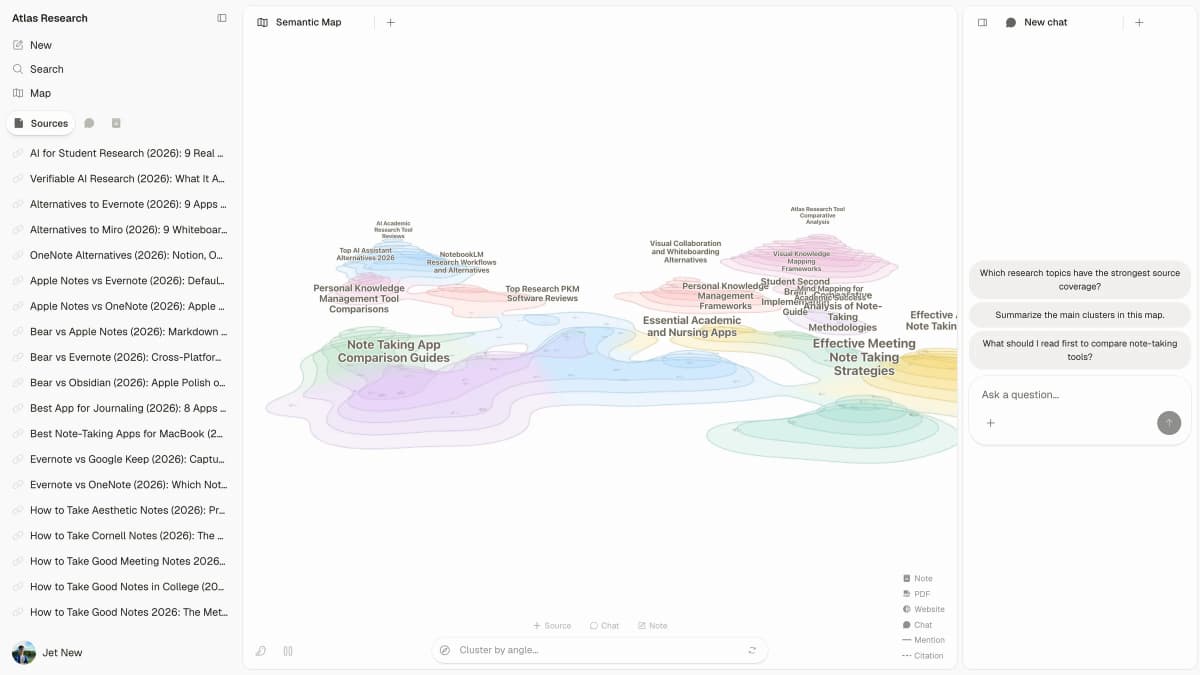
Atlas keeps notes and sources beside the map and chat. You can check an AI-made group without leaving the page.
The screenshot shows sources on the left, a Semantic Map in the center, and chat on the right. The map groups related topics. Chat lets you ask about those groups. The source files stay close enough to check.
Suppose you have notes from twelve papers. Name the notes and sources you want to compare, then ask how two claims relate. Open the citation before you add the answer to a map or report.
A Knowledge Map helps you find links without reading every note again. Check an important node against its source.
AI notes organizer tool paths
- Use Atlas when notes and sources need cited answers or a visual Knowledge Map.
- Use NoteGPT when class notes, PDFs, and study material need quick summaries.
- Use Mem when personal notes need memory and retrieval.
- Use NotebookLM when a focused source notebook needs a visual map.
- Use Revisely when the job is changing the note text itself.
Atlas for source-backed maps
Atlas fits when notes are linked to source files and you need cited answers or a map. Add Markdown notes or source files to a project, ask a question, and open the citation. You can make a Knowledge Map when you want to see how the ideas link. Choose another tool for quick personal notes, meeting records, tasks, or a calendar because Atlas does not record or transcribe meetings.
NoteGPT for study notes
NoteGPT turns lectures into text and can make summaries, PDF translations, study aids, audio lessons, and writing help. It is a strong choice for study notes, especially when you need to turn audio or slides into text. Check its current price, account rules, and file limits before you use it for a course.
Mem for personal note memory
Mem makes it quick to save a note. Its AI can sort your notes, show related items, and find them from a plain-language question. Mem fits a personal archive that you want to search over time, but it does not trace a claim back to an outside source. Check its current folders, sharing, search, and citation features on the product page.
NotebookLM for source notebooks
Google says NotebookLM Mind Maps show the main topics and links in uploaded sources. NotebookLM is a strong choice when you want a quick map of the sources in one notebook. Check the current source limit because the map covers only the sources added to that notebook.
Revisely for note text editing
Revisely can make text longer or shorter, rewrite it, fix spelling and grammar, translate it, and change its tone or style. Use it when you need to change one note or document. Pair it with another tool if you also need to sort a large archive, and check its current source and search features before you use it to manage notes.
Microsoft 365 for meeting notes
Microsoft's guide covers AI notes, transcripts, summaries, labels, keywords, team work, and links between apps. This path makes sense when your team already uses Microsoft 365 because notes can stay in OneNote, Teams recaps, and related apps. Check current product names, plans, and which app provides each feature.
Nearity-style web-clip workflows
Nearity's workflow saves web pages, articles, and PDFs, sums them up, and sorts them into folders you can search. This is one way to turn web research into a personal archive. Other tools may handle the same steps in a different way, so check how your chosen tool saves pages, writes summaries, and sorts folders.
How to evaluate an AI notes organizer
Our method uses the product pages above as evidence for features, then applies the same five checks to each tool. A roundup of AI note apps warns that AI summaries, groups, and tasks still need a human check. Storyflow's roundup also divides note apps by the work they support, such as saving notes, linking ideas, and using notes in a project.
- Save: Can it take notes by typing, Markdown import, PDF upload, or web clip?
- Sort: Do its folders, tags, topics, or maps match how you think?
- Check: Can you open the note or source behind a summary or map node?
- Find: Can you quickly search for one note or reach it through a map?
- Reuse: Can you move a checked finding into a report or another tool?
A tool may save and sort notes well but still hide the source. In that case, check its groups by hand. This concern also appears in a Reddit thread about years of notes: people want AI to suggest a structure they can approve, not make silent changes.
Which AI notes organizer should you choose?
The choices become clearer once you name the main job:
- Use NoteGPT when the job is study material: class notes, PDFs, and learning-oriented summaries.
- Use Mem when you want low-friction personal note capture with AI-assisted memory and retrieval.
- Use NotebookLM when you've uploaded a focused set of sources and want a visual Mind Map of them.
- Use Revisely when the job is editing note or document text itself.
- Use Microsoft 365 when your team already organizes meetings and notes inside that ecosystem.
- Use a Nearity-style workflow when the job is clipping and summarizing web research into folders.
- Use Atlas when your notes are tied to source material and you need cited answers or a Knowledge Map to move through and verify how the evidence connects.
If you need a wider system for saving notes, folders, labels, and databases, see our notes organizer tools. If you want AI to write the notes, see AI notes tools. Our best note-taking apps guide compares the wider app market. Whichever path you take, treat every AI-made structure as a draft and check key notes against the source.
For related work, see our guides to legal document organizers, AI for articles, and knowledge graph tools.
Map source-backed notes in Atlas
Ask grounded questions, inspect citations, then map links across your notes.