

This comparison uses official product docs reviewed in July 2026.
Perplexity and Gemini are close enough that a feature list can make the choice look harder than it is. The useful split is web lookup, Google file context, or source checking.
-
Use Atlas after either tool when the answer depends on sources you need to keep. Atlas helps you compare, cite, and inspect those sources before the claim leaves your workspace.
-
Use Perplexity when the job starts with the open web. It helps you find sources, ask current questions, compare pages, and see source links quickly.
-
Use Gemini when the job starts inside Google's apps. That includes Drive, Gmail, Docs, Sheets, images, video, code, NotebookLM notebooks, or a longer Deep Research report.

Compare sources from either tool in Atlas
Compare selected sources and verify claims against cited passages.
Quick verdict
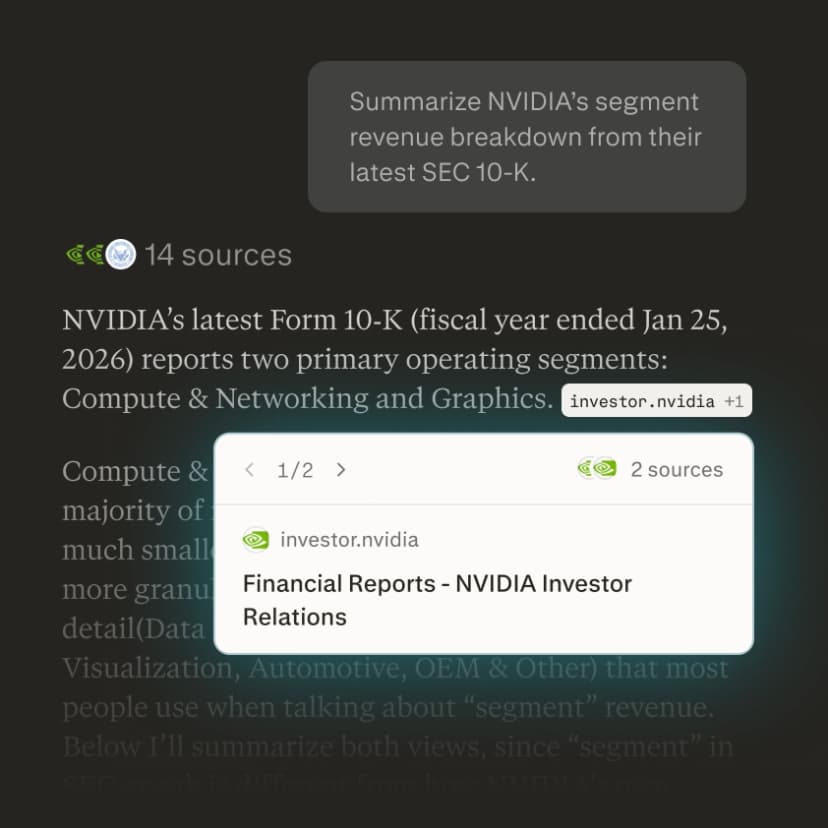
Choose Perplexity if you want search-led research with visible source links and fast follow-up questions. Perplexity describes itself as an AI search engine. It searches the web and returns chat-style answers backed by source links. That makes it a strong default for "what is current?", "which sources should I open?", and "what do different pages say?" work.
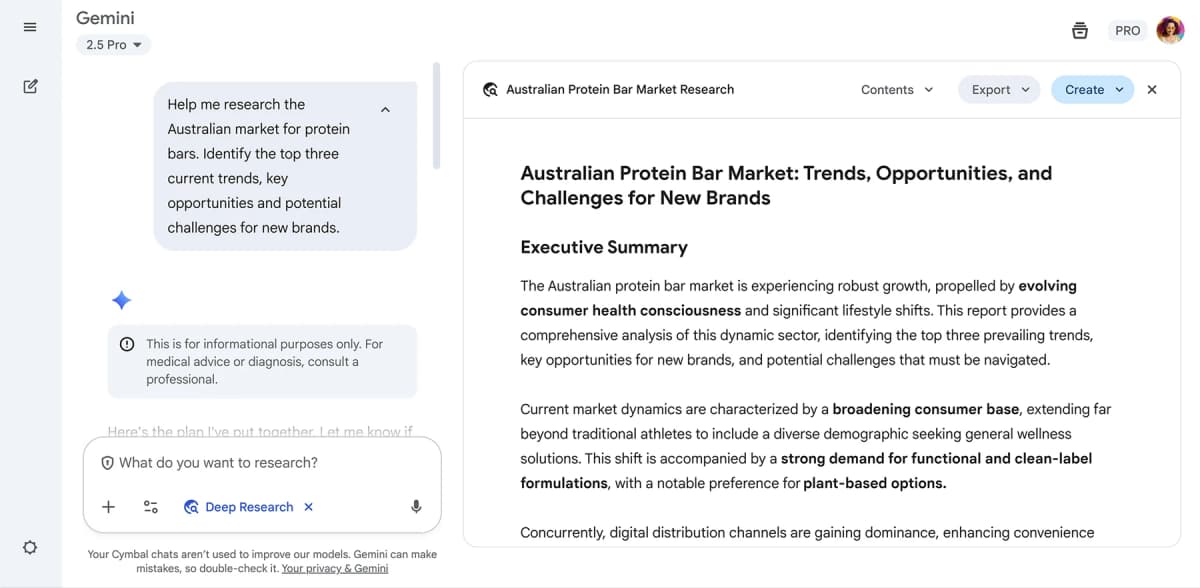
Choose Gemini if you want a broader assistant across Google apps and mixed media. Google's Gemini help pages cover file uploads, connected apps, and Deep Research reports. Those reports use Google Search by default. Gemini is the better fit when the source material already sits in Google Workspace. It also fits tasks with images, video, code folders, sheets, or a long research report.
Choose both when the research task has two stages. Perplexity or Gemini can help you find, summarize, or draft from a first set of sources. Atlas becomes useful when the next question is about proof. Do the chosen sources support the claim? Do they disagree? Which passage can you cite?
Core differences to compare
Perplexity is search-first. Its useful default is a question that turns into web answers, source links, and follow-up searches. Its help center describes Projects as spaces for threads, files, instructions, and team work.
Some users can search the web along with team files or project files. That makes Perplexity more than a one-off answer box.
Gemini is assistant-first. It can search, but its edge is the nearby Google context. Gemini Apps can upload docs, sheets, photos, videos, NotebookLM notebooks, code folders, GitHub repos, and Drive files.
Account, plan, and availability limits still apply. Connected Apps can bring in Google services such as Gmail, Calendar, Docs, Drive, Keep, Tasks, YouTube, Maps, and Photos. Account settings decide what is available.
That difference matters more than a universal "better" label. A consultant checking recent vendor claims may prefer Perplexity because the answer starts with source links. A student whose notes, drafts, and PDFs live in Drive may prefer Gemini because the assignment can stay in Google.
A researcher writing from a fixed source set may use either tool to find sources. Then the key sources can move into a workspace where citation checks are the main job.
The official docs also point to a shared limit. Source links and connected context are not proof by themselves. Perplexity's links help you open the original source. Gemini's Deep Research and connected apps can widen the context. In both cases, important claims still need a check against the page, file, paper, or report.
Perplexity vs Gemini workflow matrix
This table sorts the choice by stage. It avoids model names and quota claims because those change quickly. Check the current official pages before choosing based on limits.
| Workflow | Perplexity fit | Gemini fit | Verification handoff |
|---|---|---|---|
| Fast web-backed answers | Strong fit. Perplexity is built around current web search, cited answers, and follow-up questions. | Useful, especially when Google Search context is enough, but the product identity is broader than search. | Open the cited pages before reusing the answer. |
| Source transparency | Strong fit when the answer includes visible source links and citation references. | Strongest in Deep Research or workflows where Gemini exposes the sources it used. | Open citations and confirm the passage before relying on a claim. |
| Google Workspace work | Limited compared with Gemini, though Projects and connectors can help some teams. | Strong fit. Gemini can work with Google services when Connected Apps, account settings, and admin controls allow it. | Check whether the answer used the intended file, email, document, or sheet. |
| Uploaded files | Useful for file-informed sessions, with extraction behavior depending on file length and media type. | Strong fit for documents, spreadsheets, NotebookLM notebooks, photos, videos, code, and Drive files, subject to current limits. | For long or high-stakes files, verify the exact passage or table behind the answer. |
| Deep research reports | Relevant for research-style searches and reports, but this broad article should not own report-mode details. | Strong fit when you want a planned, multi-source Deep Research report using Google Search and optional connected sources. | Use the Deep Research comparison for report-mode depth. |
| Multimodal creation and analysis | Useful for uploaded images, audio, and video in supported contexts. | Usually the better fit for multimodal input, visual output, and Google app context. | Keep generated visuals and summaries separate from source evidence. |
| Durable source comparison | Helpful for discovery and first-pass answers, especially inside Projects. | Helpful for analysis and drafting inside Google context. | Move selected sources into Atlas when you need cited multi-source synthesis and passage inspection. |
Table 1: Perplexity vs Gemini workflow fit across search, files, Workspace context, reports, mixed media, and later source checks.
Research, files, and citation checks
For research, Perplexity's edge is speed from question to sourced answer. It helps when you need to map the current web, find official pages, or compare rival explanations.
It can also collect starting points for a lit scan or market scan. Projects add order for longer work. Some accounts can also search the web and internal files together.
The risk is treating a well-cited answer as a finished conclusion. A citation can show where an answer came from. The source may still be weak, old, mismatched, or narrower than the generated sentence.
When a Perplexity answer will support a memo, essay, review, or decision, open the cited source first. Read the surrounding context before copying the claim.
Gemini's advantage is breadth. The source set may live in a Drive folder, Google Doc, sheet, Gmail thread, NotebookLM notebook, or mixed file set. In those cases, Gemini can fit the way the material is already stored.
Deep Research starts from a research question and creates a plan. It uses Google Search by default and can add sources such as Gmail or Drive when connected.
The risk is assuming Google context is always the right context. Connected Apps vary by account, place, device, language, and admin settings. Workspace privacy and storage rules also depend on the account and org controls.
For work or school accounts, check your admin settings first. Do that before you build around Drive, Gmail, or NotebookLM access.
For files, the practical split is this:
-
Use Atlas when the file or page has become proof for a claim. Atlas helps compare it with other sources and check the passage.
-
Use Perplexity when the file belongs inside a search session, a Project, or a web-plus-files research question.
-
Use Gemini when the file work depends on Drive, NotebookLM, spreadsheets, images, video, code folders, or a broader Google workflow. That last step is not bureaucracy. It is the difference between "the tool gave me an answer with links" and "I know which source supports this sentence, which caveat matters, and which conflicting source I still need to resolve."
Source verification after Perplexity or Gemini
Atlas should not replace Perplexity or Gemini here. Perplexity is better for open-web search. Gemini is better for Google app help and mixed media. Atlas fits after search or drafting, when chosen documents, pages, notes, or citations need to become a source set.
A practical handoff looks like this:
- Use Perplexity or Gemini to find sources, summarize a topic, or produce a first research report.
- Save the sources that matter: PDFs, public pages, notes, exported text, or files you are allowed to use.
- Add durable evidence to Atlas as project sources when it should be searchable and citable later. Use attachments only for temporary chat context.
- Ask a grounded question, such as "Compare these sources on this claim."
- Ask for a table when sources must stay separate: claim, support, limit, citation.
- Open the citation badges for important claims and read the surrounding passage before saving the finding.
Atlas is strongest when the source set itself needs to do the proving. It can answer focused questions over project sources. It can also combine proof from several processed sources and return citation badges that point back to passages. Its own citation model is cautious. A citation means Atlas found related proof. The reader still needs to decide whether the generated claim is complete and strong enough to publish.
That is why Atlas belongs here as a next step after search or drafting. If the job is "find current sources," start with Perplexity. If the job is "work across my Google files and apps," start with Gemini. If the job is "turn selected sources into claims I can defend," move those sources into Atlas. Inspect the citations before reusing the answer.
Which should you choose?
Use Perplexity when your task starts with a question about the web. It is the better default for current lookup, source search, cited answers, and quick page checks. It is also a good fit when Projects or internal knowledge search match your team's setup.
Use Gemini when your task starts with Google context or mixed media. It is the better default for Drive files, Docs, Sheets, Gmail, NotebookLM inputs, images, videos, code folders, connected apps, and Deep Research reports.
It is also better when the output must stay near the Google apps where editing, sharing, or review will continue.
Use Atlas after either tool when the answer will depend on a source trail. That can be a lit review paragraph, market claim, policy note, research memo, or client report. Perplexity and Gemini can help you get to the first answer faster. Atlas helps you slow down at the stage where the claim has to survive citation checks.
For deeper report workflows, read Perplexity vs Gemini Deep Research.
For ChatGPT options, use the ChatGPT alternatives guide.
For the broader choice, use this rule. Perplexity is for search-led discovery. Gemini is for Google app help. Atlas is for synthesis after the important sources have been selected. That is the split.
Compare sources from either tool in Atlas
Compare selected sources and verify claims against cited passages.