

AI can help with a thesis, but only with the reading and checking. Use it to find papers, keep hundreds of PDFs in one place, ask questions that cite the exact page, and check every reference. Many graduate schools, such as Bristol, do not let you submit text an AI wrote, and others leave it to your supervisor, so draft each chapter in your own words.
Here is the whole workflow:
- Check your university's AI rules before you open any tool.
- Find papers and their PDFs with a search tool built for papers.
- Keep all PDFs together in one project, sorted by chapter.
- Ask for page citations, so each claim leads back to a passage.
- Write each chapter yourself from your notes and the cited pages.
- Check every reference by hand before you submit.
I ran steps 3 and 4 in Atlas on 7 November 2026 with six open-access papers about fake AI citations. The screenshots and numbers in the worked example come from that session.
Put your thesis PDFs in one project
Ask thesis chapter questions and open the cited page in each PDF.
Step 1: Check your university's AI rules
Rules differ by university, and sometimes by department or supervisor. Read your graduate school's guidance first. Then ask your supervisor what applies to your thesis, and get the answer in writing.
What four graduate schools say
I read each of these pages on 7 November 2026.
| University | What the guidance says | What it means for you |
|---|---|---|
| University of Bristol | Research students are "not permitted to use generative AI tools to write any text that is used in your thesis." Typo and grammar checks are allowed. | No AI-written sentences in the thesis. Proofreading only. |
| Georgia Tech | "Using an AI to write a portion of a dissertation or paper may constitute plagiarism." The July 2024 document says it gives recommendations only and is not Georgia Tech policy. | Treat any AI-written passage as a plagiarism risk. |
| CSULB | "Students must consult their thesis advisors whether any usage of AI tools is allowed and appropriate." | Get your advisor's yes first, then disclose which tools you used and how. |
| University of Illinois | The Graduate College "does not have a policy" on AI in doctoral milestones. It asks programs and committees to set expectations. | Your program and committee decide, so ask them. |
Table 1: Graduate school guidance on AI in a thesis at four universities, quoted from pages read on 7 November 2026.
Where Bristol draws the line
Bristol's guidance draws the most specific line. Its list of acceptable prompts includes "List every reference citation that is missing from the bibliography, if any." Its list of unacceptable prompts includes "Combine and rephrase these two sources into a coherent synthesis paragraph," because that "produces intellectual synthesis rather than merely editing."
The rest of this guide follows that split. AI can help you find, read and check. The synthesis, meaning how your sources fit together and what you argue from them, has to come from you.
Bristol's page is about writing. It does not say whether you may use AI to search for papers or to read them, so ask your supervisor about those uses too. Bristol also says any use for translation, code or diagrams must be acknowledged in your thesis.
Writing a dissertation at a UK, Irish or Australian university? The AI for dissertation guide quotes those universities' rules.
Step 2: Find papers and their PDFs
Start with a search tool built for papers. A general chatbot answers from memory and can invent papers that do not exist, as Step 6 shows.
- Atlas searches Semantic Scholar and OpenAlex by topic, title, author or ID. Select Add a source, search, check the title, authors, year and full-text status, then select Add. You can also paste a DOI, arXiv ID, PubMed ID or PDF link into Add a URL.
- Consensus describes itself as an AI academic search engine for peer-reviewed literature. It suits yes-or-no research questions.
- ResearchRabbit says it helps you find related papers and build citation maps, which is useful for working outward from one key paper.
- Elicit says it helps you synthesize evidence and weigh tradeoffs. The Elicit alternatives guide compares it with similar tools.
Whatever you use, get the actual paper. A search result only describes the paper, and you need the full text to read and cite it. Atlas's help notes that a paper record can exist even when its full text is not available. When that happens, find another version or upload the PDF yourself.
Keep your reference manager, such as Zotero or EndNote, for the bibliography. Search tools find papers, and a reference manager formats them consistently. If Zotero does not suit you, see the Zotero alternatives guide. For a ranked list of research assistants, see the best AI research assistants.
Step 3: Keep all PDFs together
A thesis can draw on hundreds of papers. Put them in one place so you can search and ask across all of them, instead of opening files one at a time.
In Atlas, create a project for the thesis. Upload your PDFs. Each file can be up to 300 MB and 6,000 pages. Then sort them:
- In Sources, open More options and select New folder.
- Name a folder for each chapter or theme, such as "Ch. 2 methods."
- Drag each source into its folder.
- Rename each source to its author and year with More options, then Rename, so citations are easy to read.
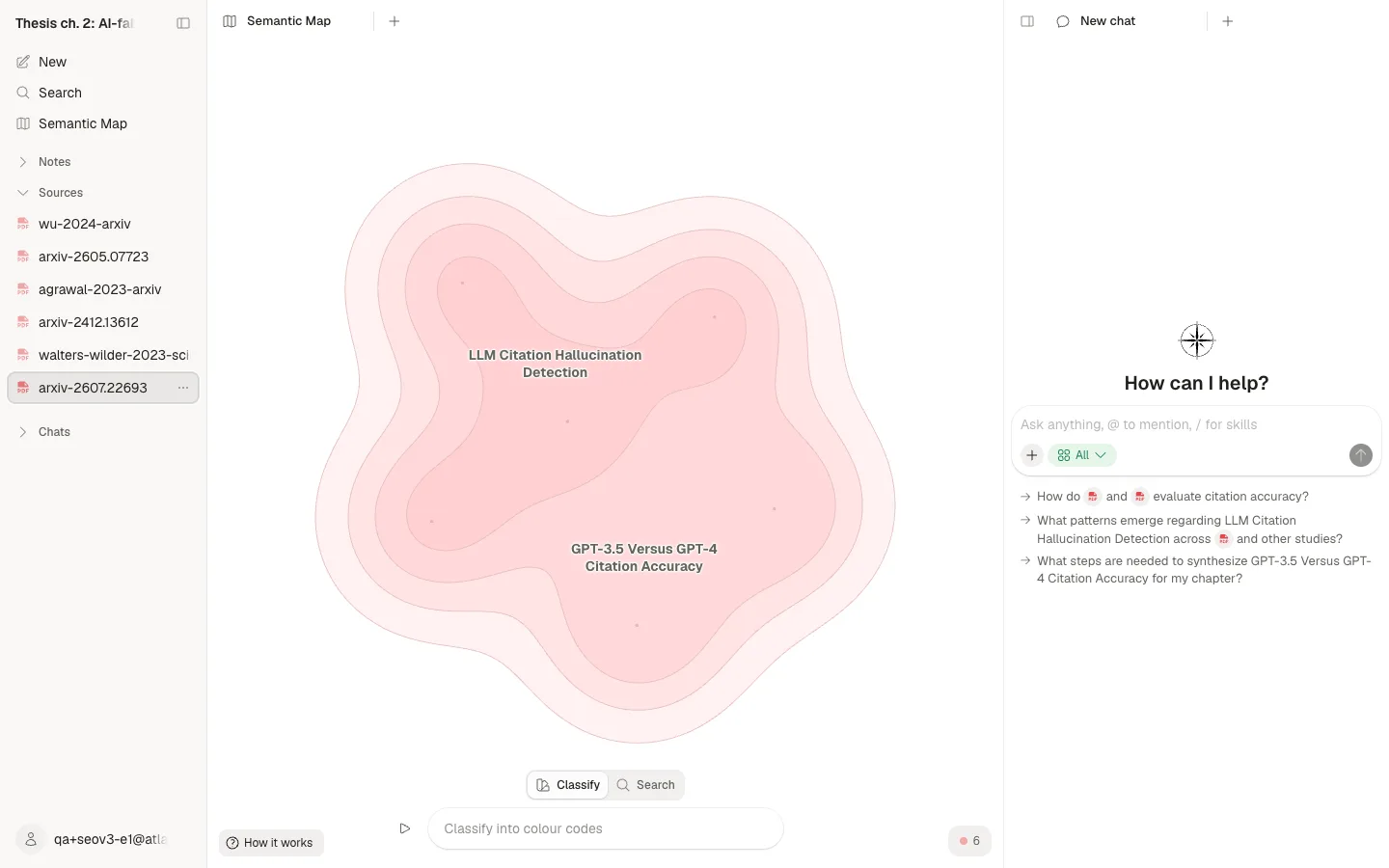
Atlas also draws a Semantic Map of the project. Sources with similar content sit close together, and labels name each cluster. It gives you a quick view of the themes in your reading before you plan a chapter. Distance on the map is not a citation. Use the map to plan, and cite the papers themselves.
For more ways to sort a large library, see the research paper organizer guide.
Step 4: Ask for page citations
Ask questions in the order your chapter runs. One question per section of the chapter works better than one giant prompt, because each answer stays short enough to check. Always ask for the page of each claim.
In Atlas:
- Open a chat in the thesis project.
- Type @ to pick the sources for this chapter, or ask across the whole project.
- Set the scope beside + to Project only. That stops new web and literature search, so the answer draws on your files. Earlier context in the same chat can remain, so start a new chat for each chapter.
- Select Send, then read the answer and its numbered citations.
- Hover over a citation to see the source and page. Select it to open the PDF at that place when Atlas has a precise location.
A citation tells you where to read. It does not prove the claim is right. Open the page and read the passage around it, because a summary can drop an "only" or an "in this sample."
Atlas page numbers are PDF file pages. The number printed on a journal article or book can differ, so check the printed page before you put it in your thesis.
Worked example: 6 papers, one question
The setup
To see how this holds up on a real chapter, I set up a project called "Thesis ch. 2: AI-fabricated references" on 7 November 2026. I uploaded six open-access papers:
- Walters and Wilder (2023), on fake and wrong citations from ChatGPT.
- Agrawal and colleagues (2023), on whether language models know when they invent references.
- Wu and colleagues (2024), on how well models cite medical references.
- Tang, Duan and Cai (2024), on models writing literature reviews.
- Zhao and colleagues (2026), an audit of 111 million references in preprints and papers.
- Badalova and Mayr (2026), on what citation-checking tools can and cannot do.
Then I asked one chapter question:
I am writing chapter 2 of my thesis on AI-fabricated references. Across these papers, how often do language models invent references, does the rate differ by model, and what checks catch fake references? Cite the page for each claim.
The answer
The answer took about 100 seconds. It had 56 inline citations, and all 56 pointed to pages in the uploaded PDFs. It cited five of the six papers. It skipped Badalova and Mayr, even though that paper is the one about checking tools.
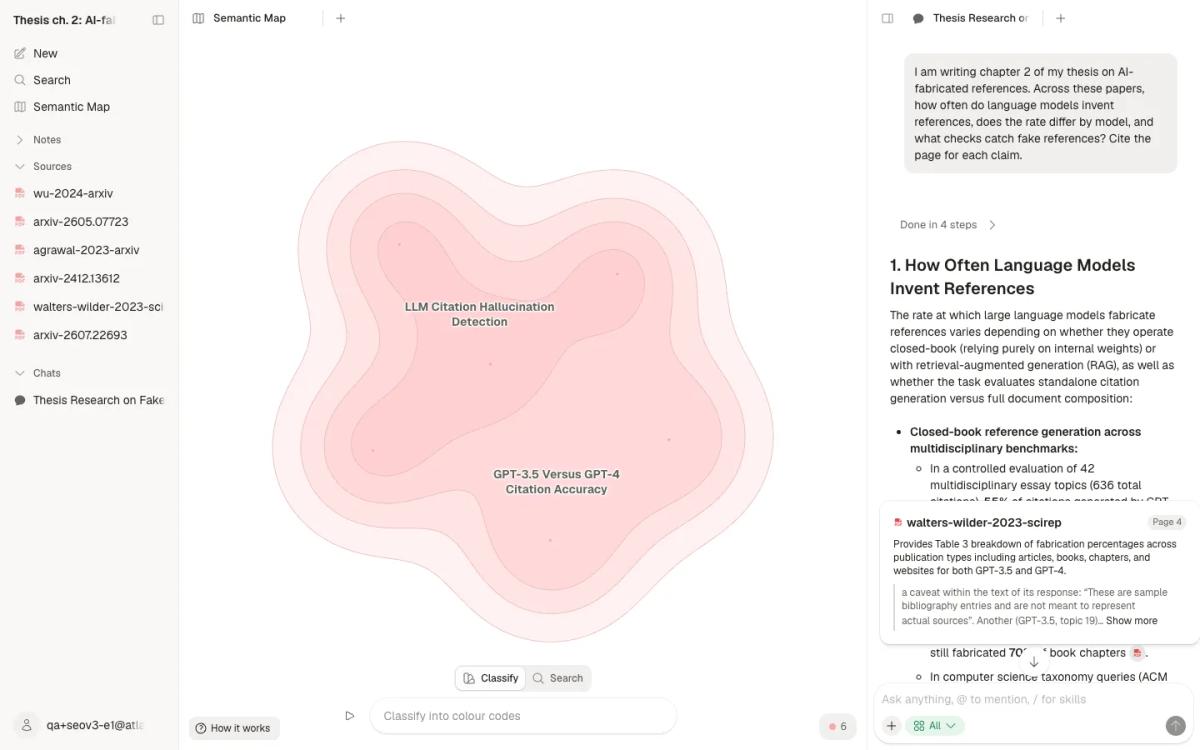
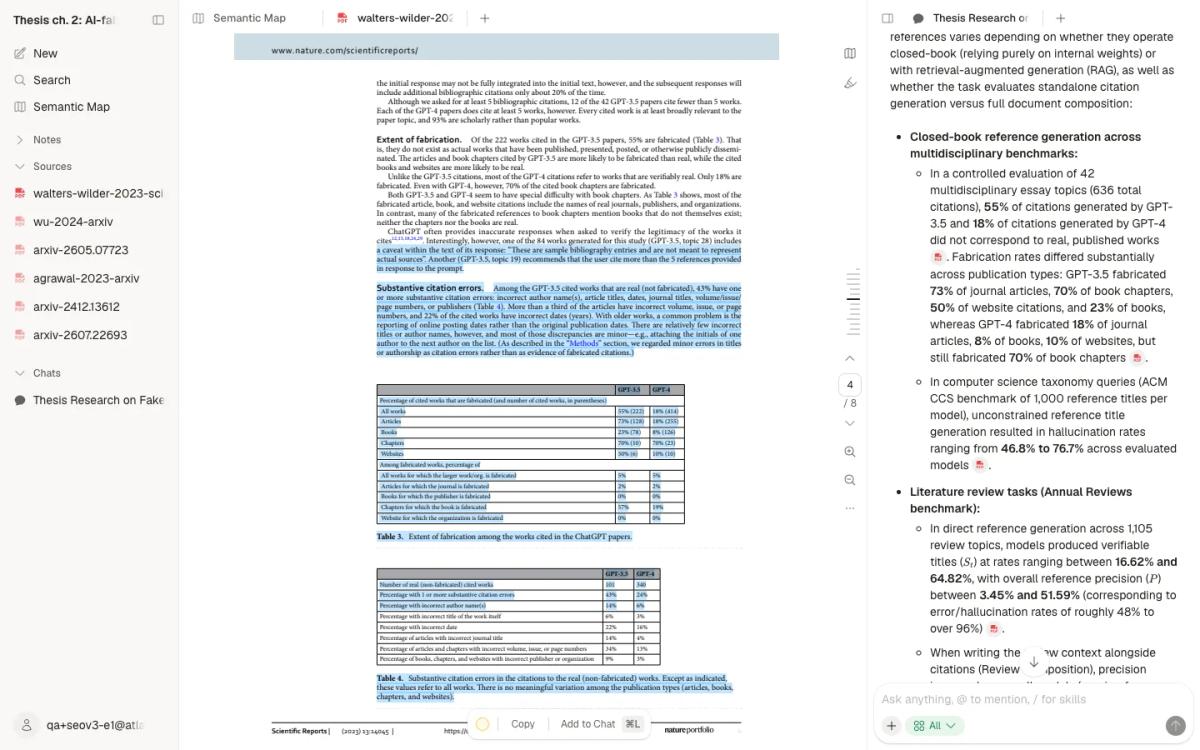
I then checked seven of the citations against the PDFs, and all seven matched the cited page. Citation 2, for example, points to page 4 of Walters and Wilder. That page says 55% of the 222 works cited in the GPT-3.5 papers were fabricated, against 18% for GPT-4.
The spot check
I compared seven citations with the text of each cited PDF page:
| Citation | Claim in the answer | What the cited page shows | Match |
|---|---|---|---|
| Walters and Wilder, p. 1 | 42 essay topics and 636 citations | The abstract gives 42 topics and 636 citations | Yes |
| Walters and Wilder, p. 4 | 55% of GPT-3.5 and 18% of GPT-4 citations fabricated | Text and Table 3 give 55% of 222 works and 18% for GPT-4 | Yes |
| Walters and Wilder, p. 4 | 43% and 24% of real citations had substantive errors | Table 4 gives 43% for GPT-3.5 and 24% for GPT-4 | Yes |
| Agrawal and colleagues, p. 6 | Hallucination rates from 46.8% to 76.7% across models | Table 1 runs from 46.8% for GPT-4 to 76.7% | Yes |
| Wu and colleagues, p. 2 | Valid links only 40% to 70% of the time without web access | The text gives valid URLs 40% to 70% of the time | Yes |
| Wu and colleagues, p. 1 | About 30% of statements unsupported even with retrieval | The abstract gives around 30% unsupported | Yes |
| Zhao and colleagues, p. 4 | Excess non-existent titles up to 1.91% on SSRN | The text gives 0.39% arXiv, 0.21% bioRxiv, 1.91% SSRN, 0.27% PMC | Yes |
Table 2: Seven of the 56 citations in the answer, each compared with the cited PDF page on 7 November 2026.
What the test did not show
The test had limits. I left the scope on All, the default, instead of Project only. The answer still cited only the uploaded files, but choose Project only for thesis work. Seven checks out of 56 is a spot check. The other 49 citations went unchecked.
The answer also restated one finding in its own terms: Wu's 40% to 70% valid links became 30% to 60% fabricated links. That is a fair reading. It also shows why your thesis should quote the paper itself.
What the answer gave me was a reading map: which page of which paper to open for each part of chapter 2. It was not a paragraph to paste.
Step 5: Write each chapter yourself
Treat a cited answer as a list of things to read. None of its sentences belong in your thesis. Under Bristol's rules, pasting an AI synthesis paragraph would break the rules even if every citation were correct. Georgia Tech warns that AI-written passages may count as plagiarism.
A practical way to work from the cited pages:
- Open each cited page and read the full passage.
- Write your own note on what the source found, how it measured it, and its limits. In Atlas, select New, then Note, and wait for Saved.
- Group your notes by the point they support, not by paper. A review that walks through one paper after another reads like a pile of summaries.
- Draft the section from your notes, in your own words, with your own argument.
- Cite the original paper and its printed page from your reference manager.
The guide to synthesizing research papers shows how to group sources by point. For a literature review chapter, the literature review with AI guide covers the method in more depth.
Step 6: Check every reference by hand
Every reference in your thesis must exist and must say what you claim it says. The papers in my test project show why this step matters.
What the research shows
- Walters and Wilder found that 55% of the works GPT-3.5 cited in short literature reviews were fabricated, against 18% for GPT-4. Even among real works, 43% of GPT-3.5 citations and 24% of GPT-4 citations had at least one substantive error, such as a wrong author, date or page number.
- Agrawal and colleagues found hallucination rates from 46.8% to 76.7% across models asked for reference titles.
- Wu and colleagues found that models without web access gave valid URLs only 40% to 70% of the time. Even GPT-4 with retrieval left around 30% of statements unsupported by the sources it linked.
- Zhao and colleagues audited 111 million references across 2.5 million papers. Their estimated excess of non-existent titles reached 1.91% of references on SSRN by August 2025.
A checklist for each reference
For each reference in your thesis:
- Find the paper itself, by its DOI or by its exact title in quotes.
- Match the authors, year, journal, volume and pages against the paper.
- Open the cited page and confirm it supports your sentence.
- Swap PDF page numbers for printed page numbers where they differ.
- Remove any reference you cannot find.
Where checking tools fit
Checking tools help, but they do not replace this list. Badalova and Mayr tested five citation checkers and found "their performance is limited by reference extraction errors, incomplete metadata, limited database coverage, and inconsistent verification results." Use a checker for early warnings, then check by hand. The AI citation checker guide compares the options.
What AI should not do
Based on the Bristol and Georgia Tech guidance above, keep AI away from these jobs in your thesis unless your own rules say in writing that you may:
- Writing text you submit. Bristol bans it outright, and Georgia Tech calls it a plagiarism risk.
- Combining sources into synthesis paragraphs. Bristol names this as unacceptable.
- Polishing your findings to sound published. Bristol lists it as going beyond typo fixes.
- Drafting your abstract. Bristol lists a whole-thesis abstract as a full section written by the model.
- Supplying references you have not opened. Georgia Tech says not to trust outputs you cannot trace back to credible sources.
- Receiving confidential data. Bristol says to ask your supervisors before you enter confidential, sensitive or personal information.
Atlas has limits too. It answers from the sources you add and cites them, but it can skip a relevant paper, as it skipped one of six in my test. It can also restate a finding in its own words. Following your university's rules, and checking each cited page, stays with you.
Where other AI thesis tools fit
Several tools in the search results draft text for you. WritingBuddy calls itself an AI thesis writer. Jenni says it helps you create essays, papers and citations. ThesisAI drafts a referenced literature review from papers you upload. The thesis AI tool comparison sets their prices, free plans and limits side by side. Under rules like Bristol's, you could not submit that drafted text, so check your own rules before you use those features.
Grammar tools such as Grammarly and Paperpal fit Bristol's allowed list for typos and grammar. Bristol limits that use to correcting errors, not improving structure or readability.
Discovery tools such as Consensus, Elicit and ResearchRabbit can beat any workspace for broad searching and citation networks. Atlas fits the middle of the workflow: one project for every PDF, a map of the themes, and answers that cite the page so you can check them. For a wider list, see AI with references and AI for academic writing.
Your next step: one chapter, one project
Start with the chapter you are working on now. Ask your supervisor which AI uses are allowed for it. Then put that chapter's PDFs in one project, ask one question per section, and open every cited page before you write. When the draft is done in your own words, run the reference checklist from Step 6.
Put your thesis PDFs in one project
Ask thesis chapter questions and open the cited page in each PDF.