
Atlas vs Apple Notes: An In-Depth Research Comparison
Atlas is a visual research workspace. Apple Notes is a free Apple-ecosystem notes app. Compare paper maps, citation grounding, and focused project context.
- Byline

Summary
Updated: use Atlas for citation-grounded answers and cited research synthesis. Use Apple Notes for fast Apple-native capture.
Atlas adds Knowledge Maps, Semantic Maps, and shared research context inside each project.
The comparison covers privacy, import paths, Apple Pencil, pricing, source checks, and daily workflow.
Apple Notes can remain a capture inbox while Atlas handles research projects that need evidence.
Note: We make Atlas. Our team wrote this comparison. Where Apple Notes has the better answer for a given research job, the article says so plainly. See the table rows where Apple Notes wins and the "When to choose Apple Notes" section below. The goal is to give you the data you need to choose the right tool for the kind of work in front of you. Atlas is not the right answer for every research job.

Atlas

Map and question your research papers
Use Atlas for cited synthesis and Apple Notes for fast capture.
Quick answer
Atlas is a visual research workspace for people who need to understand a body of papers: a thesis, a treatment decision, a major-purchase teardown, or a literature review. Apple Notes is the default notes app on iPhone, iPad, and Mac. It supports rich text, drawings, scans, and fast capture.
After capture, Atlas gives each paper a Knowledge Map, builds a Semantic Map for the whole project, and grounds answers with claim-source-justification. Each claim links to a source passage and explains why that passage supports it. Sources, notes, chats, maps, and citations share context inside that project.
Apple Notes is better for free Apple-native capture, iCloud Notes sync, and quick notes on iPhone or iPad. If you need to trust the answer in a thesis, treatment plan, brief, or hire, Atlas earns the comparison through visual maps, source traces, and a focused project evidence base.
Comparison criteria
We compared the 2 tools on four research jobs. Capture means getting a thought, scan, sketch, or PDF into the system quickly. Structure means turning a paper or source set into something you can read, search, and revisit.
Trust means checking whether an answer is tied to the right source passage. Context asks whether sources, notes, maps, and chats stay useful inside a focused project. These criteria separate a quick-capture app from a second-brain workspace.
Apple Notes wins when the job is fast capture inside the Apple ecosystem. Atlas wins when the job is cited synthesis across papers. The comparison below uses that split. It does not treat Apple Notes as a failed research AI tool, and it does not treat Atlas as a better phone notes app.
| Atlas | Apple Notes |
|---|---|
| Best for cited research synthesis across PDFs. | Best for fast Apple-native capture. |
| Knowledge Map shows claims, evidence, and source passages. | Notes, folders, scans, and PDF attachments stay simple. |
| Semantic Map shows sources, notes, chats, and citations together. | Folder and note list stay familiar. |
| Claim-source-justification checks whether passages support claims. | Manual citations or links are added by the user. |
| ✗ Native iPhone and iPad capture surface. | ✓ Native iPhone and iPad app with Apple Pencil support. |
| Browser-based cloud workspace. | Built into Apple devices and iCloud. |
| Evaluation sample, then Atlas Pro. | Free with Apple devices, with iCloud+ only for storage. |
Table 1: Atlas vs Apple Notes feature comparison across citation grounding, Knowledge Maps, offline access, Apple Pencil support, and pricing.
How is Atlas different?
Apple Notes and Atlas overlap at the surface. Both touch reading and source work. They diverge on three capabilities that decide whether the output is shareable and defensible. This section walks through those differences in order.
Visual maps for papers and projects
Atlas builds two visual maps as you read. A Knowledge Map turns each paper into its argument structure. You see claims, evidence, definitions, and labeled links such as "causes" or "contradicts." You can start with the paper's main point, then click down to the supporting passage.
A Semantic Map shows the whole project on 1 canvas. Sources, notes, chats, and citations cluster by topic. You can change the topic angle without reading the whole set again. That is how 200 papers stop being a folder and start being a corpus. The knowledge graph guide explains where this visual layer differs from a normal notes graph.
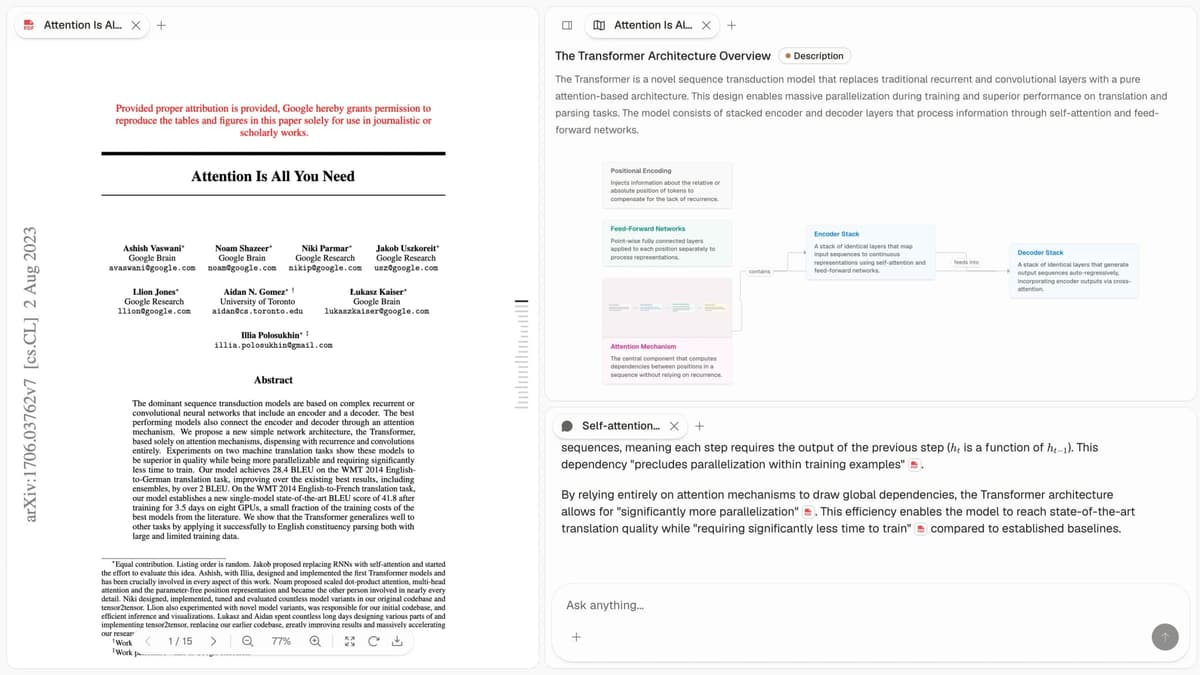
This first-party Atlas screenshot shows the paper, its visual claim map, and a cited answer in one workspace. The map supports structural reading, while the answer panel keeps the source passage visible for verification.
"It's like an ultimate GPT. I can finally see what I've read." Kyle Lao, CEO & Co-founder of MenSC Labs
Apple Notes does not break a paper into claims and evidence. It also does not re-map a whole project by topic angle.
If you have spent an afternoon rebuilding the structure of a paper you read three weeks ago, the Knowledge Map is the surface that pays for itself first. Visual maps make a body of papers legible at a glance, and the Knowledge Map is the surface Atlas is built around.
Source traces for every claim
The hallucination problem in AI research tools is not only made-up text. The harder problem is a citation that sits beside a claim it does not support.
Atlas renders each answer as a claim-source-justification triple. You see the claim, the passage, and a short explanation of why the passage supports the claim. You can click into the source paragraph and read the highlighted lines in context.
The benchmark Atlas runs internally is the H/V ratio. It compares unsupported cited sentences with cited sentences that survive a passage-level recheck. Atlas targets H/V < 0.1 on the citation-grounding benchmark. We explain the method in Verifiable AI Research.
Apple Notes may include citations or links, but it does not explain claim by claim why a passage supports the answer. For casual Q&A, that missing reasoning trace may not matter. For a thesis sentence, legal brief paragraph, or treatment-decision summary, it does. Every Atlas claim traces to its source and explains why the source justifies it.
Project-scoped research context
Apple Notes organizes material in notes and folders. Atlas uses projects as bounded research containers.
Atlas keeps citations, notes, chats, Knowledge Maps, and the Semantic Map together inside the project where they were created. That shared evidence base supports later questions in the same project.
A multiyear literature review benefits when its sources, notes, and cited chats stay together in one project. If a new question needs a different evidence base, create a separate project and add the relevant sources there.
Project-scoped context keeps cited synthesis focused on the selected corpus. Apple Notes remains stronger for lightweight capture across Apple devices.
Comparing Atlas and Apple Notes: features
Feature-by-feature comparison
Both tools can support a research day, but they live in different categories. Atlas is for reading papers, mapping a project, and cited AI answers over its corpus. Apple Notes is for free quick capture, rich text, and iCloud sync.
Apple Notes has broader Apple-system fit. Atlas goes deeper on source-backed research. Readers weighing other systems can compare Atlas with Notion or Atlas with Obsidian.
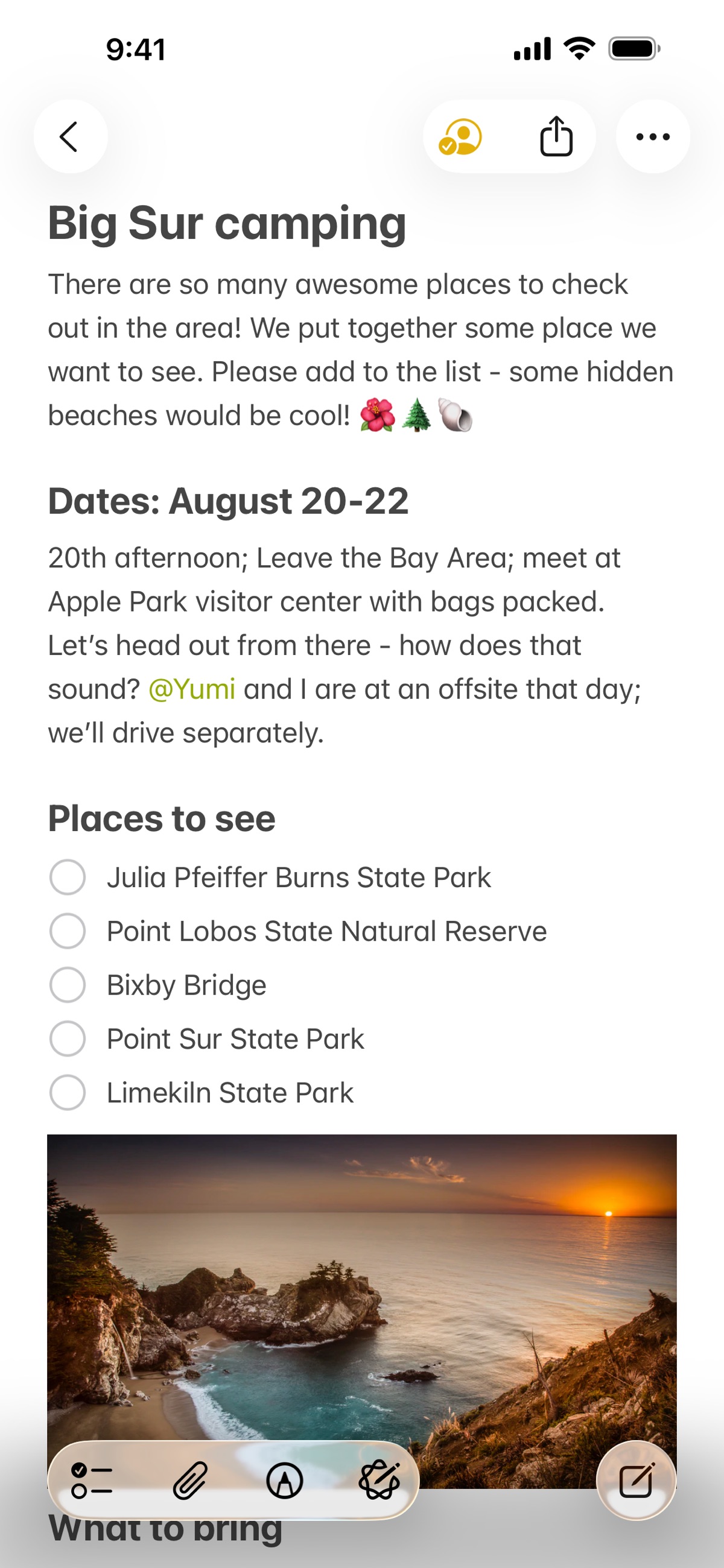
Apple Notes is the lower-friction capture surface. This official App Store screenshot shows the folder list, individual notes, and the mobile editor. The screenshot supports Apple Notes's fast-capture case. It does not show the paper maps or passage-level source checks that define Atlas's research workflow.
The rest of this article walks through five surfaces: paper structure, project view, cited answers, literature annotations, and project context. Each section uses a two-column table. At least one row in each table shows where Apple Notes wins or ties.
Paper deconstruction with Knowledge Maps
The Knowledge Map is Atlas's per-paper surface. It turns one paper into a multilevel claim map. The map shows links between claims. Node text is drawn directly from the paper's language. Breadcrumbs let you move from the main thesis to a specific paragraph.
| Atlas | Apple Notes |
|---|---|
| Multi-level argument structure ✓ | Rich-text notes with PDF attachments |
| Labeled relations (motivates, causes, enables) ✓ | ✗ |
| Faithful-to-source node text ✓ | ✗ |
| Hierarchical breadcrumbs ✓ | ✗ |
| ✗ | Free with any Apple device, integrated mobile app ✓. Apple-only, no AI deconstruction |
Table 2: Atlas vs Apple Notes on paper deconstruction, covering Knowledge Map argument structure and Apple Notes rich-text notes.
Good to know: The bottom row belongs to Apple Notes. Atlas does not ship that surface. The Knowledge Map's payoff is recovering a paper's argument three weeks after you first read it, when topic chips alone are no longer enough.
Project view with Semantic Maps
The Semantic Map is Atlas's project view. It places sources, notes, chats, and citations on 1 canvas. Related items cluster by topic. You can change the topic angle without uploading the set again.
| Atlas | Apple Notes |
|---|---|
| Spatial embedding of sources + notes + chats ✓ | Folder-based organisation |
| Auto-labeled topic clusters ✓ | ✗ |
| Topic-angle re-projection ✓ | ✗ |
| One project-scoped evidence view ✓ | ✗ |
| ✗ | iCloud sync across iPhone, iPad, Mac ✓. Apple Notes leads on sync. Atlas leads on research depth |
Table 3: Atlas vs Apple Notes on corpus view, covering Semantic Map spatial clustering and iCloud sync.
Good to know: Apple Notes's strength on that row is real. If your work depends on iCloud sync, that is the boundary. The Semantic Map pays off when 200 papers stop being a folder and start being a corpus you can view from several angles.
Citation-grounded answers
Atlas answers with 3 linked parts. You see the claim, the source passage, and a short note explaining why the passage supports the claim. You can jump to the paragraph, read the highlighted lines, and check the reasoning.
| Atlas | Apple Notes |
|---|---|
| Claim-source-justification triples ✓ | ✗ |
| Reasoning traces (why this passage supports this claim) ✓ | ✗ |
| Jump-to-source with passage highlight ✓ | ✗ |
| H/V ratio < 0.1 benchmark published ✓ | ✗ |
| ✗ | Apple Pencil handwriting and scanned-document capture ✓. Apple Notes excels at capture. Atlas is built for reasoning over sources |
Table 4: Atlas vs Apple Notes on citation-grounded answers, covering reasoning triples, H/V ratio, and Apple Pencil handwriting capture.
Good to know: Both tools can store citations. The key question is whether the tool explains why a passage supports a claim. For everyday Q&A the missing explanation is a minor limitation. For a thesis sentence or brief paragraph, it matters.
Literature-grounded annotations
Atlas annotates each paper on upload. Citations inside the paper become objects you can inspect. When the cited source is open access, Atlas pulls in the relevant passage. You can see how the paper builds its case without leaving the document.
| Atlas | Apple Notes |
|---|---|
| Auto-annotate on ingest ✓ | Manual highlights via PDF markup |
| Multi-citation synthesis (how citations build the argument) ✓ | ✗ |
| Resolve cited sources (open-access) ✓ | ✗ |
| Exact passage / page / paragraph anchors ✓ | ✗ |
| ✗ | Quick capture from Share Sheet across apps ✓. Apple Notes leads on capture. Atlas leads on research depth |
Table 5: Atlas vs Apple Notes on literature-grounded annotations, covering auto-annotation on ingest and Share Sheet capture.
Good to know: These annotations resolve citations inside the paper you are reading. When a cited source is open access, Atlas pulls in the cited passage. It is not web grounding. It is a way to see how one paper builds its case from other sources.
Project-scoped context
Atlas keeps citations, notes, Knowledge Maps, Semantic Maps, and chats inside one project. A separate project starts with its own sources and context.
| Atlas | Apple Notes |
|---|---|
| Project-scoped research context ✓ | Per-folder organization |
| Sources + notes + maps + chats share one project ✓ | ✗ |
| Separate projects isolate unrelated context ✓ | Folders separate notes manually |
| Sources must be added to each relevant project | Notes can be copied between folders |
| ✗ | Free, no subscription required ✓. Apple Notes has a pricing advantage. It does not affect citation or graph capability |
Table 6: Atlas project context compared with Apple Notes folder organization and free pricing.
Good to know: Atlas keeps one project's evidence together across sessions. Separate projects remain isolated, which helps prevent unrelated research from entering a cited answer.
Price comparison
Atlas is a paid product. There is no perpetual no-cost plan. You get a short evaluation sample (10 sources · 5 lifetime AI chats), and after that you pay $20/mo or $204/yr for Atlas Pro.
At the paid tier, Atlas combines Knowledge Maps, Semantic Maps, claim-source-justification, unlimited AI chats, and unlimited sources. Apple Notes is bundled with Apple devices. iCloud+ pricing applies only when you need more storage.
| Atlas | Apple Notes |
|---|---|
| Free: ✗ (evaluation sample only: 10 sources · 5 lifetime AI chats) | Free: Free with any Apple device, included in iCloud ✓ |
| Pro: $20/mo or $204/yr (unlimited sources · unlimited AI chats · all features) | Paid: iCloud+ from $0.99/mo for storage if you exceed 5GB |
| Pro unlocks Knowledge Map, Semantic Map, and claim-source-justification ✓ | ✗ |
Table 7: Atlas vs Apple Notes pricing, covering Atlas Pro at $20/mo and Apple Notes free with iCloud storage options.
When to choose Atlas vs Apple Notes
Choose Atlas when cited synthesis, visual paper structure, and reuse across a research corpus are the deciding jobs. It is the stronger recommendation when you must defend a claim by opening its source passage.
Choose Apple Notes when fast Apple-native capture, Pencil input, and iCloud sync matter most. It remains the better recommendation for quick notes that do not need source-grounded analysis.
Choose by research job
- Want paper structure broken into a map? Go with Atlas. (Knowledge Map)
- Want answers that explain how each citation justifies the claim? Go with Atlas. (claim-source-justification)
- Want one focused evidence base for maps, notes, and cited chat? Go with Atlas. (project-scoped context)
- Want a free, fast note-capture app integrated across the Apple ecosystem? Go with Apple Notes.
- Want free quick-capture notes synced across iPhone, iPad, and Mac? Go with Apple Notes.
- Tied: capturing a quick thought about a paper on your phone: both work, with Apple Notes faster for that job. The gap opens once you build a corpus you will revisit.
Recommendations by user type
- PhD researchers: Atlas. Years 1-2 need Knowledge Maps so papers do not have to be rebuilt from memory. Years 3-4 need cited answers that anchor thesis sentences to passages. Keep the thesis corpus in one project so its evidence stays available across sessions.
- Students doing literature reviews and thesis research: Atlas, scoped to a dissertation, thesis, or literature review. The Knowledge Map saves the most time in the reading phase. Project context keeps the selected evidence close across semesters.
- Knowledge workers (consultants, analysts, PMs, journalists): Atlas when you read papers and need citation grounding, and Apple Notes when you just need to capture a thought or sketch on your iPhone fast.
- Personal researchers with stakes: Atlas for medical, legal, major-purchase, or deep self-study work. This is where source-backed reasoning earns its keep. Apple Notes is a fine starting tool. Atlas is the tool to use once you need to defend the answer.
Apple Notes wins capture jobs such as quick thoughts, scans, sketches, voice drafts, and Apple-device sync. Atlas wins when those materials turn into a corpus that needs source-backed answers.
The dividing line is reuse. If a note is useful only today, keep it in Apple Notes. If a paper, claim, or source set will be revisited, Atlas is the better workspace.
Notion, Obsidian, Evernote, OneNote, Google Keep
If your real choice is broader than Atlas vs Apple Notes, use the job as the filter. Pick Notion for shared docs and databases. Pick Obsidian, Roam Research, or Logseq when backlinks and graph-style personal knowledge work matter most.
Pick Evernote for a long-running web clipper and scan archive. Pick OneNote for notebooks, ink, and Microsoft 365 fit. Pick Google Keep for lightweight reminders. Pick Bear when polished Apple-native writing is the main job. The broader Apple Notes alternatives guide compares those capture-first options.
Atlas is narrower than those general note apps. It is the better fit when the core job is reading source documents, mapping paper structure, and writing claims you can trace back to passages.
Apple Notes research workflows
Migrating from Apple Notes to Atlas
Apple Notes does not have a one-click bulk export. The first practical path is manual: open each note and use the share sheet to save it as a PDF. Apple's Notes import and export guide documents the built-in formats.
The second path is a third-party exporter that reads the local Notes database and writes one Markdown or HTML file per note, with attachments in a side folder. Neither path is fast for a multiyear library. Both can lose some structure on the way out.
The body text of each note usually migrates cleanly. File attachments you pasted in also come across. If your workflow was "drop the PDF into a note, scribble a few lines around it," the PDFs are the load-bearing object.
Upload those PDFs to Atlas first. Each one becomes a Knowledge Map on ingest. The same files that were opaque attachments in Apple Notes become source-backed maps with cited answers on top.
The weak point is the surface Apple Notes is best at. Handwritten Apple Pencil ink does not survive a PDF export as searchable text, and Atlas does not OCR handwriting on ingest.
Scanned-document OCR text is searchable inside Apple Notes. It does not always round-trip through PDF export with the text layer attached, so the scan can land in Atlas as an image-only PDF.
Smart Folders are saved filters rather than file containers. They have no match in Atlas and do not export. A non-owner also cannot export a shared note. The owner must export it, or the collaborator must export their own copy.
A pragmatic order is to export the 20-30 notes that hold PDFs you still reread. Upload those PDFs to Atlas first. Leave the rest of the Apple Notes library where it is.
You do not have to migrate everything at once. Add the sources that belong to the current research project and that you expect to revisit. Dumping the whole archive in on day one adds noise without value.
A worked literature-review example
Suppose you are writing the related-work section of a paper on retrieval-augmented generation. You have twelve PDFs from the last two months. In Atlas, you open the project and start with the Semantic Map.
The map shows the papers in 3 groups: retrieval methods, generation quality, and evaluation. You switch the topic angle to "failure modes" and see which papers cluster there.
You pick the 4 matching papers. Open the Knowledge Map for each, then skim the claim nodes under "limitations." You now have a structured view of what each paper argues about failure modes.
Your next question is, "Across these 4 papers, what are the disagreements about why retrieval fails on long-tail queries?" Atlas returns one cited block for each disagreement. Each block includes the claim, source passages, and a short reason why each passage supports that side.
You click into the highlights to verify the reasoning. Then you use the cited block as the spine of your draft paragraph. The thesis sentence is anchored to a passage you can defend in front of an advisor.
The same job in Apple Notes is free-form work. You open a note, paste in the four PDFs, and type a scratchpad as you reread. There is no argument map, cited synthesis chat, or jump-to-source highlight.
You build the structure in your head and write it back out in prose. This can work well if the 4 papers are still fresh. If you return after two months, the rereading tax can take the whole afternoon.
Apple Notes deserves credit for capture. Dropping each PDF into a note and adding a few quick reactions is faster there than in a more structured tool. Atlas pulls ahead when the task moves to synthesis.
If your workflow is mostly capture, Apple Notes is doing real work. If your workflow ends with a defensible paragraph anchored to passages, Atlas gives time back.
When Apple Notes is the right call
There are several jobs where Apple Notes is clearly better. Quick capture on a phone is one, especially one-handed on a walk or in a meeting.
Choose Apple Notes when your main job is fast mobile capture inside the Apple ecosystem.
The Apple Notes mobile app launches fast, recognizes handwriting and voice, and syncs to your other Apple devices. Atlas does not have a mobile app at parity with that experience today. Our student note-taking guide covers more mobile-first choices.
Personal notes that live inside the Apple ecosystem belong in Apple Notes. That includes shopping lists, recipe clips, kitchen sketches, and birthday-gift ideas. None of those jobs need cited answers or a Knowledge Map. They need a fast surface that is already on your devices.
Voice-to-text drafts are also well served by Apple Notes plus iOS dictation. The goal is to get the rough thought down and clean it up later.
Apple Pencil sketching is another native Apple Notes job, whether it is a diagram, wire frame, or PDF note. Scanning a receipt, whiteboard, or library page is a one-tap task there too. If your workflow starts and ends with capture, Apple Notes is the right answer.
Common objections and edge cases
"iCloud sync is the whole reason I use Apple Notes. Does Atlas sync?" Atlas is cloud-hosted, so your library is available in any browser you sign into. The comparison is not apples-to-apples with iCloud.
Apple Notes syncs across Apple devices through iCloud. Atlas syncs across browsers because the server holds the source of truth. For multi-device capture while moving between an iPhone, iPad, and Mac, Apple Notes still has the smoother experience.
"Is there an Atlas iOS app?" Not at parity with Apple Notes today. Atlas runs in mobile browsers, but the Knowledge Map and reading views are desktop-first because deep-reading PDFs and traversing argument structures need space.
If your primary research surface is one-handed phone capture, Apple Notes or another mobile-native tool is the better fit. Atlas is the wrong recommendation for that job.
"Can I run both side by side?" Yes. Apple Notes can stay on the phone for capture, errands, and kitchen-table notes. Atlas can live on the laptop for deep reading, Knowledge Maps, and cited answers.
There is no integration between the two, so PDFs must be uploaded to Atlas separately. The workflows do not conflict, and Apple Notes is free with your device. You do not have to pick only one.
Atlas
Map and question your research papers
Use Atlas for cited synthesis and Apple Notes for fast capture.
Frequently Asked Questions
Atlas explains how each citation supports a claim. Every answer is rendered as a claim-source-justification triple: the claim, the passage it draws from, and a one-sentence explanation of why the passage supports the claim. You can click into the source paragraph and read the highlighted sentences in context. Apple Notes may cite at the sentence level or link to sources, but it does not render the reasoning trace that connects the claim to the passage. That trace is the move when you need to defend a thesis sentence, a brief paragraph, or a treatment-plan summary. Read more about how Atlas grounds claims in Verifiable AI Research (2026): What It Actually Means.